


 ビデオコンバーター究極
 スクリーンレコーダー
 ビデオ修復
ビデオ修復3GPをFLVに変換するための著名で役立つ方法[実証済み]
音声・動画ファイルは、3G 携帯電話で一般的に使用されている 3GP 形式に保存できます。2G や 4G 携帯電話でも利用可能です。インターネット上では、この MP4 ベースのコンテナを介してマルチメディアファイルの送受信が行われます。一方で、多くのオンライン動画や音声ストリーミングサービスは、Flash に準拠した動画コンテナである FLV を使用しています。Adobe Flash Player 以外にも、多くの動画プレーヤーが FLV ファイルを再生できます。3GP ファイルをより扱いやすくし、かつ容量を小さくするために、FLV へ変換する簡単な方法がいくつかあります。以下に、3GP を FLV に変換する際に利用を検討すべきコンバーターを紹介します。

パート1。3GPをFLVに変換する優れた方法[オフライン]
Video Converter Ultimateは、品質を犠牲にすることなく3GPファイルをFLVに変換するための完璧なツールです。プログラムのSuperSpeedテクノロジーを使用すると、ユーザーは大きなファイルでも数分で変換できます。さらに、このアプリでは、必要に応じてファイルを編集できます。ビデオのトリミング、回転、トリミング。色パラメータを調整します。ビデオの解像度とビットレートを変更します。または字幕を追加します。このソフトウェアでは、iPhone、iPad、Androidベースのデバイス、Xbox、PlayStationなど、最も人気のあるすべてのデバイスをサポートできます。このソフトウェアの簡単な紹介がわかったので、このソフトウェアを使用して3GPをFLVに変換する方法を理解するときが来ました。
ステップ 1: まずは、下に表示されている 無料ダウンロード をクリックしてソフトウェアをダウンロードします。Windows と Mac のどちらにもダウンロードできます。ダウンロード後、パソコンにインストールし、インストール完了後に画面に表示されるウィンドウの 今すぐ開始 をクリックして起動します。
無料ダウンロードWindows 7 以降に対応安全なダウンロード
無料ダウンロードMacOS 10.7 以降に対応安全なダウンロード
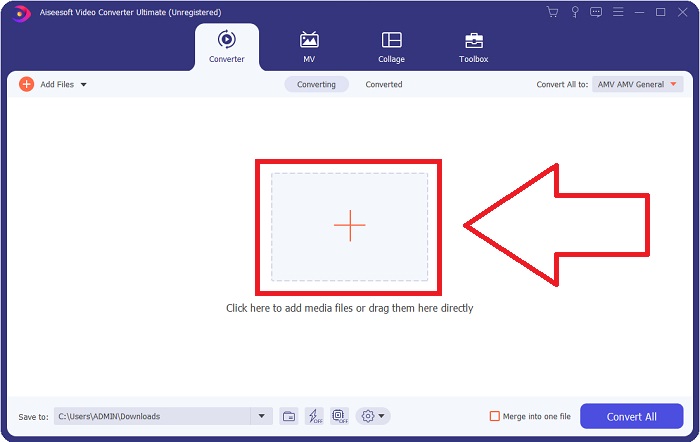
ステップ 2: 変換を始めるには、まずファイルをアップロードする必要があります。そのためには、ソフトウェア画面中央にある + ボタンをクリックするか、パソコンから動画ファイルをドラッグ&ドロップしてください。
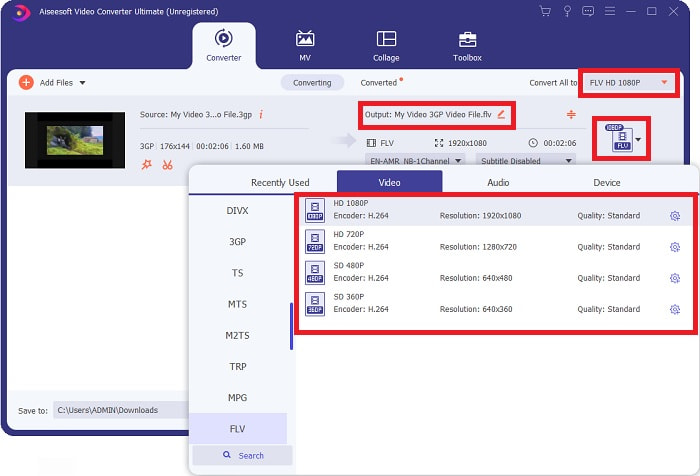
ステップ 3: ファイルのアップロードが完了したら、画面右側にある形式選択で FLV 形式を選びます。使用可能なすべての属性が表示されるので、その中から希望する画質を選択できます。
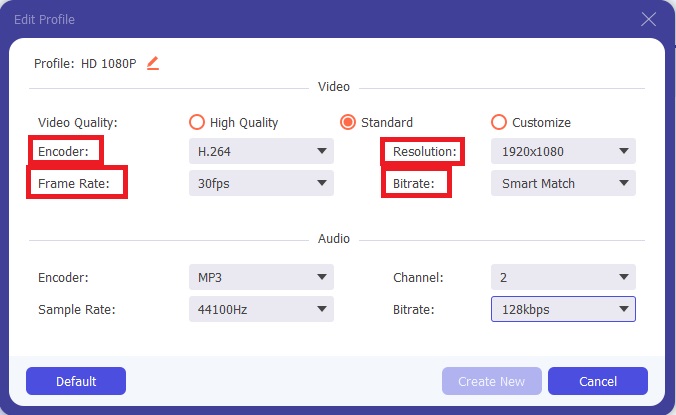
ステップ 4: 表示されている画質の選択肢に希望の設定がない場合は、自分で画質をカスタマイズできます。歯車アイコンをクリックするとウィンドウが表示されるので、その中の項目を調整してください。解像度は画面表示のきめ細かさ、フレームレートは動画再生のコマ数、ビットレートは一定時間あたりにエンコードされるデータ量を表します。最後に、エンコーダーは動画フォーマットの処理方式を決める項目です。
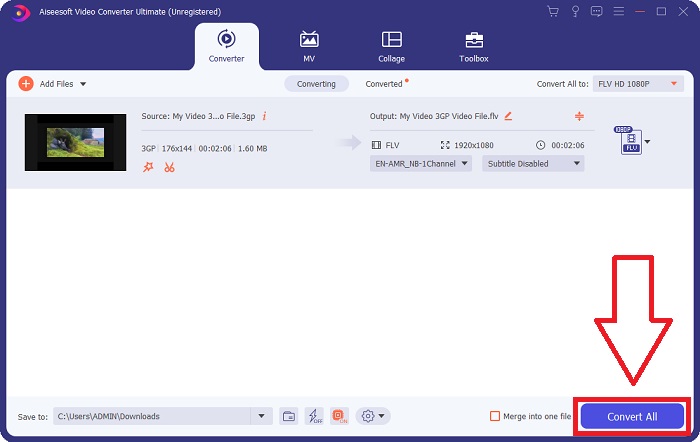
ステップ 5: 動画出力に必要な設定をすべて調整し終えたら、すべて変換 をクリックして変換を開始します。
パート2.3GPをFLVに変換するもう1つの興味深い方法[オンライン]
ソフトウェアの紹介はこれくらいにして、ここからは 3GP を FLV に変換するのに役立つオンラインツールについて説明します。それが Free Video Converter Online です。このオンラインコンバーターは 3GP や FLV を含む多くの形式に対応しています。パソコンから直接ファイルをアップロードして変換できます。500 MB を超える大きなファイルをアップロードする場合でも、このオンラインツールを使って 3GP を FLV に変換できます。変換を始める前に、多くの設定を変更することも可能です。たとえば、音声コーデックや音量を変更できますし、動画の解像度も調整できます。ここまでの説明を踏まえて、必要な手順を見ていきましょう。
ステップ 1: オンラインツールのリンクはこちらです。クリックすると、ブラウザでメインページが開きます。ファイルを追加して変換 をクリックして、オンラインツールを操作するためのランチャーをダウンロードします。ランチャーをインストールしたら、ファイルのアップロードを開始します。
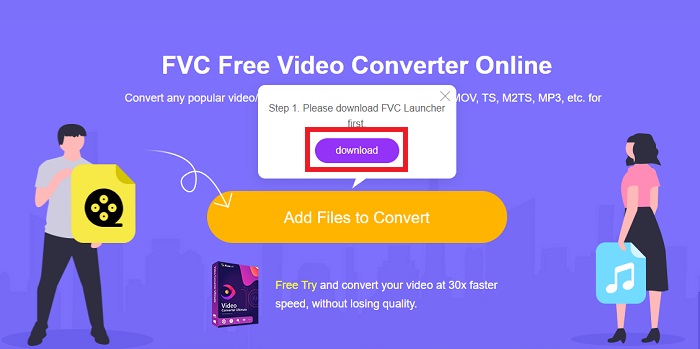
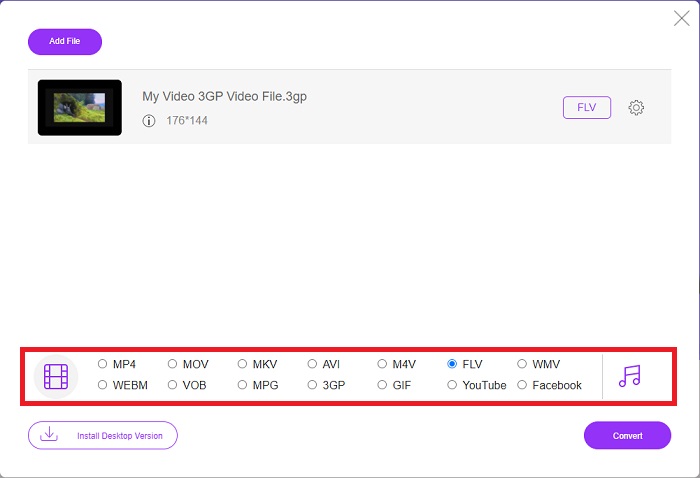
ステップ 2: ファイルをアップロードするには、もう一度 ファイルを追加して変換 をクリックします。ファイルのアップロード後、ウィンドウ下部に並んでいる動画形式の一覧から FLV を選択できます。
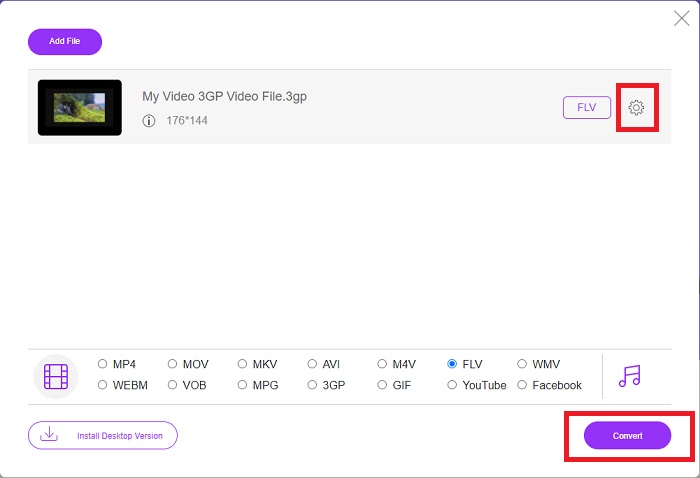
ステップ 3: 選択した動画形式の右側にある歯車アイコンをクリックすると、解像度・フレームレート・ビットレートなど、動画の画質やその他の仕様を編集できます。出力の設定を希望どおりに調整し終えたら、変換 をクリックしてファイルの変換を開始します。
パート3。概要:3GPとFLV
オーディオおよびビデオクリップを3GP形式で保存したい場合は、適切な場所に来ました。 (3GPP)。 ISOメディアファイル形式は、マルチメディアコンテナ形式である3GPPの基盤として機能します。 H.263またはH.264ビデオストリームとAMR-WB、AMR-WB +、AMR-NB、HE-AAC v1、AAC-LC、または拡張aacPlusオーディオストリームがすべてサポートされています。通常、3GPファイルは3G携帯電話を使用してビデオをキャプチャしますが、ユーザーは一部の2Gおよび4G電話でそれらを再生することもできます。 3GPファイルはまだ使用されていますが、より効率的なビデオ形式が3GPP形式に取って代わったため、その人気は低下しています。
ただし、Adobe Flash Video(FLV)コンテナ形式で保存されたビデオファイルはFLVドキュメントです。オーディオおよびビデオストリームは、標準のFlashと同じ方法でエンコードできます。 SWF形式とメタデータパケットには短いヘッダーが含まれています。 Flash Video Exporterプラグイン(Adobe Animateで利用可能)またはFLVファイルをサポートするアプリケーションは、Flash Videoコンテンツを生成し、FLVファイルとしてエクスポートできます。 Adobe Media Encoderは、QuickTimeまたはWindowsMedia形式でビデオをエンコードする場合もあります。 3GPとFLVに関するアイデアが得られたので、特定の事項の詳細を知るための比較チャートを提供します。
| ファイル拡張子 | 3GP | FLV |
| ファイルタイプ | ISOメディアファイル | Flashビデオファイル |
| によって開発された | 第3世代パートナーシッププロジェクト | アドビシステム |
| 長所 | 3GPファイル形式はビデオサイズとオーディオコンポーネントを削減するため、モバイルユーザーはビデオファイルを共有および保存するのが簡単です。 3GPで設計されたファイル形式は3G対応デバイスを使用しますが、多くの2Gおよび4Gデバイスはこの形式を再生できます。 | アニメーションやインタラクティブな要素を含めたいWebサイトには、AdobeFlashが最適です。長期的には、大きな影響を与える可能性があります。ピーク時には、Flashはシンプルなゲームを採用していました。 |
| 短所 | ビデオストリームとオーディオストリームは、品質と解像度の低下した1つのファイルに圧縮できますが、ユーザーは、オーディオ品質、画面解像度、再生速度などの他の形式と比較して、ユーザーエクスペリエンスを大幅に向上させることができます。 | もちろん、FLVの人気がここ数年で減少していることは不利です。 FLVコンテンツの作成には多くの時間とお金がかかります。 Flashのもう1つの欠点は、iOSデバイスで表示できないため、新しいファンを引き付ける能力が大幅に制限されることです。 |
| プログラムはビデオフォーマットを開きます | ◆QuickTimeプレーヤー ◆WindowsMediaPlayer | ◆VLCメディアプレーヤー ◆AdobeFlashPlayer |
パート4。3GPからFLVへの変換に関するFAQ
3GPは高品質ですか?
可変ビットレートとフレームレートは、MP4と同様に3GPをサポートします。 3GPは、フィーチャーフォンが依然として最も一般的な通信形式であったときに人気のある形式でした。かつてはスペースが贅沢だったので、小さいビデオが必要です。品質は当時の携帯電話に搭載されていたポテト品質のカメラと同等なので、衝撃的ではありません。
3GPが再生されないのはなぜですか?
お使いのデフォルトのメディアプレーヤーが 3GP コーデックに対応していない場合は、代わりに VLC Media Player で3GP ファイルを再生してみてください。VLC はほぼあらゆる動画ファイルを再生できる優れたオープンソースの動画プレーヤーです。Windows や iOS に加え、Linux や Android でも利用できます。
FLVは適切な録音フォーマットですか?
Adobe Flash Player は FLV ファイル形式を使用します。FLV は汎用性の高い動画形式であり、世界中で最も広く使われている形式のひとつです。YouTube のようなオンライン動画配信プラットフォームは、FLV 形式を利用することで多くの利点を得ています。ファイルサイズが小さいため非常に扱いやすいという利点もあります。ここでは、試してみる価値のあるおすすめの FLV 録画ソフトを紹介します。
結論
一般的に言えば、提供されているすべてのコンバーターは、使用を検討する必要がある最良かつ最も推奨されるソフトウェアおよびオンラインコンバーターです。彼らはこれらの専門的でフレンドリーなユーザー機能を持っているので、これら2つを他のソフトウェアやオンラインツールと比較することはできません。楽しんで使ってください、そしてそれを使った後にレビューを置くことを忘れないでください。
-
 3GP を AVI 形式に変換する最も効果的な方法トップ 4 [2025]
 3GPファイルをAVIに変換できますか? 3GPからAVIへの変換の問題に対して考えられるすべての解決策を集めたので、これらのツールを試してみると、簡単に変換できます。
-
 VOBをFLVに変換する最良の方法[無料およびオンラインで含まれる]
 VOBファイルをFLVファイルに変換したいですか?デスクトップまたはオンラインコンバーターを使用して、タスクを簡単に完了することができます。このガイドを読み、VOBをFLVに簡単かつ迅速に変換する方法を学びます。
-
 デスクトップとオンラインでDATをFLVに変換するトップ3の方法
 DATをFLVに変換したいのですが、方法がわかりませんか?推奨されるDATからFLVへのビデオコンバーターを確認し、具体的なガイドに従って作業を簡単に完了してください。
