


 ビデオコンバーター究極
 スクリーンレコーダー
 ビデオ修復
ビデオ修復
 安全なダウンロード
FLVをWAVに変換する3つの無料の方法
ダウンロードした動画から音声だけを取り出したいけれど、やり方がわからないですか? FLV を WAV や MP3 に簡単に変換する方法をお探しですか?
場合によっては、1つのビデオのオーディオトラックまたはバックグラウンドミュージックのみが必要になります。したがって、ビデオをオーディオに変換する必要があります。この投稿では、主にFLVをWAVに変換する方法について説明します。

ここでは、FLV ファイルを変換するのに役立つ 3 つの優れたFLV から WAV へのコンバーターをご紹介します。お好みの方法を選んで、FLV を WAV オーディオに変換できます。
パート1。FLVをWAVオンラインに変換する
インターネットで FLV を WAV に変換する方法を検索すると、多くの検索結果が無料のオンラインコンバーターであることがわかります。どれを使えばよいかわからない場合のために、ここでは人気のFree Online Video Converterをおすすめします。このツールは、FLV を MP4、MOV、AVI、MP3、AAC、M4A、WAV など、よく使われるあらゆる動画・音声形式に変換できるよう特別に設計されています。
他のオンラインFLVからWAVへのコンバーターと比較して、より多くの入力および出力フォーマットをサポートし、より速い変換速度を提供します。さらに、アカウントのサインアップやサインインは必要ありません。ファイルサイズの制限なしにFLVファイルを変換できます。
ステップ 1: ブラウザでこの無料オンライン FLV to WAV コンバーターサイトにアクセスします。Safari、IE、Chrome、Firefox、Yahoo など、ほとんどのウェブブラウザに対応しています。
ステップ 2:Add Files to Convert をクリックし、続いて Download ボタンをクリックして、FLV 変換用ランチャーをインストールします。インストール後、FLV ファイルを読み込むためのポップアップウィンドウが表示されます。

ステップ 3: メインのコンバーター画面に進むと、MP4、MOV、AVI、FLV、MKV、VOB、MPG、WMV などの人気動画形式が一覧表示されているのがわかります。このステップでは、Audio アイコンをクリックして音声形式を表示させます。出力形式として WAV を選択します。
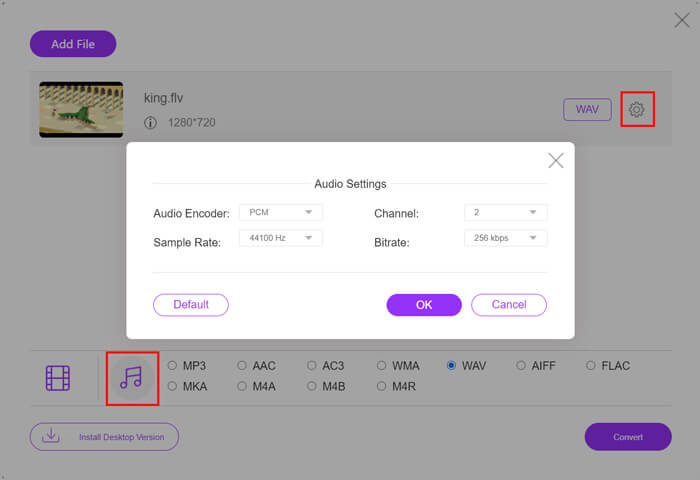
ステップ 4: FLV から WAV への変換を行う前に、出力形式の横にある Settings アイコンをクリックして、さらに詳細な音声設定をカスタマイズできます。ここでは、オーディオエンコーダー、チャンネル、サンプルレート、ビットレートを調整できます。その後、Convert ボタンをクリックして、FLV ファイルを WAV オーディオに変換します。
FLV を MP3、WMA、WAV などの音声ファイルに変換したい場合は、オーディオタブをクリックしてチェックマークを付けてください。
パート2。FLVをWAVに無料で変換
オンラインの FLV コンバーター以外にも、FLV を簡単に WAV に変換できる無料動画変換ソフトがいくつかあります。その場合は、Free FLV Converter を利用できます。

無料のFLVからWAVへのコンバーター
155321+ダウンロード- FLVをWAV、AAC、MP3、M4A、MP4、MOV、AVIなどに変換します。
- 頻繁に使用されるすべてのビデオおよびオーディオ形式をサポートします。
- 最新のマルチコアCPUとGPUアクセラレーションをサポートします。
- 品質を損なうことなく1つ以上のFLVファイルを変換します。
無料ダウンロードWindows 7 以降に対応安全なダウンロード
無料ダウンロードmacOS 10.7 以降に対応安全なダウンロード
必要なすべての変換機能を備えています。次のガイドでは、FLVをWAVに変換する方法を説明します。
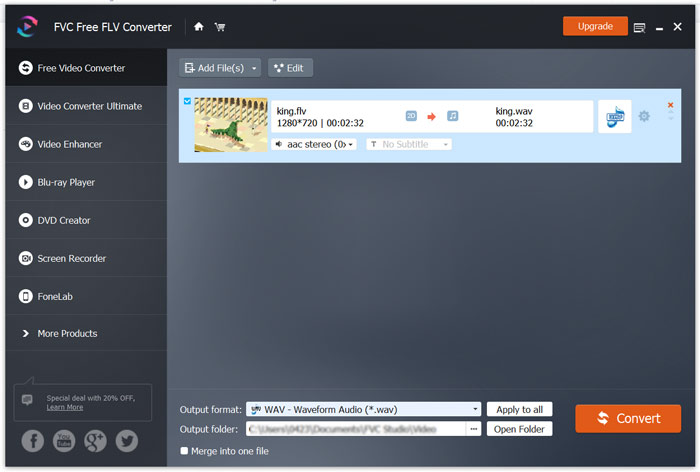
ステップ 1: この無料 FLV to WAV コンバーターをパソコンに無料でダウンロード・インストールし、起動します。Add Files をクリックして、FLV ファイルを読み込みます。

ステップ 2:Output format をクリックして、ターゲット形式として WAV を選択します。続いて、適切な保存先フォルダーを指定します。
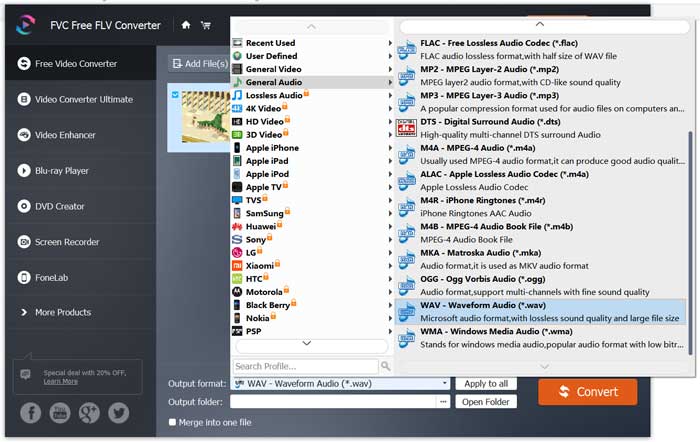
ステップ 3:Convert ボタンをクリックして、FLV から WAV への変換を開始します。
パート3。VLCでFLVをWAVに変換する
パソコンにVLC Media Player がインストールされている場合は、VLC を使って FLV を WAV に変換することもできます。ご存じのとおり、VLC は人気のメディアプレーヤーであり、基本的な変換機能や編集機能も備えています。
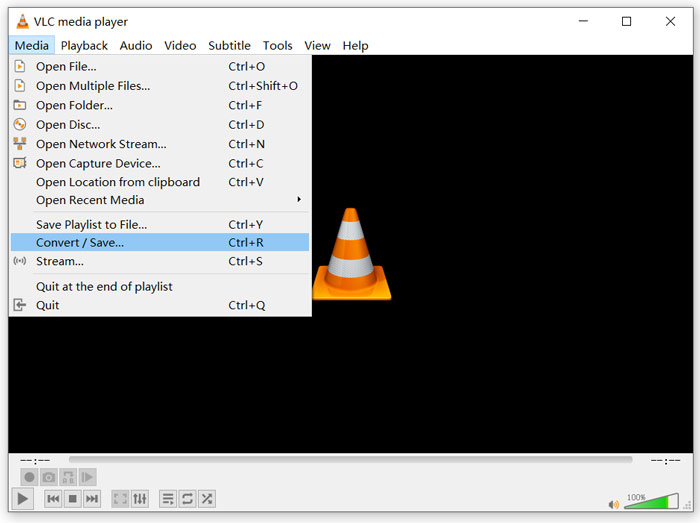
ステップ 1: パソコンで VLC Media Player を起動します。まだの場合は、VideoLAN のサイトから無料でインストールできます。[メディア]をクリックし、ドロップダウンメニューから 変換/保存(Convert/Save)オプションを選択します。
ステップ 2: すると メディアを開く(Open Media)ウィンドウが表示されます。追加(Add)ボタンをクリックして、変換したい FLV ファイルを追加します。その後、変換/保存 ボタンをクリックして、変換(Convert)ウィンドウを表示させます。
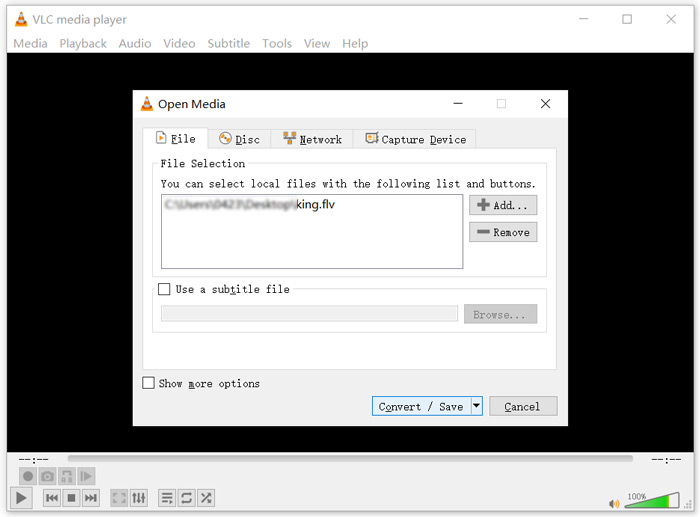
ステップ 3:変換 タブの下にある 出力を表示(Display the output)オプションにチェックを入れます。続いて、プロファイル(Profile)のドロップダウンリストから適切な出力形式を選びます。参照(Browse)ボタンをクリックして、保存先フォルダーを指定します。このステップで出力ファイル名を変更することもできます。
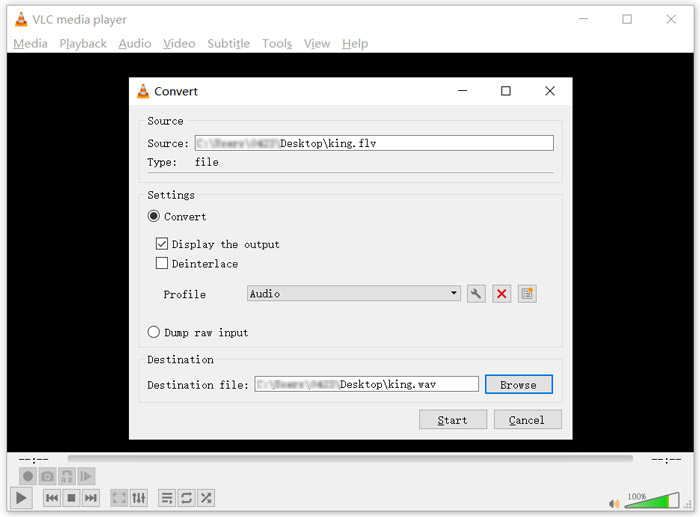
ステップ 4:開始(Start)ボタンをクリックして、FLV から WAV への変換を開始します。変換後、VLC は自動的に変換された WAV ファイルを再生します。変換中は、ファイルを変換中(Converting file)のメッセージが表示されます。変換が完了するまで、VLC Media Player を完全に閉じないでください。
パート4。FLVからWAVへの変換に関するFAQ
FLVとWAV、FLVとWAVの違いは何ですか?
FLV(Flash Video File)は、Adobe Systems によって開発された Flash 対応の動画ファイルです。短いヘッダーと、インターリーブされた映像・音声・メタデータのパケットを含んでいます。FLV はもともと Adobe 製アプリケーションに動画ストリームを埋め込むために設計された形式です。一般的な FLV ファイルには、640×360 のビデオストリームと、44.1 kHz・2 チャンネル・AAC のオーディオストリームが含まれます。
WAV 拡張子を持つファイルは Waveform Audio File Format(WAV)であり、データをセグメントごとに格納するコンテナ形式です。もともと Microsoft と IBM によって開発され、非圧縮のロスレス音声を保存するため、ファイルサイズは非常に大きくなります。この形式は、音声データ、トラック番号、サンプルレート、ビットレートなどをコンテナ内に保存します。
FLVをソフトウェアなしでWAVに変換する方法は?
コンバータソフトウェアを使用せずにFLVをWAVに変換する場合は、ファイル拡張子を.flvから.wavに変更することを選択できます。
FLVをWAVにダウンロードする方法は?
市場には多数のスクリーンレコーダーがあり、ローカルコンピューターにビデオをオーディオファイルとして保存するのに役立ちます。
結論
この記事を読めば、FLV ファイルから WAV 音声を抽出する 3 つの無料方法が理解できます。FLV を WAV に変換する必要があるときは、お好みの FLV コンバーターを選んで利用してください。
-
 Android、iOS、コンピューター用の5つの最高の無料WAVプレーヤー
 Android携帯でWAVファイルを再生する方法は?どのプレーヤーがWAVを再生できますか?この投稿では、Android、iPhone、Mac、PC向けの5つの最高の無料WAVプレーヤーを共有しています。
-
 あなたが試してみなければならないWindows10 / 8/7、Mac、iOS、Android用の10の最高のFLVビデオプレーヤー
 FLVプレーヤーを使用すると、Windows、Mac、Android、iOSデバイスでFLVファイルに簡単にアクセスできます。あなたが今ダウンロードできる最高のFLVファイルプレーヤーをチェックしてください。
-
 トップ5の無料コンバーターでWAVをMP3に変換する方法
 このページは、コンピューターでWAVをMP3に変更するための無料のWAVからMP3へのコンバーター(iTunes、Audacity、VLC、Windows Media Player、および無料のオーディオコンバーター)の長いリストです。
