


 ビデオコンバーター究極
 スクリーンレコーダー
 ビデオ修復
ビデオ修復
 安全なダウンロード
市場でトップのピック画像アップスケーラーを知る[総合レビュー]
プロ仕様での利用や、自分で撮影した画像をプロフェッショナルな見栄えにしたい人たちのあいだで、画像アップスケーラーの必要性が高まっています。写真を扱っていると、サイズが合わなかったり画質が悪かったりといった問題に直面することがあります。これは誰にでも起こりうることです。そのため、どんな解決策を使えばよいか知っておくことが、この問題を解消するうえで重要になります。もし、これらの解決策がどのようなものかを一緒に探っていく準備ができているなら、ここで紹介するツールの説明を読み進めてください。ここでは、Web上で使えるものと、PCにダウンロードして使えるもののなかから、最適なソリューションを厳選して紹介します。

パート 1.3 Web 上で直接使用できる無料のフォト エンハンサー [インストール不要]
FVC Free Image Upscaler - Web 上の写真品質エンハンサーとしてのトップチョイス
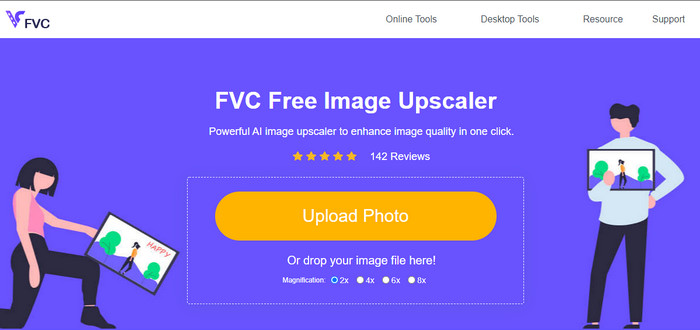
対応環境: Web
価格: 無料
FVC Free Image Upscaler は、ドラッグ&ドロップ方式で誰でも簡単に画像をアップロードし、変換できる、AI搭載の写真高画質化ツールです。対応環境の面では、幅広いWebブラウザからアクセスできます。アップスケーリングの経験がなくても、そのAI技術の恩恵を受けられます。色相・トーン・濃淡・シャープさのバランス調整や、レタッチなど、さまざまな問題の解決に最適です。
ここでワンクリックで画像をアップロードし、適用する倍率を選択すると、画像のアップスケール バージョンができあがります。多くの人がその機能の有効性に感銘を受けており、使用できるかどうか疑問に思っている場合は、名前をクリックして Web ツールを開きます。
長所
- これは、Web サービスで利用できる最高のワンクリック画質エンハンサーです。
- これは、品質と解像度の問題を抱えているすべての人のためのワンストップ ソリューションです。
- 初心者や専門家にとって最良の選択は、画像の解像度をアップスケールする方法を探すことです。そして品質。
- さまざまなアップスケーリング オプションを選択できます。
- Webサービスなので相性問題なし。
短所
- インターネット接続の必要性を除けば、このアプリを使用するデメリットはありません。
- 有料版はありませんが、それでも強化とアップスケーリングに優れています.
AI画像拡大
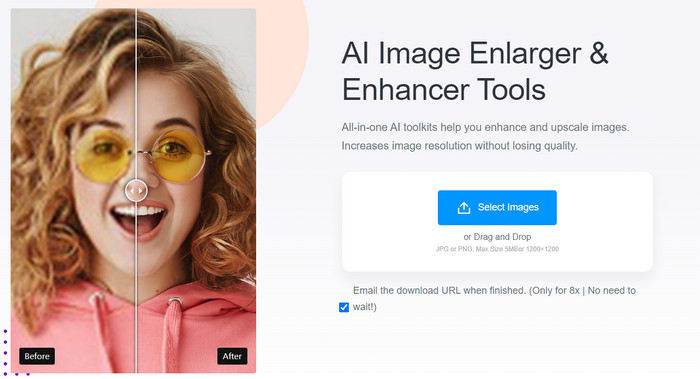
対応環境: Web、iOS & Android デバイス
価格: 無料および年額・月額プラン
AI Image Enlarger は、画像のアップスケーリングを行うための、もうひとつの写真高画質化アプリです。画像編集が初心者でも使いやすく、Webブラウザから手軽に利用できるので、作業自体を楽しみながら進められます。インターフェースを見ると、上部に広告がなければ、コンパクトでほぼクリーンなデザインであることが分かります。ここでは、最大 5MB までの PNG または JPG 形式の画像をアップロードでき、推奨解像度は 1200 x 1200 以下です。
このオンライン ツールは Web 上で無料で使用できますが、使用回数などの制限があります。アクセシブルなバージョンでは、1 週間に最大 8 つの画像をアップロードできます。これは、強化できる他のソリューションと比較して少ない.ただし、プランを購入することで、機能のアクセシビリティをアップグレードできます。プレミアムバージョンを購入することには大きな利点があります。ただし、お支払いいただく必要があります。
長所
- できる 写真の解像度を上げる あなたのJPGとPNGの。
- ファイルをドラッグ アンド ドロップして、ここにすばやくアップロードできます。
- 画像の見栄えを良くするために使用できる複数の機能をサポートしています。
短所
- それの無料版は、オンラインの他のアプリと比較して制限されています
- アップロードする 2 つの形式をサポートしています。 JPEG と PNG。
- 毎週 8 回アップスケールを試すことができます。
フォトジェット
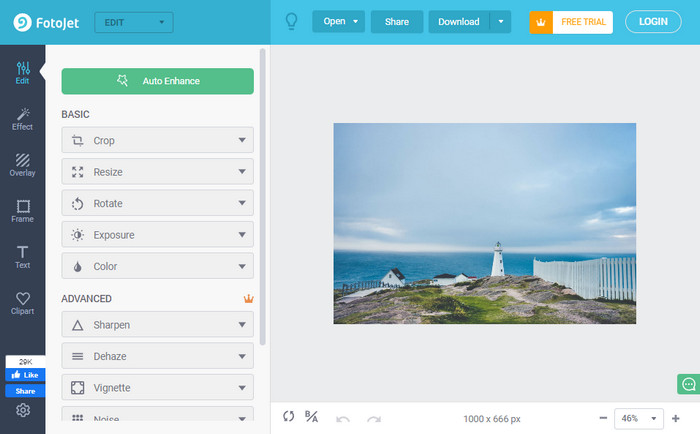
対応環境: Web
価格: 無料&有料
アカウントにログインしなくても、Web上で利用できる無料のピクセル補正ツールのひとつに、Fotojet があります。このアプリでは、デザイナーでなくてもデザインを作成したり、コラージュを作ったり、写真を編集して、見る人にとってより魅力的な仕上がりにすることができます。このソフトウェアを使えば、画像をよりよく見せるのに役立つ豊富なテンプレート資源を利用できると断言できます。高機能なオンラインアプリでありながら、操作は非常に簡単です。
優れた画像エンハンサーであるにもかかわらず、フリー ソフトウェア バージョンを使用する場合にはまだ欠点があります。画質を向上させるには、無料および基本オプションのみを使用できます。その他のプレミアム バージョンの料金を支払う必要があります。公式ウェブサイトにアクセスして、最初に無料版を試すことができます。購入する場合は、メインの Web ページで購入できます。または、このアプリが提供する 7 日間の無料試用版を使用することもできます。
長所
- 使用できる多くのテンプレート、リソース、および編集機能をサポートしています。
- 学習曲線は、あなたが思っているほど難しくありません。
- 他の AI 写真エンハンサーよりも詳細な画像補正オプションがあります。
短所
- プレミアム機能にアクセスするには、プランを購入する必要があります。
- 編集中に一部の広告が飛び出します。
パート 2.4 Windows、Mac、iOS、Android でダウンロード可能な Picture Enhancer [インストールが必要]
Adobe Lightroom
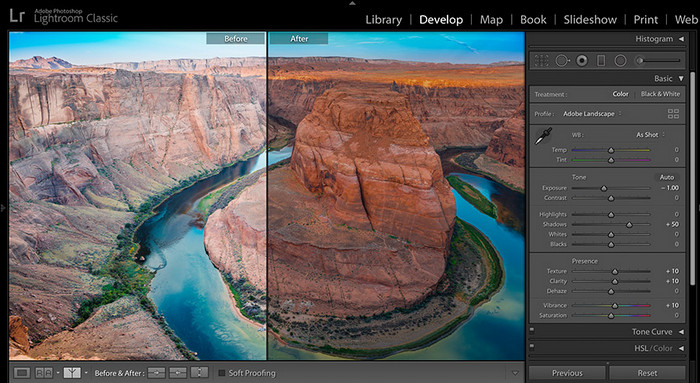
対応環境: Windows、Mac、および特定要件を満たすモバイルデバイス
価格: 月額・年額課金制
このリストは、バージョン4.3で導入されたスーパー解像度機能から始めましょう。この機能は現在でも、Windows や Mac などのデバイスにダウンロードして使用できます。Adobe Lightroom は、画像をより良く仕上げるための、もうひとつの有力な選択肢です。Adobe Photoshop と比べても、画像編集機能が非常に充実しています。これを使えば、RAW画像をより鮮明な色合い、シャドウ、ハイライトなどを持つ写真へと変換できます。疑いのないリニアな解像度を求めているなら、今すぐデスクトップに導入すべきソリューションと言えるでしょう。
これらの高度で神のような編集機能により、アクセスする前にプランを購入する必要があると言っても過言ではありません.このツールは使用可能な編集機能を既にサポートしていますが、他のプラグインは別途購入する必要があります。無料試用版を使用していない場合は、デスクトップにソフトウェアをダウンロードして使用を開始してください。
長所
- 画像編集の専門家が使用する可能性が最も高いです。
- 画質エンハンサーに必要なすべてをサポートします。
- Photoshop と比較すると、これはより高い解像度を実現するための優れたオプションです。
- イメージリポジトリがあります。
短所
- 有料版はかなりのお金がかかります。
- ご購入前に必ず守っていただきたい仕様があります。
- ソフトウェアは、実行中に大量の RAM を消費します。
アフィニティフォト
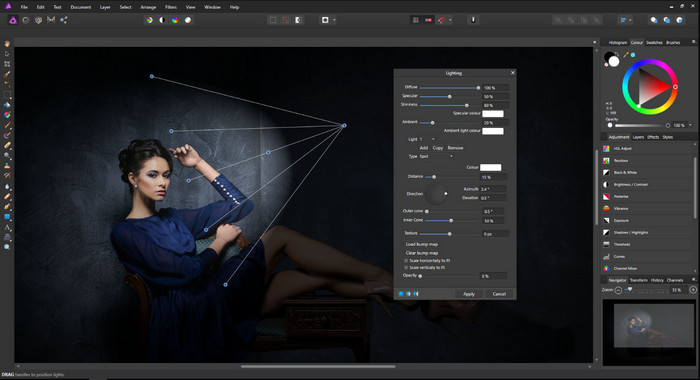
対応環境: Mac、Windows、iPad
価格: 買い切り
Affinity Photo は、写真の品質を向上させるだけでなく、プロ向けの画像エディターでもあります。その機能は、ここに追加する他のソフトウェアと同様に、最も印象的なものの 1 つです。さらに、使いたいと思うユニークなエンハンサーのセットと、ここで入手できる他のアプリ拡張機能があります.編集に関しては、Adobe Lightroomがトップですが、使いやすさや初心者に最適な選択であるということであれば、間違いなくこれが選択肢になる可能性があります.他のソフトウェアの GUI とは異なり、このツールは整理されているため、イメージで使用するツールを簡単に見つけることができます。
Lightroom と同様に、その可能性を最大限に引き出すには、そのプロ バージョンを購入する必要があります。なんで?無料トライアルで入手できるバージョンが基本だからです。このソフトウェアを購入すると、スプレー ペイント、ペイント ローラー、インク スタンプなどの他の編集機能がパッケージに含まれます。また、このアプリは、購入できる他の画像エディターに比べて高価です。
長所
- その特徴と機能は使いやすく、最大限に活用できます。
- 開発者は、このフォト アップスケーラーに関するビデオとチュートリアルを提供しています。
- JPG、PNG、RAWなどのさまざまな画像形式をサポートしています。
- ここでしか使用できないプライマリおよびプロのツール セットがあります。
短所
- Adobe Lightroom のような画像リポジトリはありません。
- 他の画像エディタに比べて高価です。
- これをダウンロードする前に、デバイスの仕様を確認する必要があります。
Remini アプリ - AI 写真エンハンサー
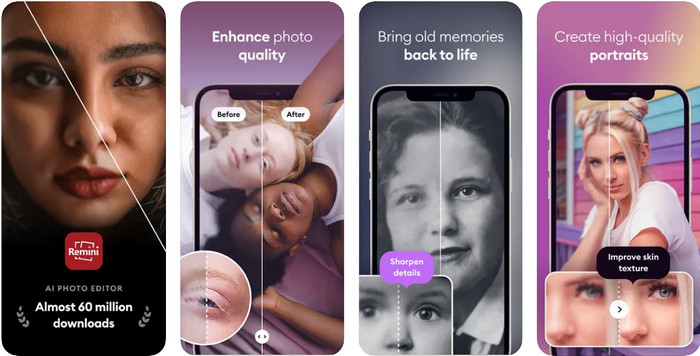
対応環境: Android & iOS
価格: 月額課金制
Remini アプリ は、ワンタップで画像の品質や解像度を向上させられるソリューションとして知られています。モバイル向けアプリではありますが、その画像編集性能は、他の多くのアプリよりも優れています。編集スキルに自信がなくても、このアプリならすぐに使いこなせ、1分もかからず問題を解決できるでしょう。GUI はシンプルに設計されており、編集作業の負担を大きく軽減してくれます。
ただし、特に古いバージョンの電話を使用している場合は、編集中にフリーズしたりクラッシュしたりするなど、このアプリに問題がある場合があります。それにもかかわらず、この画像解像度エンハンサーをダウンロードして画像解像度を修正する必要があります。
長所
- Android および iOS システムにダウンロードできる最も厳選された画像エディターの 1 つです。
- アプリは無料でダウンロードできます。
- 使い方をマスターするのに、そう長くはかからないでしょう。
短所
- フリーズしたり、クラッシュしたり、バグがまだ残っていることがあります。
- 無料版で広告が表示されます。
PicPlus: 写真のフィルターと編集 12+
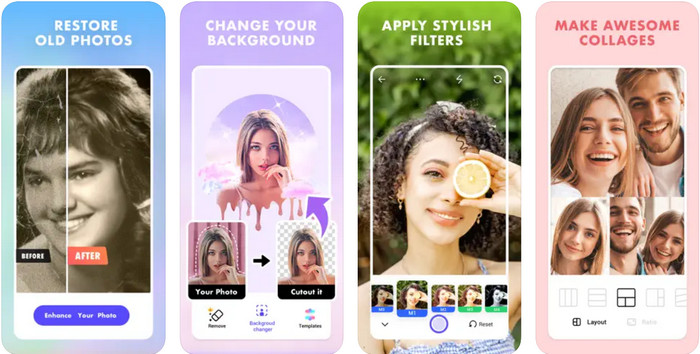
対応環境: iOS
価格: 年額プラン
画質改善ツールのレビューを締めくくるにあたり、iOS 向け画像編集アプリのなかでも特におすすめのひとつである PicPlus を紹介します。私たちがこのアプリを選んだ理由は、その画像編集機能の効率性にあります。初心者でも、このアプリさえあれば iOS デバイスでの写真編集を存分に楽しむことができます。編集機能に加え、豊富なフィルターやコラージュレイアウトなども利用可能です。iOS 向けの画像編集アプリを探している方には、ぜひダウンロードをおすすめします。ただし、Remini アプリと同様の体験が得られることも、あらかじめ想定しておくとよいでしょう。
長所
- 追加のフィルター、美的およびアニメーション化されたコラージュなどを提供します。
- これは、iOS デバイスにダウンロードする必要がある最高の画像エディターの 1 つです。
- それを使用して写真を編集しているときに、あまり問題が発生することはありません。
短所
- 年間プランは自動更新です。
- 月額プランには対応していません。
- まだ発生しているバグがあります。
パート 3. 画質向上ツールに関する FAQ
画質を向上させるのは難しいですか?
そうではない。しかし、市場にはさまざまなオプションがあるため、画像の品質を向上させるために使用する適切なアプリまたはソフトウェアを選択することは非常に困難です.使用するオプションを最小限に抑えるために、使用するのに最適な7つのアプリが含まれているため、ここに追加した情報をお読みください.
画像を強化する必要がありますか?
です。何百万人もの視聴者を引き付けたいとします。ただし、加工した画像をソーシャル メディア サイトに投稿すると、特に画像が標準に達していない場合に圧縮が発生します。
高品質の画像を販売して稼ぐことはできますか?
大デブYESです!画像をストック Web サイトにアップロードして、必要とする可能性のあるユーザーに販売できます。ですから、売りたいのであれば、より魅力的に見えるようにイメージを高める必要があります。
結論
確かに、検索は終わりました!ここに追加した AI フォト エンハンサーを使用すると、お粗末な画像を最高のバージョンに変えることができます。リストから使用したいアプリを選択して、すぐに問題を解決してください。他に質問はありますか?それらを以下に追加して、私たちに伝えることができます!
-
 ハンズオン チュートリアルで画像を 4k にアップスケールする公式の方法
 画像を 4k にアップスケールするには、デバイスにソフトウェアが必要です。お持ちでない場合は、ここに含まれているツールを選択する必要があります。
-
 無料アプリと有料アプリを使用して写真の明瞭度を編集する方法
 写真の明瞭度を編集するには?この質問は、この記事を読むことで解決されます。また、知っておく必要のあるヒントを追加します。
-
 市場で見つけられる最良の方法で Photo HD を作成
 写真を HD にしようと思っていますか?以下に追加するチュートリアルに従って、使用できるさまざまなソリューションを使用できます。
