


 ビデオコンバーター究極
 スクリーンレコーダー
 ビデオ修復
ビデオ修復
 安全なダウンロード
iFunny 透かしを削除する 4 つの最も簡単な方法
iFunny は、おもしろいメッセージや画像(ミーム)を楽しみたいときに最も人気のあるアプリのひとつです。しかし、画像の中には iFunny のウォーターマークが入っていて、気になることがあります。もし、こうしたウォーターマークを消すための優れた方法を探しているなら、今まさに最適なページを開いています。ここでは、写真から不要な要素を取り除くのに使えるさまざまなアプリケーションを紹介します。これらのツールはテスト済みで信頼できるものなので、正当なツールかどうかを心配する必要はありません。iFunny のウォーターマークを消す方法を知りたいですか?それでは、この記事を最初から最後まで読んでみてください。

パート 1: トリミング ツールを使用して iFunny 透かしを削除する
iFunny の透かしを削除する最良の方法の 1 つは、トリミング ツールを使用することです。この方法は、透かしが画像の端または隅に配置されている場合に適用できます。画像を上下左右にカットできます。画像から iFunny の透かしを切り抜きたい場合は、以下の簡単な手順に従ってください。
ステップ 1: iFunny のウォーターマークが入った写真を開きます。トリミングツールを使うために、画像を編集(Edit Image)オプションを選択します。ctrl+E を押しても構いません。
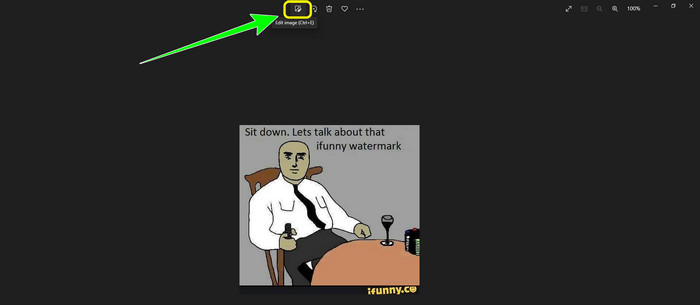
ステップ 2: その後、トリミング(Cropping)ツールをクリックします。あとは写真をトリミングして、画像から iFunny のウォーターマークを切り取ります。
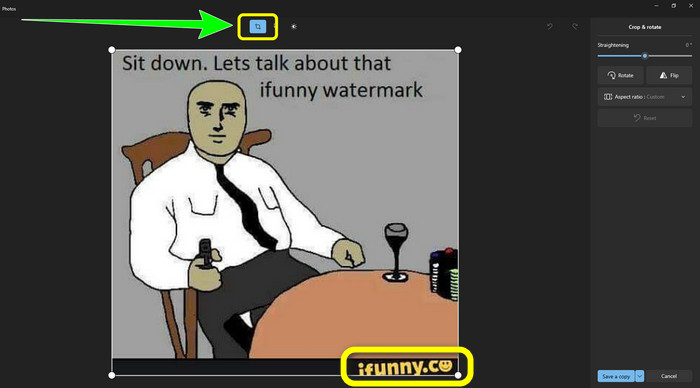
ステップ 3: トリミングが終わったら、コピーを保存(Save a copy)ボタンをクリックします。保存が完了するまで待ち、仕上がった写真を好きな場所に保存します。
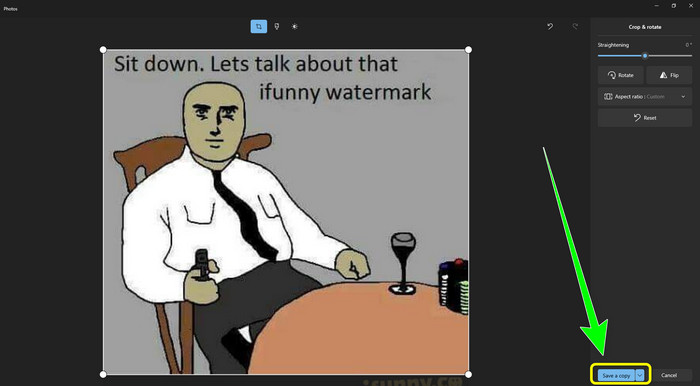
これは、トリミング ツールを使用して iFunny 透かしを削除する最も簡単な方法です。
パート 2: トリミングせずに iFunny 透かしを削除する最良の方法
FVC Free Watermark Remover の使用
iFunny のウォーターマークを消せるツールを探しているなら、FVC Free Watermark Remover を使うことができます。このアプリケーションを使えば、画像からあらゆるウォーターマークを簡単かつ即座に削除できます。写真に複数のウォーターマークがある場合でも、このツールに任せることができます。さらに、このオンラインツールは JPG、PNG、BMP、TIFF など、ほぼすべての画像ファイル形式に対応しています。画像から不要なオブジェクトやウォーターマークを取り除くために、このウォーターマークリムーバーには「なげなわ」「ブラシ」「多角形」の 3 種類のツールが用意されています。これらのツールを使えば、写真から不要なものを簡単に消すことができます。加えて、FVC Free Watermark Remover はインターフェースが分かりやすく、初心者からプロフェッショナルまで、すべてのユーザーが利用しやすい設計になっています。さらに、このウォーターマークリムーバーはプライバシー保護を保証しており、編集できるのは自分だけなので、ファイルも安全です。最後に、このソフトは無料で利用できるため、いつでも使うことができ、好きなだけファイルをアップロードして加工できます。
ステップ 1: ブラウザで FVC Free Watermark Remover を開きます。そして、画像をアップロード(Upload Image)ボタンをクリックして、iFunny のウォーターマークが入った写真を追加します。
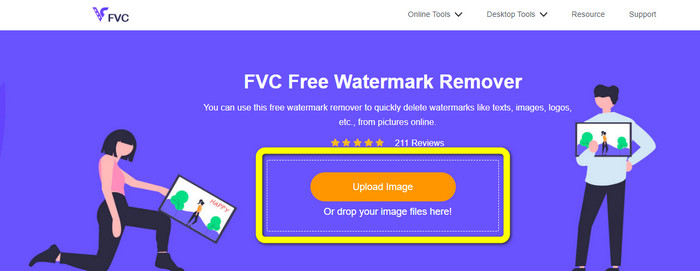
ステップ 2: 写真を追加したら、ウォーターマークリムーバーのツールを使って iFunny のウォーターマーク部分を選択します。
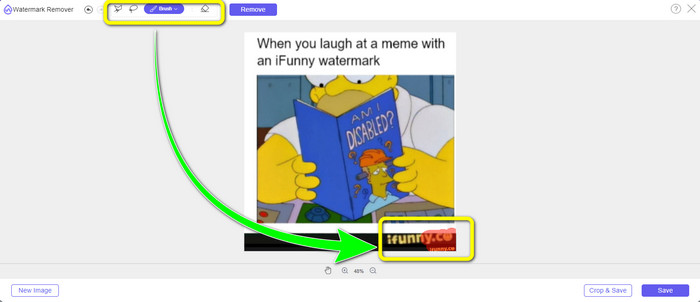
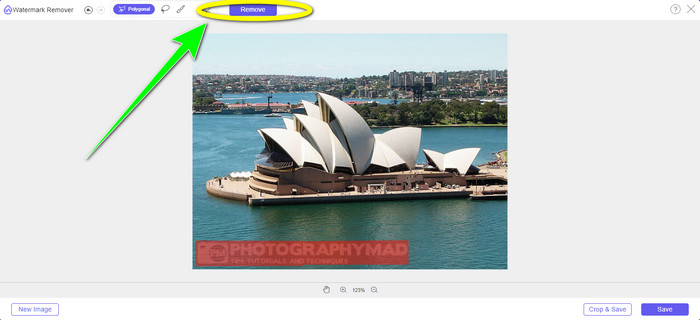
ステップ 3: 次に、削除(Remove)ボタンをクリックして、写真から iFunny のウォーターマークを消します。
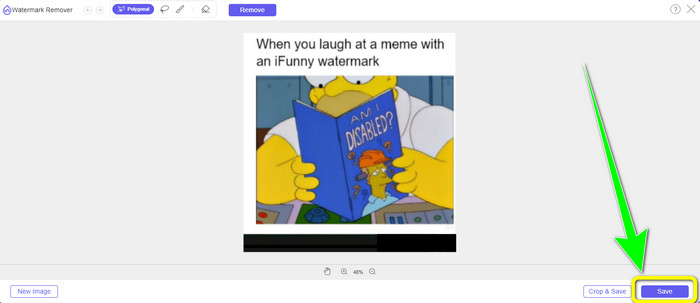
ステップ 4: 削除処理が終わったら、最後に 保存(Save)ボタンをクリックして、iFunny のウォーターマークのない写真をデバイスにダウンロードします。
WatermarkRemover.io の使用
ほかの Web アプリを使って写真から iFunny のウォーターマークを消したい場合は、WatermarkRemover.io を利用してみてください。この無料ツールは、ロゴ、キャプション、スタンプなど、画像内の余計な要素を削除できます。複数のウォーターマークがある画像にも対応可能です。また、初心者にも使いやすいシンプルなインターフェースを備えています。この Web ツールは PNG、JPG、WEBP、JPEG などのさまざまな画像形式をサポートしています。ただし、無料版には制限があります。アップロードできる写真は一度に 50 枚までで、ストレージ容量は 25GB のみです。さらに多くの写真をアップロードしたり、より多くのストレージを利用したい場合は、有料プランを契約する必要があり、その料金はやや高めです。以下の手順に従って、この便利な iFunny ウォーターマークリムーバーを使ってみてください。
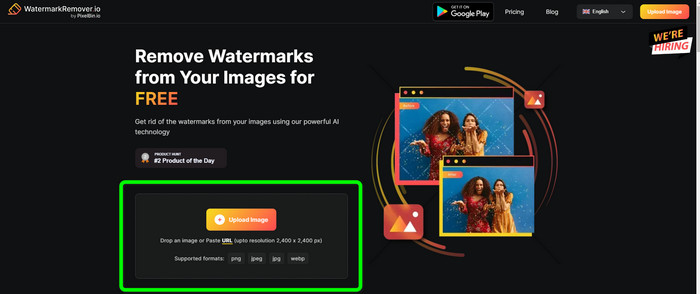
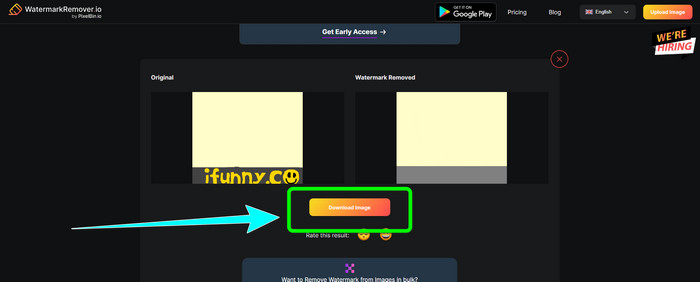
ステップ 1: ブラウザを開き、WatermarkRemover.io にアクセスします。iFunny のウォーターマークが入った写真をアップロードするために、画像をアップロード(Upload Image)ボタンをクリックします。ファイルをボックス内にドラッグ&ドロップしても構いません。
ステップ 2: 写真をアップロードすると、自動的に iFunny のウォーターマークが削除されます。ウォーターマークなしの写真が表示されたら、ダウンロード(Download)ボタンをクリックします。
Apowersoft透かしリムーバーをオンラインで使用する
写真から iFunny のウォーターマークをすばやく消したいなら、Apowersoft Watermark Remover Online も便利なオンラインアプリです。署名、テキスト、ロゴなど、写真から不要な要素を消去できます。また、JPEG、JPG、PNG、TIFF など、さまざまな画像ファイル形式に対応しています。Apowersoft Watermark Remover Online は操作方法がシンプルでインターフェースも分かりやすいため、十分なスキルがない初心者でも利用できます。さらに、写真のウォーターマークを削除してダウンロードしたあと、ファイルは自動的にサーバーから削除されるので、第三者に見られることはありません。写真だけでなく、動画からウォーターマークを消すこともできるため、ユーザーにとって便利です。MOV、WMV、MP4、3GP、AVI など、さまざまな動画形式に対応しています。ただし、このオンラインウォーターマークリムーバーは削除処理がやや遅いという欠点があり、ユーザーにとっては使いづらい場合もあります。また、インターネット接続がないと動作しません。このツールを使いたい場合は、以下の基本的なステップに従ってください。
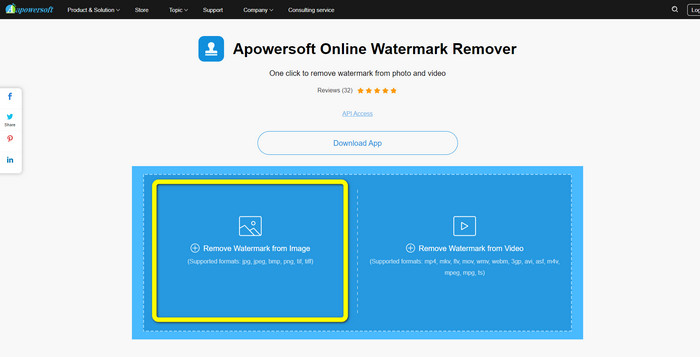
ステップ 1: Apowersoft Online Watermark Remover を検索します。その後、Remove Watermark from Image ボタンをクリックして、iFunny のウォーターマークが入った写真を追加します。
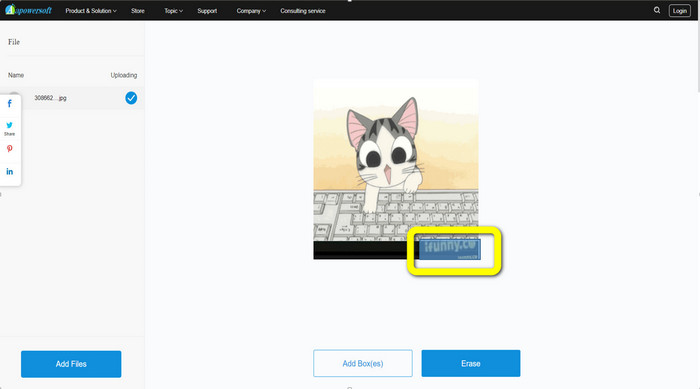
ステップ 2: ファイルを追加したら、青いボックスで iFunny のウォーターマーク部分を覆います。
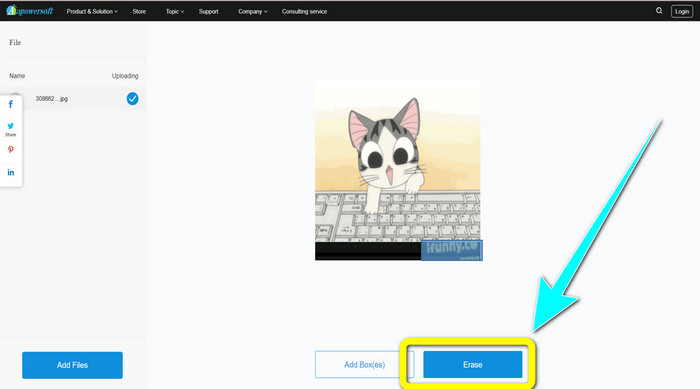
ステップ 3: その後、消去(Erase)ボタンをクリックします。削除処理が終わるのを待ってから、仕上がったファイルをダウンロードします。
関連記事:
Inpaint ウォーターマークリムーバーの正直なレビューと代替ツール
パート 3: iFunny 透かしの削除に関する FAQ
iFunny の透かしを削除するのに最適なアプリケーションは何ですか?
最もおすすめのアプリケーションは、FVC Free Watermark Remover です。このツールを使えば、画像から iFunny のウォーターマークを簡単に取り除けます。さらに、処理速度が速く、操作手順も非常に分かりやすいため、最良のウォーターマークリムーバーと言えるでしょう。
動画から透かしを削除することはできますか?
もちろん可能です。動画からウォーターマークを削除するためのオンライン・オフラインアプリケーションが多数あります。以下はおすすめのツールです。
1. Video Converter Ultimate
2. Media.io
3. HitPaw
4. Online Video Cutter
5. Apowersoft Online Watermark Remover.
FVC Free Watermark Remover で使用できるトリミング ツールはありますか?
はい。 FVC Free Watermark Remover には、写真から透かしを削除する 2 つの方法があります。 1 つ目は、なげなわ、ブラシ、多角形などのさまざまな透かし除去ツールを使用することです。 2 つ目は切り抜きツールを使用しています。
結論
上記の情報から分かるように、ツールやトリミング機能を使うなど、iFunny のウォーターマークを削除するための簡単な方法はいくつもあります。しかし、画像から邪魔な要素をもっと手軽に取り除きたいなら、今すぐ FVC Free Watermark Remover を利用してみてください。
-
 写真やビデオからステッカーを削除する優れた方法
 ビデオや写真から簡単にステッカーを削除したいですか?ここでは、試すことができる最も信頼性が高く、最も簡単な方法を含む効果的な方法を紹介します。
-
 画像から Reddit 透かしを簡単に削除する方法
 ここにいる場合は、優れた Reddit 透かし除去ツールを探している可能性があります。その場合、Reddit の透かしを削除する最も簡単な方法を紹介します。
-
 Lightroom Mobileで透かしを削除する方法[解決済み]
 Lightroom で写真から透かしを削除する方法を学びたいですか?携帯電話とコンピューターを使用して試すことができる最も簡単な方法を次に示します。
