


 ビデオコンバーター究極
 スクリーンレコーダー
 ビデオ修復
ビデオ修復Imglargerの公平なレビュー:知っておくべきことすべて
画像のアップスケーリングは、多くの人にとって一般的な作業になりつつあります。特に、さまざまな理由で画質が低下してしまった写真を扱う場合に重要です。もしあなたもその一人で、写真を高解像度化したいのであれば、現在利用できるツールがいくつかあり、そのひとつがImglargerです。このツールは有名な画像編集ツールであり、写真をアップスケールできる特定の機能を備えています。このツールについて詳しく知りたい場合は、このまま読み進めてください。また、無料で使える代替の画像アップスケーラーツールもあわせてチェックしてみましょう。

パート1. Imglargerの徹底レビュー
Imglargerは、画質を損なうことなく画像を拡大・補正できる、多用途で強力なオンラインツールです。人工知能(AI)を活用したこの画像編集ツールは、ワンクリックで写真を200%、400%、さらには800%まで拡大できます。さらに、AI技術は画像を拡大するだけでなく、リサイズ処理中にぼかしを除去し、鮮明度を高めるため、大きなサイズでも写真がシャープでクリアに見えるようになります。
長所
- ユーザーが画像を拡大する方法については、さまざまなオプションがあります。
- AI が自動的に画像を鮮明化して強化し、時間を節約します。
- 複数の画像を一度に処理できるため、一括編集が簡単に行えます。
- ユーザーインターフェースは非常にシンプルで使いやすいです。
- 画像は 24 時間後に削除され、プライバシーが確保されます。
短所
- 無料セットの機能は制限されています。
- プレミアムバージョンでも、10 MB のファイル制限があります。
パート2. Imglargerの料金プラン
Imglargerは完全に無料ではありません。無料版は提供されていますが、機能や使い勝手が制限されているように感じます。そのため、ツールの全機能を利用するには、無料版をプレミアム版にアップグレードする必要があります。以下は、それぞれの価格と含まれる内容を含む料金プランです。
Imglargerには様々な料金プランがあり、ユーザーがニーズと予算に合わせて最適なプランを選べるのは素晴らしいことです。しかし、無料プランは、特に高解像度の画像を処理したり、複数のファイルを同時に操作したりする必要があるユーザーにとっては、機能がかなり制限されているように感じるかもしれません。すべての機能を制限なくフルに活用するには、有料プランへのアップグレードを強くお勧めします。
パート3. Imglarger.comを使って画像を拡大する方法
Imglargerがどのようなツールか分かったところで、次は実際に画像をアップスケールする方法を見ていきましょう。この写真拡大ツールは非常にシンプルで直感的なインターフェースを備えており、初心者を含むあらゆるタイプのユーザーでも簡単に扱えます。以下に、Imglargerを使って画像をアップスケールする手順をステップごとに紹介します。
ステップ1.まず、公式サイトからこのツールにアクセスする必要があります。そのために、検索エンジンで「Imglarger.com」と検索してください。
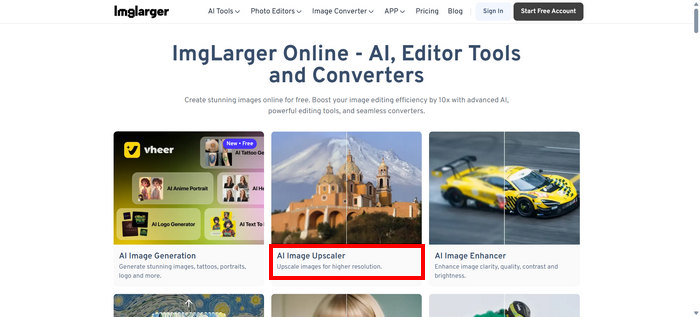
ステップ2.サイトにアクセスしたら、表示されている各種ツールの中からAI Image Upscalerを選択します。
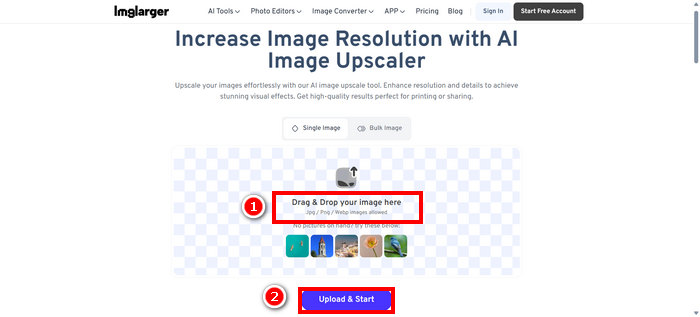
ステップ3.次に、Drag & Drop your image hereをクリックするか、そこに写真をドラッグ&ドロップします。写真を選択したら、Upload & Startをクリックします。
ステップ4.アップスケール後の写真を元の画質と比較しながらプレビューできます。仕上がりに満足したら、下にあるDownloadボタンをクリックして保存します。
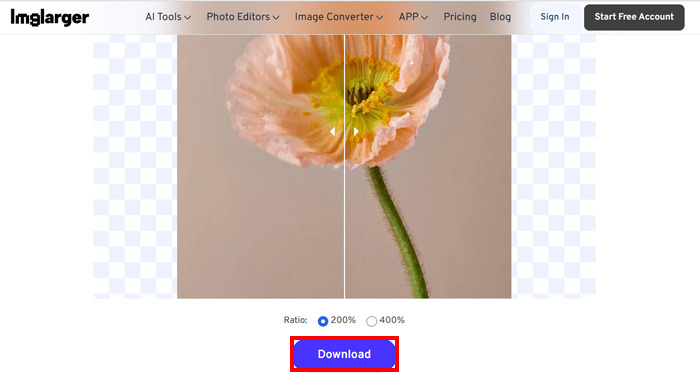
多数の写真を拡大したい場合は、まず一括画像を選択する必要がありますが、これはプレミアム バージョンでのみ利用できることに注意してください。
パート4. Imglargerの代替アプリとしておすすめ:FVC無料画像アップスケーラー
Imglargerの無料代替ツールを探しているなら、最適なのがFVC Free Image Upscalerです。このツールを使えば、わずか数ステップで画像をアップスケールできます。シンプルで直感的なインターフェースのおかげで、ユーザーは写真をアップロードするだけで、自動的に高解像度化された画像を得ることができます。
主な特徴
• 画像アップスケールは AI を搭載しており、画像品質を自動的に向上させます。
• 画質を損なうことなく、画像のサイズを 2 倍、4 倍、6 倍、または 8 倍に変更できます。
• ぼやけた部分を自動的に修正し、失われた詳細を復元します。
• JPG、JPEG、PNG、BMP などの一般的な形式をサポートします。
• 拡大された画像には透かしは入りません。
• 高速処理と結果のリアルタイムプレビュー。
以下では、FVC Free Image Upscaler を使って画像サイズを変更する手順を、ステップごとに紹介します。
ステップ1.まず公式サイト上のツールにアクセスします。そのために、Chrome を開き、検索エンジンで FVC Free Image Upscaler と検索してください。
ステップ2.ツールにアクセスしたら、Upload a Photoをクリックし、アップスケールしたい画像をインポートします。
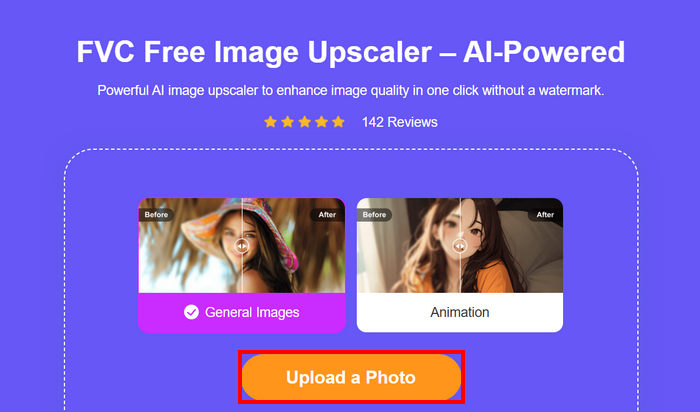
ステップ3.画像がアップスケールされるまで待ちます。数秒後、拡大後の画像のプレビューが表示されます。ここから、モードを変更したり、どの程度アップスケールするかを調整することもできます。設定が終わったら、Save ボタンをクリックします。
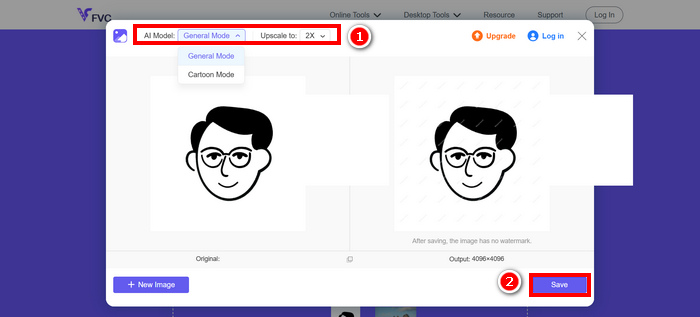
FVC Free Image Upscalerは、まさにImglargerの最高の代替品です。無料であることに加え、非常に使いやすく、高画質でアップスケールされた画像を提供し、幅広い出力形式をサポートしています。
パート5. Imglargerレビューに関するよくある質問
Imglarger は画像に透かしを追加しますか?
いいえ。Imglargerは、無料版を利用している場合でも、アップスケールまたは編集した画像にウォーターマークを追加することはありません。
Imglarger は画像をどの程度拡大できますか?
Imglarger では、画像を元のサイズから 200% から最大 800% まで拡大できます。このツールをサポートする AI テクノロジーにより、拡大処理中に写真の画質が向上します。
Imglarger で複数の画像を一度に処理できますか?
はい。この画像アップスケーラーでは、複数画像の一括処理が可能です。ただし、この機能が利用できるのは有料ユーザーのみで、無料ユーザーは1枚ずつの処理に制限されています。プレミアムプランにアップグレードすると一括処理機能が解放され、複数の写真を素早く効率的に編集またはアップスケールしたいユーザーにとって非常に便利です。
結論
Imglargerが優れた画像アップスケーラーツールであることは間違いありません。充実した機能や柔軟な料金プランなど、多くの利点があります。しかし一方で、無料版には、他の無料アップスケーラーツールでは利用できる機能が一部欠けている点も認識しておく必要があります。もし無料で使える代替ツールを探しているなら、FVC Free Image Upscalerも試してみるべきでしょう。どちらのツールも高品質な仕上がりを提供してくれるので、自分にとって使いやすい方を選んでください。
-
 オンラインおよびオフラインで印刷するために画像を拡大する方法
 解像度の低い画像を拡大したい場合は、解決策があります。印刷用に画像を拡大する方法については、この記事をお読みください。
-
 高画質で画像の解像度を上げる7つの簡単な方法
 Photoshop で画像の解像度を上げるにはどうすればいいですか? JPEG 画像の解像度を上げることはできますか? 画像の解像度を上げる 7 つの方法を学びましょう。
-
 デスクトップとモバイルデバイスでの画像サイズ縮小ツール
 この記事で上位にリストされているアプリを参考にして、お気に入りのデバイスに最適な写真サイズ縮小アプリを見つけてください。今すぐ画像のサイズ最適化を学んでください。
