


 ビデオコンバーター究極
 スクリーンレコーダー
 ビデオ修復
ビデオ修復簡単にアクセスできるXviDコンバーター:XviDファイルをMOV形式に変換する方法
XviD ファイルは、DivX と競合するために使われているもっともよく知られたコーデックです。また、このコーデックは MPEG‑4 ASP を採用しており、B フレーム、ルミナンスマスキング、グローバル & 1/4 ピクセルモーション補償、トレリス量子化、カスタム量子化マトリックス、H.263 などの機能を備えています。これらの理由から、XviD は DivX よりも人気の高いエンコーダーとなりました。仮に、XviD コーデックを使用したファイルを iOS に転送したとします。そのファイルが再生できなくても驚く必要はありません。というのも、このコーデックは iOS などのモバイルデバイスをサポートしていないからです。一見解決不能に見えても、どんな問題にも必ず解決策があります。そこで、XviD でエンコードされたファイルを AVI 形式へ変換するという方法を用意しました。もし「XviD ファイルを MOV に変換する方法」を知りたい場合は、本記事を読み進めてください。

パート1。XviDとMOVの紹介
前述のとおり、XviD を使って圧縮すれば、画質を損なうことなくファイルサイズを小さくでき、かつ高速に伸長(デコード)できます。XviD は非プロプライエタリなコンプレッサーですが、ポータブルデバイスや編集用途におけるコーデックとしての互換性には制限があります。そのため、XviD コーデックの動画を視聴したり編集したりしたい場合は、ファイルを MOV に変換することが必須となります。では、なぜ MOV なのか。MOV はメタデータや音声・動画ファイル、テキストや字幕などのメディアを格納できるフォーマットだからです。それだけでなく、この形式は iOS デバイスをはじめ、さまざまなデバイスで再生可能です。そこで、XviD ファイルに関するお悩みを解決するために、以下で紹介するツールを使って「XviD を MOV に変換する方法」を見ていきましょう。
パート2。WindowsとMacでXviDをMOVに変換するための最良のコンバーター
FVCビデオコンバーターアルティメット
一瞬でファイルを変換できる最高の XviD から MOV へのコンバーターをお探しですか?それなら、あなたが探しているツールは FVC Video Converter Ultimate だけです。最大 30 倍の高速変換に対応しているだけでなく、編集、結合、カットなど、さまざまな機能で動画をより魅力的に仕上げることができます。高度な機能を備えているにもかかわらず、このツールを使うために特別なハイスペックマシンを用意する必要はありません。
それに加えて、このソフトウェアには、ハードウェアアクセラレーションと高速変換が含まれており、変換エクスペリエンスをより速く、より良くすることができます。そして今、このツールの助けを借りてXvidファイルをMOVに変換する方法を学びたい場合は、以下のチュートリアルに進みましょう。
FVC Video Converter Ultimate で XviD を MOV に変換する手順:
ステップ 1. このソフトウェアは Windows PC と Mac のどちらにもダウンロードできます。まずは下のダウンロードボタンをクリックしてください。ダウンロード後、ファイルをクリックしてインストールし、すばやくセットアップを完了させたら、今すぐ開始 をクリックしてツールを起動します。
無料ダウンロードWindows 7 以降に対応安全なダウンロード
無料ダウンロードMacOS 10.7 以降に対応安全なダウンロード
ステップ 2. .xvid ファイルを読み込むには、+ボタンをクリックし、フォルダーから目的のファイルを選択して 開く をクリックします。ただし、.xvid ファイルが 2 つ以上ある場合は、ファイルをドラッグ&ドロップしてインターフェース上に追加することをおすすめします。
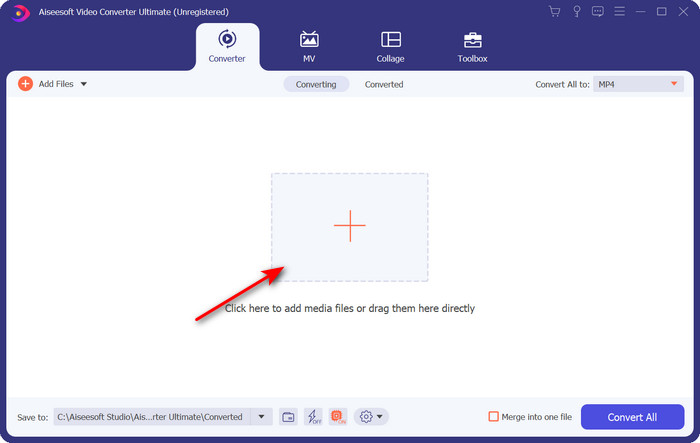
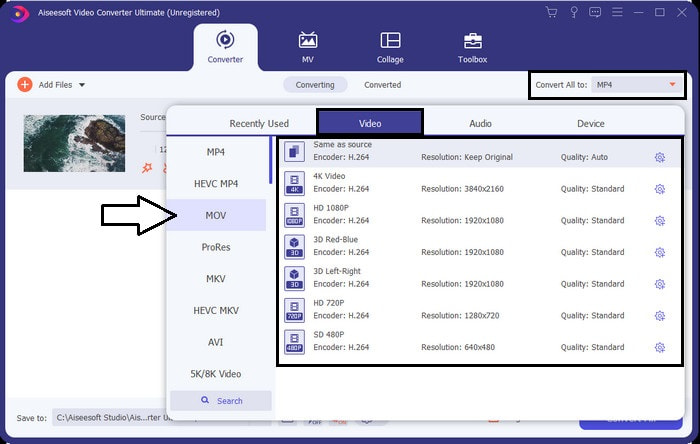
ステップ 3. 画面右上の ドロップダウン ボタンをクリックし、一覧から MOV 形式を探して選択します。
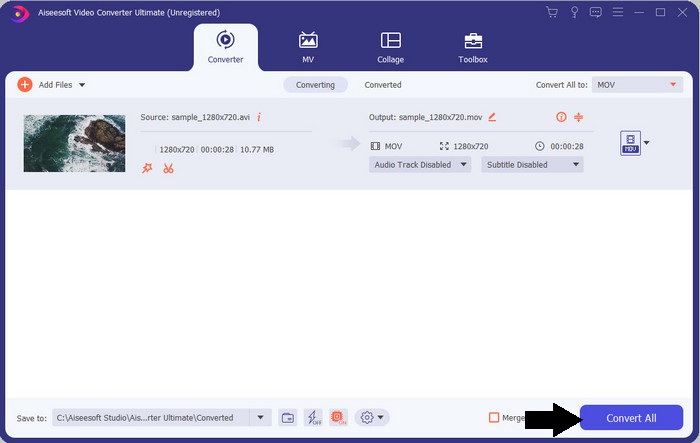
ステップ 4. すべて変換 をクリックして、XviD ファイルを MOV へ変換し始めます。
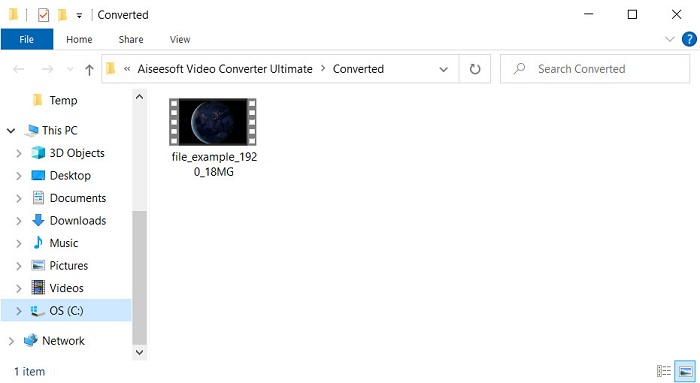
ステップ 5. 数秒ほど処理が完了するのを待ちます。処理が終わると .mov ファイルが入ったフォルダーが画面に表示されますので、そのファイルをクリックしてローカルのメディアプレーヤーで再生し、楽しんでください。
パート3。XvidをMOVに変換するための最良のオンラインコンバーター
FVC無料ビデオコンバーターオンライン
ストレージ容量がいっぱいでソフトをインストールしたくない、あるいは 1 本だけオンラインで変換したいという場合には、すべてのウェブブラウザーで利用可能な FVC Free Video Converter Online を使いましょう。このツールを使えば、XviD ファイルの変換は 1 分以内に完了します。また、アカウント登録も不要で、インターフェースに広告も表示されません。ウェブ上で利用できるオンラインコンバーターの中でも、非常にすっきりしたツールです。ただし、このツールはネットワーク接続に依存しているため、インターネット環境がなければ利用できません。また、対応しているフォーマットは中程度の数に限られています。とはいえ、コンバーターをインストールしたくないのであれば、このオンラインの XviD から MOV へのコンバーターを利用するべきでしょう。
FVC Free Video Converter Online を使って XviD ファイルをオンラインで MOV 形式に変換する手順:
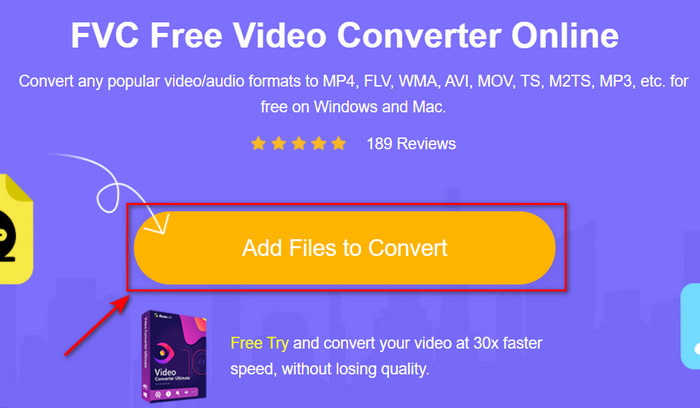
ステップ 1. オンラインコンバーターのメインページにアクセスするには、この リンク をクリックします。
ステップ 2. Add Files to Convert(変換するファイルを追加)をクリックしてツールを起動すると、フォルダーが表示されるので、変換したい XviD ファイルを選び、開く をクリックして進みます。
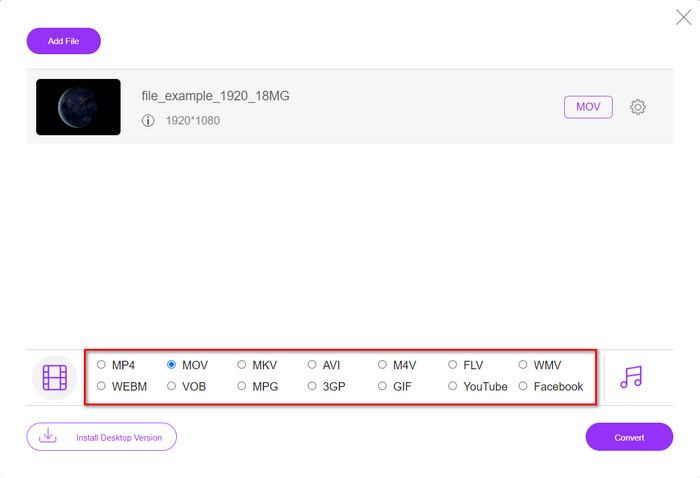
ステップ 3. XviD ファイルを追加すると新しいインターフェースが表示されるので、下部にある MOV 形式、もしくは変換したい別の形式を選択します。
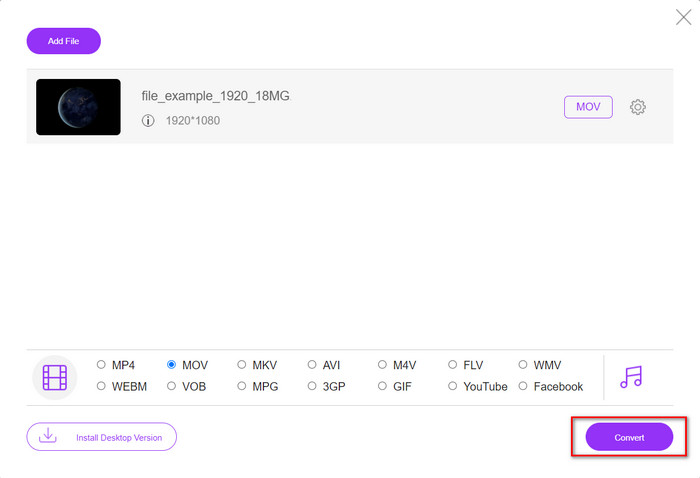
ステップ 4. 形式の変換を開始するには、変換 をクリックします。
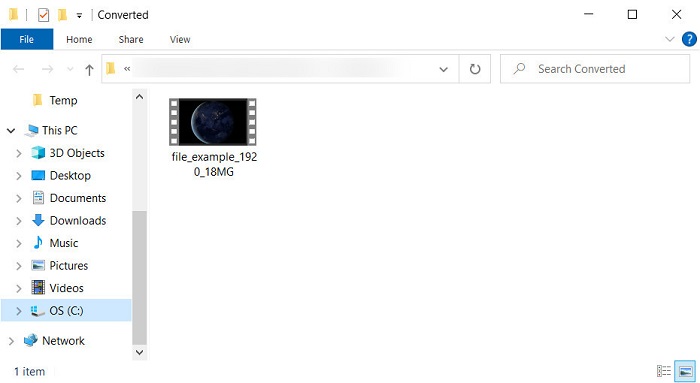
ステップ 5. このツールでの変換は、他のオンラインコンバーターよりも短時間で完了します。変換後、作成されたファイルが入ったフォルダーが表示されます。
パート4。XviDからMOVへの変換に関するFAQ
XviDビデオはどこで見ることができますか?
XviD ファイルの再生には VLC メディアプレーヤーを利用できます。ダウンロードしたくない場合は、Windows に標準搭載されている Windows Media Player を使ってください。Mac ユーザーであれば、QuickTime を利用できます。さらに、高解像度の XviD 動画を視聴したい場合は、利用可能な XviD プレーヤーをまとめたこの記事を読んで、XviD ファイルを再生してみてください。
XviDは無料ですか?
XviDは無料で、ファイルを使用および圧縮してWeb経由ですばやく転送したり、スペースを節約したりしたい人なら誰でも利用できます。それはすべてGPLフリーソフトウェアライセンスのおかげで、無料になりました。
XviDビデオを編集できないのはなぜですか?
このタイプのコーデックでビデオを編集できない主な理由の1つは、サポートされていないことです。その場合、最小限のビデオエディタは、その複雑さのためにこのタイプのコーデックのみをサポートします。したがって、この形式でビデオを編集する場合は、最初に変換することを検討する必要があります。その場合、XviDファイルをMP4、AVI、MOVなどに変換できる多目的コンバーターが必要です。次に、ファイルを変換した後、次にエディターにアップロードして、好きな編集を行います。
結論
この記事を読み終えることで、XviD に関する知識が深まり、XviD をさまざまな視点から理解できるようになったはずです。iOS デバイスで動画を保存・再生したい場合は、まずファイルを MOV 形式に変換する必要があります。これまでに紹介した 2 つのコンバーターは、どちらも MOV 形式への変換性能に優れています。どちらのツールも一見完璧に見えますが、変換速度とパフォーマンスにおいては、FVC Video Converter Ultimate がデスクトップおよびウェブ上のあらゆるツールよりも抜きん出ています。一方で、無料かつ安全にオンライン変換を行いたいのであれば、FVC Free Video Converter Online を選ぶとよいでしょう。
-
 簡単な手順とツールでAVIをMOVに変換する方法
 AVIを再生可能なMOVに変換する方法を知りたいですか?変換を成功させるための方法とヒントを知るには、この記事に従う必要があります。
-
 AVIをインポートしてiMovieでサポートされているフォーマットに変換する[2021]
 AVIファイルをiMovieにインポートできないために問題がありますか?この記事を読んだら、あなたはすでにこの問題に対する正しい救済策を選択しています。
-
 Win / MacでTSをオンラインでAVI / MKV / MOV / WMVに変換する方法
 TSファイルをAVI / MKV / MOV / WMVにすばやく変換したいですか?この記事では、オンラインおよびオフラインのビデオコンバーターと完全なガイドを紹介します。たぶんあなたはここで最高の無料のTSコンバーターを手に入れることができます。
