


 ビデオコンバーター究極
 スクリーンレコーダー
 ビデオ修復
ビデオ修復ステップバイステップガイドでAIFFをMP3に変換するための最高のコンバーター
AIFF ファイルは、これまで耳にしたことのあるオーディオファイルの中でも最高クラスの情報量を持つ形式です。非圧縮形式であるためデスクトップ用のプログラムには適していますが、スマートフォンに保存したりダウンロードしたりするには理想的とはいえません。とはいえ、AIFF ファイルをスマホやデスクトップに保存する際、使用するストレージ容量を減らす方法があります。その最善の方法が、AIFF を MP3 に変換 することです。ただし、変換にはオーディオファイルへの影響が出ることもあります。そこで、AIFF の品質を落とさずに変換できるツールを十分に集めました。ではさっそく、以下のツールを確認しつつ、手順の紹介に進みましょう。

パート1。WindowsとMacでAIFFをMP3に変換する方法
1.ビデオコンバーターアルティメット
形式変換を行うなら、Video Converter Ultimate を使えば抜群の効果が期待できます。現在お使いのコンバーターで特別な機能が得られていないなら、このツールを試してみてください。なぜなら、この究極のコンバーターは、他の Windows や Mac で AIFF を MP3 に変換 するソフトにはない高度な機能を多数備えているからです。また、このツールは Windows だけでなく Mac にも対応しています。究極の変換体験をしたいなら、以下の手順に従って AIFF を問題なく変換してみてください。
ステップ 1. コンバーターを使うには、まず PC または Mac のドライブにダウンロードします。その後インストールを行い、設定を調整して[完了]をクリックするとツールが起動します。
無料ダウンロードWindows 7 以降に対応安全なダウンロード
無料ダウンロードMacOS 10.7 以降に対応安全なダウンロード
ステップ 2. コンバーターのインストール後、Add Files をクリックして変換したい AIFF ファイルを追加します。フォルダー内で選択するファイルが多い場合は、ドラッグ&ドロップでインターフェースに追加することもできます。
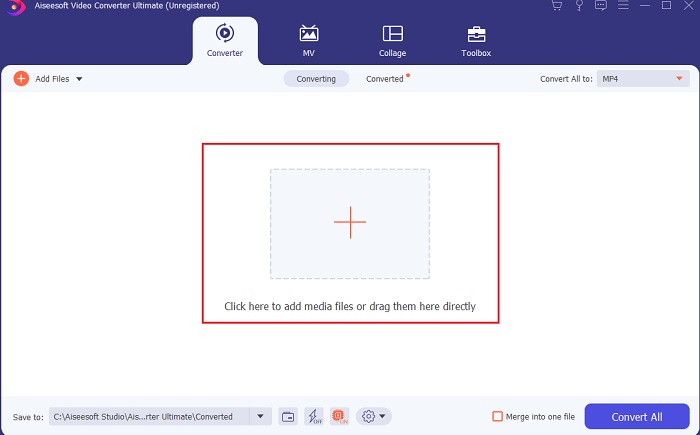
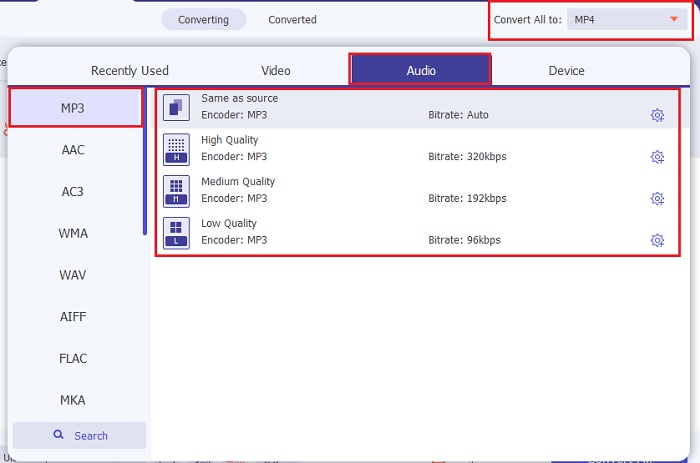
ステップ 3. 次に、Convert All to オプションをクリックして進みます。ここで希望するオーディオ形式を選択します。たとえば、最終的な出力形式として MP3 を選択できます。
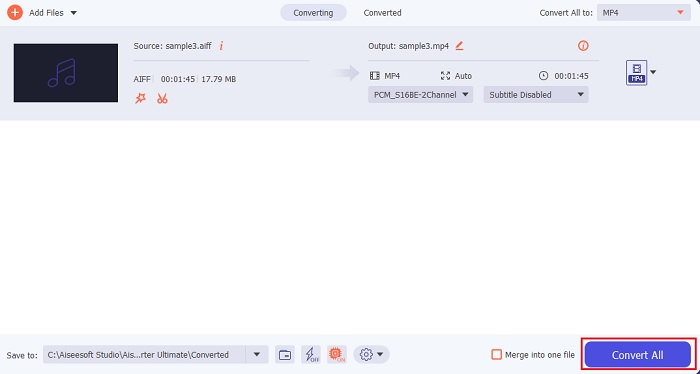
ステップ 4. Convert All ボタンをクリックして、AIFF ファイルの変換を開始します。
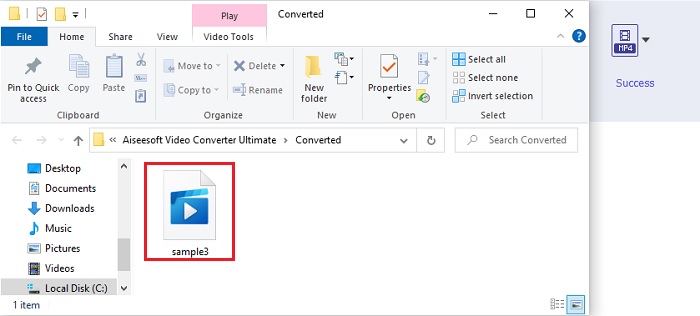
ステップ 5. 数秒ほど変換を待つと、フォルダーが画面に表示されます。新しく変換された MP3 ファイルをクリックして、これまでで最高のサウンドを楽しみましょう。
2. iTunes
Mac で AIFF ファイルを MP3 に変換 するには、標準のメディアプレーヤーである iTunes も利用できます。このメディアプレーヤーは Apple が開発したもので、すべての iOS および Mac プログラムにおけるデフォルトの音楽ライブラリ兼プレーヤーです。その機能のひとつとして、変換機能も備えています。ただし、変換機能はあるものの、対応フォーマット数はオンラインツールより少なめです。それでも、ファイルを別形式に変換して再生できる、効果的かつ安全な方法です。また、このネイティブメディアプレーヤーは Android や Windows などの Apple 以外の製品では利用できません。以下の手順に従って、iTunes の変換機能について詳しく確認していきましょう。
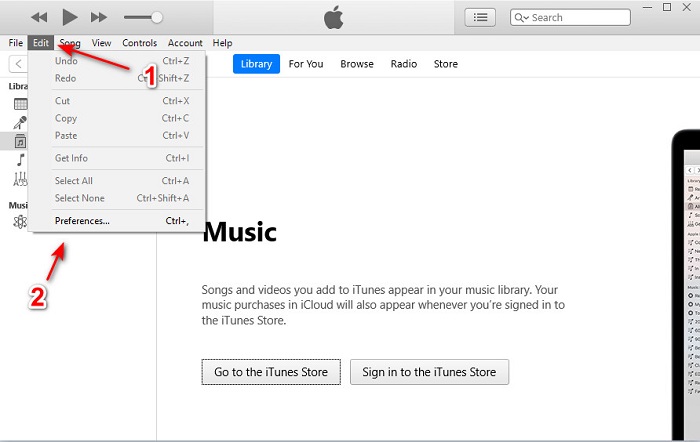
ステップ 1. デスクトップで iTunes を開き、Edit、続いて Preferences をクリックします。
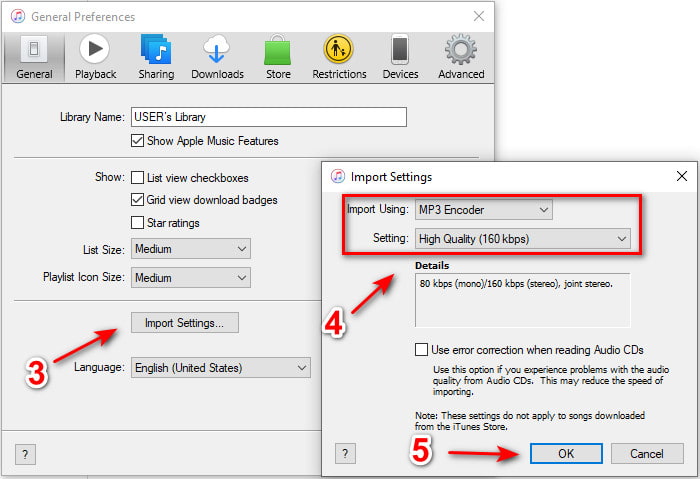
ステップ 2. General タブで Import Settings をクリックします。小さなメニューが表示されるので、ここで format と quality を変更し、OK をクリックして保存します。
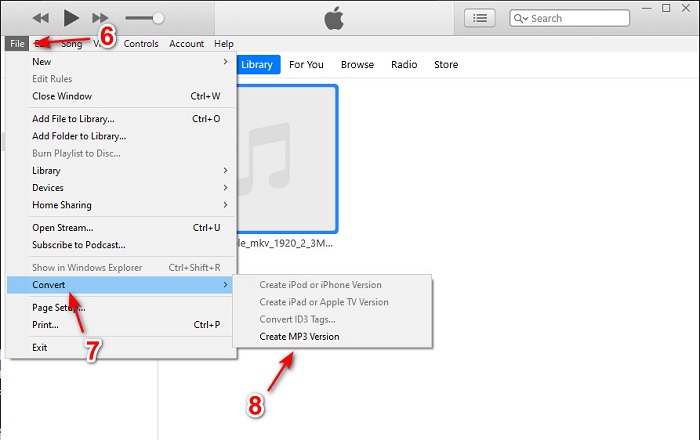
ステップ 3. ファイルをインターフェースにドラッグし、そのファイルをクリックします。続いて File、Convert と進み、Create MP3 Version をクリックして変換を開始します。
パート2。AIFFをMP3に変換するためのトップ2無料オンラインコンバーター
1.FVC無料オーディオコンバータ
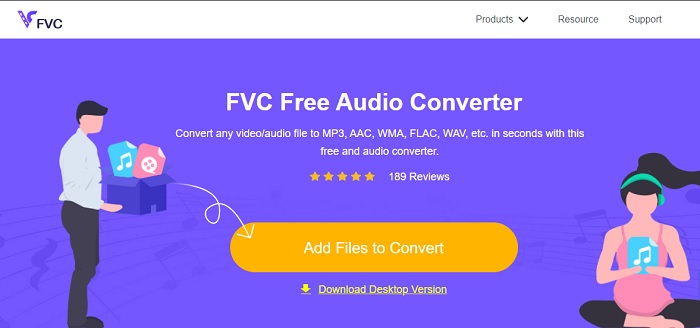
このウェブコンバーター FVC Free Audio Converters を使って convert AIFF to MP3 すると、ファイルサイズが 320 kbps 未満になります。このソリューションは、ファイル形式を変換するために何百万人ものユーザーに利用されています。ただし、このツールは無料版であるため、FVC Video Converter Ultimate のような有料版が備える高度な機能は搭載していません。それでも、このツールを使えば、中程度ながら「究極の変換」に近い体験を得ることはできます。また、iTunes より多くのオーディオ形式に対応しています。以下の手順に従って、このウェブツールの使い方を確認しましょう。
ステップ 1. オーディオコンバーターの公式サイトへ移動するには、この リンク をクリックします。
ステップ 2. 次に Add Files to Convert ボタンをクリックし、ランチャーの起動を 許可 します。補足として、このウェブツールを初めて使う場合は、事前にランチャーをダウンロードしてインストールする必要があります。
ファイルを一括変換するには、デスクトップ版をダウンロードしてください。
ステップ 3. ウェブツールを起動したら、AIFF ファイルを選択して open をクリックし、ウェブツールのメインインターフェースに進みます。
![[開く]をクリックしてリダイレクトします](/images/2021/10/click-open-to-redirect.jpg)
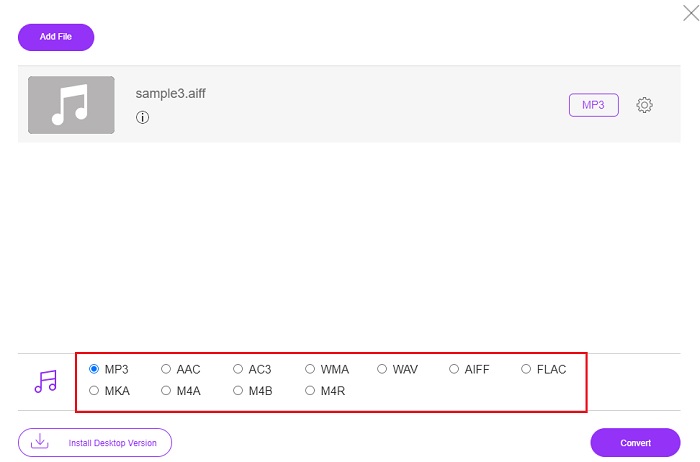
ステップ 4. 画面下部で希望するオーディオ形式を選択します。その後 Convert ボタンをクリックし、保存先フォルダーを指定して変換処理を開始します。
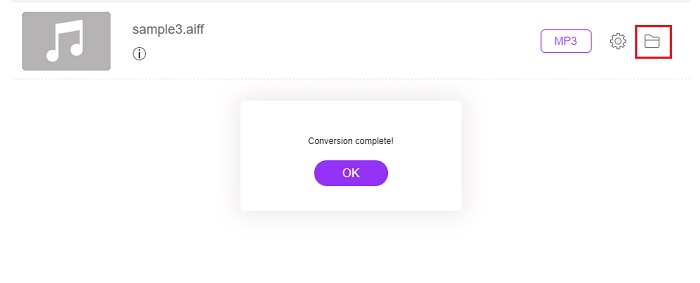
ステップ 5. 変換が完了したか確認するには、folder をクリックして変換後のファイルを探します。ファイルエクスプローラーが画面に表示されるので、変換されたファイルをクリックして再生しましょう。
2.ザムザール
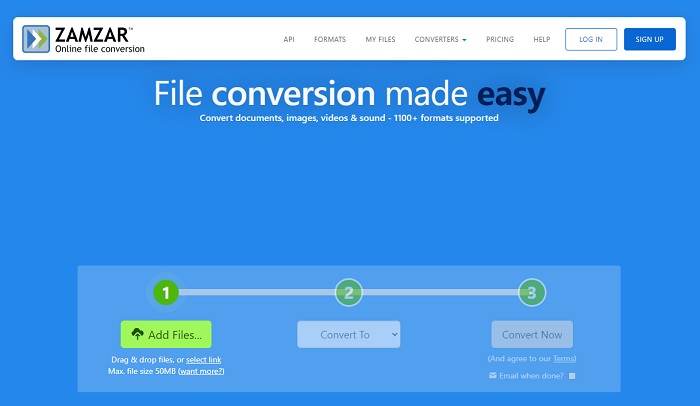
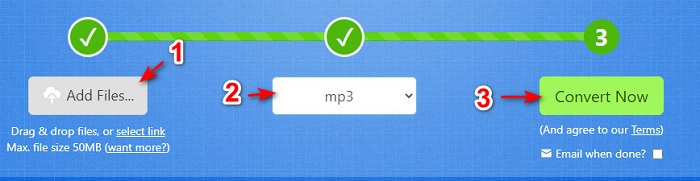
Zamzar を使った変換は、ファイル変換において最良の選択肢になるかもしれません。このツールは、わずか 3 つの基本ステップで変換できるため、とても分かりやすい設計です。ただし、ファイルサイズや同時に変換できるファイル数には制限があります。また、変換処理に時間がかかる点もデメリットです。いったん変換が始まると途中でキャンセルできないため、別の変換を行う前に処理が終わるまで待ち、その後もう一度ファイルを追加しなければなりません。以下の手順を読み、従って変換を行いましょう。
ステップ 1. ブラウザで Zamzar の公式ページを検索します。
ステップ 2. 次に Add File をクリックし、変換したいオーディオファイルを選択します。Convert to をクリックして変換したい形式を選びます。
ステップ 3. 準備ができたら、Convert Now をクリックして変換プロセスを開始します。
関連記事
AIFFとMP3
オーディオ交換ファイル形式であるAIFFは、Appleによって開発されました。そして、それはIFF形式の変形です。 AIFFファイルは非圧縮であるため、同様のMP3ファイルよりも音質が高くなります。また、ディスク容量が不足しているという問題が発生する可能性もあります。
MP3形式は、1993年にMoving Picture Experts Group(MPEG)によってリリースされました。オーディオを他の非圧縮フォーマットよりもはるかに小さいサイズに圧縮できるため、音楽を保存するための標準でした。特にオーディオをオンラインで配信するために、今日でも広く使用されています。
パート3。AIFFからMP3に関するFAQ
AIFFとMP3のどちらが良いですか?
同じ形式で高品質のオーディオファイルが保存されますが、各形式を比較してみましょう。短くするために、MP3はより少ないスペースで高品質を生成しますが、AIFFはより高いスペースで高品質のオーディオファイルを生成します。
AIFFファイルの最適な使用法は何ですか?
AIFFファイルは自然で高品質のオーディオファイルを保存するため、この形式のファイルサイズは圧縮されていないため、非常に大きくなります。ただし、このAIFF形式は、オーディオサウンドを改善するためのエフェクトの編集および追加に使用するのに理想的です。
AIF、AIFF、AIFCの違いは何ですか?
AIFファイルは、CD、DVD、Blu-ray、および個人データとサウンドデータの保存に使用されるAIFFファイルにオーディオファイルを保存するために最も一般的に使用されます。つまり、ファイルサイズが非常に大きくなります。ただし、AIFCはAIFFの圧縮バージョンであり、この形式は、高品質の.aiff形式を再生するためにメディアプレーヤーによって最も一般的に使用されます。
結論
まとめると、AIFF ファイルとは何かをこれで理解しやすくなったはずです。ただし、ここまで見てきたように、この形式はファイルサイズが非常に大きいのが難点です。これを解消するには、汎用的なオーディオ形式である MP3 に変換するのが最善です。しかし、どのツールを使うべきか探すのは少々面倒で、ものによっては AIFF ファイルを劣化させてしまうこともあります。そこで、さまざまなソリューションを紹介してきましたが、その中でも変換性能に優れたツールがひとつあります。それが FVC Video Converter Ultimate です。このツールがあれば、このような簡単な問題もすぐに解決できます。さあ、今すぐこのツールをダウンロードして、驚くほど高品質な変換を体験してみてください。
-
 品質を損なうことなくOGGをMP3に変換するためのトップ4の方法
 コンピューターやモバイルデバイスで聴くためにOGGファイルをMP3形式に変換するにはどうすればよいですか?ここでは、デスクトップまたはオンラインでそれを行う5つの最も簡単な方法を共有します。
-
 4つの無料オーディオコンバータでM4AをMP3に変換する方法
 M4Aを再生できず、MP3に変換する必要がありますか?オンラインでM4AをMP3に変換する無料の方法はありますか?この投稿では、iTunes、オンラインおよびプロフェッショナルオーディオコンバータを使用してM4AをMP3に変換するための4つの無料の方法を共有しています。
-
 Mac / Windows / OnlineでWMAをMP3に変換する方法
 Windows Media PlayerでWMAをMP3に変換することは可能ですか? WMAをMP3フリーに変換する方法は?この投稿では、Mac、Windows PC、およびオンラインでWMAからMP3へのオーディオ変換を行うのに役立つ4つの簡単な方法を共有しています。

