


 ビデオコンバーター究極
 スクリーンレコーダー
 ビデオ修復
ビデオ修復
 安全なダウンロード
MOV to MP3 –MOVからMP3ファイルを簡単に抽出するための4つの最良の方法
ビデオからバックグラウンドミュージックファイルを抽出したい場合、元の品質でMOVをMP3に変換する方法は? MOVは、ほとんどのデバイスで頻繁に使用されるビデオ形式です。MOVからMP3ファイルを簡単に抽出するための4つの最も効率的な方法について詳しく知ることができます。今すぐ要件に応じて目的の方法を選択してください。

パート1:簡単にMOVをMP3に変換するための5つの最良の方法
方法1:MOVをMP3オンラインに変換する方法
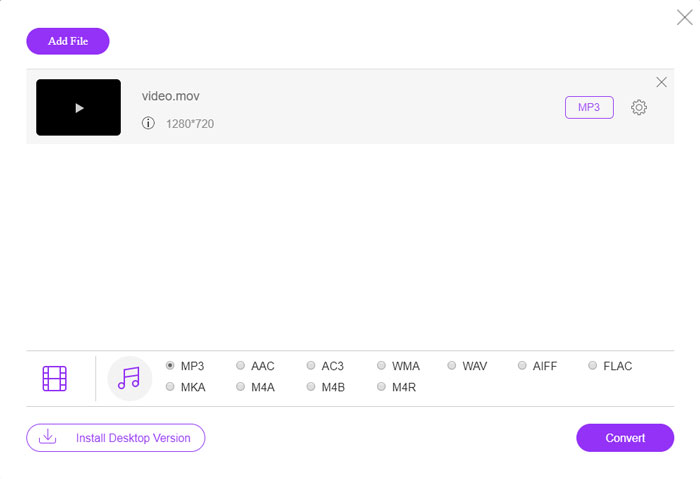
FVC Free Online Video Converter は、多くの動画・音声ファイルを変換できる汎用的なオンラインMOVからMP3へのコンバーターです。音声や動画の設定を調整できるほか、透かしやサイズ制限なしで、安定かつ安全に変換できます。
ステップ1. 任意のWebブラウザーでオンライン動画コンバーターにアクセスし、Add Files to Convert ボタンをクリックして、変換したいMOVファイルを読み込みます。事前にPKGプログラムをインストールしておく必要があります。

ステップ2. MOVファイルをインポートしたら、インターフェース内のオーディオメニューからMP3 を選択します。さらに、サンプルレートやオーディオチャンネルなどの設定を調整することもできます。

ステップ3. その後、Convert ボタンをクリックしてMOVをMP3に変換します。数秒で目的のファイルが作成されます。完了したら、MP3ファイルをパソコンにダウンロードするか、ソーシャルメディアサイトで共有できます。
方法2:WindowsでMOVをMP3に変換する方法
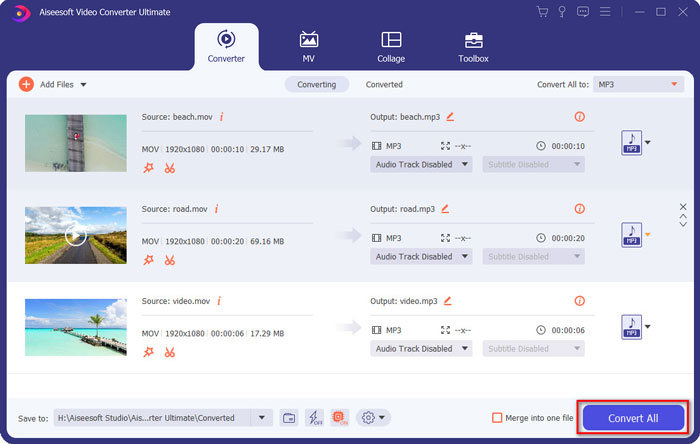
WindowsとMacでMOVを元の品質のMP3に変換したい場合、FVC Video Converter Ultimateは、ほとんどのビデオ形式のトランスコード、オーディオ/ビデオ設定の微調整、出力ファイルの編集、または適用に必要なMOVからMP3へのコンバーターです。簡単に複数のビデオフィルター。
- 1. MOVをMP3、WAV、WMAなどの元の品質に変換します。
- 2.ビデオコーデック、サンプルレート、オーディオビットレートおよびその他のオーディオ設定を微調整します。
- 3.クリップ、トリムなどのビデオ編集機能を提供します。 MOVをマージ フィルタを適用します。
- 4.70倍の高速でビデオファイルを変換する高度なハードウェアアクセラレーション。
ステップ1. MOVからMP3へのコンバーターをダウンロードしてインストールし、パソコンでプログラムを起動します。Add Files オプションをクリックしてMP4ファイルを読み込むか、動画を直接プログラムにドラッグします。
無料ダウンロードWindows 7 以降に対応安全なダウンロード
無料ダウンロードMacOS 10.7 以降に対応安全なダウンロード

ステップ2. MP4動画をインポートしたら、オーディオメニューを開き、出力形式としてMP3 を選択します。その後、ビットレート、サンプルレートなどのプロファイル設定を調整できます。

ステップ3. 変換後のファイルを保存する出力フォルダーを選択します。次に、メイン画面のConvert All ボタンをクリックして、必要に応じてMOVからMP3への変換をコンピューター上で開始します。
方法3:AndroidでMOVをMP3に変換する方法
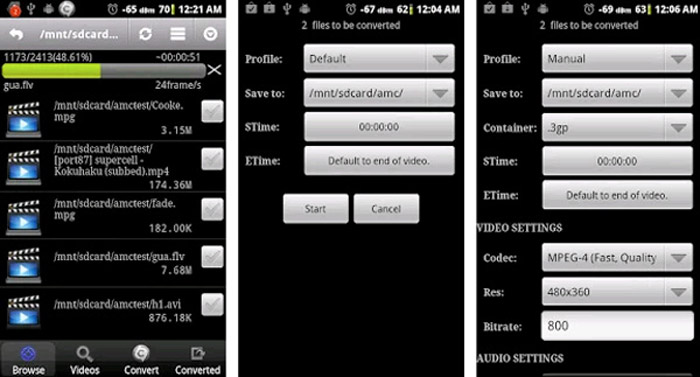
AndroidデバイスにいくつかのMOVファイルがある場合は、ビデオをコンピューターに転送する必要はありません。VideoConverterAndroidは、数回クリックするだけでMOVビデオを目的のオーディオに変換する推奨されるシンプルなMOVからMP3へのコンバーターアプリです。
ステップ1. MP3コンバーターをインストールしたら、アプリを開いてAndroidのギャラリーからMOVを選択・追加します。その後、画面上部のRefresh アイコンをタップします。
ステップ2. 次に、MOVファイルからBGMを切り出すためにSTimeとETimeを指定し、変換前にサンプルレートなどの設定を調整します。
ステップ3. その後、Convert タブに移動し、コーデックリストから出力形式としてMP3を選択します。Start ボタンをクリックして、MOVからMP3への変換処理を実行します。
方法4:iOSでMOVをMP3に変換する方法
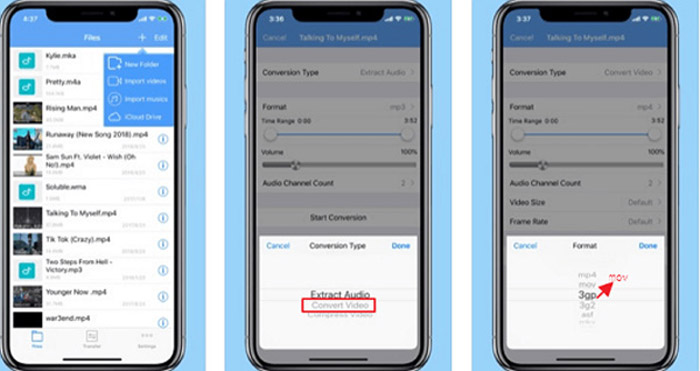
Media Converterは、iPhoneおよびiPad用のMOVからMP3へのコンバーターアプリです。それはあなたがほとんどのビデオとオーディオフォーマットを再生することを可能にする内蔵のメディアプレーヤーを持っています。さらに、zipとRARを使用してオーディオファイルを簡単に圧縮することもできます。
ステップ1. すでにMOVからMP3へのコンバーターをインストールしている場合は、iOSデバイスでプログラムを起動します。MOVファイルを読み込んだら、Extract Audio オプションをタップします。
ステップ2. 入力形式としてMOV、出力形式としてMP3ファイルを選択します。その後、サンプルレートなど、必要に応じてオーディオ設定を調整します。
ステップ3. その後、Convert ボタンをタップしてMOVからMP3への変換を開始します。目的のファイルが作成されたら、変換されたMP3ファイルを写真アプリからデバイスへ書き出します。
パート2:Win / MacでのMOVからMP3への変換に関するFAQ
1.すべてのデバイスでMOVをMP3に変換するための多目的な方法はありますか?
VLC Media Playerは、単なるメディアプレーヤーではありません。コンピューターやスマートフォンでMOVをMP3に変換することもできます。さらに、さまざまな設定を微調整したり、いくつかの基本的な編集機能を使用してビデオを編集したりすることもできます。しかし、満足のいく出力を得るには、プロのビデオコンバーターを使用する必要があります。
2. MOVを変換するのに最適な出力形式、MP3またはWAVはどれですか?
MOVをMP3に変換すると、ほとんどのデバイスでオーディオ形式を使用できます。コンピューターまたは他の互換性のあるメディアプレーヤーからオーディオファイルを抽出するには、要件として出力形式としてWAVオーディオを選択できます。
3.希望するオンラインMOVからMP3へのコンバーターを選択する方法は?
オンラインのMOVからMP3へのコンバーターを選択する必要がある場合は、変換する前に、サイズ制限、透かし、アカウント登録などに特別な注意を払う必要があります。 FVC Free Online Video Converterは、オーディオファイルを制限なく抽出する汎用性の高いものです。
結論
MOVビデオからMP3を抽出するために、記事から4つの最高のMOVからMP3へのコンバーターについてさらに学ぶことができます。コンピューターでビデオをMP3にトランスコードする必要がある場合でも、iOS / AndroidデバイスでMOVファイルを簡単に変更する必要がある場合でも、記事から要件に応じて目的のソリューションを選択できます。
-
 デスクトップとオンラインでOGG音楽ファイルをMP3に変換する方法
 コンピューターやモバイルデバイスで聴くためにOGGファイルをMP3形式に変換するにはどうすればよいですか?ここでは、デスクトップまたはオンラインでそれを行う5つの最も簡単な方法を共有します。
-
 Windows / Mac / iPhone / Android / OnlineでMP4をMP3に変換する方法
 MP4ビデオからMP3オーディオを抽出する場合は、この記事を確認して8つのソリューションを入手できます。携帯電話やコンピューターでMP4をMP3に簡単に変換するオンラインとオフラインの方法があります。
-
 Windows、Mac、iPhone、AndroidでMOVファイルを圧縮する方法
 この記事では、携帯電話またはコンピューターでQuickTimeMOVビデオを圧縮する方法について詳しく説明します。 MOVビデオが大きすぎて送信、共有、保存できない場合は、ここで4つの実行可能なソリューションを入手できます。
