


 ビデオコンバーター究極
 スクリーンレコーダー
 ビデオ修復
ビデオ修復
 安全なダウンロード
FLAC から MP4 への変換で音楽体験を向上させる方法
究極のサウンド体験を求める音楽愛好家の方にも、マルチメディア作品のクオリティ向上を目指すクリエイティブなプロフェッショナルの方にも、このFLAC から MP4への変換ガイド記事は最適な内容になっています。音楽ライブラリの世界を広げ、あらゆるデバイスやプラットフォームでの高い互換性を実現し、共有やストリーミング、そしてオーディエンスを惹きつける無限の可能性を解き放ちましょう。
あなたの音楽体験を再定義し、卓越したオーディオと見事なビジュアルが出会う領域を満喫する準備をしてください。 FLAC を MP4 に変換する変革の旅にぜひご参加ください。卓越したオーディオ品質と魅惑的なビジュアル要素が融合し、音楽鑑賞を新たな高みに引き上げる忘れられない感覚体験が得られます。

パート 1. オフラインで FLAC を MP4 に変換する最良の方法
Video Converter Ultimate は、使いやすいインターフェースと満足度の高い変換結果を兼ね備えた、賢明な選択肢と言えます。高速な変換スピードと、元の画質・音質を優れた状態で保持できる点が、多くのユーザーを惹きつけている主な理由です。さらに本ソフトは、幅広い音声・動画フォーマットの相互変換に対応しており、バッチ変換もサポートしています。以下に、Mac や Windows PC で FLAC を MP4 に変換する際の、本プログラムの主な機能をまとめます。
主な機能
◆ 多彩な出力オプション: Video Converter Ultimate ソフトウェアは、個々の要件に応えるための多様な出力オプションを提供します。スマートフォン、タブレット、ゲーム機などのさまざまなデバイスで再生できるようにビデオを変換する場合、またはオンライン プラットフォームやソーシャル メディア用にコンテンツを準備する場合は、事前定義された出力プロファイルから選択するか、可能な限り最高の結果を達成するために設定をカスタマイズするオプションがあります。
◆ 高速変換: Video Converter Ultimate は超高速の変換速度を提供します。最先端のアルゴリズムとハードウェア アクセラレーション テクノロジーを利用したこのソリューションは、高品質の出力を維持しながら、迅速かつ効果的な変換を提供します。長時間の待ち時間がなくなり、変換されたメディア ファイルにすぐにアクセスできます。
◆ バッチ変換: バッチ変換機能を利用して複数のファイルを一度に変換することで、生産性を最適化します。 Video Converter Ultimate ソフトウェアを使用すると、ユーザーはワークフローを効率的に合理化し、複数のビデオを同時に追加して変換することで効率を最大化できます。
ステップ 1. まずは適切なインストーラーを入手することから始めます。Windows 版と Mac 版のインストーラーは以下に用意されています。ダウンロード後、パソコンにインストールし、その後ツールを起動してください。
無料ダウンロードWindows 7 以降対応安全なダウンロード
無料ダウンロードMacOS 10.7 以降に対応安全なダウンロード
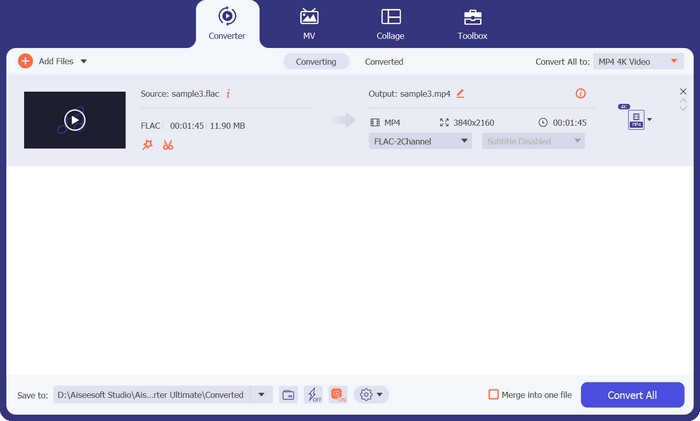
ステップ 2. メイン画面に表示されているプラスアイコンをクリックし、パソコン上のフォルダーから目的の FLAC ファイルを選択します。選択後、サムネイルが表示されるはずです。
ステップ 3. 次に、ドロップダウンリストを開いて、利用可能なすべてのフォーマットを確認します。動画タブの中からMP4形式を探して選択します。その後、動画変換の希望する画質を選ぶことができます。
ステップ 4. ファイルを追加し、出力形式を選択したら、プログラム画面上のすべて変換ボタンをクリックして変換プロセスを開始します。
パート 2. オンラインで無料で FLAC を MP4 に変換する最良の方法
Free MP4 Converter Online は、パソコンにソフトウェアをインストールしたくない方や、変換ツールだけを手軽に利用したい方に適したサービスです。これは FLAC を MP4 に高速変換できるウェブベースのアプリケーションです。さらに、Windows と Mac のどちらの環境でも利用できるクロスプラットフォーム対応となっています。ネットワーク環境が良好であれば、この FLAC から MP4 へのオンラインコンバーターは、初心者でも簡単に操作できます。
主な機能
◆ プリセット出力設定: さまざまなデバイスやプラットフォームに合わせたプリセット出力設定を選択します。スマートフォン、タブレット、または特定のメディア プレーヤーで再生するためにビデオを変換する場合でも、Free MP4 Converter Online は最適な互換性と品質を保証する事前構成されたプロファイルを提供します。
◆ 調整可能な出力パラメータ: 好みに応じてさまざまなパラメータを調整して、出力ファイルをカスタマイズします。解像度、ビットレート、フレームレート、オーディオ品質などの設定を変更して、望ましい結果を達成します。
◆ ウォーターマークやサイズ制限なし: 無料の MP4 コンバーター オンラインは、ウォーターマークなしで無制限の変換エクスペリエンスを保証します。ファイル サイズや不要な透かしの制限なしでファイルを変換すると、変換されたファイルを元の品質で楽しむことができます。
ステップ 1. オンライン変換を行うため、Free MP4 Converter Online の公式ページにアクセスしてください。
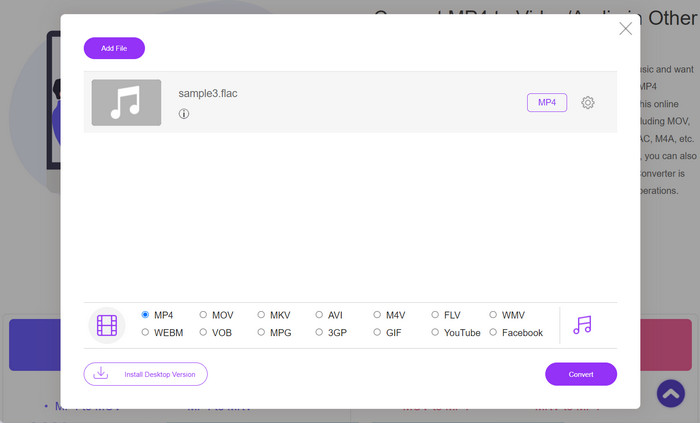
ステップ 2. 変換したい FLAC ファイルをアップロードするには、Add Files to Convert ボタンをクリックします。
ステップ 3. MP4 のラジオボタンは初期設定で選択されています。これは、アップロードしたファイルが MP4 形式に変換されることを意味します。
ステップ 4. 準備ができたら、Convert ボタンをクリックして変換プロセスを開始します。
パート 3. 別の方法で FLAC を MP4 に変換する
iTunes は、Apple Inc. によって開発された総合的なメディア プレーヤーおよびライブラリ管理ソフトウェアです。元々は音楽ファイルの管理と再生のために設計されました。 iTunes は MP4 形式をネイティブにサポートしていますが、iTunes で FLAC を MP4 に変換するには次の回避策があります。
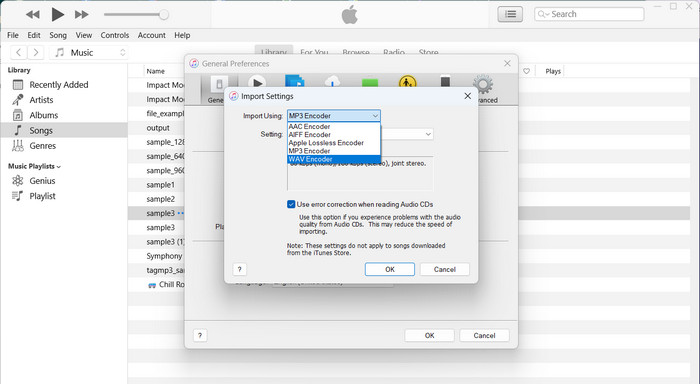
ステップ 1. まず、FLAC ファイルを iTunes ライブラリに取り込みます。
ステップ 2. FLAC ファイルが iTunes ライブラリに追加されたら、これらのファイルからMP4 バージョンを作成できます。対象となる FLAC ファイルを選択し、iTunes 内の「MP4 バージョンを作成」オプションを選ぶことで実行できます。
ステップ 3. その後、iTunes が選択した FLAC ファイルを MP4 形式に変換します。変換が完了すると、新たに作成された MP4 バージョンは iTunes ライブラリ内に表示されますので、そこからパソコン上の任意の場所へ書き出すことができます。
さらに詳しく読む:
WAVからMP4へ、音声を動画に変換するおすすめコンバーター
パート4。比較チャート
以下は、Video Converter Ultimate、Free MP4 Converter Online、および FLAC MP4 コンバーターとしての iTunes の機能を強調した比較表です。
| ビデオコンバーター究極 | 無料のMP4コンバーターオンライン | iTunes | |
| フォーマットのサポート | 幅広いフォーマット | 限られた形式のサポート | 限られた形式のサポート |
| 変換速度 | 速い | インターネットによって異なります | 適度 |
| 使いやすさ | ユーザーフレンドリーなインターフェース | ユーザーフレンドリーなインターフェース | ユーザーフレンドリーなインターフェース |
| バッチ変換 | サポートされています | サポートされていません | サポートされていません |
| カスタマイズオプション | 高度な編集ツール | 限定的なカスタマイズ | 限定的なカスタマイズ |
| 出力品質 | オリジナルの品質を維持 | 設定により異なります | 設定により異なります |
パート 5. FLAC と MP4 の変換に関する FAQ
音質を損なうことなくMP4をFLACに変換できますか?
はい、音質を損なうことなく MP4 を FLAC に変換できます。 FLAC は、圧縮および解凍中に元のオーディオ データを保持します。ただし、オーディオの品質はソース MP4 ファイルに依存することに注意してください。元の MP4 ファイルのオーディオ品質が低い場合、FLAC に変換しても品質は向上しません。
MP4をFLACに変換するために利用できるオンラインツールはありますか?
はい、MP4 を FLAC に変換できるオンライン ツールがいくつかあります。 Online Audio Converter、Convertio、Zamzar などの Web サイトは、ソフトウェアをインストールせずに MP4 ファイルをアップロードして FLAC に変換できるオンライン変換サービスを提供しています。
オンライン プラットフォームで FLAC を MP4 に直接変換できますか?
いいえ、オンライン プラットフォームでは通常、ビデオ付きの FLAC から MP4 への直接変換は提供されていません。オンライン変換ツールは、主にオーディオからオーディオへの変換、またはビデオからビデオへの変換に重点を置いています。
FLAC を字幕またはキャプション付きの MP4 に変換できますか?
はい、ビデオ付きの FLAC を MP4 に変換するときに、MP4 ファイルに字幕やキャプションを追加することができます。ほとんどのビデオ編集ソフトウェアでは、SRT (SubRip Subtitle) や VTT (WebVTT) などの形式で字幕ファイルをインポートし、ビデオと同期できます。ビデオ編集ソフトウェアを使用すると、FLAC オーディオ、ビデオ ストリーム、および字幕ファイルを結合して、字幕が埋め込まれた MP4 ファイルを作成できます。
ビデオ付きの FLAC を MP4 に変換する際、品質に関する考慮事項はありますか?
MP4 のオーディオ品質は、ソース FLAC ファイルと変換形式によって異なります。 FLAC は元のオーディオ品質を維持します。 AAC に変換すると、圧縮により音質が多少低下する可能性があります。変換中の品質の低下を最小限に抑えるために、高いビットレートと品質設定を使用します。
結論
動画付きのFLAC から MP4変換を行うには、まず FLAC 音声を対応フォーマットに変換し、その後動画編集ソフトを使って映像ストリームと結合するという 2 段階の手順が必要です。オンラインプラットフォームでは、この形式の変換に直接対応していない場合もありますが、専用の動画編集ソフトを利用すれば、仕上がりに対するコントロール性と柔軟性が大幅に高まり、より理想に近い結果を得ることができます。
-
 FLAC と WAV を簡単に変換する方法 (無料および有料)
 FLAC を WAV に変更したいのですが、どこから始めればよいのかサポートが必要ですか?この道標は、それを素早く簡単に行う方法を教えてくれます。
-
 Mac と Windows のトップ 3 FLAC メタデータ エディター [2023 年更新]
 FLACメタデータを変更しますか?この場合、使用できる最新のFLACメタデータエディタに関する十分な知識を提供しているため、この記事を読む必要があります。
-
 M4AをMP4に簡単に変換するための最良のツール(オンラインおよびオフライン)
 包括的なレビューと比較ガイドで、M4A を MP4 に変換するためのトップ ツールを見つけてください。どのソフトウェアとオンライン コンバーターが最良の結果をもたらすかを学びます。
