


 ビデオコンバーター究極
 スクリーンレコーダー
 ビデオ修復
ビデオ修復
 安全なダウンロード
オンラインおよびオフラインで DV を MP4 に変換する簡単な方法
DVファイル形式は、素晴らしい画質の動画を保存して視聴・編集できるため、以前はほとんどすべてのビデオカメラで最も一般的なファイル形式でした。しかし、この種のファイルは現代ではあまり使われなくなっています。一部のプログラムではこのファイル形式に対応しておらず、DV動画ファイルを持つユーザーには不便です。すべてのプログラムで動画を再生したい場合は、DVファイルを現在最も一般的な形式であるMP4形式に変換する必要があります。幸運なことに、この記事では、優れたコンバーターを使ってDVをMP4に変換する最も効果的な方法をご紹介します。必要な情報を学びながら、ぜひこの記事を読み進めてください。

パート 1: DV と MP4 の違い
ファイル変換プロセスに進む前に、まず DV ファイルと MP4 形式の違いを見てみましょう。
| ファイル | DV | MP4 |
| ファイル拡張子 | .dv | .mp4 |
| フルネーム | デジタルビデオ | MPEG-4 |
| 説明 | ビデオ機器の主要メーカーは、1995 年に磁気ビデオ記録用のデジタル形式およびビデオ圧縮方法として DV を作成しました。 DV フォーマットは、720×576 ピクセル、8 ビットのデジタル コンポーネント ビデオ信号を使用します。ビデオ、オーディオ、およびサブコード データを含む DIF シーケンスを使用してデータを転送します。サービスエリアには、時刻と日付が記録されます。 | MPEG-4 ビデオと AAC オーディオ規格は、MP4 拡張子を共同で定義します。コンテナーには、2D および 3D グラフィックス、オーディオ、ビデオ、字幕など、あらゆるメディアを保持できます。 Windows では、事実上すべてのプレーヤーで MP4 ファイルを再生できますが、Mac では、プラグインを使用するか、MP4 ファイルを別の形式に変換する必要があります。 |
| 開発者 | ソニーとパナソニック | 動画専門家グループ |
| MIME タイプ | ビデオ/x-dv | ビデオ/mp4 |
| 関連プログラム | QuickTimeプレーヤー Windowsムービーメーカー VLCメディアプレーヤー | VLCメディアプレーヤー MPlayer QuickTimeプレーヤー ウィンドウズメディアプレイヤー マイクロソフトの映画とテレビ |
パート 2: オンラインで DV を MP4 に変換する最良の方法
DVをMP4にオンライン変換するのは、どのアプリを使えばよいか、どれを信用してよいかわからない場合、とくに難しく感じるかもしれません。ですが、FVC Free Video Converter Onlineのおかげで、DVファイルをすばやく簡単にMP4形式へ変換できます。このオンラインツールは、AVI、FLV、M4V、VOB、WMA、MOV、TS など、さまざまな動画ファイルに対応しています。数回クリックするだけのシンプルな変換手順も備えており、簡単にファイルを変換できます。さらに、複数のDVファイルを1つのMP4ファイルに変換したい場合でも、バッチ変換機能があるため、このコンバーターを利用できます。また、Google Chrome、Mozilla Firefox、Safari、Microsoft Edge など、あらゆるブラウザーで利用できるため、誰にとっても非常に便利です。これらすべての機能から、このオンラインコンバーターは非常に優れたアプリケーションのひとつと言えるでしょう。以下の簡単な手順に従って、FVC Free Video Converter Online を使ってDVファイルをMP4形式に変換する方法を学びましょう。
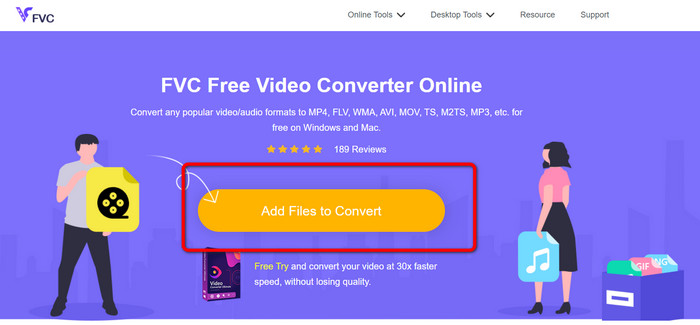
ステップ1: まず、ブラウザーを開いてFVC Free Video Converter Onlineのサイトにアクセスします。次に、メインページ中央にあるAdd Files to Convertボタンをクリックし、DV動画ファイルをアップロードします。
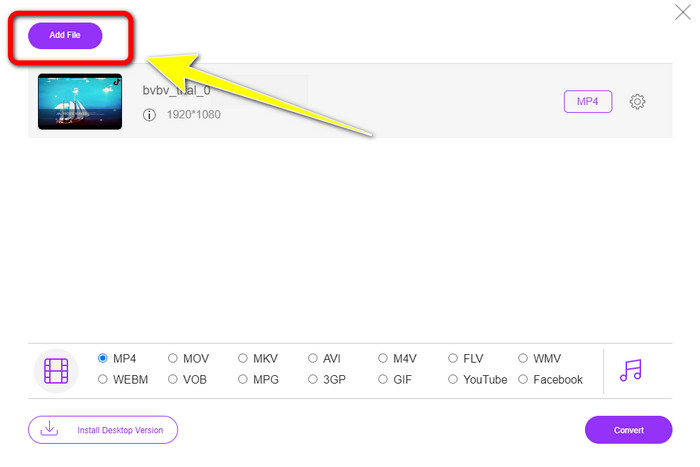
ステップ2: 複数のDVファイルを1つのMP4に変換したい場合は、インターフェース左上のAdd Fileボタンをクリックして、ファイルを追加します。
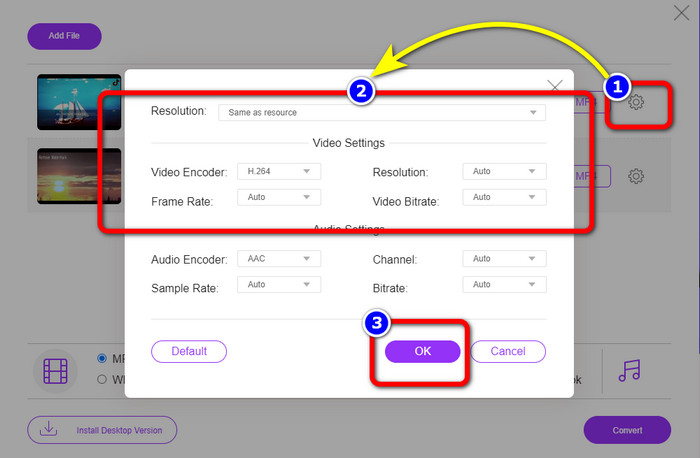
ステップ3: Settingアイコンをクリックして、動画のビットレート、フレームレート、解像度を調整します。設定を好みに合わせて変更し終えたら、OKをクリックします。
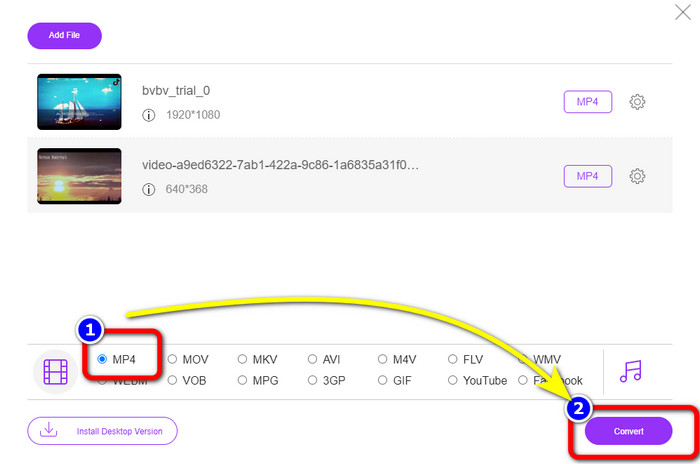
ステップ4: すべての設定が完了したら、インターフェース下部にある形式オプションを確認します。MP4形式を選択し、Convertを押して変換を開始します。
パート 3: ロスレスで DV を MP4 に変換する方法
オフラインコンバーターを利用する場合は、Video Converter Ultimateを使って、MacとWindowsでDVを無劣化でMP4に変換できます。さまざまな動画ファイルを、画質を落とさずに変換可能です。また、このアプリケーションではバッチ変換にも対応しているため、複数ファイルを同時に変換できます。このオフラインツールは、MOV、AVI、FLV、M4V、SWF、MTS、MKV、WMV、VOBなど、100種類以上の動画形式をサポートしています。さらに、Video Converter Ultimate は、一般的な変換速度より30倍速い究極の変換スピードを誇り、すべてのユーザーにとって非常に使いやすいツールです。加えて、多くのユーザーは簡単な手順でファイル変換を行いたいと考えていますが、このアプリケーションは非常に分かりやすいインターフェースとシンプルな変換方法を提供しています。編集機能も搭載されているため、変換しながら動画を編集することも可能です。mini DVをMP4ファイル形式に変換したい場合は、以下の詳細な手順に従って、Video Converter Ultimate を使用してください。
ステップ1: MacまたはWindowsでVideo Converter Ultimateをダウンロードしてインストールします。Downloadボタンをクリックして入手し、インストール後にソフトを起動します。
無料ダウンロードWindows 7 以降に対応安全なダウンロード
無料ダウンロードMacOS 10.7 以降に対応安全なダウンロード
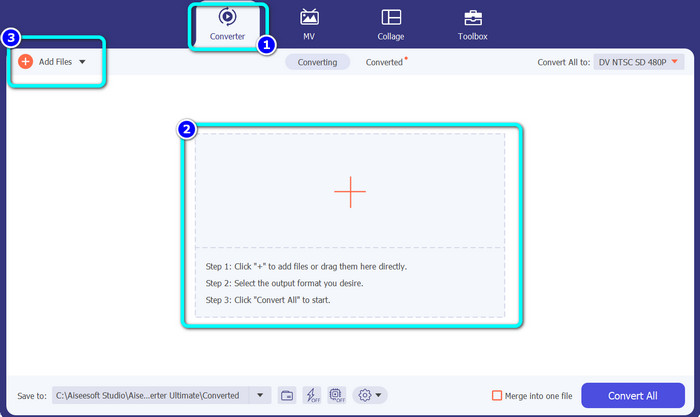
ステップ2: Converterパネルを押して、Plusアイコンを選択し、DVファイルを追加します。Add Filesボタンをクリックするか、ファイルをボックス内にドラッグ&ドロップして追加することもできます。
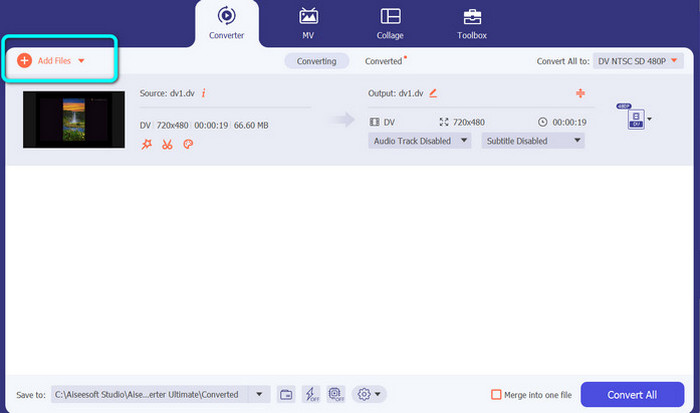
ステップ3: バッチ変換を行いたい場合は、Add Filesボタンをクリックして、さらにDV動画ファイルを追加します。
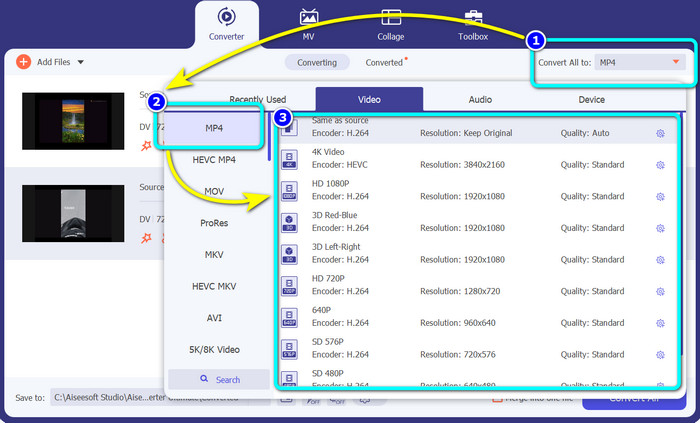
ステップ4: 別のDVファイルを追加したら、Convert All to ボタンをクリックして出力形式を変更します。形式のオプションが表示されるので、MP4形式を選択します。その後、希望する解像度を選びます。
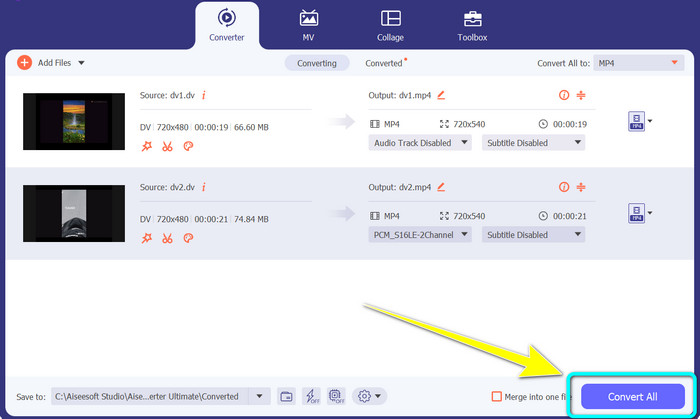
ステップ5: 最後に、Convert Allボタンをクリックして変換を開始します。変換が完了したら、動画ファイルを任意の保存先に保存します。
パート 4: フリーウェアを使用して DV を MP4 に変換する簡単な方法
このパートでは、ハンドブレーキを使用して DV を MP4 に変換する方法を学びます。このオフライン ツールは、MP4、MKV、WEBM などのビデオ ファイルを変換することもできます。バッチ変換プロセスも提供します。ただし、このツールを利用するのは簡単ではありません。インターフェイスには多くのオプションがあり、特に初心者にとっては理解しにくいものです。以下の手順に従って、DV を MP4 に変換します。
ステップ1: パソコンにHandbrakeアプリケーションをダウンロードし、起動します。
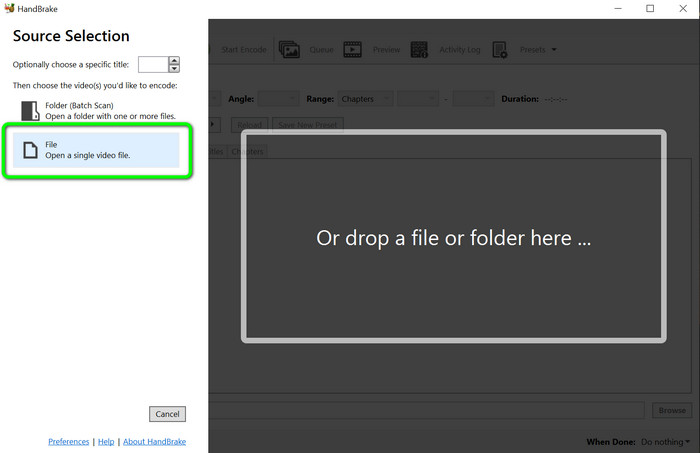
ステップ2: アプリケーションを開いたら、Fileボタンを選択してDVファイルを追加します。
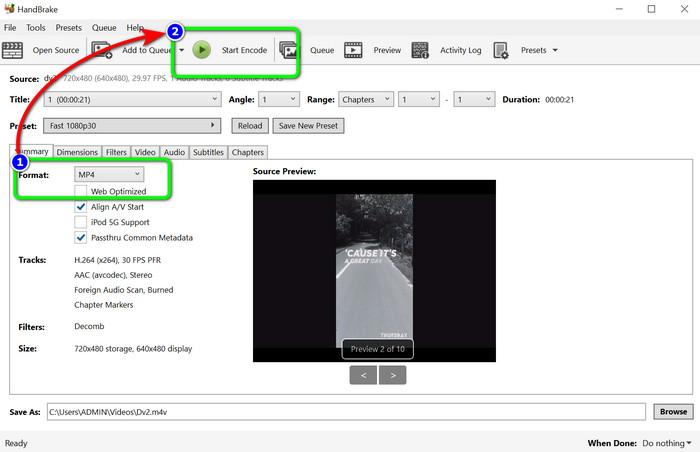
ステップ3: フォーマットオプションからMP4形式を選択します。その後、Start Encodeボタンをクリックして変換を開始します。
参考文献:
DVファイルをMOVに無料で変換するトップ2の方法【デスクトップ&オンライン】
DVをFLVに変換するのに役立つDV to FLVコンバーター【2023年】
パート 5: DV から MP4 への変換に関する FAQ
1. VLC は DV ファイルを再生できますか?
はい! VLC Media Player は DV ファイル形式をサポートしているため、このプログラムでビデオを再生できます。
2. ビデオ変換に最適なオンライン ソフトウェアはどれですか?
FVC Free Video Converter Onlineを使用できます。このオンラインツールなら、動画を簡単に変換できます。バッチ変換も可能で、動画のビットレート、フレームレート、解像度の編集も行えます。
3. DV ファイルの標準解像度は?
DV ファイルの標準解像度は、水平 720 ピクセルと 480 インターレース ラインです。 DV の高精細規格は 720 線と 1080 線です。
結論
上記のとおり、オンラインとオフラインの両方でDVをMP4に変換する最も優れた方法を紹介しました。オンライン変換にはFVC Free Video Converter Onlineを、オフラインでより高速に変換したい場合はVideo Converter Ultimateを利用してください。
-
 DV を WMV に変換する究極の無料の方法 [オンライン & オフライン]
 DVを手間のかからないWMVに変換するための最良の方法を見つけてください。もっと知りたい?次に、この記事を読んで、DVとWMVの詳細を確認してください。
-
 最も効果的な方法で F4V を MP4 に変換する方法
 F4V ビデオの品質は良くありませんか?次に、MP4 ファイルに変換します。この投稿では、オンラインおよびオフラインで F4V を MP4 に変換する最良の方法を紹介します。
-
 Xvid を MP4 形式に変換する 5 つの一般的な方法
 この記事では、Xvid を MP4 ファイル形式に変換するこれらの驚くべき方法を垣間見ることができます。また、変換に使用できる最高のアプリについても学びます
