


 ビデオコンバーター究極
 スクリーンレコーダー
 ビデオ修復
ビデオ修復
 安全なダウンロード
DVR から MP4: 簡単な変換でメディアライフを快適に
最高のDVR から MP4への変換ソリューションを使って、利便性と自由に満ちた世界へ踏み出しましょう。複雑さに別れを告げ、DVR 録画を汎用性の高い MP4 形式へシームレスに変換できます。面倒のないアクセス性を手に入れ、DVR コンテンツの可能性を大きく広げましょう。さあ、今日から MP4 への変換を始めて、あなたのメディアコレクションの真価を笑顔とともに引き出してください。大切な思い出を共有したいときも、お気に入りの番組を外出先で楽しみたいときも、私たちのユーザーフレンドリーなアプローチなら、すべてが驚くほど簡単です。

パート 1. DVR を MP4 に変換する最良の方法
FVC Video Converter Ultimate は、多機能かつ扱いやすい動画変換ソフトで、動画を手軽に変換できるようにしてくれます。高速変換、バッチ変換機能、出力設定のカスタマイズ、さらには動画から音声のみを抽出することも可能です。以下の主な機能一覧をご覧になり、このツールについてさらに理解を深めてください。
主な機能
◆ 編集ツール: このソフトウェアには基本的な編集ツールが用意されており、変換前にトリミング、クロップ、透かしの追加、ビデオ効果の適用などを行ってビデオを強化できます。
◆ 高品質出力: ビデオの元の品質を維持するか、さまざまなエンコードの選択肢を選択して、変換されたコンテンツの最適な出力品質を保証します。
◆ 多言語サポート: このソフトウェアはさまざまな言語をサポートしているため、世界中のユーザーがアクセスできます。
ステップ1.適切なインストーラーを入手
まず第一に、適切なインストーラーを入手する必要があります。以下は Windows および Mac コンピューター用のインストーラーです。ツールを入手したら、コンピュータにインストールします。次に、コンピュータで起動します。
無料ダウンロードWindows 7 以降に対応安全なダウンロード
無料ダウンロードMacOS 10.7 以降に対応安全なダウンロード
ステップ2.DVR ファイルをアップロード
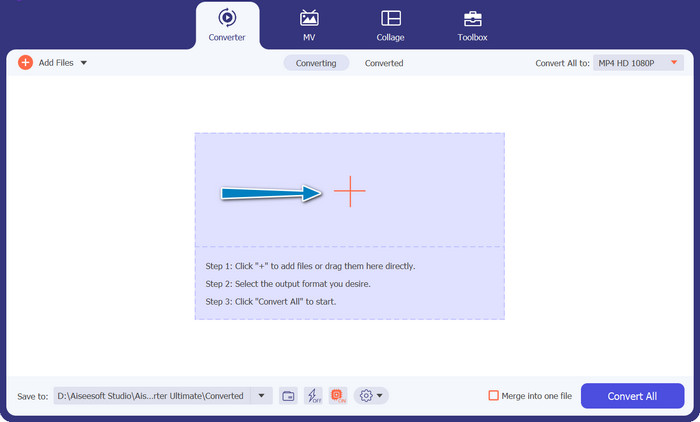
次に、メインインターフェースにあるプラスアイコンのボタンをクリックし、パソコンのフォルダーから変換したい DVR ファイルを選択します。その後、サムネイルが表示されるはずです。
ステップ3.出力形式を選択
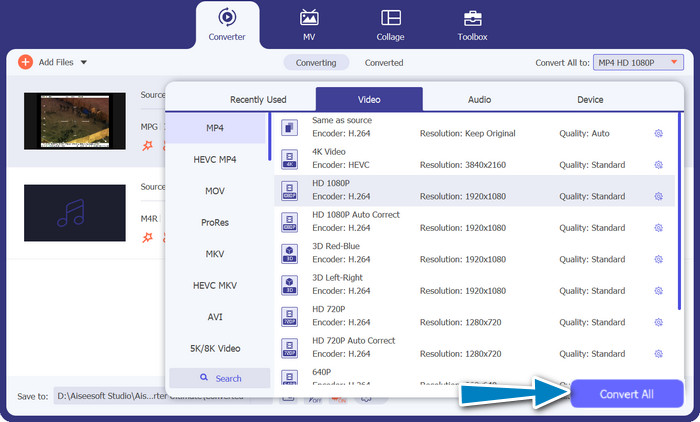
続いて、ドロップダウンリストメニューを開いて、利用可能なすべての形式を確認します。動画タブに移動し、MP4 形式を探してください。そのあと、動画変換用にお好みの画質を選択できます。
ステップ4.変換プロセスを開始
ファイルをアップロードし、出力形式を選択したら、プログラム画面下部のすべて変換ボタンにチェックを入れてクリックし、変換プロセスを開始します。
パート 2. DVR をオンラインで無料で MP4 に変換する最良の方法
Free MP4 Video Converter Onlineをご存じですか?これは、動画を人気の MP4 形式に変換するのに役立つ便利なオンラインツールです。これを使えば、動画があらゆるデバイスやプラットフォームで再生できるようになります。しかも、一番の魅力はとても簡単に使えることです。このオンライン DVR から MP4 へのコンバーターの使い方と、さらに多くの機能を確認してみましょう。
主な機能
◆ 無料: FVC Free MP4 Converter Online は無料で利用できるため、ビデオを MP4 形式に変換するための経済的な選択肢になります。
◆ 無制限の使用量:FVC Free MP4 Converter Online を使用して変換できるビデオの数に制限はなく、制限なく必要なだけビデオを変換できます。
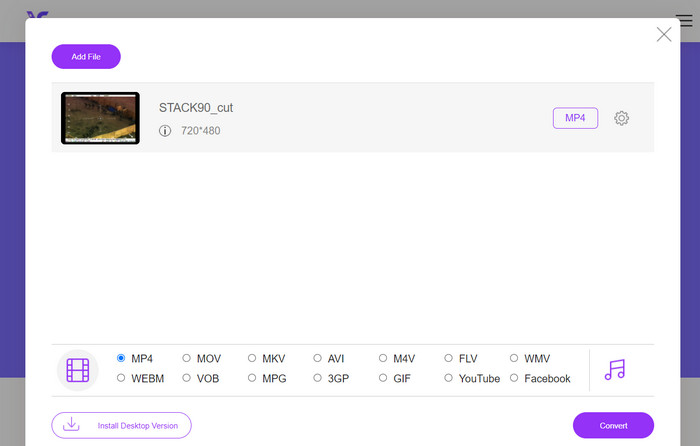
ステップ1. まず最初に、上記ツールの説明文中にあるリンクをクリックして、プログラムの公式サイトにアクセスします。続いて、メインページのファイルを追加して変換ボタンをクリックし、DVR ファイルをアップロードします。
ステップ2. その後、パソコンから変換したいファイルを選択します。アップロードが完了すると、本ツールは出力形式を自動的にMP4に設定します。
ステップ3. 最後に、変換ボタンを押して変換プロセスを開始します。あとは処理が完了するまで待ちましょう。
パート 3. 別の方法を使用して DVR を MP4 に変換する
FFmpeg は、DVR を MP4 に変換し、その他のマルチメディア タスクを実行できる強力なコマンド ライン ツールです。使用するにはある程度の技術的な理解が必要ですが、さまざまな方法でカスタマイズでき、マルチメディアの処理によく使用されます。
主な機能
◆ コマンド ライン インターフェイス: FFmpeg はコマンド ライン コマンドを通じて動作するため、上級ユーザーは複雑な変換操作を柔軟に実行できます。
◆ 高度な処理: ビデオ フィルタリング、スケーリング、クロッピング、オーディオ操作などの高度な機能を提供し、ユーザーが変換を微調整できるようにします。
ステップ1. 公式サイト(https://ffmpeg.org/)から、お使いの OS に合った FFmpeg をダウンロードしてインストールします。
ステップ2. 次に、パソコンでコマンドプロンプトまたはターミナルウィンドウを起動します。
ステップ3. その後、FFmpeg がインストールされているディレクトリへ移動するか、コマンド内で FFmpeg 実行ファイルへのフルパスを指定します。
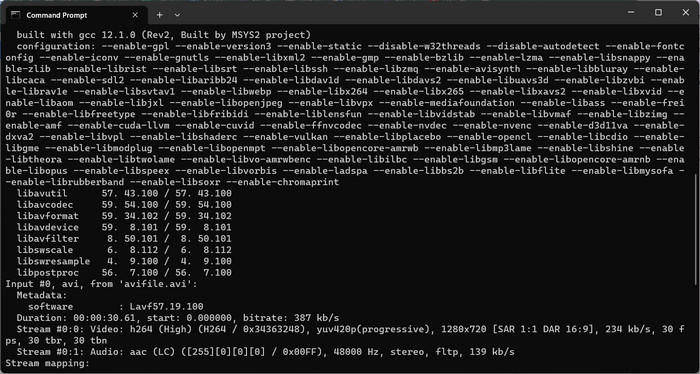
ステップ4. FFmpeg のコマンドライン構文を使用して、入力する DVR ファイルと目的の出力ファイル形式(MP4)を指定します。例:ffmpeg -i input.dvr output.mp4.
ステップ5. 最後に、Enterキーを押してコマンドを実行します。FFmpeg が変換プロセスを開始し、コマンドプロンプト上に進行状況が表示されます。
さらに詳しく読む:
DV を WMV に変換する究極かつ無料の方法[オンライン・オフライン対応]
パート 4. 3 つの方法の比較
DVR から MP4 へのコンバーターとして、FVC Video Converter Ultimate、Free MP4 Video Converter Online、FFmpeg のどれを使用するかを決めるのに役立つように、次の表を作成しました。
| ビデオコンバーター究極 | 無料のオンライン MP4 ビデオ コンバーター | FFmpeg | |
| フォーマットのサポート | 幅広いフォーマット | 限られたフォーマット | 幅広いフォーマット |
| カスタマイズ | 詳細な出力設定 | 基本的な出力設定 | 広範なカスタマイズ |
| ユーザーインターフェース | デスクトップソフトウェア | Webベースのインターフェース | コマンドラインツール |
| パフォーマンス | 効率的かつ高速 | インターネット速度に応じて | システム仕様に依存 |
| プライバシー | ローカルファイル変換 | オンラインファイル変換 | ローカルファイル変換 |
パート 5. DVR から MP4 への変換に関する FAQ
DVR ファイルを開くにはどうすればよいですか?
Windows Media Center は、パーソナル コンピュータに DVR-MS 形式で保存された DVR ファイルをキャプチャして再生できます。
VLC は DVR ファイルを再生できますか?
VLC は DVR ファイルを再生できる場合がありますが、適切なオーディオ デコーダとビデオ デコーダが組み込まれている場合に限ります。DVR ファイルは、それぞれ MPEG-2 形式と AAC 形式でオーディオとビデオを再生できます。 VLC で DVR ファイルを効果的に再生するには、MPEG-2 ビデオ デコーダと AAC オーディオ デコーダが必要です。
DVR ファイルを MP4 以外のビデオ形式に変換できますか?
はい、使用するソフトウェアによっては、DVR ファイルを AVI、MKV、MOV、WMV などの他のさまざまなビデオ形式に変換できる場合があります。この柔軟性により、再生または共有のニーズに最も適した形式を選択できます。
変換プロセス中にデータ損失や品質低下のリスクはありますか?
評判の良い信頼できるソフトウェアを使用すると、データ損失や品質低下のリスクが最小限に抑えられます。ただし、安全のため、変換を実行する前に元の DVR ファイルのバックアップを作成することを常にお勧めします。
FFmpeg は DVR ファイルを MP4 以外の形式に変換できますか?
はい、FFmpeg はさまざまなビデオおよびオーディオ形式をサポートする強力なコマンドライン ツールです。適切なコマンドを使用すると、DVR ファイルを AVI、MKV、MOV などの形式に変換できます。
結論
ニーズに合った最適なツールを選べば、画質を維持しながら効率的にDVR ファイルを MP4 に変換できます。デスクトップソフトを使う場合でも、オンラインコンバーターを利用する場合でも、これらのオプションにより DVR ファイルを柔軟に変換し、マルチメディア体験をさらに向上させることができます。
-
 Windows / Macで品質を損なうことなくDVファイルを圧縮する方法
 ソニーのカメラで撮影したDVビデオを共有したい場合は、品質を無料で失うことなく、DVを電子メールまたはSNSに圧縮する方法について詳しく知ることができます。
-
 デスクトップとオンラインで無料でDVファイルをMOVに変換するトップ2の方法
 MacでDVファイルをMOVに変換する際に問題が発生しましたか?それがあなたの問題であるならば、私たちがこの記事を読めば、私たちは一緒にそれを解決することができます。
-
 DV を MP4 ファイル形式に変換する方法 [問題解決済み]
 オフラインおよびオンライン コンバーターを使用して DV を MP4 に変換することに興味がありますか?その後、あなたは正しい道を進んでいます。私たちはあなたが望む最高のソリューションを提供します。
