


 ビデオコンバーター究極
 スクリーンレコーダー
 ビデオ修復
ビデオ修復
 安全なダウンロード
オフラインおよびオンライン ツールを使用して F4V を MP4 に簡単に変換する方法
FLVファイル形式は、Adobe Flashで使用される標準的な形式の1つですが、より高画質で動画を再生したい場合は、F4VファイルをMP4などの別形式に変換する必要があります。MP4形式は、iPhone、iPad、Android、パソコンなど、ほぼすべてのデバイスで再生できます。そのため、高品質な動画を好むのであれば、オフラインとオンラインのツールを使ってF4VをMP4に変換する最も効果的な方法をご紹介します。

パート 1: Mac および Windows で F4V を MP4 に変換する基本的な方法
Macユーザーで動画ファイルの変換をよく行うなら、Video Converter Ultimateを利用できます。このオフラインコンバーターは、MacとWindowsの両方でF4VをMP4に変換するのに優れており、すべてのユーザーにとって便利です。さらに、AVI、MP4、MOV、FLV、VOB、MTS、SWF、MKV、WMVなど、ほぼあらゆる動画ファイルに対応しているため、多くの動画を変換できます。また、このアプリケーションでF4Vファイルを変換する操作は簡単で、基本的な変換方法がわかりやすく配置されたインターフェースになっています。そのため、特に初心者でも安心して利用できます。加えて、変換速度の面でも常に満足できるでしょう。Video Converter Ultimateは、他のコンバーターより30倍高速なウルトラスピード変換を提供します。バッチ変換にも対応しているので、複数の動画ファイルを同時に変換することも可能です。さらに、このアプリケーションでは、動画変換以外にもさまざまなことができます。必要であれば、このツールからミュージックビデオを作成することもできます。アプリ内にはミュージックビデオ作成機能があり、シンプル、ハッピー、雪の夜、きちんとした印象、などの多彩なテーマを提供しています。加えて、この動画コンバーターにはコラージュ作成機能もあり、さまざまなテンプレートやフィルターを使ってコラージュを作ることができます。FVC Video Converter Ultimateを使用すれば、さらに多くの優れた機能を体験できます。
機能
◆ MP4、F4V、MOV、AVI、MKV、WMV、VOB など、100 以上のビデオ ファイル形式を変換します。
◆ 無料のテンプレートとフィルターを使用してコラージュを作成します。
◆ さまざまなテーマで素晴らしいミュージック ビデオを作成します。
◆ ビデオを目的のファイル サイズに圧縮します。
◆ ビデオの速度を平均ビデオ速度の 0.125 倍から 8 倍に調整します。
◆ ビデオに透かしを追加および削除します。
◆ BMP、PNG、JPG、TIF などの画像ファイル形式を変換します。
以下の簡単な方法に従って、FVC Video Converter Ultimate を使用して F4V を MP4 にすばやく変換します。
ステップ1: 下のダウンロードボタンをクリックしてデスクトップにVideo Converter Ultimateをダウンロードします。その後、インストール作業を進め、アプリケーションを起動します。
無料ダウンロードWindows 7 以降に対応安全なダウンロード
無料ダウンロードMacOS 10.7 以降に対応安全なダウンロード
ステップ2: F4V動画を変換するには、コンバーター(Converter)オプションに移動し、プラスアイコン、またはファイルを追加(Add File)ボタンを選択して、F4V形式の動画を読み込みます。
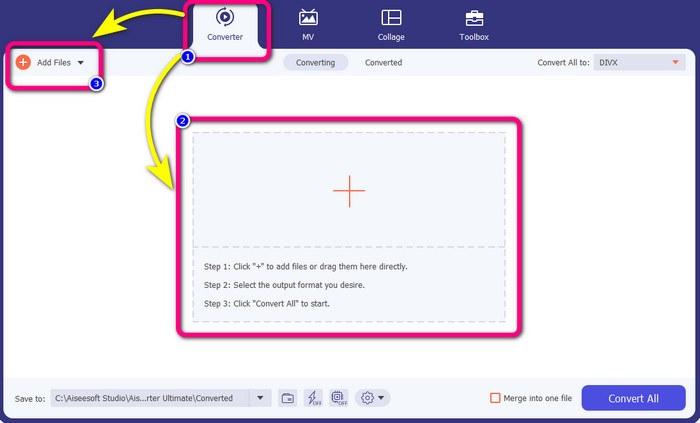
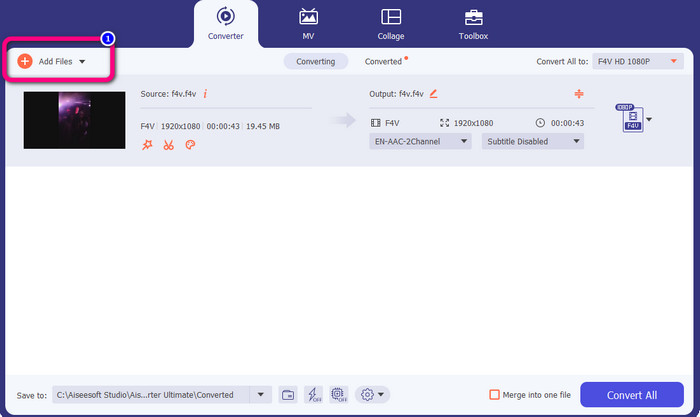
ステップ3: 複数のF4Vファイルを同時に変換したい場合は、ファイルを追加(Add Files)ボタンを押し、別のF4Vファイルを追加します。
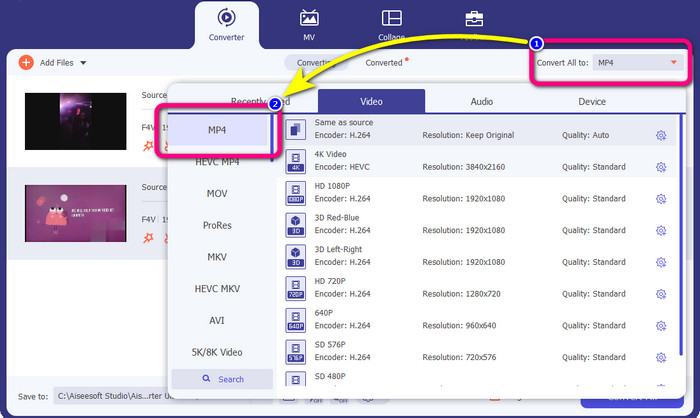
ステップ4: 出力形式を変更するには、すべて変換(Convert All)の先にあるボタンをクリックします。形式の一覧が表示されるので、MP4形式を選択します。あわせて、希望する動画品質も選択できます。
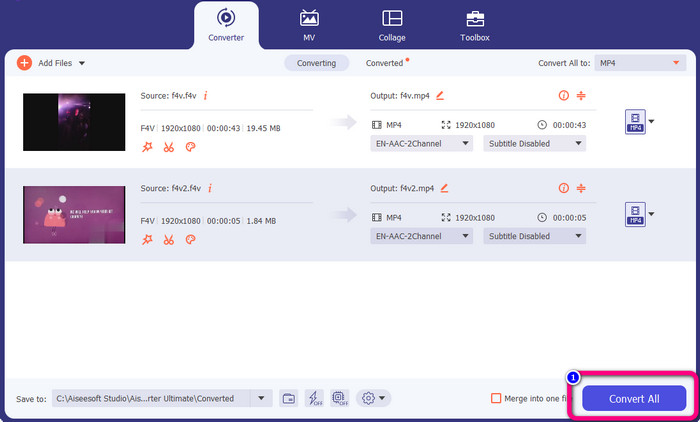
ステップ5: 出力形式の設定が完了したら、すべて変換(Convert All)ボタンをクリックしてファイルを変換します。変換プロセスが始まり、数秒でF4V動画がMP4ファイルに変換されます。
パート 2: VLC を使用して F4V を MP4 に変換する簡単な手順
このパートでは、VLC Media Player を使用して F4V を MP4 に変換する方法を学習します。はい!あなたはそれを正しく読みました!ビデオの再生以外に、VLC はファイルの変換に使用できる別のツールです。また、MP4、WEBM、OGG、TS、ASF など、さまざまなファイル形式をサポートしています。ただし、このツールにはわかりにくいインターフェースがあるため、このツールについて十分に理解する必要があります。チュートリアルを視聴するか、一部の上級ユーザーに VLC を使用したファイルの変換についてアイデアを得るよう依頼してください。また、このコンバーターをダウンロードするには時間がかかります。 VLC Media Player を使用して F4V を MP4 に変換するには、次の手順に従います。
ステップ1: パソコンにVLCメディアプレーヤー(VLC Media Player)をダウンロードします。インストール完了後、アプリケーションを起動します。
ステップ2: メディア(Media) > 変換/保存(Convert/Save)ボタンに進みます。次に、追加(Add)ボタンをクリックして、F4V動画を読み込みます。
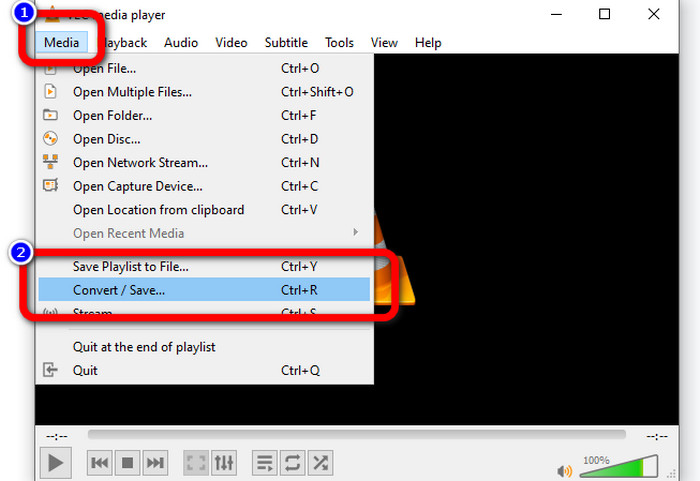
ステップ3: F4V動画を追加したら、画面下部にある変換/保存(Convert/Save)ボタンをもう一度クリックします。
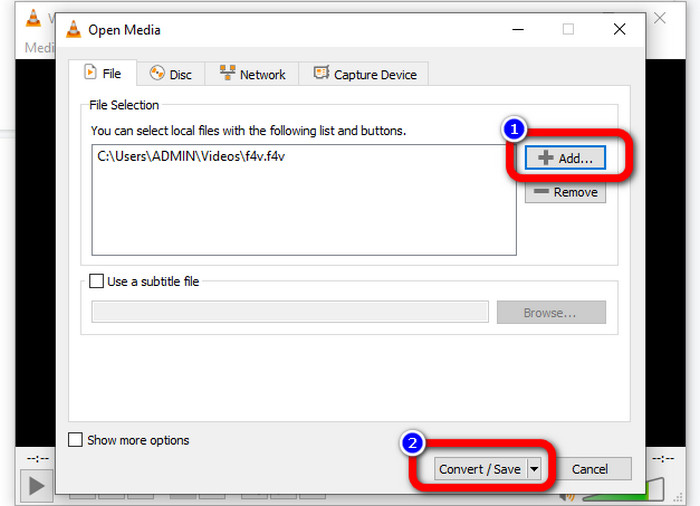
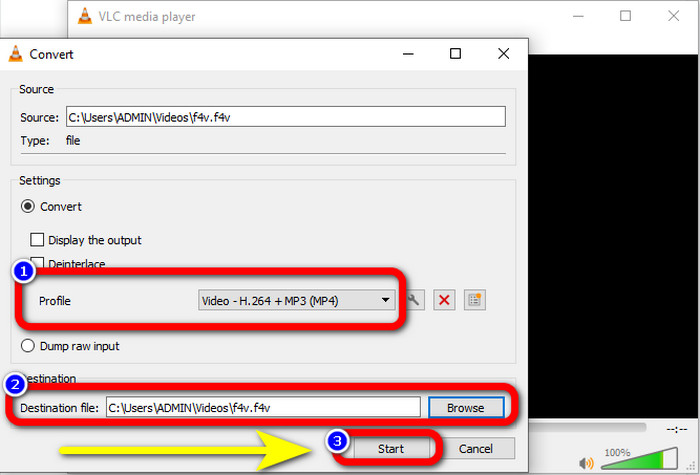
ステップ4:プロファイルに移動し、MP4ファイル形式を選択します。その後、参照(Browse)で保存先フォルダーを指定します。[開始(Start)]ボタンを押して変換プロセスを実行します。
パート 3: ハンドブレーキを使用して F4V を MP4 に変換する簡単な方法
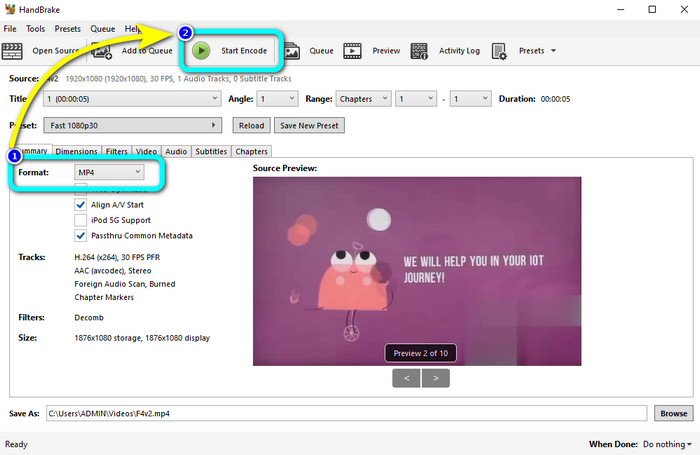
Windowsで使える別のF4VからMP4へのコンバーターを探しているなら、Handbrakeを利用できます。これはオフラインツールで、MP4、MKV、WEBMなど、複数の動画形式をサポートしています。ただし、このツールはオプションが多く、分かりにくいため、操作が難しいという欠点があります。以下の手順に従って、F4VファイルをMP4形式に変換してみましょう。
ステップ1: WindowsパソコンにHandbrakeをダウンロードします。インストール完了後、アプリケーションを起動します。
ステップ2: ファイル(File)ボタンをクリックして、F4Vファイルを追加します。
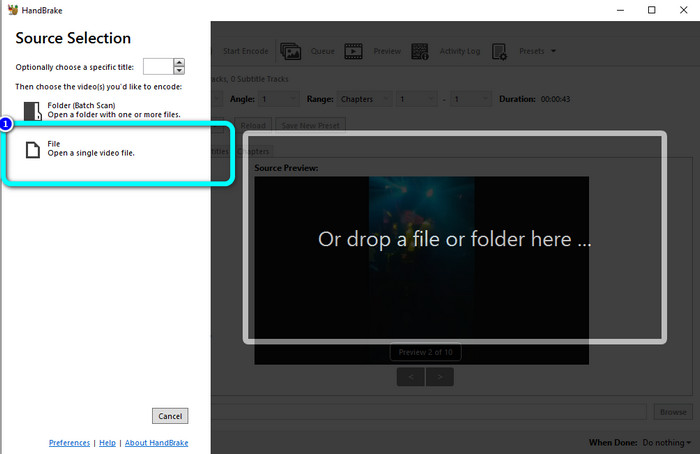
ステップ3: フォーマットのオプションに移動し、MP4ファイル形式を選択します。続いて、Start Encodeボタンを押します。変換処理が完了するまで待ち、変換後の動画を保存します。
パート 4: オンラインで F4V を無料の MP4 に変換する詳細な手順
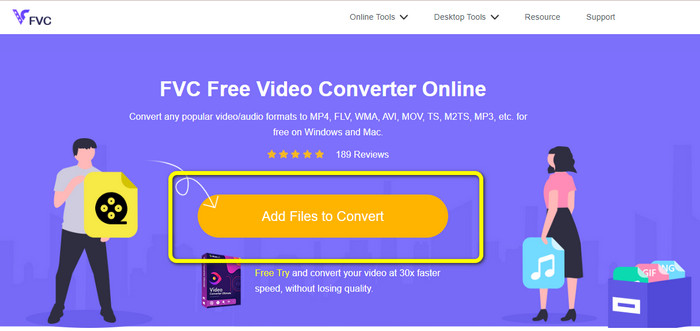
F4VをMP4に無料で変換できるオンラインアプリケーションを使いたいですか?その場合は、FVC Free Video Converter Onlineを利用してみてください。このツールを使えば、F4Vファイルを1円もかけずに変換できます。また、このコンバーターはインターフェースが非常にシンプルで、専門知識のないユーザーにも適しています。FLV、WMA、MOV、AVI、WMVなど、さまざまな動画形式をサポートしています。さらにうれしい点として、画質を落とさずに動画ファイルを変換できることが挙げられます。以下の詳細な手順に従って、F4VをMP4に簡単に変換しましょう。
ステップ1: FVC Free Video Converter Onlineのウェブサイトにアクセスします。変換するファイルを追加(Add Files to Convert)ボタンを押して、F4V動画ファイルをアップロードします。
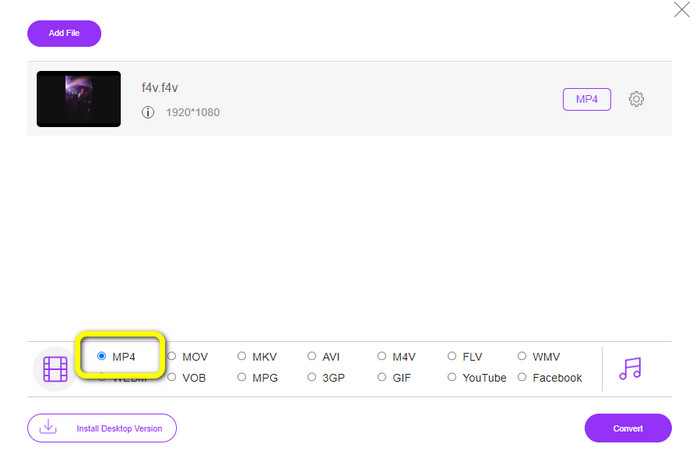
ステップ2: 動画をアップロードしたら、画面下部にあるインターフェースからMP4ファイル形式をクリックします。
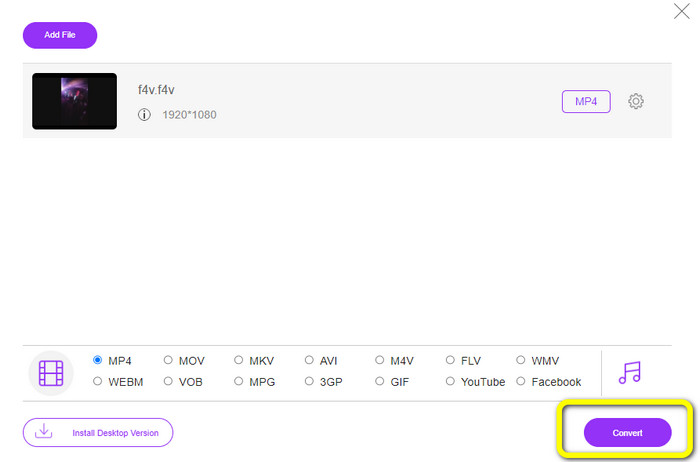
ステップ3: 最後に、[Convert]ボタンを押します。変換プロセスが完了するまで待ち、希望する保存先にファイルを保存します。
パート 5: F4V 対 MP4
これら 2 つのファイル形式については、以下の追加情報を参照してください。
| F4V | MP4 | |
| ファイル拡張子 | .f4v | .mp4 |
| によって開発された | 林檎 | 動画エキスパートグループ |
| 説明 | これは、元のフラッシュ ファイル形式です。また、Flash Player 9 をサポートする ISO ベースのメディア ファイル形式に基づいています。また、F4V ファイルは iOS デバイスでは再生できませんが、Flash をサポートするブラウザーでは再生できます。 | これはマルチメディア ファイルです。コンテナーには、字幕データ、オーディオ、およびビデオを格納できます。また、他のコンテナ形式と同様に、MP4 はインターネットでのストリーミングを可能にします。 |
| 関連プログラム | XVLC メディア プレーヤー ビデオLAN ウィンドウズメディアプレイヤー FFDショー マイクロソフトウィンドウズ フォト ギャラリー ビューア | Apple QuickTime プレーヤー ビデオLAN VLCメディアプレーヤー アップル アイチューンズ Microsoft Windows メディア プレーヤー |
参考文献:
F4VをWMVに変換するためのおすすめコンバーター2選【2023年版】
F4VをFLVに変換する最速の方法2選【オンライン&オフライン】
パート 6: F4V から MP4 への変換に関する FAQ
1. MP4 を F4V に変換できますか?
はい、できます! Video Converter Ultimate を使用できます。このアプリケーションは、MP4 ファイルを F4V 形式に即座に変換できます。
2. F4V と FLV の違いは何ですか?
これら 2 つの形式の主な違いは、F4V は H.264 でエンコードされた高品質のビデオをサポートすることですが、FLV 形式は通常 H.263 を使用します。
3. FFmpeg を使用して F4V を MP4 に変換する方法は?
コンピューターに FFmpeg をダウンロードします。コマンド プロンプトを開きます。コマンド ラインを切り替えるには、「デスクトップ」と入力します。変換コマンドは FFmpeg-i で始まり、ビデオの名前とそのファイル形式を入力します。また、出力ファイルのタイプ。 Enter キーを押して、変換プロセスを待ちます。その後、デスクトップにファイルが表示されます
結論
このガイド記事では、オンラインとオフラインの両方でF4VをMP4に変換するための詳しい手順を紹介しました。ユーザーの多くは、よりシンプルで高速な変換方法を求めています。そんなときは、他のコンバーターより30倍速い変換速度を備えたVideo Converter Ultimateを使えば、動画ファイルをすぐに変換できます。また、数回クリックするだけで動画を簡単に変換できるFVC Free Video Converter Onlineを利用することも可能です。
-
 F4VをAVI形式に変換する4つの最新のオンラインおよびオフラインコンバーター
 F4VをAVIまたはその他のビデオ形式に変換するためにどのコンバーターを使用すべきかわかりませんか?次に、利用可能なツールを使用して変換する方法を学びながら、この記事を読んでください。
-
 品質を落とさずにF4VをMOVに変換する方法[解決済み]
 F4Vのようないくつかのビデオフォーマットを認めるのに苦労しているなら。この記事を読んで、F4VおよびMOVビデオ形式の詳細と、さまざまな方法を使用してF4VをMOVに変換する方法を学びます。
-
 DIVX を MP4 にすぐに変換する成功した方法
 DIVX を MP4 に変換するにはどうすればよいですか?最適なソリューションをお探しの場合は、適切な記事をご覧ください。 DIVXをMP4に簡単に変換する方法を紹介します
