


 ビデオコンバーター究極
 スクリーンレコーダー
 ビデオ修復
ビデオ修復
 安全なダウンロード
MPG から MP4 へのコンバーターについて知っておくべきことは次のとおりです
動画に最適な形式を選ぶことは非常に重要です。不適切な形式を選んでしまうと、視聴の流れが途切れたり、ワークフローが止まってしまうことがあります。特に、内蔵プレーヤーがその形式を認識しない場合はなおさらです。MP4 と MPG はよく似た形式ですが、状況によってどちらか一方を選ばなければならない場合があります。MPG ファイルは、DVD や CD に動画を書き込む際によく利用されますが、圧縮技術がやや古いという面があります。一方で、互換性の問題を解消し、より高画質を求めるのであれば、MP4 が最適な選択肢です。この記事では、デスクトップ、オンライン、モバイルアプリを使って変換できる、最適なMPG から MP4 へのコンバーターをご紹介します。

この記事のプログラムを比較した以下の表をよく読んでください。
| 設置サイズ | ベストユーザー | 価格 | |
| ビデオコンバーター究極 | 23.8MB | 平均的なものから専門家まで | $55.20 / 生涯 |
| 任意のビデオ コンバーター | 55.7MB | 初心者から中級者まで | $49.95 / 生涯 |
| 無料のビデオコンバーターオンライン | 無し | 初心者向け | 自由 |
| CloudConvert | 無し | 平均 | 自由 |
| ビデオ フォーマット ファクトリー | 15MB | 平均的な人から初心者向け | アプリ内購入 |
| ビデオコンバーター | 28.43MB | 平均 | アプリ内購入 |
パート 2. Windows および Mac 用 MPG から MP4 コンバーター
1.ビデオコンバーターアルティメット
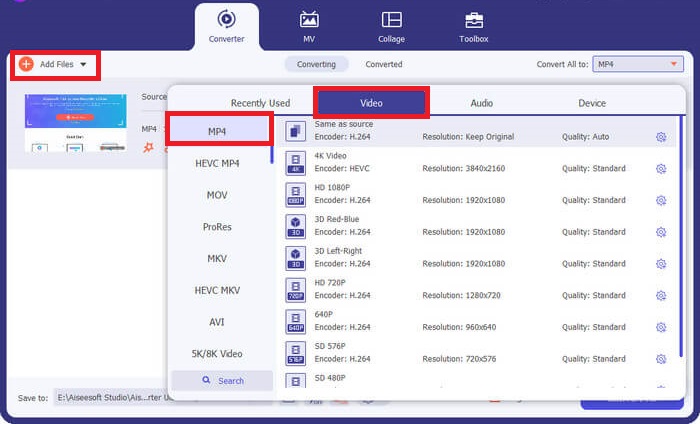
変換作業を最大限に活用したいのであれば、Video Converter Ultimate がぴったりかもしれません。本ソフトは GPU ハードウェアアクセラレーション機能を活用することで、最大 50 倍の高速変換を実現しています。さらに、出力画質のパラメーターを調整して、希望する画質に合わせることも可能です。そのうえ、Video Converter Ultimate では FLV や MOV をはじめ、MPG や MP4 など幅広い出力形式から選択できます。以下に、この MPG コンバーターを使って MPG を MP4 に変換する手順を簡単にご紹介します。
ステップ 1. まずは下の適切な[ダウンロード]ボタンをクリックします。Mac をお使いの場合は右側、Windows をお使いの場合は左側のボタンを選びます。その後、ソフトを起動し、画面の指示に従ってインストールを完了させ、デバイス上で起動します。
無料ダウンロードWindows 7 以降対応安全なダウンロード
無料ダウンロードMacOS 10.7 以降対応安全なダウンロード
ステップ 2. MP4 ファイルを読み込むには、中央のプラスアイコンをクリックします。MP4 ファイルまたはフォルダーを選択し、サムネイルが画面に表示されるまで待ち、アップロードを完了させます。
ステップ 3. 次に、プロファイルをプルダウンして出力形式の一覧を開きます。そこで動画タブに移動し、MP4 を選択します。必要に応じて、設定から画質を調整することもできます。
ステップ 4. 出力の条件設定が完了したら、変換に進みます。処理を開始するには、すべて変換ボタンをクリックします。
主な機能
◆ この最高の MPG から MP4 コンバーターを使用すると、ユーザーは一括変換機能を楽しむことができます。
◆ 1000 以上の事前選択されたオーディオおよびビデオ出力フォーマットを提供します。
◆ Video Converter Ultimate は、Video Enhancer、Compressor、GIF Maker などのデジタル ファイル編集用のツールボックスを提供します。
◆ このプログラムには、無料の MPG から MP4 コンバーター Windows 10 の 14 日間の試用版が含まれています。
長所
- このプログラムは、初心者、平均、プロのユーザーに最適です。
- インターフェイスは見た目も美しく、快適に操作できます。
短所
- ツールのビデオ編集機能は、基本的な機能のみを提供します。
- URL によるビデオ変換は利用できません。
2. 任意のビデオコンバータ
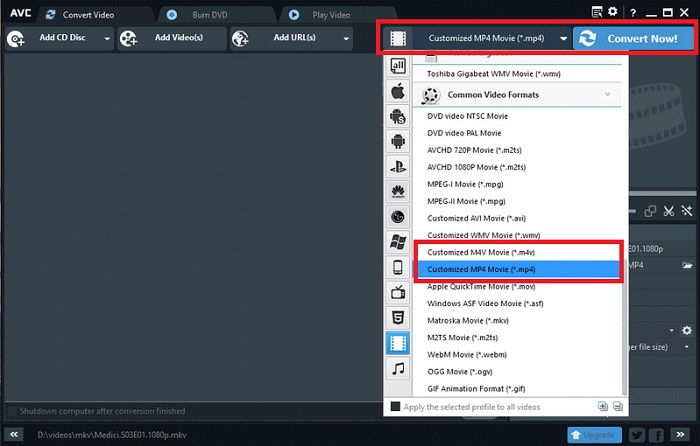
評価に値するもう 1 つのツールは、Any Video Converter です。このプログラムは、好みのビデオを変換する場合に驚異的に機能します。ただし、プロ バージョンにアップグレードしたユーザーは、ファイルの変換に加えて、無制限のスクリーン レコーダー機能と Web カメラ レコーダーにアクセスできます。このプログラムを使用して MPG を MP4 に変換する方法の内訳は次のとおりです。
ステップ 1. まず、動画変換パネルを開き、MPG ファイルを MP4 形式に変換できるようにします。その後、動画を追加ボタンをクリックし、変換したいファイルを選択します。
ステップ 2. ファイルを読み込んだら、出力プロファイルをプルダウンし、MP4 を選択します。
ステップ 3. 続いて、出力ファイルの保存先フォルダーを指定します。最後に 今すぐ変換をクリックして、変換プロセスを開始します。
主な機能
◆ プログラムの無料版には、不要で迷惑な広告は含まれません。
◆ Any Video Converter は、変換された出力にブランドの透かしの痕跡を残さないように努めています。
長所
- このプログラムは、MPG ファイル用のビデオ編集ツールを提供します。
短所
- どのビデオコンバーターも初心者にとっては使いにくいかもしれません。
パート 3. MPG から MP4 へのオンラインコンバーター
1. 無料オンライン動画変換ソフト
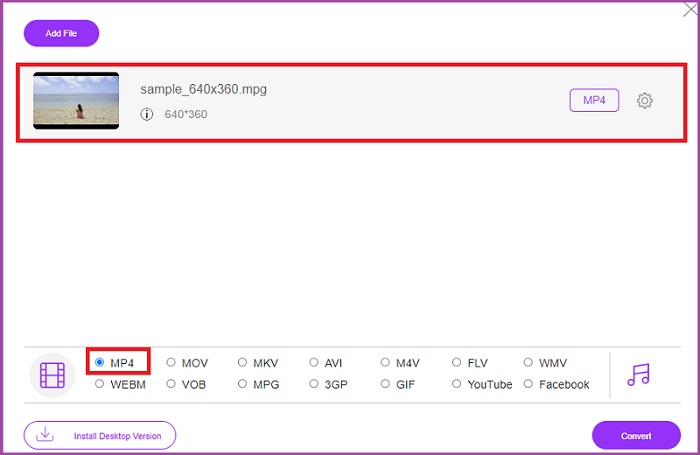
ソフトウェアをインストールするだけの空き容量があまりない場合でも、オンラインツールを利用すれば変換が可能です。中でも Free Video Converter Online は、MPG から MP4 への動画変換に幅広く対応できる充実したプログラムです。このオンラインツールは、よく知られている 50 種類以上の形式をサポートしています。さらに、各種パラメーターを調整することで、出力画質の要件を細かくコントロールすることもできます。この高機能かつ無料の MPG から MP4 へのコンバーターを利用したい場合は、以下の簡単な手順に従ってください。
ステップ 1. お使いの検索エンジンでオンラインプログラムを開きます。ページが表示されたら、ファイルを追加して変換ボタンをクリックして起動します。
ステップ 2. 続いて、同じボタンをもう一度クリックして、変換したい元動画を読み込みます。ファイルがアップロードされたら、出力形式の一覧からMP4を選択します。
ステップ 3. 最後に変換ボタンをクリックし、変換されたファイルのダウンロードが完了するまで待ちます。
長所
- この MPG から MP4 へのオンライン コンバーターでは、一括変換機能が可能です。
- 最大 300 MB の大きなファイル サイズに対応できます。
短所
- Free Online Video Converter にはビデオ編集ツールは提供されていません。
2. CloudConvert
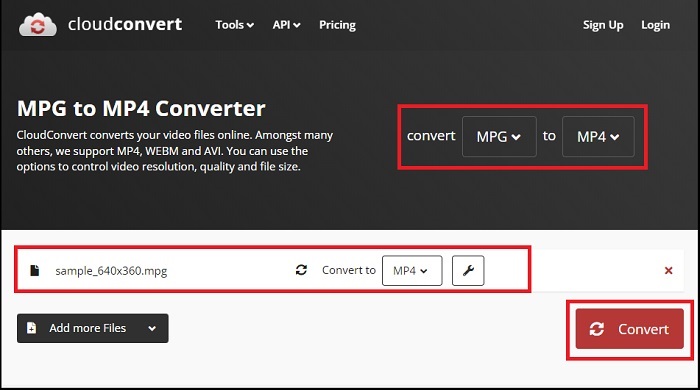
200 以上の出力形式がサポートされている CloudConvert は、多用途であると考えられています。このツールはビデオの変換に役立つだけでなく、電子ブック、アーカイブ、画像、オーディオ ファイルを別のファイル拡張子に変換することもできます。さらに、このプログラムでは、最高の結果を最大化するために品質を変更することもできます。以下に作成したガイドを参照して、以下の最高の MPG から MP3 コンバーターのダウンロードを使用してビデオ形式を変換してください。
ステップ 1. 検索エンジンで Convert Files のサイトにアクセスします。中央にある参照ボタンをクリックして、ローカルフォルダーを開きます。
ステップ 2. ファイルをアップロードしたら、出力形式ボックスを展開し、一覧からMP4を選択します。
ステップ 3. 最後に変換をクリックし、ファイルのダウンロードが終わるまで待ちます。
長所
- ユーザー情報を保護するためのデータセキュリティ保護を提供します。
- このプログラムは 1000 以上のメディア出力形式を提供します。
短所
- インターネットが切断されると変換は中断されます。
パート4. AndroidおよびiOS用のMPGからMP4へのコンバーターアプリ
1. オーディオビデオファクトリー
テクノロジーの革新により、MPG から MP4 への変換がハンドヘルド モバイル デバイスで実行できるようになりました。 Audio Video Factory を使用すると、1 つのアプリケーションでオーディオとビデオの形式を変換できます。さらに、ファイルを変換する前にコーデックやビットレートなどのビデオパラメータを編集することもできます。
ステップ 1. アプリ画面でプラスボタンをタップし、ビデオを選択して、ファイルフォルダーにアクセスします。
ステップ 2. MPG ファイルを選択したら、変換ボタンをタップし、出力タブを展開して、形式一覧を表示します。
ステップ 3. 一覧から MP4 を選んだ後、ファイル内のそのほかの情報を編集することもできます。終わったら、変換ボタンを押して変換を開始します。
長所
- ユーザーが曲のタイトル、アルバム カバー、アーティストなどのメタデータ情報を編集できる、Android および iOS の万能アプリケーションです。
- 変換されたファイルを直接再生するためのネイティブメディアプレーヤーが付いています。
短所
- インターフェースのデザインに関してはアップグレードが必要です。
2. Technorazer のビデオコンバーター
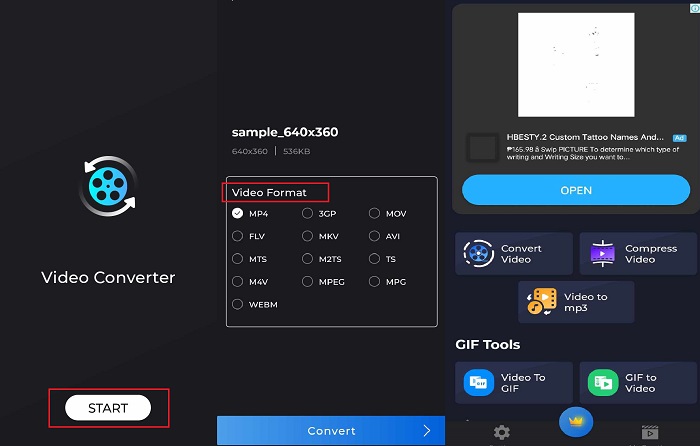
ビデオを変換、圧縮し、オーディオに変換します。これらは Video Converter が提供する強力な機能です。 Technorazer 社が作成したアプリケーションには、Playstore で 4.8/5 を超えるレビューが付いています。このアプリケーションは、最大 70 倍の高速変換速度を実現します。さらに、品質を損なうことなく、MPG を VOB、MPP4、3GP、FLV などのあらゆる形式に変換できます。それに加えて、Tehcnorazer のビデオ コンバーターは GIF ファイルを抽出し、内蔵トリマーを使用してオーディオから着信音を作成できます。
ステップ 1. 動画を変換ボタンをタップして、この機能を有効にします。その後、動画を選択ボタンをタップし、MPG ファイルを読み込みます。
ステップ 2. ファイルが画面に読み込まれると、出力形式が自動的に表示されるので、MP4を選択します。
ステップ 3. 最後に変換ボタンをタップします。処理が完了したら、ファイル名を変更し、デバイスのローカルフォルダーに保存できます。
長所
- 黒いスキンインターフェイスにより、プログラムに洗練された外観が追加されます。
- ビデオファイルサイズは無制限です。
- 有料版には反転ビデオ機能が含まれています。
短所
- 無料版には広告が多すぎます。
さらに詳しく読む:
パート 5. MPG コンバーターから MP4 へのよくある質問
無料でMPGをMP4に変換できますか?
絶対そうです!ビデオ ファイルを別の形式に変換したい場合は、Free Video Converter Online などの多くのオンライン プラットフォームが役に立ちます。
MPG は MP4 よりも優れていますか?
品質に関しては、同じビットレートにもかかわらず、MP4 は MPG よりも優れています。ただし、インターネット上でファイルを配布するためのより効率的な形式を目指す場合は、MP4 の方が有利です。
MP4の利点は何ですか?
記録のために言っておきますが、MP4 が当社の標準形式です。この形式は、ファイルのサイズを削減することを目的とした非可逆圧縮の一種です。品質に関しては、MP4 は平均的であり、あらゆるプラットフォームとの互換性が高いと考えられています。
MPGをMP4に変換しても安全ですか?
はいぜったいに!オンライン ソフトウェアでもオフライン ソフトウェアでも、ほとんどのプラットフォームでは、使用前にユーザーの個人情報は必要ありません。一方、MPG を MP4 に変換しても、メディア プレーヤーとの非互換性の問題は発生しません。
MPG ファイルを再生できないのはなぜですか?
MPG ファイルは、ほとんどの場合、どのビデオ プレーヤーでも互換性があります。問題が発生した場合は、メディア プレーヤーが MPG ファイルをサポートしているかどうか、またはファイルが破損していないかを確認してください。
結論
状況によっては、MPG と MP4 のどちらもニーズを満たせます。ここまで紹介してきた各種ツールのうち、オフラインツールは編集や圧縮機能も備えており、動画形式の変換とあわせて利用できます。無料の MPG から MP4 へのコンバーターであるオンラインプログラムは、一括変換や音声パラメーターの調整にも対応しています。一方、モバイルアプリは、大きなファイルを単体で変換するのに向いており、その後に編集作業を行う必要がない場合に特に便利です。
-
 Windows/Mac/Android/iPhone 向けのベスト 4 MPG/MPEG プレーヤー [2025]
 お気に入りのMPGまたはMPEGファイルをスムーズに再生したい場合は、この記事から、コンピューターおよび携帯電話用の上位4つのMPG / MPEGプレーヤーについて詳しく知ることができます。
-
 オンライン/オフラインコンバーターを使用してMPGをMKVに変換する4つの方法
 MPGファイルをMKVに変換できる使いやすいコンバーターをお探しですか?この記事では、MPGをMKVファイルにすばやく変換するための最良かつ最も簡単な方法をリストします。
-
 確かに:MP4ビデオを遅くするためのベストプラクティス
 ビデオの速度を上げることに加えて、速度を落とすことは、ビデオから最高の出力を達成するために必要な多くのプラクティスの1つです。記事の残りの部分を読んで、可能な限り最高の編集者になることを目指してください。
