


 ビデオコンバーター究極
 スクリーンレコーダー
 ビデオ修復
ビデオ修復
 安全なダウンロード
MTVをMP4に簡単に変換するための挑戦的な方法
近年、多くのユーザーが MTV 動画ファイルをほかの形式に変換する方法を知りたがっています。本記事では、さまざまな動画ファイルを変換するうえで最も効果的な方法をご紹介します。さらに、ファイル変換に役立つ 2 つの優秀なアプリケーションも取り上げます。さっそくこの記事を読み進めて、MTV から MP4 への変換に最適な手順を身につけましょう。

パート 1: なぜ変換を行う必要があるのですか?
現在のデジタル時代には何百ものプラットフォームがビデオ ファイルを処理しており、それぞれに独自の設定があります。ビデオを録画した可能性がありますが、別のプラットフォームの要件に合わせて変換する必要があります。変換を行う必要がある 3 つの理由を次に示します。
1. デバイスとファイル形式の互換性。
あるデジタル デバイスから別のデジタル デバイスにファイルを転送する場合、デバイスの互換性の問題が頻繁に発生することがあります。これは、特定のガジェットが特定のファイル形式を別のファイル形式よりも優先し、他のファイル形式をサポートしていないことが原因である可能性があります。たとえば、デジタル カメラのビデオ ファイルは、携帯電話のビデオ プレーヤーが読み取れるようにするためにサポートが必要な形式で保存されている場合があります。このような状況では、動画を MOV から MP4 や MP4 から MP3 などの他の形式に変換する必要があります。これは、現在 MP4 が十分にサポートされている形式であるためです。
2. ファイルサイズが大きい。
インターネット経由で動画を転送する際は、頻繁にファイル サイズを小さくする必要があります。たとえば、ファイル サイズが大きくて開くことができない場合、最善の解決策は、ビデオを他のファイル形式に変換して圧縮し、ファイル サイズを小さくすることです。
3. ビデオのビットレートを改善するため。
ビットレートは、1 秒あたりのビット数です。ビデオファイルのサイズと品質を決定するために使用されます。ビデオ ファイルの品質は、ビットレートが高くなるほど向上します。ただし、ビットレートが高くなるとファイル サイズが大きくなり、オンライン プラットフォームでビデオをバッファリングする能力が低下します。そのため、ビデオを中程度のビットレート ファイルに変換することは、ビデオをすばやく再生して視聴者の満足度を高めるために不可欠です。
パート 2: MTV を MP4 に簡単に変換する方法
無料でダウンロードした MTV から MP4 へのコンバーターが必要な場合は、Video Converter Ultimate を使用してください。何も支払うことなく、無制限の数のビデオ ファイルを変換できます。多くのファイルを同時に変換する場合、このオフライン コンバーターは信頼できます。他のコンバーターの 30 倍の速さでファイルを変換するため、ファイルを瞬時に変換することもできます。さらに、このコンバーターには、すべてのユーザーがアクセスできる使いやすいインターフェイスがあり、このプログラムを簡単に利用できます。さらに、ここで MTV ビデオを編集または変更することもできます。ビデオは、希望の長さに編集したり、360 度回転したり、エフェクトを追加したりできます。これらのオプションに加えて、動画や画像を使用して GIF を作成することもできます。
機能
◆ MTV、MP4、M4V、MKV、WMV、MOV、AVI、FLV、SWF、MTS、AMV、3GP など、100 以上の異なるビデオ フォーマットを変換します。
◆ バッチ変換方法を提供します。
◆ GIF クリエーター、クロッパー、コンプレッサー、クロッパー、トリマー、リバーサーなど、ビデオを編集するためのツールを提供します。
詳細なプロセスを使用して、FVC Video Converter Ultimate を使用して MTV を MP4 に簡単に変換する方法を学びます。
ステップ1: Video Converter Ultimate をダウンロードしてインストールします。下の ダウンロード ボタンをクリックしてください。インストール後、アプリケーションを起動します。
無料ダウンロードWindows 7 以降に対応安全なダウンロード
無料ダウンロードMacOS 10.7 以降に対応安全なダウンロード
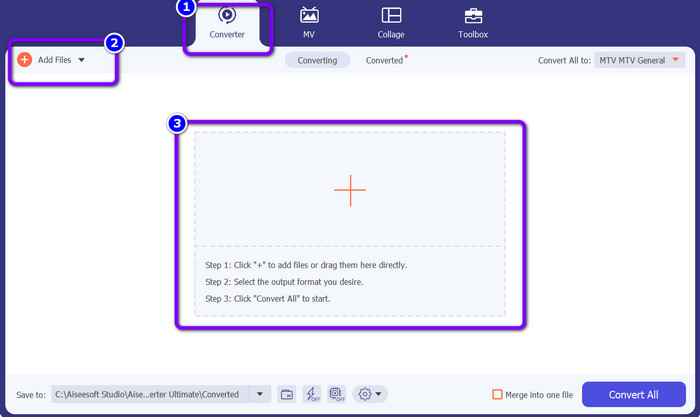
ステップ2: コンバーター パネルに進みます。その後、ファイルを追加 ボタン、または プラス アイコンをクリックして MTV 動画ファイルを読み込みます。
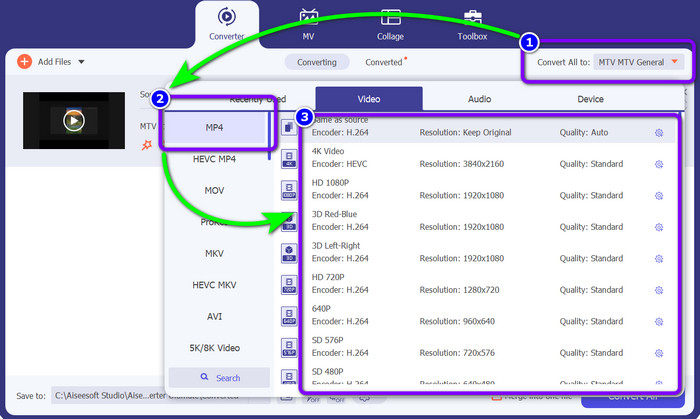
ステップ3: すべて変換 のボタンを開き、形式オプションの中から MP4 を選択します。続いて、お好みの画質を選びます。
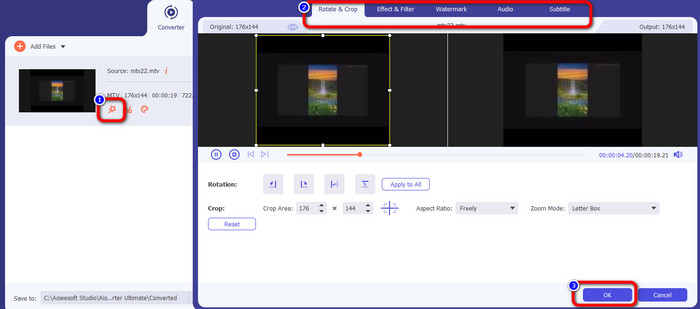
ステップ4: 動画を編集したい場合は、編集 アイコンに進みます。すると、新しい画面が表示されます。その画面で動画の回転やトリミング、ウォーターマーク・フィルターなどの追加が可能です。編集が完了したら、OK ボタンをクリックします。
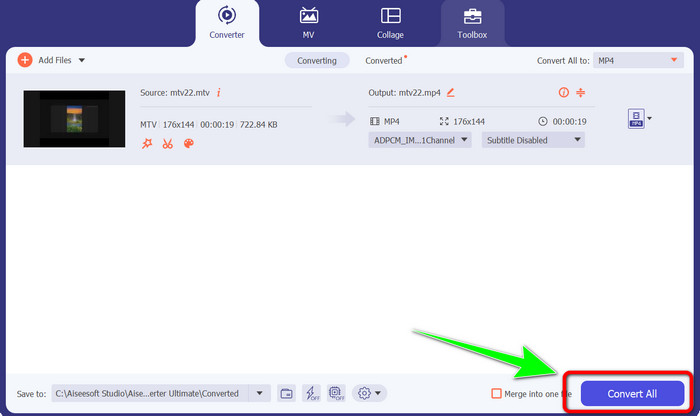
ステップ5: 最後に、すべて変換 ボタンをクリックして MTV ファイルを MP4 形式に変換します。変換処理が完了するまで少し待ち、指定した保存先に動画を保存します。
パート 3: オンラインで MTV を MP4 に変換する最良の方法
オンラインで MTV を MP4 に変換する方法を知りたいですか?それなら、FVC Free Video Converter Online を利用してみてください。シンプルでわかりやすいインターフェースのおかげで、動画を簡単に変換できます。大きな特長のひとつは、一度に複数のファイルを変換できるバッチ変換機能です。これにより、余分な時間をかけずに作業できます。また、このプログラムでは動画のビットレート、フレームレート、解像度も変更できます。解像度は 1920×1080 まで設定可能なので、高画質な動画を再生できると安心して利用できます。さらに、音声ファイルの変換にも対応しており、FLAC、MP3、AAC、AC3、WMA、MKA、WAV など多くの形式をサポートしています。音声のビットレートとサンプリングレートも調整可能です。加えて、FVC Free Video Converter Online は Microsoft Edge、Mozilla Firefox、Safari、Google Chrome など、あらゆるオペレーティングシステム・ブラウザで利用できます。そのため、このオンラインコンバーターをどこで使う場合でも、環境面で困ることはほとんどありません。
特徴
◆ 多数のビデオ フォーマットを同時に変換します。
◆ ビデオの解像度、ビットレート、およびフレーム レートを変更できます。
◆ MP3、FLAC、MKA、AAC、AC3 などのオーディオ形式を変換できます。
◆ オーディオのビットレートとサンプルレートを変更できます。
以下の簡単なガイドに従って、ブラウザで FVC Free Video Converter Online を使用して MTV を MP4 に簡単に変換します。
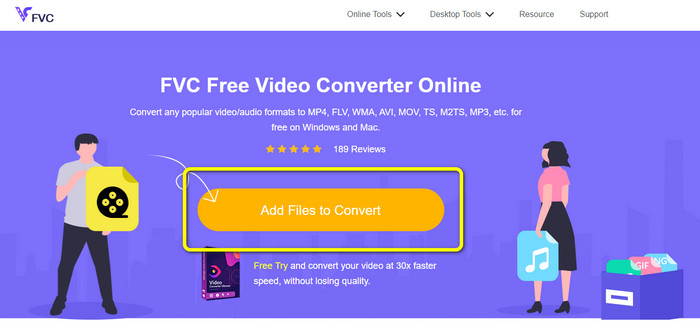
ステップ1: 任意のブラウザーで FVC Free Video Converter Online の公式サイトにアクセスします。その後、ファイルを追加して変換 ボタンをクリックし、変換したい MTV ファイルを追加します。
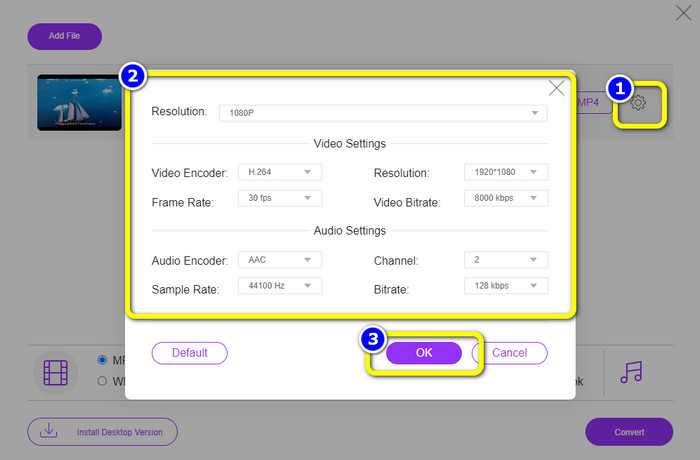
ステップ2: 設定 アイコンをクリックして動画設定を編集します。解像度は 1080p まで設定可能です。また、音声・動画のサンプルレート、ビットレート、フレームレートも変更できます。設定が終わったら OK をクリックします。
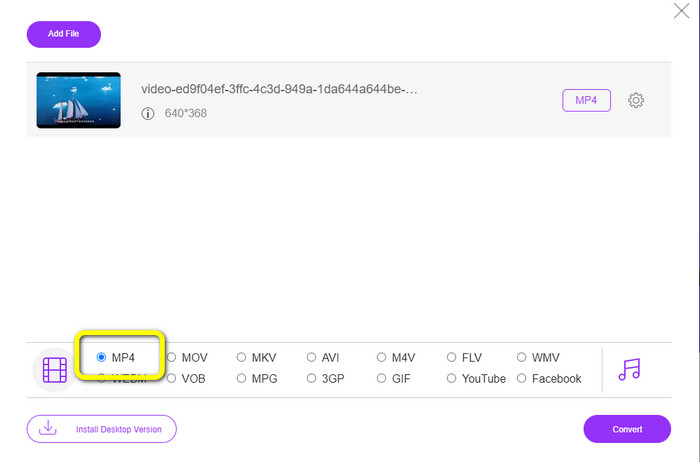
ステップ3: その後、画面下部の形式オプションから MP4 形式を選択して出力フォーマットを変更します。
ステップ4: 変換 ボタンをクリックして変換処理を開始します。次に、変換後の動画ファイルを保存したい保存先フォルダーを選択します。
![[MTV MP4 に変換] をクリックします](/images/2023/01/click-convert-mtv-mp4.jpg)
参考文献
画質を落とさずに MTV を WMV に変換できる最新コンバーター 2 選
パート 4: MTV から MP4 への変換に関する FAQ
1. MTV ファイルとは何ですか?
MTV ファイルは MTV 形式で保存されたビデオで、一部の中国のポータブル 'MP4' ビデオ プレーヤーに固有のものです。 MP3 オーディオがあり、再生中に 1 秒あたり 12 のフレーム レートで一連の画像を表示します。 MTV ファイルは AMV ファイルと同等ですが、形式が異なります。
2. MTV ファイルを開くにはどうすればよいですか?
Video LAN、VLC Media Player、または Online Media Technologies AVS Media Player を使用して MTV ファイルを開くことができます。
3. MKV と MP4 のどちらが優れていますか?
互換性に関して言えば、MP4 は MKV ファイルより優れています。 MP4 は互換性が広く、どのプラットフォームでもこのファイルを再生できます。
結論
MTV から MP4 への変換は、最適なツールさえわかっていればとても簡単です。本記事では、オンライン・オフライン両方のアプリケーションを使って MTV を MP4 に手間なく変換するための最良の方法を紹介しました。どのツールにも独自の便利な機能が備わっています。今後、より多くの動画ファイルを手軽かつ迅速に変換したい場合は、Video Converter Ultimate と FVC Free Video Converter Online を活用してみてください。
-
 MacでMTVをMOVに変換する2つの効果的な方法[2023]
 MTVファイルをMOVに変換して、Macで使用したいですか?それでは、.mtvファイルを新しい.mov形式に変換するために使用できる2つのコンバーターを見てみましょう。
-
 MTVをFLVに変更するための手間のかからないMTVからFLVへのコンバーター
 MTVをFLVに変換する新しいコンバーターを試してみませんか?この記事を読んで、他のコンバーターの中で最も主要なコンバーターであるこれらのMTVからFLVへのコンバーターを理解してください。
-
 AMVをMP4にすばやく変換するための2つの特別な手順
 これらのビデオコンバーターを使用して AMV を MP4 に変換する方法を知っておいてください。また、AMV と MP4 の最もアクセスしやすく詳細な手順も学習します。
