


 ビデオコンバーター究極
 スクリーンレコーダー
 ビデオ修復
ビデオ修復
 安全なダウンロード
3つの方法でSWFをMP4に無料で変換する方法
最も変換が難しい動画形式の1つである SWF を MP4 に変換するには、ここで紹介する無料のおすすめSWF MP4 変換ソフトベスト3を利用できます。

SWF は、マルチメディア、ベクターグラフィックス、そして ActionScript を使うブラウザー向けの Adobe Flash ファイル形式です。SWF ファイルは Adobe Flash Player で簡単に開くことができます。しかし、Adobe Flash Player や Adobe Integrated Runtime など、Adobe および他社製プログラムで作成された SWF を再生できるプラグインは限られています。より多くのプレーヤーで SWF ファイルを再生するには、ほぼすべてのプレーヤーに採用されている最も一般的な動画形式である MP4 にSWF を変換する必要があります。
いくつかの異なる方法とアプリを試した後、この無料のトップ3リストを考え出しました。
パート1。無料のビデオコンバーター– PC / MacでSWFをMP4に変換します
SWFは、Web形式として、どこにでもアップロードできる優れたアニメーション品質とオーディオコーデックで作成されています。その結果、アドビ製品なしでSWFファイルを開いたり編集したりできるソフトウェアを見つけるのは困難です。それでも、無料のSWFからMP4へのコンバーターがあります。
Free Video Converter は無料の SWF ファイル変換ソフトで、Windows と Mac のパソコン上で SWF ファイルを MP4、MOV、AVI、WMV、MKV などに変換できます。

無料のFLVからMP4へのコンバーター
30000以上のダウンロード- PCとMacでSWFとFLVを無料でMP4にバッチ変換します。
- SWFをH.264、MPEG4などでMP4に変換します。
- SWFをMOV、AVI、MP3、MKVなどの他の形式に変換します。
- MP4ファイルをエクスポートする前にSWFファイルを編集します。
無料ダウンロードWindows 7 以降に対応安全なダウンロード
無料ダウンロードMacOS 10.7 以降に対応安全なダウンロード
長所
- SWFをMP4にバッチ変換します。
- 幅広いフォーマットをサポートします。
- SWFをデバイスに変換します。
短所
- 編集機能は弱いです。
SWFをMP4に変換する手順は非常に簡単です。
ステップ1. SWF ファイルを追加
上記のダウンロードリンクをクリックして、無料のSWFからMP4への変換ソフトウェアをコンピューターにダウンロードします。すぐに起動します。
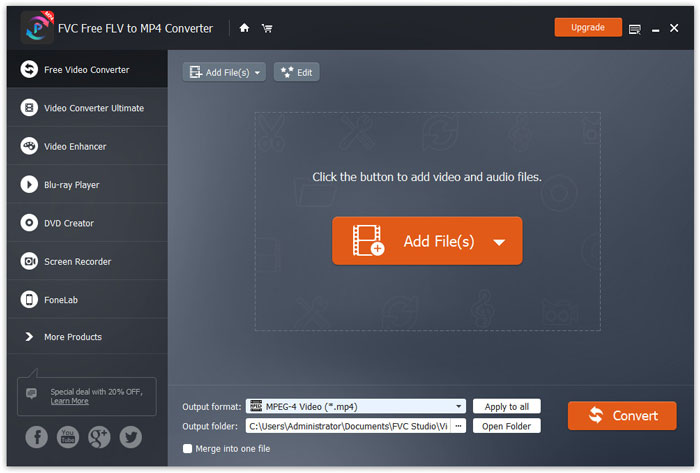
ファイルを追加ボタンをクリックして、1つまたは複数のSWFファイルをこのプログラムに読み込みます。
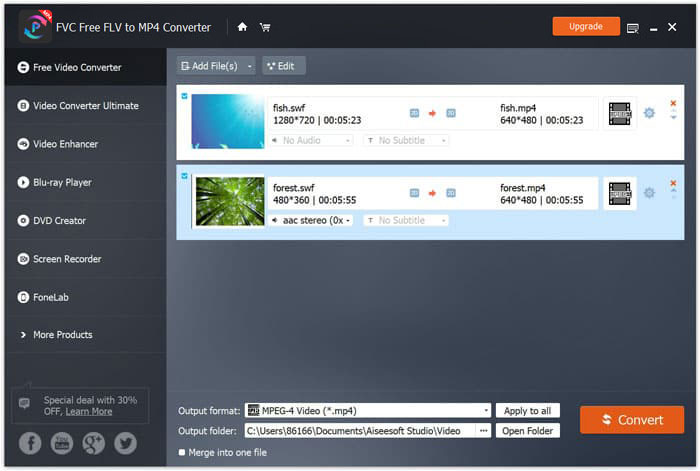
ステップ2. MP4 をカスタマイズ
下部の出力形式のドロップダウンからMP4を選択します。ここでは、PSP、Avid Media Composer、Adobe Premiere、Apple iPhone、Samsung、PS3/4、Xbox など、SWF ファイルを開けるデバイスも選択することができます。

さらに、MP4出力の横にある歯車のアイコンをクリックすることで、ビデオコーデック、解像度、ビットレートなどをカスタマイズできます。
ステップ3. SWF を MP4 に書き出し
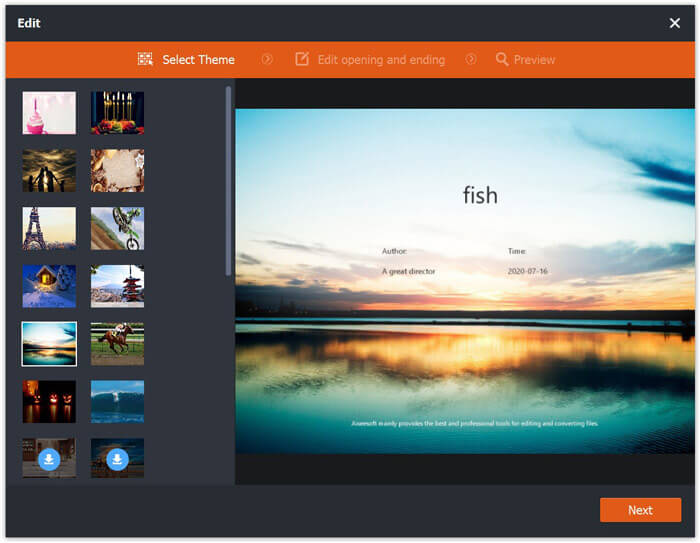
必要であれば、メイン画面の編集ボタンから SWF ファイルを編集して、オープニングやエンディングのテーマを追加することができます。
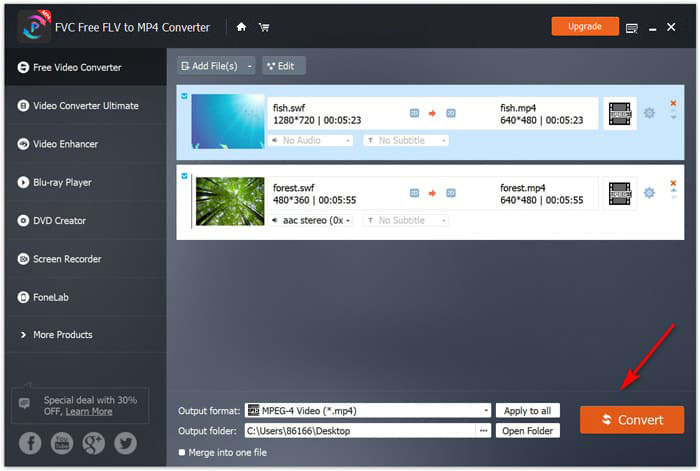
すべての設定が完了したら、下部で変換後の MP4 ファイルの保存先を選択し、右下の変換ボタンをクリックして、すぐに SWF ファイルを MP4 動画に変換します。
パート2。無料のオンラインビデオコンバーター–SWFをMP4オンラインに変換
SWFをMP4に変えるソフトウェアをインストールしたくないですか?無料のオンラインビデオコンバーターを試してみてください。
Free Online Video Converter は、ブラウザー経由で SWF を MP4 に変換できるオンライン変換ツールです。SWF や FLV を MP4 や AVI、MOV などの人気形式に変換できます。さらに、SWF ファイルから音声だけを抽出して、BGM を保存することも可能です。
長所
- SWFをFacebookとYouTubeに変換します。
- GIFを作成する SWFファイルから。
- ビデオの解像度、コーデックなどをカスタマイズします。
短所
- 編集機能の欠如。
これは、無料のオンラインビデオコンバーターを使用してSWFをMP4に変換するためのガイドです。
ステップ1. SWF ファイルをオンラインにアップロード
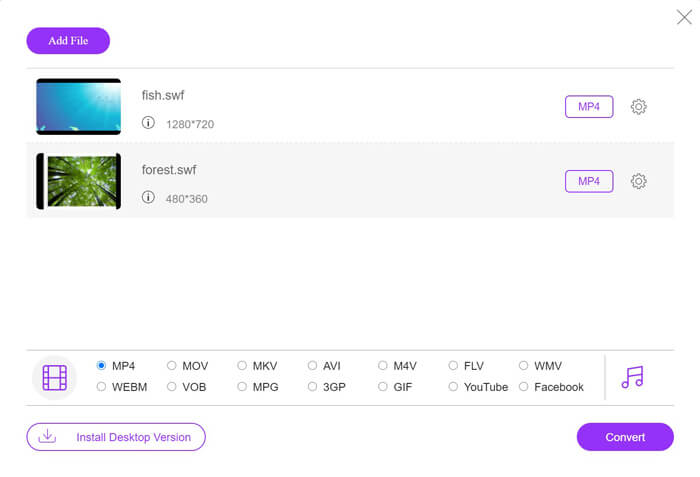
ブラウザーでこの無料オンライン SWF MP4 変換ツールを開きます。Add Files to Convert ボタンをクリックすると、ランチャーのダウンロードとインストールを求めるポップアップが表示されます。指示に従ってインストールすると、オープンソースのウィンドウが表示されます。ローカルコンピューターから MP4 に変換したい SWF ファイルを選択し、このオンラインサイトに読み込みます。
ステップ2. MP4 を選択
下部のMP4のチェックボックスにチェックを入れます。それ以外にも、AVI、VOB、FLV、M4V、MKV、GIF、YouTube、MP3、WMA など、ほかの出力形式も選択できます。MP4 の横にある設定アイコンから、エンコーダー、フレームレート、解像度、ビットレートなどの各種パラメーターを調整できます。

ステップ3. SWF を MP4 に変換
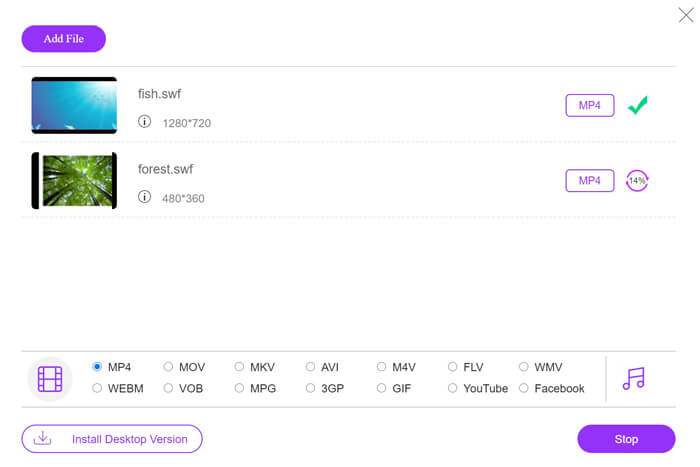
すべての設定が完了したら、Convert ボタンをクリックして、変換後の MP4 ファイルの保存場所を指定します。その後、もう一度Convertボタンをクリックして、SWF を MP4 にすぐ変換します。
パート3。VLC– Windows / MacでSWFをMP4に変更
VLCは、SWF、FLV、MP4、およびその他の形式を再生するオープンソースメディアプレーヤーで有名です。ただし、見逃す可能性のある隠された機能があり、SWFをMP4に変換することもその1つです。ビデオコンバーター用に設計されていないことを考えると、VLCはSWFをMP4に変換するためにわずかに異なる動作をします。
長所
- SWFを一括でMP4に変換します。
- SWFを無料でMP4に変換します。
短所
- SWFコンバーターとしての使用には適していません。
- 変換速度が遅い。
この短いチュートリアルでは、VLCでSWFをMP4にトランスコードする方法を示します。
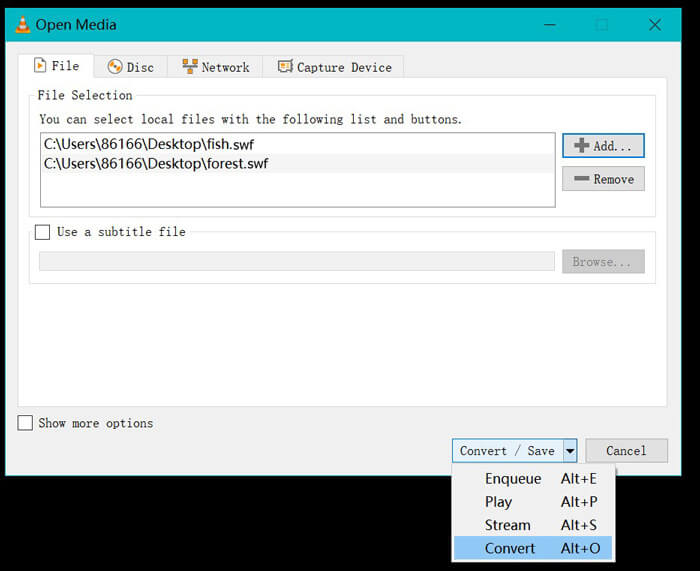
ステップ1. VLC に SWF ファイルを追加
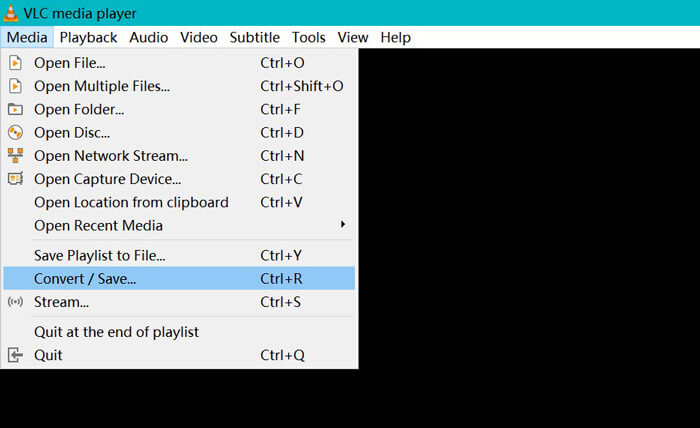
(Windows、Mac、Linux、Chrome 版の)VLC を起動します。上部メニューからメディアを開き、ドロップダウンから変換 / 保存を選択します。
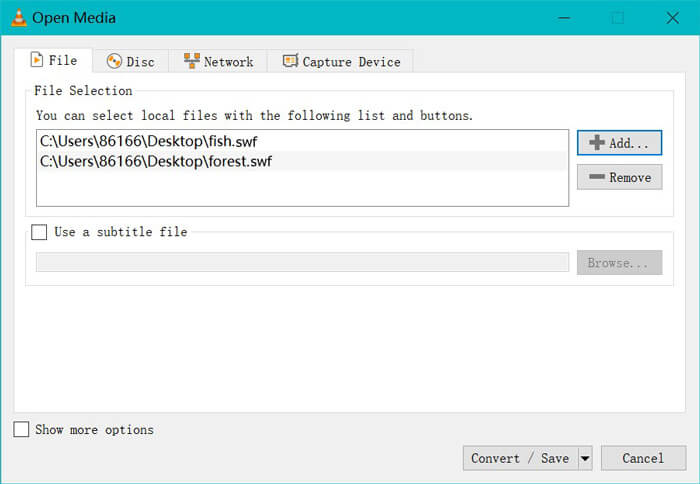
右側の追加ボタンをクリックして、パソコン上の SWF ファイルを読み込みます。
ステップ2. MP4 を選択
下部の変換 / 保存のドロップダウンリストから変換を選びます。
続いて表示される変換ウィンドウで、プロファイルのドロップダウンから MP4 を選択します。
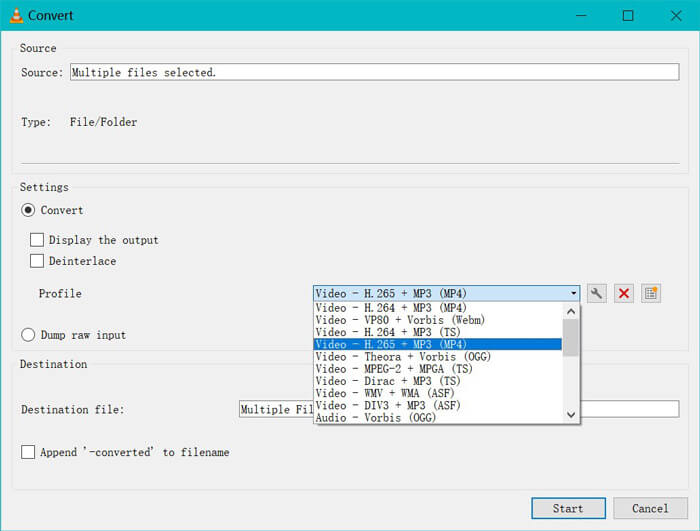
MP4出力の横にある設定アイコンを使用すると、カプセル化、ビデオコーデック、オーディオコーデック、および字幕を調整できます。
ステップ3. VLC で SWF を MP4 に変換
次に、変換されたMP4ファイルを保存する宛先を選択し、[スタート]ボタンをクリックして、VLCを介してSWFからMP4への変換を開始します。
あなたはVLCプレーヤーで進捗状況を見つけることができます。 VLC変換では、記録機能を使用して変換タスクを終了するため、変換速度が遅くなります。
パート4。SWFからMP4へのFAQ
SWFファイルはまだ使用されていますか?
アドビはSWFを正式に廃止しました。これは、SWFがサポートまたは開発されなくなることを示しています。 HTML5ビデオのサポートとCSS3アニメーションがSWFに取って代わりました。
PS3はSWFファイルをサポートしますか?
はい。 Sony PlayStation Portableコンソールは、ファームウェアバージョン2.71以降、SonyのWebブラウザで限定されたSWFファイルを再生できます。どちらのPS3も、インターネットブラウザを介してSWFファイルを実行できます。
MP4ビデオがAndroidフォンのVLCで機能しないのはなぜですか?
VLCの変換機能は、コンピューターでのみ使用できます。 AndroidまたはiOSデバイスでVLCを使用している場合、SWFをMP4に変換することはできません。
結論
この投稿では、オープンソースのSWFからMP4へのコンバーターのトップ3を集めているため、SWFをMP4に変換して、より多くのデバイスで再生できます。また、参考のために、これらの無料コンバーターの長所と短所を示します。
どの無料のSWFからMP4へのコンバーターがお気に入りですか?
または、より良い推奨事項はありますか?
いずれにせよ、以下にコメントを残して私に知らせてください。
-
 MOV VS MP4 –どちらが良いか
 MOV VS MP4、どちらが良いですか?この投稿では、MP4とMOVの違いを説明しているので、ビデオファイルに使用するためのより良い選択を得ることができます。
-
 Windows / Mac / iPhone / Android / OnlineでMP4をAVIに変換する7つの方法
 AVIをMP4ビデオに変換するすべての無料の方法を取得したいですか?この記事をお見逃しなく。 Windows、Mac、iPhone、Android、オンラインでAVIファイルをMP4に無料で変換する7つの方法があります。
-
 MTSファイルをMP4に変換する方法
 MTSファイルをMP4に変換する方法がわかりませんか?このガイドでは、品質を損なうことなく、WindowsまたはMacでMTS形式をMP4に変更する6つの無料で簡単な方法を紹介します。
