


 ビデオコンバーター究極
 スクリーンレコーダー
 ビデオ修復
ビデオ修復
 安全なダウンロード
Windows / Mac / OnlineでVOBファイルをMP4に変換する3つの無料の方法
VOBは、DVDビデオオブジェクトファイル形式として知られています。したがって、DVDディスクは、デフォルトでビデオ、オーディオ、および字幕ストリームをVOB形式で保存します。 MP4に関しては、ビデオ、オーディオ、字幕データを保存するための一般的なコンテナ形式です。 VOB VS MP4の最大の比較は、互換性です。ほとんどすべてのポータブルデバイスとプレーヤーがMP4ビデオを再生できます。これが、VOBをMP4形式に変換する最大の理由です。
さらに、VOBファイルは常に大きなファイルサイズになっています。ストレージスペースを節約し、非互換性の問題を修正するには、VOBをMP4に変換することをお勧めします。同じビデオコンテンツをかなり高品質ではるかに小さいファイルサイズで保存できます。その結果、MP4形式に変換した直後に携帯電話またはコンピューターでVOBビデオを再生できます。

パート1:バッチでVOBをMP4オンラインに変換する方法
バッチ変換に対応したオンラインのVOBからMP4へのコンバーターはありますか?もちろんあります。それがFVC Free Online Video Converterです。このツールでは、ユーザーはVOBファイルをMP4ファイルにオンラインで無料かつ一括変換できます。最大時間の制限はありません。ファイルサイズが大きすぎることを心配する必要もありません。そのため、制限なしで利用できるオンラインのVOBからMP4コンバーターを探しているなら、FVC Free Online Video Converterが第一候補になるでしょう。
- •元の品質を維持しながら、VOBファイルをMP4にバッチ変換します。
- •ファイルサイズの制限はありません。大きなVOBをMP4ファイルに無料で変換できます。
- •VOBをMP4形式にエクスポートする前に、ビデオ解像度、サンプルレート、フレームレートなどを調整します。
- •透かしなし。変換されたMP4ビデオは完全に透かしなしになります。
ステップ1:Add Files to Convertをクリックしてランチャーをインストールします。表示されるウィンドウで、VOBファイルを参照して追加します。
ステップ2:オンラインビデオコンバーター画面の下部で、出力動画形式としてMP4を設定します。
ステップ3:隣にある歯車(gear)アイコンをクリックして、出力動画の設定を調整します。
ステップ4:Convertをクリックして、VOBをMP4にオンラインで無料変換します。
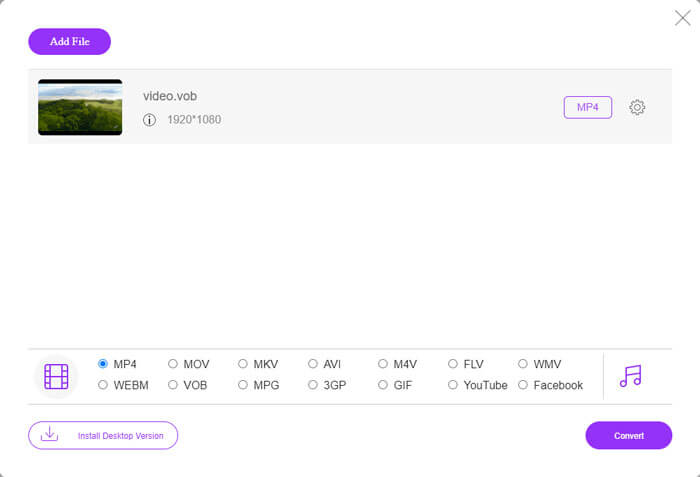
この無料オンライン MP4 コンバーターは、M2TS、MTS、MOV、MKV、WMV、TS など、その他の形式から MP4 への変換にも対応しています。
デスクトップ版もございますので、ぜひお試しください。
無料ダウンロードWindows 7 以降に対応安全なダウンロード
無料ダウンロードMacOS 10.7 以降に対応安全なダウンロード
パート2:WindowsでVOBをMP4に変換する方法(VLCを使用)
VLCは、Windows、Mac、iOS、およびAndroidユーザー向けの無料のVOBからMP4へのコンバーターアプリです。お使いの携帯電話またはコンピューターでVOBファイルをMP4に簡単に変換できます。ここでは、VLC MediaPlayerを使用してWindows10でVOBをMP4に変換する方法を示します。
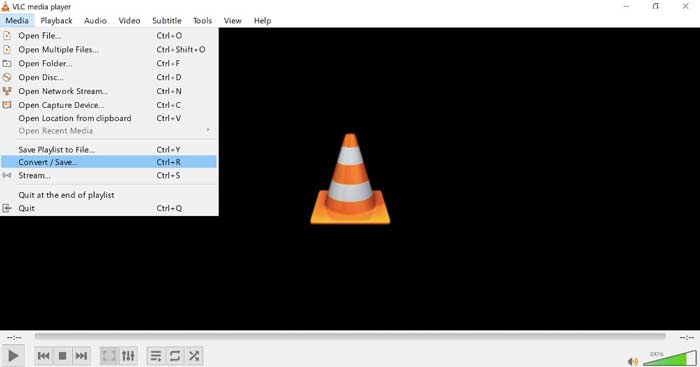
ステップ1:VLCを起動します。上部のMediaメニューからConvert/Saveを選択します。
ステップ2:Open MediaウィンドウでAddをクリックします。VLCに取り込むVOB動画を参照して追加します。
ステップ3:右下のConvert/SaveからConvertを選択します。
ステップ4:Profile欄で、出力動画形式としてMP4を設定します。
ステップ5:Startをクリックして、VLCでVOBファイルをMP4に変換し始めます。
パート3:MacでVOBをMP4に変換する方法(HandBrakeを使用)
HandBrakeは、Windows、Mac、LinuxでVOBをMP4に無料で変換できるオープンソースのビデオコンバーターです。複数のVOBファイルを同時にMP4に変換することがサポートされています。ビデオ変換速度は速くありませんが。
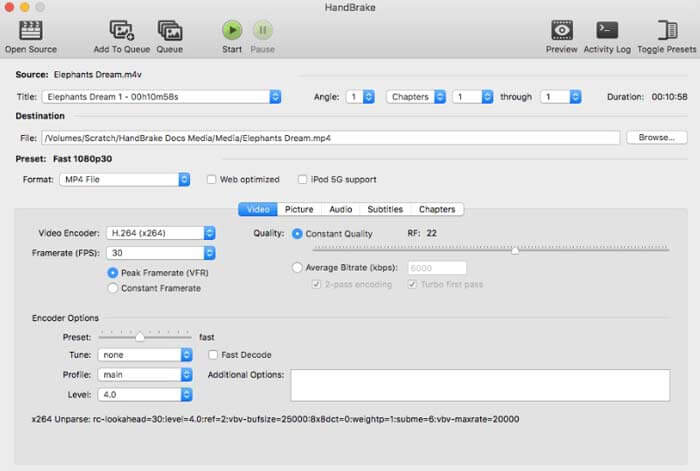
ステップ1:HandBrakeを起動します。Open SourceをクリックしてDVDのVOBファイルを追加します。
ステップ2:Browseをクリックして、新しい保存先フォルダを指定します。
ステップ3:PresetセクションのFormatリストからMP4を選択します。
ステップ4:その他の動画出力設定を調整します。
ステップ5:Startをクリックして、MacでHandBrakeを使いVOBをMP4に変換します。
-
パート4:VOBをMP4に変換するためのFAQ
FFmpegを使用してVOBをMP4に変換する方法は?
FFmpegはWindowsおよびMacユーザーにとって優れたVOBコンバーターです。しかし、FFmpegは初心者には使い方や実行方法がわかりにくいツールでもあります。コマンドライン操作に慣れている場合は、FFmpegのウィンドウで「ffmpeg -i input -acodec libfaac -vcodec mpeg4 -b 1200k -mbd 2 -flags+mv4+aic -trellis 2 -cmp 2 -subcmp 2 -metadata title=filename output.mp4」と入力できます。その後、Enterキーを押してFFmpegでVOBをMP4に変換します。
Windows Media Playerを使用してVOBをMP4に変換できますか?
いいえ。WindowsMediaPlayerはVOBプレーヤーのみになります。 WindowsMediaPlayerでVOBファイルを再生できます。ちなみに、Windowsで初めてVOBファイルを再生するときは、コーデックをダウンロードする必要があります。
iPhoneとAndroidでVOBファイルを再生する方法は?
VOBは、携帯電話ではネイティブにサポートされていません。 VLC MediaPlayerなどのVOBプレーヤーをインストールする必要があります。または、VOBを他の形式に変更して、ファイルサイズを効果的に圧縮することもできます。たとえば、MP4からVOBファイルを作成して、iPhoneとAndroidを再生できます。
最高のVOBからMP4へのコンバーターは何ですか?人によって答えは異なります。品質を損なうことなくVOBをMP4にバッチ変換したい人もいれば、直感的なインターフェイスや高度な機能などに重点を置いている人もいます。いずれにせよ、他に何もインストールしたくないが、大きなVOBファイルをMP4に変換する必要がある場合は、FVC Free Online VideoConverterが最適です。 VOBファイルを制限や透かしなしでオンラインでMP4にバッチ変換できます。
もっと読む-
 品質を低下させずにM2TSをMP4に変換する方法
 ビデオをHDカムコーダーから一般的なMP4に変換したいですか? WindowsとMacでM2TSファイルをMP4に変更する5つの簡単で無料の方法があります。
-
 品質を損なうことなくMOVをMP4に変換する方法
 MOV(Apple QuickTime Movie)ファイルをMP4に変換したいですか?この投稿では、Windows 10/8/7 / XPおよびMacOSXでMOVビデオファイルをMP4形式に変換する4つの無料の方法を共有しています。
-
 M2TSファイルを無料で編集および変換する方法
 M2TSファイルを無料で編集するにはどうすればよいですか? M2TSファイルを変換する方法はありますか?このガイドでは、M2TSファイルを簡単に編集および変換するのに役立つ最高の無料のM2TSエディターを紹介します。
-
