


 ビデオコンバーター究極
 スクリーンレコーダー
 ビデオ修復
ビデオ修復
 安全なダウンロード
オンラインおよびオフラインで Xvid を MP4 に変換する一般的な方法
Are you encountering some problems when playing your Xvid videos? Then we offer the best solutions for you. The best solution you can do is to convert your Xvid to other great formats, like MP4. This way, you won’t get into trouble streaming your videos. This article will give you a free Xvid to MP4 converter you can use. This tool will help you convert your video files easily and instantly. If we caught your interest in this kind of discussion, read the following parts and cherish your time learning new things!

パート 1: Mac および Windows で Xvid を MP4 に変換する最も簡単な方法
Use Video Converter Ultimate to convert Xvid to MP4. You can use this converter on both a Mac and a Windows computer. It converts data 30 times faster than other converters. Additionally, because it supports batch conversion, you can convert numerous Xvid files into a single MP4 format. You may easily and quickly convert files with this feature. Additional video file types supported by this utility include AVI, FLV, MKV, MOV, VOB, WMV, M4V, and more than 100 more. It is available for Xvid and MP4 users. Additionally, because of its user-friendly design and basic conversion techniques, this converter may be used by both novice and experienced users. To learn more about what to anticipate when using the Video Converter Ultimate, see the extra features listed below.
機能
◆ Xvid、MP4、DIVX、M4V、FLV、AVI、MKV、WMV、SWF など、さまざまなビデオ ファイル形式を変換します。
◆ 複数のビデオ ファイルを同時に変換します。
◆ 他のコンバーターの 30 倍の超高速変換プロセスを提供します。
◆ ビデオ エンハンサー、コンプレッサー、トリマー、クロッパー、リバーサーなどのビデオ編集ツールを提供します。
以下の詳細な手順に従って、FVC Video Converter Ultimate を使用して Mac または Windows で Xvid を MP4 に変換します。
Step 1: Download Video Converter Ultimate on your Mac or Windows by clicking the Download button below. After that, when you are done installing it, launch the application.
無料ダウンロードWindows 7 以降に対応安全なダウンロード
無料ダウンロードMacOS 10.7 以降に対応安全なダウンロード
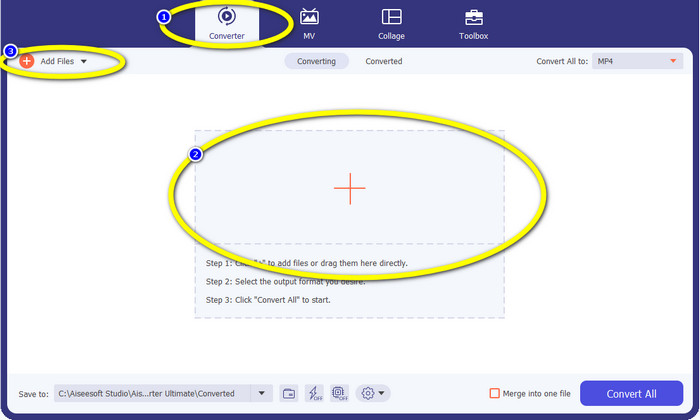
Step 2: When the interface is already on your screen, select the Converter option and click the + icon to add the Xvid file. Another way to add a video file is to click the Add Files button.
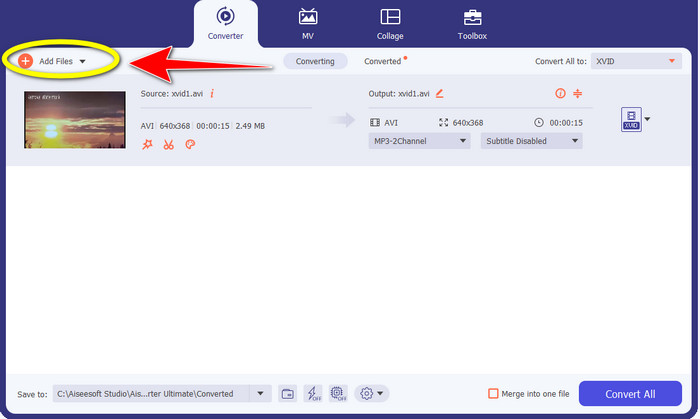
Step 3: This application lets you convert multiple files. So to add another Xvid video you want to convert, click the Add Files button on the upper left of the interface.
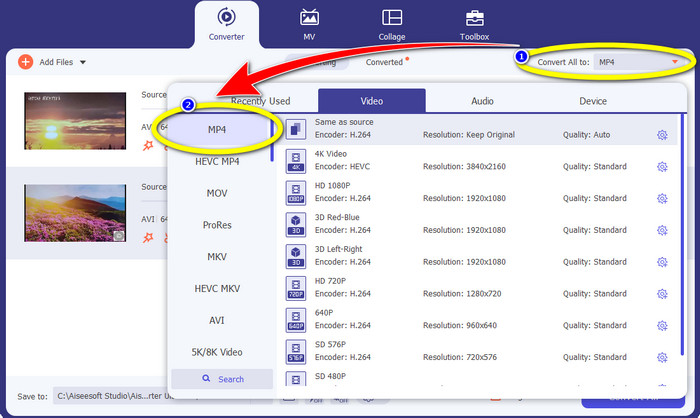
Step 4: Afterwards, to convert them into one MP4 file, click the Convert All to button. Select the MP4 file from the format options and choose your desired video quality.
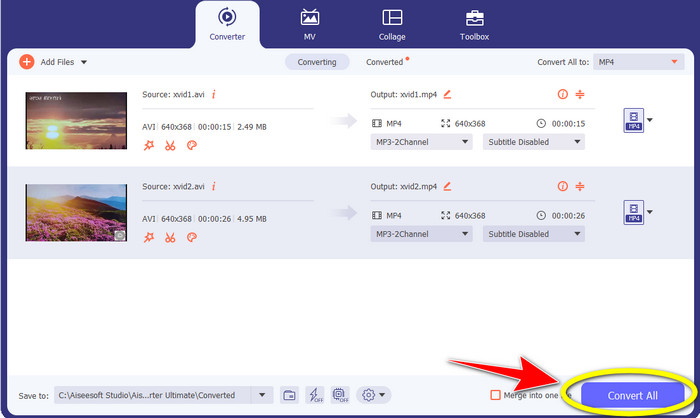
Step 5: After selecting the desired output format, you can proceed to the conversion process by clicking the Convert All button. Then, save your MP4 video on your device.
パート 2: VLC で Xvid を MP4 に変換する方法
In this part, you will learn how to convert Xvid to MP4 in VLC. For additional information, VLC Media Player can convert multiple video files besides playing videos. It supports video file formats, such as MP4, TS, WEM, OGG, and more. Moreover, it can convert audio files like MP3, FLAC, etc. In this case, VLC is also a reliable application for converting various files. However, this software is not suitable for beginners. It has a hard-to-understand interface, which makes it more complicated to utilize. Also, it takes too much time when downloading and installing it on your computers.
Step 1: Download and install the VLC Media Player on your computer. Then, launch the application.
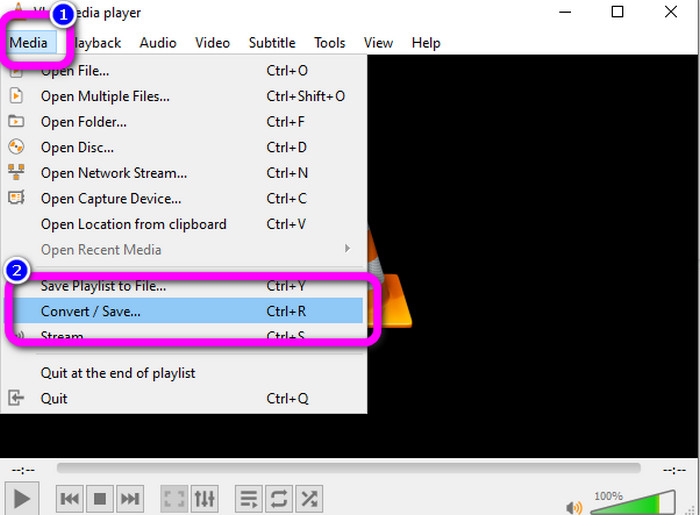
Step 2: Go to the upper part of the interface and select the Media option. Then, click the Convert/Save button.
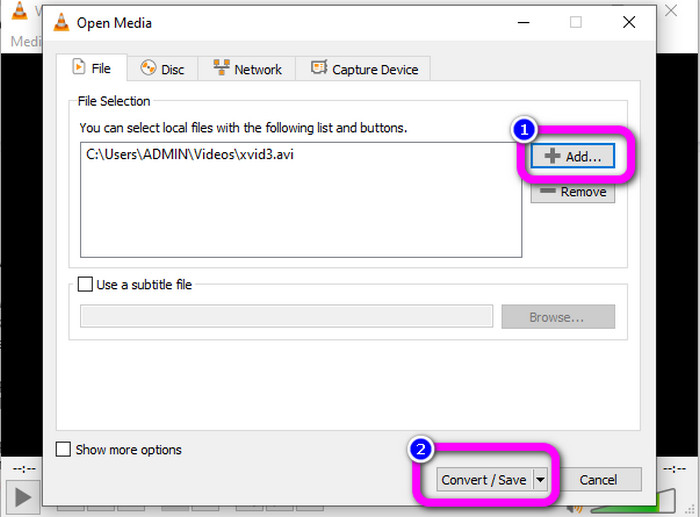
Step 3: Press the Add button to insert the Xvid video file. When the file is already added, click the Convert / Save button.
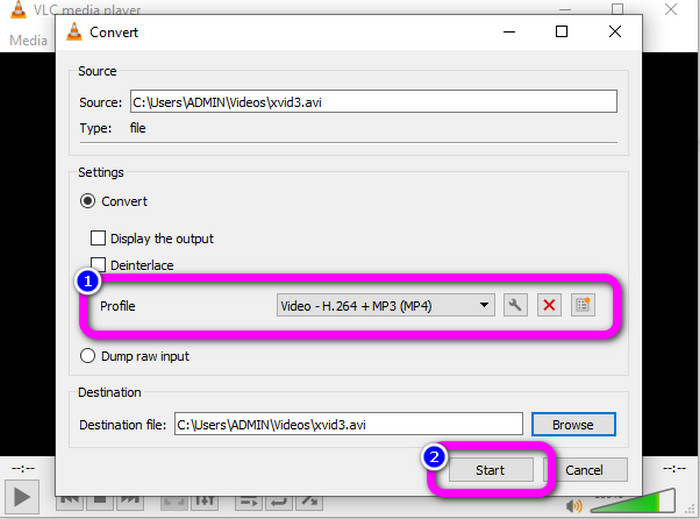
Step 4: For the last step, click the Profile to see the format options and select the MP4 file format. Set your destination file and proceed to the conversion process by clicking the Start button.
パート 3: Handbrake で Xvid を MP4 に変換する簡単な手順
Handbrake は、Xvid ファイルを MP4 形式に変換する際に信頼できるもう 1 つのオフライン ツールです。また、このツールはバッチ変換プロセスを提供し、複数のビデオで構成されるフォルダーを挿入して一度に変換するだけで済みます。ただし、使いにくいです。多くのオプションは初心者にとって混乱を招きます。以下の簡単なガイドに従って、ハンドブレーキを使用して Xvid を MP4 に変換します。
Step 1: Download the Handbrake on your computer. Launch it after the installation process.
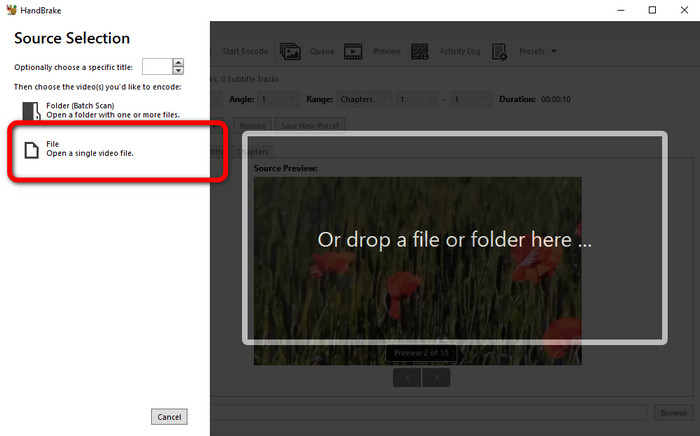
Step 2: Open the File button to add the Xvid video file.
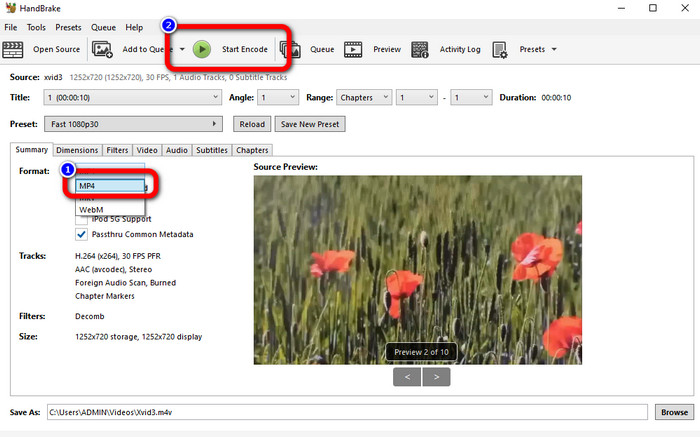
Step 3: Go to the Format option and select the MP4 file format. Then, click the Start Encode button to convert your Xvid file to MP4 format.
パート 4: オンラインで Xvid を MP4 に変換するプロセス
FVC Free Video Converter Online is a great tool to convert Xvid to MP4 online. It offers a user-friendly interface which is perfect for beginners. You can only convert files in just three simple steps. In addition, you can also convert multiple files at once because it allows you to do a batch conversion process. This tool supports various video file formats, such as FLV, AVI, MKV, WMA, MOV, VOB, and more. If you want to use FVC Free Video Converter Online, use the simple instructions below.
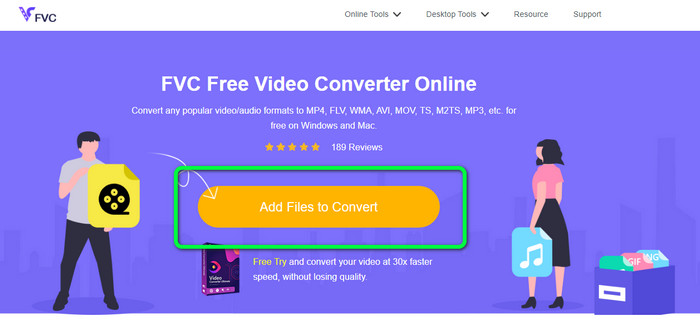
Step 1: Go to the FVC Free Video Converter Online website. On the main page, select the Add Files to Convert button to upload the Xvid video file you want to convert.
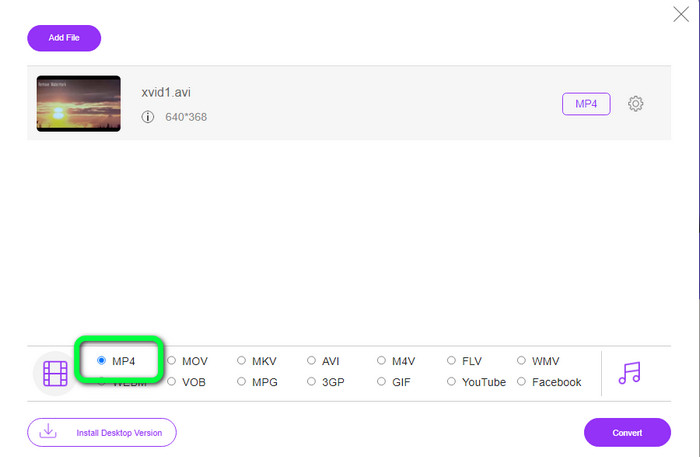
Step 2: As you can see on the lower part of the interface, there are format options. Select the MP4 as your output file format.
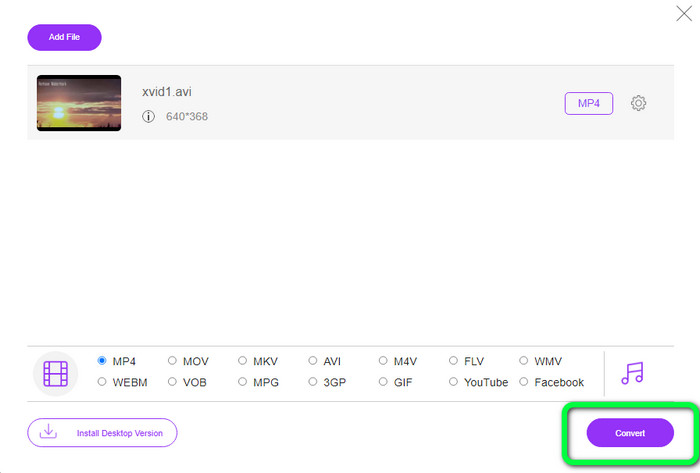
Step 3: Hit the Convert button to convert your Xvid file to MP4 format. Wait for the conversion process and save your final video.
パート 5: Android を使用して Xvid を MP4 に変換する優れた方法
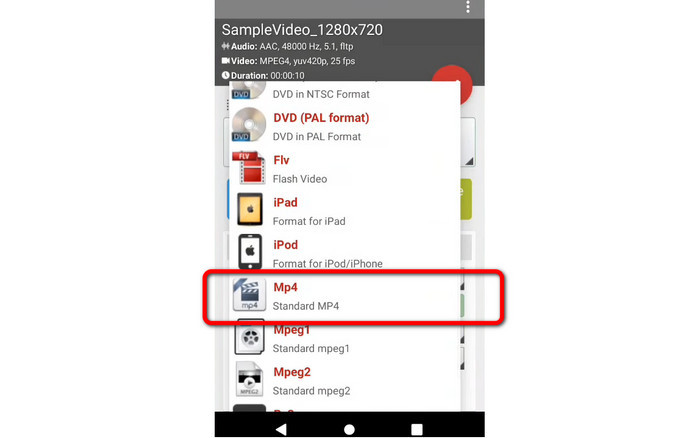
If you want an Xvid to MP4 converter for Android, you can use the Video Format Factory. You can easily change a video file to other formats using this application. However, converting your videos is time-consuming because the conversion process is slow. See the steps below to convert Xvid to MP4.
Step 1: Download and install the Video Format Factory on your Android.
Step 2: After launching the application, select the Video button to insert the Xvid file.
Step 3: Select the Convert Option and select the MP4 format from the format options. Then start the conversion process by clicking the Checkmark.
参考文献:
Easy-to-learn Methods on How to Convert Xvid to DivX
Excellent Techniques to Convert XviD to 3GP Quickly
パート 6: Xvid から MP4 への変換に関する FAQ
1. Xvid ファイル形式とは何ですか?
Xvid ファイル形式は、MPEG-4 コーディング標準に準拠したビデオ コーデックです。このコーデックは、MPEG-4 Part 2 A SP 形式を使用してビデオ ファイルを圧縮します。
2. Xvid は高品質ですか?
はい。このファイルは Project Mayo の続きです。その目標は、高品質のオープン ソース MPEG-4 コーデックを開発することです。
3. MP4 は圧縮されていますか?
はい、そうです。圧縮された MP4 ファイルが存在します。ビデオのさまざまなコーデックを MP4 ファイルに含めることができます。 MP4 用の最も人気のあるビデオ コーデックには、H.264、H.265、および MPEG-4 があります。 H.264 圧縮では、MP4 ビデオ コーデックを使用して、1 時間のビデオを約 1 GB に圧縮できます。
結論
With all the information above, you already know how to convert Xvid to MP4 online, offline, and using Android devices. But the best converters you can use are Video Converter Ultimate and FVC Free Video Converter Online. These two converters offer you an intuitive interface that is suitable for all users.
-
 Macでオンラインツールを使用してMPGをM4Vに変換する方法
 あなたは新しい Mac ユーザーで、MPG を M4V に変換する方法を知りませんか?次に、この記事を読んで詳細を知り、Mac を使用してファイルを変換する方法を見つけてください。
-
 DIVX を MP4 にすぐに変換する成功した方法
 DIVX を MP4 に変換するにはどうすればよいですか?最適なソリューションをお探しの場合は、適切な記事をご覧ください。 DIVXをMP4に簡単に変換する方法を紹介します
-
 最も効果的な方法で F4V を MP4 に変換する方法
 F4V ビデオの品質は良くありませんか?次に、MP4 ファイルに変換します。この投稿では、オンラインおよびオフラインで F4V を MP4 に変換する最良の方法を紹介します。
