


 ビデオコンバーター究極
 スクリーンレコーダー
 ビデオ修復
ビデオ修復3エリートソフトウェアでビデオを逆再生する方法を学ぶ
さまざまな動画共有プラットフォームにアップロードされている多くの動画では、すでに逆再生効果が追加されており、視聴者にとって新鮮な映像表現となっています。そこで本記事では、視聴者の目を引く新しい動画に仕上げるために、動画を逆再生する方法を、詳しい手順と併せて、利用できるさまざまなソフトウェアとともに紹介します。動画の逆再生について知りたい方は、ぜひ読み進めてみてください。

パート1。ビデオを逆再生するための最良の方法
この高性能コンバーターは、特に逆再生編集において、動画編集の第一歩をすでに踏み出しています。多くのユーザーがこのツールを使って、自分の動画を印象的なものに仕上げています。Video Converter Ultimate は、期待を上回る機能を忠実なユーザーに提供してきました。さらに、このソフトには、視聴者の目を引く新しい映像に仕上げるための高度な機能が多数搭載されています。では、動画を逆再生で再生する方法とその保存方法を知りたいですか? それでは、以下の手順に従って実際に試してみましょう。
ステップ1. Video Converter Ultimate を使用する前に、まずはソフトをダウンロードします。インストールを行い、簡単なセットアップを完了させてください。
無料ダウンロードWindows 7 以降に対応安全なダウンロード
無料ダウンロードMacOS 10.7 以降に対応安全なダウンロード
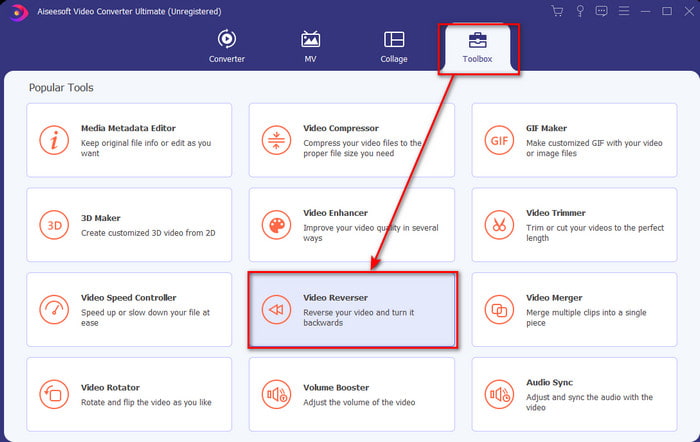
ステップ2. ツールボックスに移動し、ビデオリバーサーを探します。
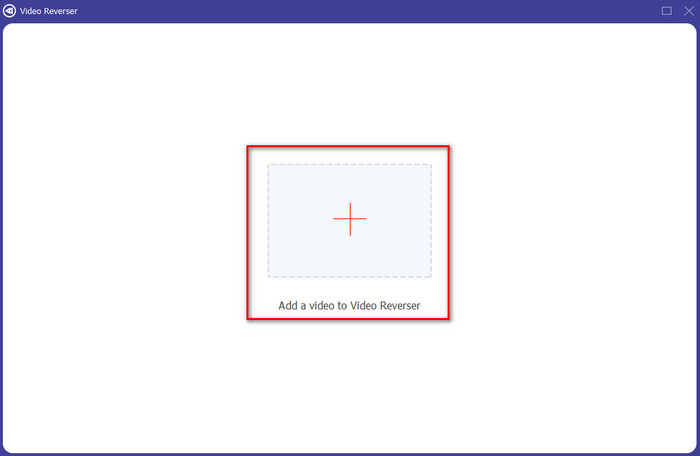
ステップ3. ファイルを追加するには、+ボタンをクリックするとフォルダーが表示されます。逆再生にしたい動画ファイルを選択し、開くをクリックしてファイルを読み込みます。
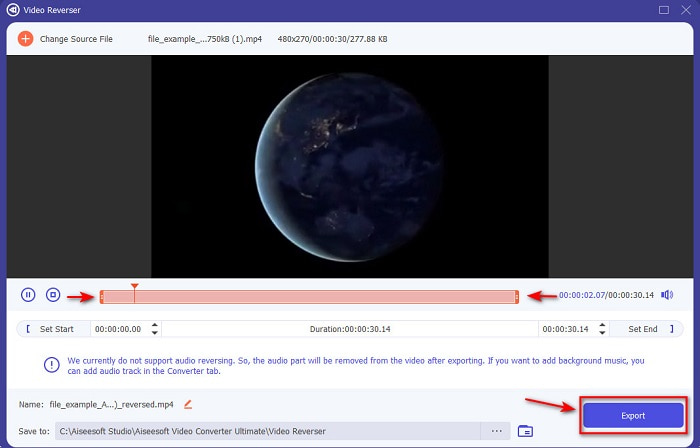
ステップ4. 動画を短くしたい場合は、再生開始位置と終了位置を変更します。その後、エクスポートをクリックして、逆再生動画の保存を開始します。
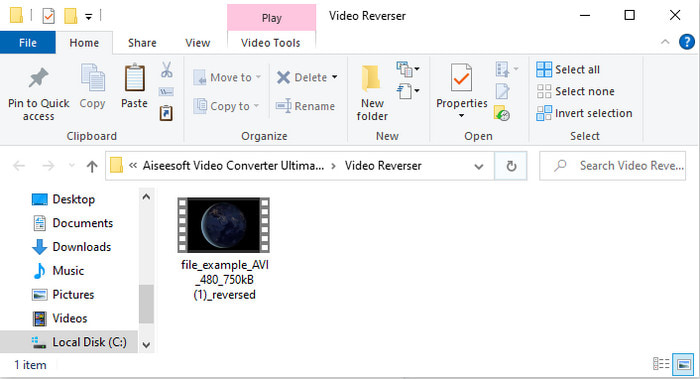
ステップ5. 動画のエクスポートが完了すると、逆再生された動画が入っているフォルダーが画面に表示されます。ファイルをクリックして、逆再生動画を再生してみましょう。
長所
- 多くの高度な機能があり、AdobePremiereProよりもはるかに扱いやすいです。
- すべてのビデオフォーマットをサポートしています。したがって、ビデオがAVI、MP4、MKV、MOVなどの形式であるかどうかを心配する必要はありません。
- 驚異的な変換機能を提供するシンプルなツールが必要なプロや初心者に適しています。
短所
- 有料ですが、Premier Proソフトウェアと比較すると、価格ははるかに安くなっています。
- ツールにアクセスする前に、まずツールをダウンロードする必要があります。
パート2。iMovieでビデオを逆再生する方法
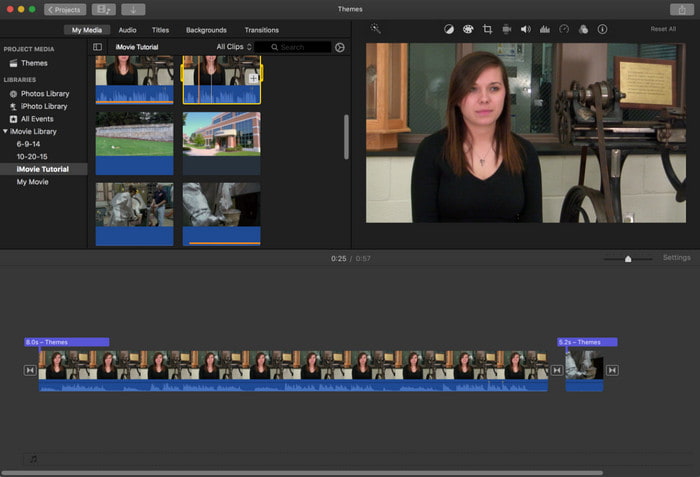
iMovieは、Mac に標準搭載されている無料の動画編集ソフトです。すでにドライブにプリインストールされているため、あらためてダウンロードする必要はありません。そこで、iMovie で動画を逆再生する方法を知りたい方は、以下の手順に従ってください。
ステップ1. Mac で iMovie を開きます。その後、動画ファイルをタイムラインへドラッグ&ドロップします。
ステップ2. 時計のような形のボタンをクリックし、逆再生にチェックを入れます。続いて、再生速度を「通常」「スロー」「速い」など、お好みに合わせて調整します。
ステップ3. 出力を保存するには、書き出し(エクスポート)ボタンをクリックし、保存先をギャラリーに指定します。
長所
- ダウンロードは不要で、すべてのMacユーザーが無料で利用できます。
- すぐにやりたいクイック編集に使いやすい。
- 自動保存機能があるため、+Sをコマンドする必要はありません。
短所
- ここでビデオをエクスポートするには、かなりの時間がかかります。
- プロの編集者として必要となる高度な機能が欠けています。
パート3.AdobePremiereProを使用してビデオを逆再生する方法
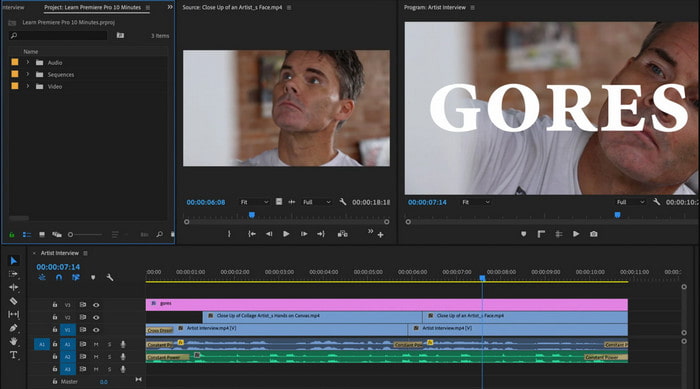
Adobe Premiere Proは、プロ並みのクオリティを目指すなら最適な編集ツールです。ただし、動画編集の経験がほとんどない初心者にとっては、やや扱いが難しく感じられるかもしれません。そこで、Premiere Pro で動画を逆再生する方法を身につけたい方は、以下の手順を順番どおりに行ってください。
ステップ1. Adobe Premiere Pro をパソコンにダウンロードしてインストールし、ソフトを起動します。
ステップ2. 動画ファイルをメディアポートへドラッグ&ドロップし、その後タイムラインへ移動します。動画をクリックして右クリックし、速度・デュレーションを選択します。
ステップ3. 逆再生速度にチェックを入れ、希望する再生時間を設定してからOKをクリックします。
長所
- プロの出力のための高度な機能をサポートしているため、プロの編集者にとって最良の選択です。
- それは重い編集を行うことができ、あなたは高品質の編集されたビデオを作成する必要があります。
- ほぼすべてのビデオ形式をサポートしています。
短所
- 逆にしたり、単純な編集をしたりするだけの場合は、非常にコストがかかります。
- これを使用する方法を学ぶことはあなたに多くの時間を要します。基本的に、それはユーザーフレンドリーではありません。
- 不明な理由でソフトウェアがクラッシュすることがあります。
パート4。逆方向にビデオを再生することに関するFAQ
iPhoneでビデオを逆再生するにはどうすればよいですか?
iPhone には標準で逆再生編集機能は搭載されていませんが、iPhone 上で簡単に動画を逆再生できるアプリをダウンロードして利用することができます。ここで紹介しているようなアプリがその一例です。さらに詳しく知りたい場合は、このリンクをクリックして、利用できるその他の動画逆再生アプリを確認してください。
反転した後、ビデオの品質が低下するのはなぜですか?
設定した出力が中または低である可能性があります。ただし、これを回避するには、設定を高く設定して、品質の低下がないリバースビデオを作成できます。ただし、低品質のものよりもはるかに大きなファイルサイズを期待してください。
リバースビデオにサウンドを追加するにはどうすればよいですか?
これらのツールでは、動画は逆再生されますが、音声は対象外になっています。そのため、動画にBGMを追加したい場合は、別途音声を追加する必要があります。動画をより魅力的にするために、こちらの記事で説明している動画に音声を追加する方法もあわせてご覧ください。
結論
ここまでで、動画を逆再生する方法は理解できたと思います。あとは実際に作成するだけです。インターネット上で見つかる優秀なツールを活用すれば、十分実現可能です。しかし、iMovie よりも凝った逆再生動画を作りたいけれど、Premiere Pro ほど高価なソフトは避けたいという方には、Video Ultimate Converterが最適な選択肢です。ユーザーからの評価どおり、このソフトは逆再生に求められるあらゆる面で優れた性能を発揮します。動画の逆再生に取り組み始める前に、自分の動画を印象的なものにしてくれる最適なツールを選ぶことが大切です。詳しく知るには、まずこのツールをダウンロードし、あとはツールに任せてみてください。
-
 具体的なチュートリアル–Audacityで2つのオーディオトラックをマージする方法
 Audacityは、オーディオの編集で評判を楽しんでいます。 Audacityをダウンロードしましたが、Audacityでオーディオトラックをマージする方法がわかりませんか?この投稿では、Audacityでトラックをマージする方法を説明します。
-
 古いTVシリーズを組み合わせるためにMPEGファイルをマージする2つの効率的な方法
 MPEGの古いテレビシリーズがある場合は、要件に応じてMPEGファイルを1つのムービーにマージする2つの効率的な方法について詳しく知ることができます。
-
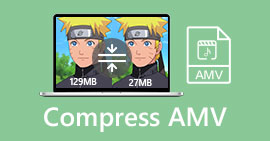 AMVビデオをより小さなサイズに圧縮する2つの方法
 アニメMVをオンラインでアップロードするかダウンロードするかにかかわらず、AMVの大きなファイルサイズは厄介です。この投稿では、この問題を解決するためにコンピューター上のAMVファイルサイズを小さくする2つの簡単な方法を共有しています。
