


 ビデオコンバーター究極
 スクリーンレコーダー
 ビデオ修復
ビデオ修復
 安全なダウンロード
AirShouスクリーンレコーダーレビュー:知っておくべきこと
バーチャル会議やオンライン授業など、さまざまなことがオンラインで行われるようになり、Android や iOS のスマートフォンでそれらを録画する必要が生じることがあります。とはいえ、画面録画ツールの必要性はそれだけにとどまりません。スマホ画面上のあらゆる操作を録画したい場合にも、こうしたツールは欠かせません。もしこの作業を行うためにAirShouのインストールを検討しているなら、この記事がお役に立つはずです。本レビューでは、その主な機能を詳しく検証し、優れている点と改善が望まれる点を明らかにします。また、AirShou が期待に合わなかった場合に備えた代替ツールも紹介します。ぜひ最後までお読みください。

パート 1. AirShou スクリーン レコーダーとは何ですか?
AirShouはAndroidとiOS向けのスクリーン録画アプリです。ルート化や脱獄を必要とせず、高画質のスクリーン動画を録画できることで知られています。シンプルなインターフェースで、数回タップするだけで録画を開始できるため、ゲーマー、コンテンツクリエイター、教育関係者の間で人気です。さらに、このスクリーン録画アプリはクリアな音声で画面の動きをキャプチャでき、様々な解像度とビットレートに対応しているため、ユーザーは動画品質を柔軟に選択できます。
互換性:
AirShouはiOS 9以前のバージョンと互換性があります。iOSのアップデートバージョンには対応していません。Androidの場合は、バージョン5.0以降のデバイスと互換性があります。
評決:
AirShouはかつては堅実なスクリーンレコーダーだったかもしれませんが、今ではもはや実用的な選択肢ではありません。サポートがiOS 9以前の古いバージョンに限定されており、非公式のソースからサイドロードする必要があるため、手間や潜在的なリスクを考えると、使う価値はありません。最新のデバイスをお使いの場合は、完全な互換性、追加機能、そして積極的なサポートを提供する最新のスクリーンレコーダーを選択することをお勧めします。
パート2. AirShouスクリーンレコーダーの詳細
一方で、まだ AirShou をサポートしている端末を使っている場合、日常的な用途であれば、今でも信頼できる画面録画アプリとして利用できます。実際、基本的な画面録画ニーズに役立つ機能を備えており、操作や設定もわかりやすく簡単です。以下では、その主な機能やメリット・デメリットをさらに詳しく見ていきましょう。
主な特徴:
• 画面をHDで録画します。
• 解像度、ビットレート、フレーム レートを調整できます。
• 内部および外部オーディオ録音をサポート
• 簡単にタップして録画を開始および一時停止できます。
• 軽量で CPU 使用率が低い。
長所
- 初心者に優しいインターフェース。
- 出力ビデオに透かしはありません。
- 高品質の画面録画を生成します。
短所
- iOS 10 以降などの最新バージョンの iOS とは互換性がありません。
- App Store または Google Play では利用できなくなりました。
- インストールにはサードパーティのソースが必要です。
パート3. iOS / AndroidにAirShouをインストールするにはどうすればいいですか?
AirShouスクリーンレコーダーはApp StoreとGoogle Playでは利用できなくなりました。ダウンロードするには、公式サイトにアクセスしてください。ツールのインストール方法の詳細については、以下の手順に従ってください。
方法1:iPhone用のAirShouスクリーンレコーダーをダウンロードする
ステップ1.iPhone で Safari を開き、「AirShou Screen Recorder」と検索します。
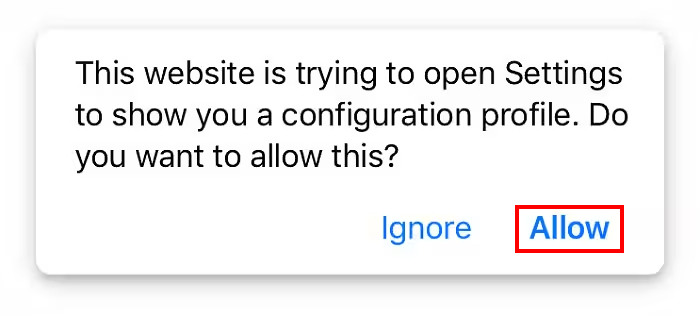
ステップ2.続いて、許可ボタンをタップして、iOS にアプリのインストールを許可します。
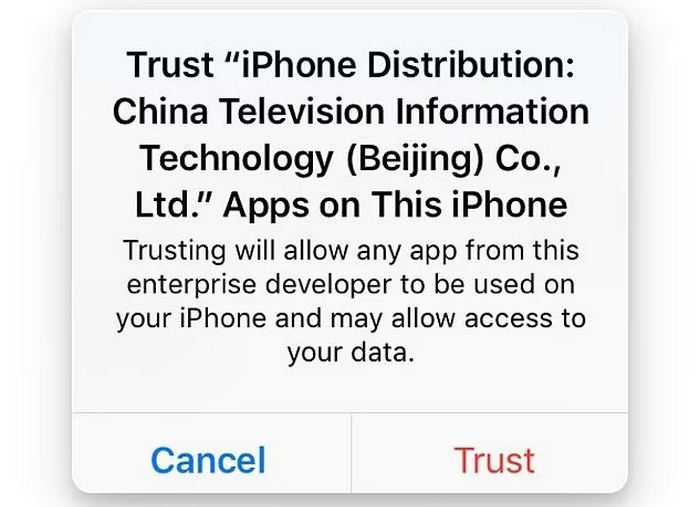
ステップ3.その後、別のメッセージが表示されるので、信頼ボタンをタップします。
ステップ4.最後に、iPhone 上でアプリを起動します。
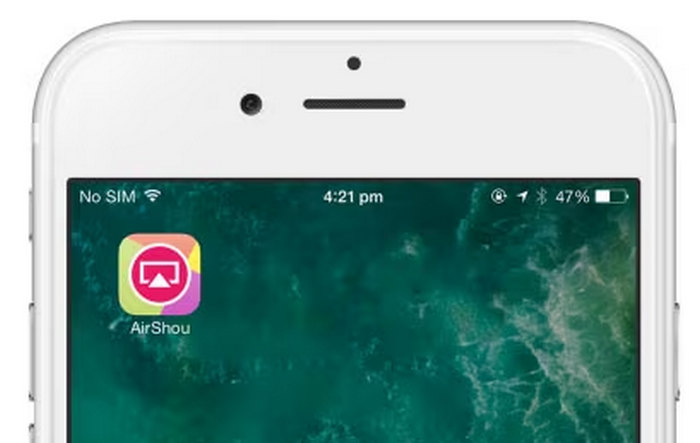
ただし、アプリはすべてのデバイス、特に新しいiOSバージョンではスムーズに動作しない可能性があることにご注意ください。インストール後、正常に動作するか必ずご確認ください。また、サードパーティのソースからダウンロードする際は注意し、デバイスの安全を守るために不要な権限を付与しないようにしてください。
方法2:Android用のAirShouスクリーンレコーダーをダウンロードする
AirShou は Google Play ストアで入手できなくなったため、Android ユーザーは APK ファイルを使用して手動でインストールする必要があります。
ステップ1.Android のブラウザを使って AirShou の APK ファイルを検索し、ダウンロードします。
ステップ2.設定を開き、セキュリティを探します。提供元不明のアプリを有効にして、Play ストア以外の提供元からアプリをインストールできるようにします。APK ファイルをインストールするには、このステップが必要です。
ステップ3.ダウンロードが完了したら、ダウンロードフォルダ、またはファイルを保存した場所を開きます。AirShou の APK ファイルを探してタップし、表示される指示に従ってインストールします。
ステップ4.インストールが完了すると、ホーム画面に AirShou のアイコンが表示されます。それをタップしてアプリを開き、画面録画を開始します。
注意:AirShou は公式アプリストアでは配信されていないため、セキュリティリスクを避けるためにも、信頼できるサイトから APK をダウンロードしてください。常にファイルをマルウェアスキャンし、アプリに付与する権限には十分注意しましょう。
興味があれば、こちらをクリックしてCamtasia Recorder のレビューをお読みください。
パート4. AirShouスクリーンレコーダーのベスト代替品
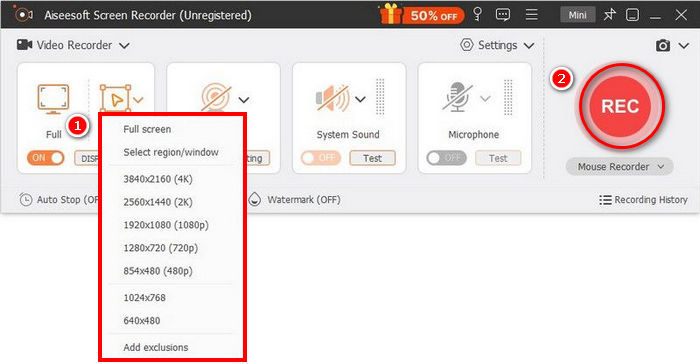
AirShou Screen Recorder は、対応端末が古く、インストール手順も直接的でないことに不安を感じる場合、より良い代替としてFVC Screen Recorderをおすすめします。この画面録画ツールは、シンプルで直感的なインターフェースを備えており、誰でも簡単に画面を録画できます。
無料ダウンロードWindows 7以降に対応安全なダウンロード
無料ダウンロードMacOS 10.7以降に対応安全なダウンロード
長所
- 全画面、選択したウィンドウ、またはカスタム領域を記録できます。
- ビデオ通話、会議、ゲームプレイ、オンライン授業を録画する
- 録画中にテキスト、線、ハイライト、図形を追加できます。
- システムオーディオとマイク音声の両方を録音できます。
- さまざまなビデオおよびオーディオ出力形式をサポートします。
- HD でビデオを画面録画します。
短所
- 無料版では制限があるように感じるかもしれません。
パート5. AirShouスクリーンレコーダーに関するよくある質問
AirShou はまだ App Store または Google Play で入手できますか?
いいえ、AirShouスクリーンレコーダーはApp StoreやGoogle Playなどの公式アプリストアでは入手できなくなりました。インストールするにはサードパーティのソースからダウンロードする必要があり、セキュリティリスクが生じる可能性があります。
AirShou を新しい iOS または Android バージョンで使用できますか?
AirShouスクリーンレコーダーはiOS 9以前のバージョンとのみ互換性があります。新しいiOSバージョンでは正常に動作しないか、全く動作しない可能性があります。Androidではバージョン5.0以上をサポートしていますが、APKファイル経由でインストールする必要があります。
AirShouは今でも機能していますか?
はい、ただし制限があります。AirShouスクリーンレコーダーは、特にiOS 9以下およびAndroid 5.0以降を搭載した古いデバイスでも引き続き動作します。ただし、公式アプリストアでは入手できなくなっており、新しいOSでは正常に動作しない可能性があります。サードパーティのソースから手動でインストールする必要がありますが、セキュリティと安定性にリスクが生じる可能性があります。
AirShou はデスクトップでの使用に適していますか?
いいえ、AirShouスクリーンレコーダーはデスクトップ用ではありません。モバイルデバイス、特にAndroidスマートフォンやiOSデバイスの旧バージョン向けに開発されています。WindowsまたはmacOS向けの公式AirShouバージョンはありません。
結論
AirShou Screen Recorderは、現在ではやや時代遅れのアプリです。ただし、対応しているデバイスであれば、問題なく動作し、十分に信頼できる画面録画ツールとして利用できる可能性があります。ただし、サードパーティの提供元からインストールする必要があるため、セキュリティリスクがある点には注意してください。より安全で、正式にサポートされている画面録画ツールを探しているなら、Windows と macOS の両方に対応した FVC Screen Recorder など、他の代替案を検討するとよいでしょう。
-
 ShareXスクリーンレコーダーのレビューとShareXで画面を記録する方法
 ShareXスクリーンレコーダーは何に使用されますか? ShareXで画面を記録するにはどうすればよいですか?この投稿はShareXのレビューを提供し、ShareXで画面を記録する方法を示しています。
-
 スクリーンビデオをキャプチャするための4つの最高の無料Web起動レコーダー
 1セントも払わずにデスクトップで画面上のアクティビティを記録するための最良の方法をお探しですか?これが最も頻繁に使用される4つの無料のWeb起動レコーダーです。
-
 コンピューター、iOS、Android向けの3つの最高のFacebook通話レコーダー
 貴重なものを保存するためにFacebookの通話を録音したい場合は、Facebookの通話レコーダーがたくさんあります。ここでは、PC、iOS、およびAndroid用のFacebookビデオ通話を録音するための3つの最良のツールを学ぶことができます。
