


 ビデオコンバーター究極
 スクリーンレコーダー
 ビデオ修復
ビデオ修復
 安全なダウンロード
PCとMac用の信頼できる手順とヒントを備えた最高のMP2オーディオレコーダー
MP2 は、もう一つの非可逆圧縮音声ファイル形式です。MP3 形式はほかの音声形式よりも非常に人気がありますが、標準として用いられているのは常に MP2 です。標準的な音声フォーマットであるため、データが失われやすいという側面もあります。そのため、インターネット経由でデータを転送しても問題はありません。とはいえ、自分の要望に合った最適な MP2 レコーダーを選ぶのに悩んでしまうユーザーもいます。そのような場合は、以下のリストで紹介する手順や情報がきっと役に立つはずです。この記事を読み進めて、MP2 ファイル形式を作成できるオーディオレコーダーについて確認していきましょう。

パート1。WindowsとMacに最適なMP2レコーダー
FVC無料オーディオレコーダー
オンラインで使える優秀なオーディオレコーダーの一つとして、FVC Free Audio Recorder があります。名前のとおり無料ツールで、多くのユーザーにインターネット上で利用されています。インターネット環境さえ問題なければ、このオンラインのVHS MP2 レコーダーを使って高品質な出力形式を作成できます。さらに、このツールは FVC によって開発されており、100% マルウェアフリーなので、安心して利用できます。以下に操作手順をまとめましたので、順番どおりにしっかりと従ってください。
ステップ 1. 提示されているこのリンクをクリックして公式サイトへアクセスします。
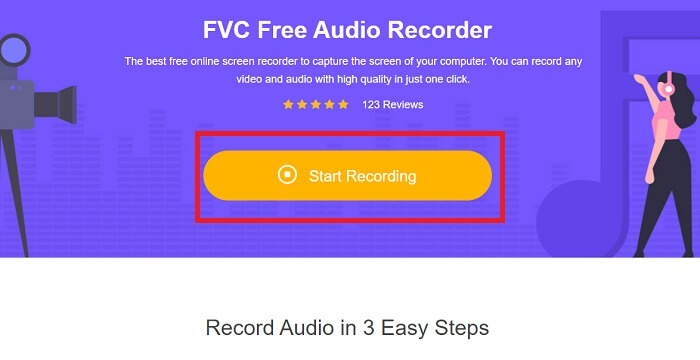
ステップ 2. Start Recording をクリックしてレコーダーを起動します。
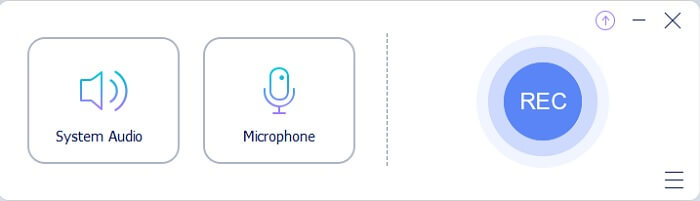
ステップ 3. 画面上に、このようなフローティングツールバーが表示されます。
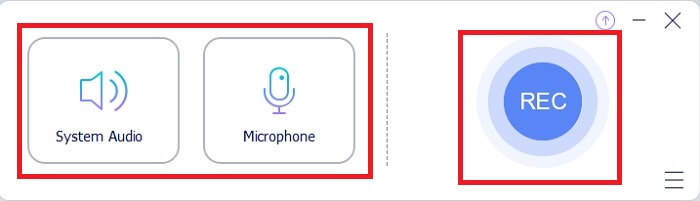
ステップ 4. System Sound と Microphone をクリックして、システム音と自分の声を追加します。設定が完了したら、丸い REC ボタンをクリックして録音を開始します。
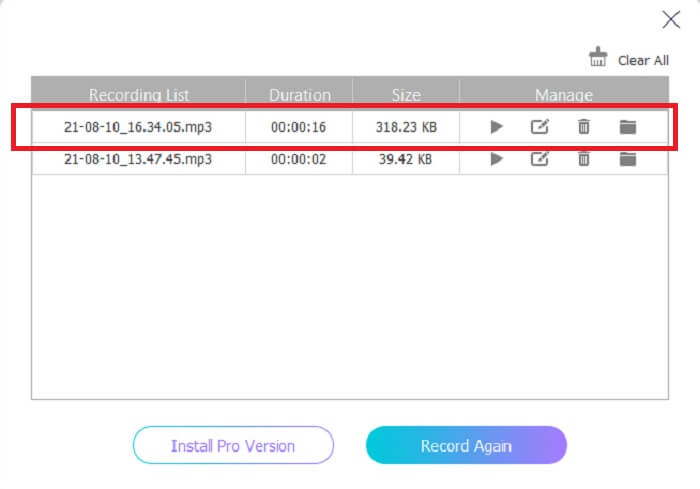
ステップ 5. 録音が終わったら、立方体のようなボタンをクリックして録音を停止します。録音は自動的にパソコンへ保存されるので、そのまま再生して楽しめます。
パート2。MP2オーディオを録音するための拡張された使いやすいMP2レコーダー
1.FVCスクリーンレコーダー
オンラインツールに「すごい」と思ったなら、このツールにはきっと「最高だ」と感じるでしょう。オンライン版のレコーダーとは異なり、FVC Screen Recorder は多機能で、あなたの創造力を制限しません。音声録音をさらにレベルアップさせ、他のツールでは実現できない機能も提供します。このツールが本当にあなたの求めるMP2 レコーダーになり得るのか、まだ半信半疑かもしれませんが、それは実際に試して確かめてみてください。前置きはこのくらいにして、このツールこそ探し求めていたものだと納得していただくために、以下の手順をよく読んで進めていきましょう。
ステップ 1. ツールを Windows PC または Mac にダウンロードします。インストールを行い、デスクトップにセットアップします。その後、Preferences(環境設定)を好みに合わせて調整し、設定がすべて完了したら Finish をクリックしてツールを起動します。
無料ダウンロードWindows 7以降に対応安全なダウンロード
無料ダウンロードMacOS 10.7以降に対応安全なダウンロード
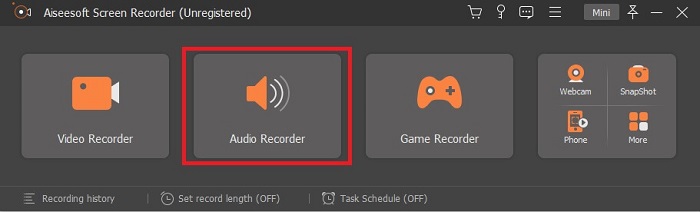
ステップ 2. ツールは自動的に起動します。画面にこのようなツールバーが表示されるので、Audio Recorder をクリックして進みます。
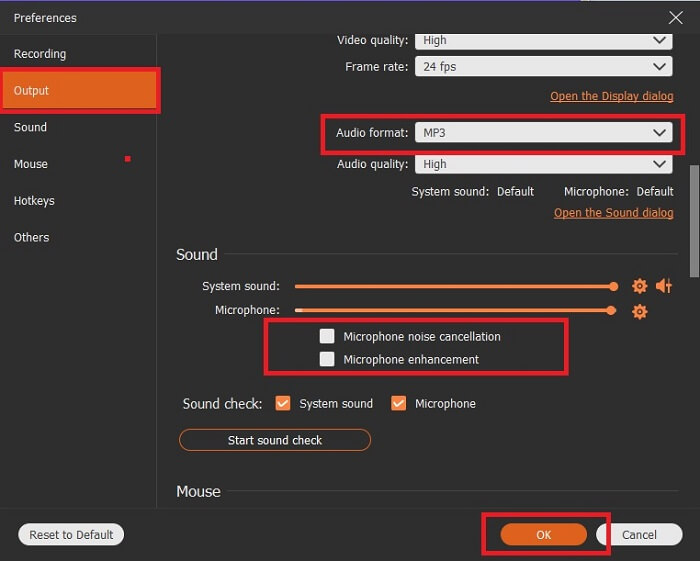
ステップ 3. 歯車(ギア)アイコンを探してクリックします。Output(出力)設定を自分の好みに合わせて変更し、OK をクリックして設定を保存します。
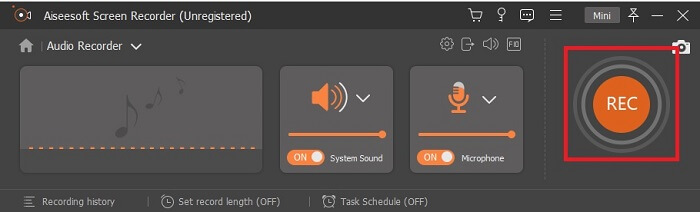
ステップ 4. 録音を始める前に、System Sound と Microphone がオンになっているか確認します。準備ができたら、ディスク形のボタンをクリックして録音を開始します。
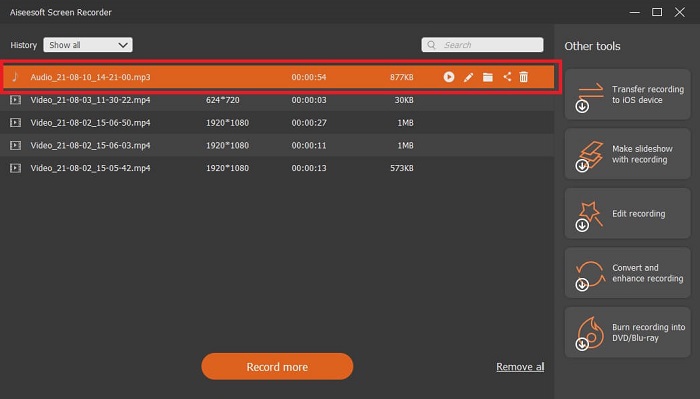
ステップ 5. 録音を終了したいときは、四角形(ボックス)のボタンをクリックして停止します。その後、Save をクリックし、続けて Next を押して録音ファイルを出力します。録音をもう一度聞き直したい場合は、平行線のボタンをクリックして、直前に作成した録音を確認できます。最上段のファイルが最新の録音で、一番下が最も古い録音になります。
2.オーディオブー
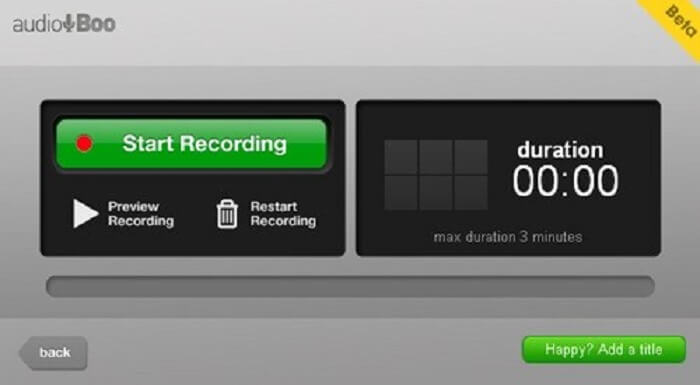
短い録音に向いている別のツールとして、Audio Boo があります。これはユーザーにショートタイプの録音を提供するツールです。たとえば、恋人への歌のメッセージを録音して送ったり、音声日記、ちょっとした音声メモなど、さまざまな用途に活用できます。ただし、録音時間に制限があるため、長時間の会話や、長いセッションの音楽演奏などをフルで録ることはできません。録音可能な長さがどのくらいか気になるかもしれませんが、最大 3 分までとなっています。
3. AdobeAudition
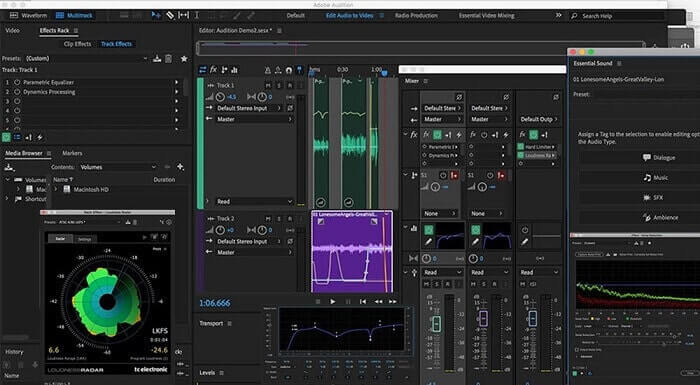
ユーザーが高品質の録音を録音できるようにするツール。また、Adobeによってサポートされているため、高品質の出力が生成されることを期待してください。これは、音楽プロデューサー、歌手、編曲家などによって最も一般的に使用されます。これは、より工業化されたレコーダーです。このタイプのMp2レコーダーを使用することは、新しいユーザーにとっては少し圧倒されます。しかし、それは他のMP2レコーダーのように良い品質を生み出します。
さらに読みたい方はこちら
パート3。比較チャート
| ツールの機能 | FVC無料オーディオレコーダー | FVCオーディオレコーダー(プレミアム) | オーディオブー | Adobe Audition |
| オーディオレコーダ | はい | はい | はい | はい |
| ノイズキャンセル | いいえ | はい | いいえ | はい |
| マイクの機能強化 | いいえ | はい | いいえ | はい |
| 編集ツール | いいえ | はい | いいえ | はい |
| 利用可能なプログラム | すべてのプログラムがサポートされています | すべてのプログラムがサポートされています | iPhone、iPod touch、およびiPad。 | Windows 7、Windows 8.1、またはWindows 10 OS X Yosemite、OS X El Capitan、またはmacOS Sierra |
| 利用可能なフォーマット | MP3とMP2 | MP3、MP2、WMA、AAC、M4A、FLAC、OGG、AMR、Opusなど。 | MP3 | AC3、M4A、MAT、VOX、W64、WAV、その他多数 |
| ツールの価格(支払い可能な場合) | 無料のオンラインツール | 1か月間:$25.00 1年間:$31.20 生涯ライセンスの場合:$55.20 | 無料でダウンロード可能なツール | $27.62 /モーメント、年間 $315.61 /年、年間 $41.43 /月額プラン |
パート4。MP2レコーダーに関するFAQ
MP2を別の形式に変換できますか?
はい、オンラインで利用できるこのMP2 Converter を使えば可能です。より高品質な出力を得たい場合には、この高機能コンバーターもぜひ試してみてください。
最高のMPはどれですか? 1、2、3、または4?
これらのMPファイル形式はすべて、オーディオ、ビデオ、およびテキストのコンテナです。しかし、それらの主な違いは、それらに含まれるものです。 MP1は、カセットフォーマットを最初に実行したものです。 MP2は、1〜2チャネルと、デジタルテレビおよびラジオ局の再生の標準をサポートします。 MP3は、オーディオ録音またはオーディオ形式を保存する最も一般的に使用される形式です。 MP4には、オーディオ、ビデオ、およびテキスト形式が含まれています。
ビデオを再生したいのですが、メディアプレーヤーがフォーマットをサポートしていません。どうすればよいですか?
ほとんどの一般的な形式をサポートしているメディアプレーヤーを使用することができます。
結論
この記事のおかげで、ウェブ上にあるさまざまなツールについて理解できたはずです。それでも、どのツールが自分に一番合っているのか迷っている場合は、次のポイントを参考にしてみてください。録音ツールは、使いやすく、信頼性が高く、デバイスを乗り換えた場合でも録音環境に影響が出ないよう、複数のプラットフォームに対応していることが望ましいです。また、長く使えて、定期的にアップデートが配信され、価格が手頃で、何よりマルウェアが含まれていないことが重要です。もしあなたの答えが FVC Screen Recorder なら、それは正解です。このツールはあなたの発想を制限せず、操作も難しすぎず、価格も高すぎません。このツール一つで他のツール以上のことができるのなら、わざわざ別のツールを探す必要はないでしょう。
-
 Windows / Mac用のトップ5ベストWebMスクリーンレコーダー
 記事を読んでWebM拡張ファイルの詳細を確認し、WebMビデオの画面記録に使用できるWebMスクリーンレコーダーアプリを見つけてください。
-
 無料のコメントフィードのためにオンラインでアクセス可能な4つの最高のSWFビデオレコーダー
 SWFファイルについて聞いたことがありますか?このファイル形式の詳細を確認し、無料のオンラインツールを使用してSWFファイルを記録する方法を見つけてください。
-
 Mac / Windowsコンピュータで互換性のある比類のないMTVビデオレコーダーコメントフィード
 この記事は、MTVファイル形式と、コンピューター画面を簡単に記録するために使用できるMTVビデオレコーダーのリストについて学習するのに役立ちます。
