


 ビデオコンバーター究極
 スクリーンレコーダー
 ビデオ修復
ビデオ修復
 安全なダウンロード
音声タレントと音声コンテンツクリエーターのための最高のWMAレコーダーの3つ
オンラインでビデオチュートリアル、ポッドキャスト、ボイスコンテンツを作成している方ですか? これからポッドキャストを始めたい方、ナレーター・声優として活動したい方は、まず高音質で声を録音できるツールを用意しましょう。出力形式としてMP3は便利ですが、WMAファイルを使うのもおすすめです。WMAは、多くの主要なマルチメディアプレーヤーでサポートされている音声コンテナ形式です。この形式には、Windows Media Playerでよく使われるロスレスコーデックが含まれています。そのため、多くのボイスコンテンツ制作者はエンコードの際にこの形式を利用しています。したがって、この種のファイル形式、もしくはそれに近い形式で保存できるレコーダーが必要になります。こうした点を踏まえ、ここでは手軽に使えるWMAレコーダーをいくつかご紹介します。

パート1。WindowsおよびMac用のトップ3WMAレコーダー
FVC無料オーディオレコーダー
最初に紹介するWMA対応のデジタルボイスレコーダーは、FVC Free Audio Recorderです。このツールは、著作権の問題を避けるためのBGM録音や、雑音の少ない音声録音が必要なときに、ブロガーやポッドキャスターによく利用されています。無料で、しかもオンラインですぐに使えるため、コンテンツ制作がとても簡単になります。利用しているのはコンテンツ制作者だけではなく、音声メモを録音したい教育関係者も含まれます。多くのユーザーを惹きつけているポイントは、「利用回数・録音時間が無制限」という点です。使用回数や録音可能な長さを気にする必要はなく、一切の制限がありません。さらに、PCへのインストールも不要なので、マルウェアがPCに入り込む心配もありません。ここまでが無料アプリとしての特徴ですが、このツールにはまだ多くの利点があります。以下のメリットを確認して、詳しく把握してください。
このツールが優れている点
●ビットレートは調整可能です。つまり、オーディオ出力の品質を自分の利益のために変更できます。
●登録やお支払いは不要です。
●音声とマイクを同時に録音できます。
●どのブラウザからでもいつでもアクセスできます。
●システムサウンドを録音します。つまり、静的ノイズやバックグラウンドノイズがありません。
一方、ツールの信頼性を試したい場合は、以下の手順を参照してください。
ステップ1 まず、この説明文中のハイパーリンクをクリックして、ツールの公式サイトにアクセスします。
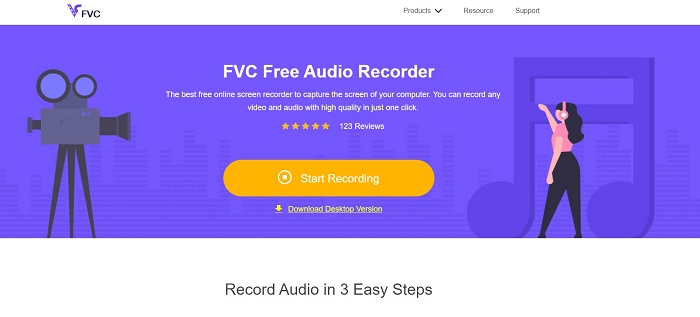
ステップ2 サイトにアクセスしたら、Start Recordingボタンをクリックしてアプリを起動します。
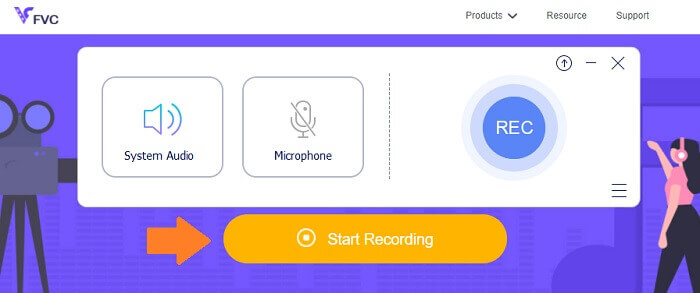
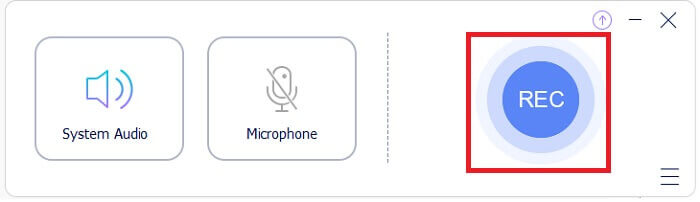
ステップ3 次に、System Audioを有効にして録音を行います。マイクを有効にしたい場合は、任意でオンにすることもできます。
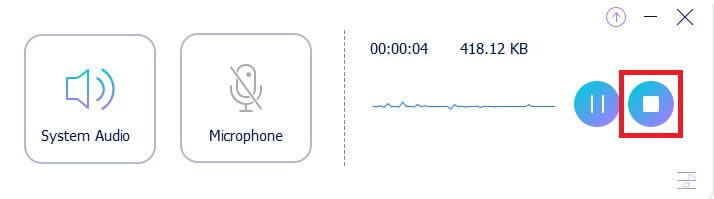
ステップ4 録音を終了するには、青いStopボタンをクリックします。録音ファイルは自動的にPCへ保存されます。
あなたが無料アプリから得るすべての良いものにもかかわらず、私たちはいくつかの欠点があるという事実を否定することはできません。そこでプレミアムツールが登場します。
FVCスクリーンレコーダー
Free Screen Recorderは、無料アプリの制限を打破するために開発されました。このようにして、FVCスクリーンレコーダーですべての可能性を最大化できます。このツールは、画面の録音だけでなく、音声を個別に録音することもできます。そのため、これはプロのVloggerやポッドキャスターでもあります。 FVCフリーオーディオレコーダーに記載されているすべての機能もツールに含まれていますが、その拡張バージョンです。ビットレート範囲も高くなっています。範囲が広いほど、音質が向上します。一方、以下のリストを読んで、それについてもっと知ってください。
このツールが優れている点
●ビットレートの調整が簡単で、範囲が広くなっています。
●ツールインターフェースはシンプルで使いやすいです。
●音質は非常に良いです。
●画面と音声を同時に別々に録音できます。
このツールがどれほど便利であるかを示すために、ガイドとなるステップバイステップの手順を参照してください。
ステップ1 以下のダウンロードボタンからアプリをダウンロードし、インストールします。
無料ダウンロードWindows 7以降に対応安全なダウンロード
無料ダウンロードMacOS 10.7以降に対応安全なダウンロード
ステップ2 インストール後、アプリを起動し、Audio Recorderをクリックします。そこでSystem Soundを有効にしてください。
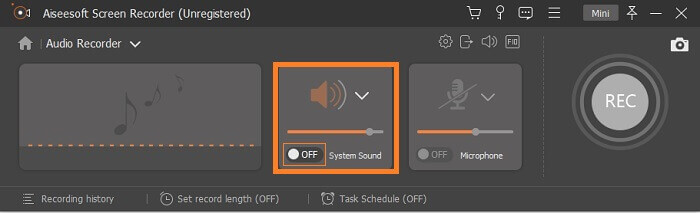
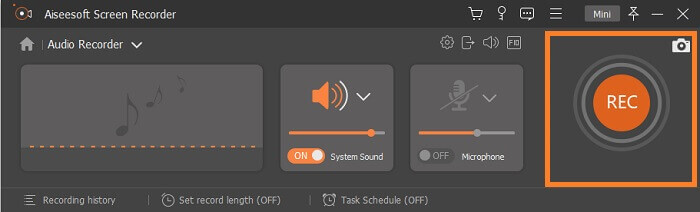
ステップ3 準備ができたら録音を開始します。録音を始めるにはRECボタンをクリックします。
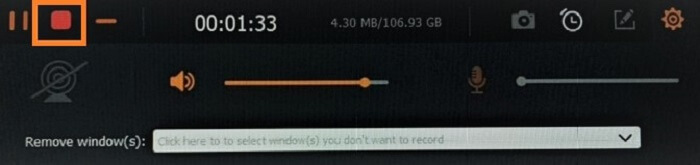
ステップ4 録音が終わったら停止ボタンをクリックします。停止ボタンは、フローティングバー左下にある赤いSquareボタンです。
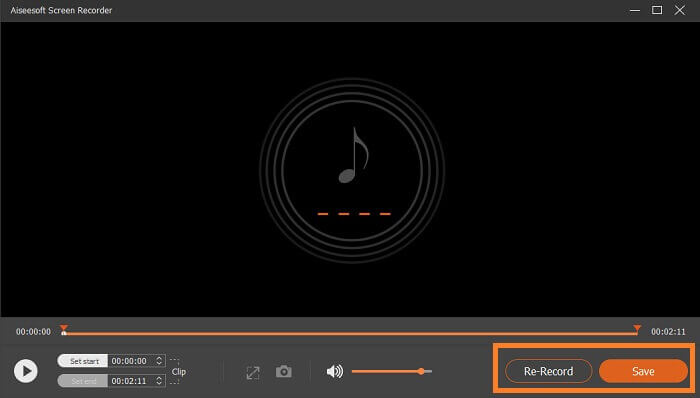
ステップ5 その後、Save(保存)するか、Re-Record(録り直し)するかを選択できます。
Snagit
最後に、Snagitを使用します。このツールはデフォルトでスクリーンレコーダーであり、ツールには音声録音もあるため、リストに追加されました。個別に録音することはできませんが、音声を録音することはできます。このツールから何が得られますか?リストには非常に多くのものがありますが、そのうちのいくつかを強調します。オーディオ機能の他に、Webカメラを録画したり、ビデオクリップをトリミングしたり、録画をアニメーションGIFに変換したりすることもできます。このツールで知られている最高の機能の1つは、キャプチャ内のオブジェクトを移動可能にすることができるスマート移動機能です。ここですべての機能について言及する場合、それだけでは十分ではありません。それらの簡略化されたリストを見たい場合は、以下のリストを確認できます。
このツールが優れている点
●簡単な録音をアニメーションまたはインタラクティブに変えることができる注釈をサポートしています。
●SnagitはiOS画面を記録できます。
●スクリーンショットを簡略化されたグラフィックに変換します。
●スタンプを使用して画像をデザインします。
パート2。比較チャート
| 比較のポイント | FVC無料オーディオレコーダー | FVCスクリーンレコーダー | Snagit |
| プラットホーム | Webベース | デスクトップアプリ | デスクトップアプリ |
| 価格 | 自由 | 有料 | 有料 |
| ビットレート | フレキシブル | フレキシブル | 停滞 |
| マイクで録音する |  | | |
パート3。WMAレコーダーに関するFAQ
WMAファイルはどれくらい良いですか?
WMAはファイル形式です。これは、Windows MediaAudioとも呼ばれます。これは、オーディオのビットストリームを保持するASFに基づいています。これにより、より少ないファイルを保存できますが、高品質のオーディオを生成できます。 MP3よりもはるかに優れています。
WMAフォーマットをサポートするどのレコーダーを使用できますか?
上記のリストで確認できます。しかし、もっと必要な場合は、PC用のAudacity、Webベースのアプリ用のAcethinker Free Audio Recorder、iPhone用のiTalk、Android用のRev VoiceRecorderを確認できます。
WMAとMP3のどちらが良いですか?
音質の面で比較すると、WMAはMP3よりも優れています。高音質オーディオをサポートする多くのファイル形式の中で、WMAはMP3よりも少ないデータ量で保存できます。ただし、MP3の利点は、WMAに比べて再生可能なメディアプレーヤーが圧倒的に多いことです。WMAをMP3に変換したい場合は、How to Convert WMA to MP3を参照して、変換方法を確認してください。
結論
この記事に記載されているツールはすべて便利で、すべての録音ニーズに対応できます。すべてのツールは独自のものであり、それぞれに長所と短所があります。自分に適したものにぴったり合う場合は、ニーズを考慮してください。支払いをしたくない場合は、FVC無料オーディオレコーダーを使用してください。一方、オーディオ録音以上のものを取得したい場合は、FVCスクリーンレコーダーであるオーディオレコーダーのプレミアムツールを使用してください。よりクリエイティブにする必要がある場合は、Snagitを使用してください。商品や悪いものに関係なく、ツールのリストは役に立ちます。
-
 トップ4ベストAMVビデオレコーダーWindows / Macコンピューター(オンラインおよびオフライン)
 AMVファイルの詳細を確認し、AMVおよびその他のビデオ形式でビデオを録画する最も実用的な方法について学びます。
-
 Windows PCおよびMac用のトップ5MOVレコーダー(詳細なレビュー)
 iOSデバイスと互換性のある小さいファイルサイズでMOVビデオを録画する必要がある場合は、記事を読み続けてください。
-
 Windows / Mac用のトップ5ベストWebMスクリーンレコーダー:詳細なレビュー
 記事を読んでWebM拡張ファイルの詳細を確認し、WebMビデオの画面記録に使用できるWebMスクリーンレコーダーアプリを見つけてください。
