


 ビデオコンバーター究極
 スクリーンレコーダー
 ビデオ修復
ビデオ修復
 安全なダウンロード
AVI のパワーを WebM に活用して最適な Web 互換性を実現
急速に進化するデジタル環境では、効果的なメディア統合がユーザー エクスペリエンスを向上させ、コンテンツへのアクセシビリティを最大化する上で極めて重要な役割を果たします。マルチメディア愛好家、Web 開発者、コンテンツ作成者が同様に直面する共通の課題の 1 つは、さまざまなプラットフォームやデバイス間でのビデオ ファイル形式の互換性です。さまざまなコーデックやファイル拡張子の急増に伴い、シームレスなメディア統合が差し迫った懸念事項になっています。
This article delves into the domain of AVI to WebM conversion, shedding light on the importance of this conversion process and its impact on web compatibility. Also, we will highlight the programs to use for this conversion. With little ado, you can refer to the tools below.

パート 1. AVI を WebM に変換する 5 つの最良の方法
1.ビデオコンバーターアルティメット
Video Converter Ultimate is a comprehensive software tool designed for video conversion tasks, including AVI to WebM conversion. It comes with a user-friendly interface and advanced features, making it a powerful option for offline conversion.
Step 1. Download and set up the application
Choose one of the Free Download buttons, then save the file to your computer by following the on-screen directions. The next step is to launch the app and become acquainted with its simple controls.
無料ダウンロードWindows 7 以降対応安全なダウンロード
無料ダウンロードMacOS 10.7 以降対応安全なダウンロード
Step 2. Include AVI files
Go to the location of the audio file you want to convert after choosing the + symbol from the main screen. A preview of a file will show up on the user interface when it has been uploaded. You can upload a folder of files if you want to batch convert AVI to WebM.
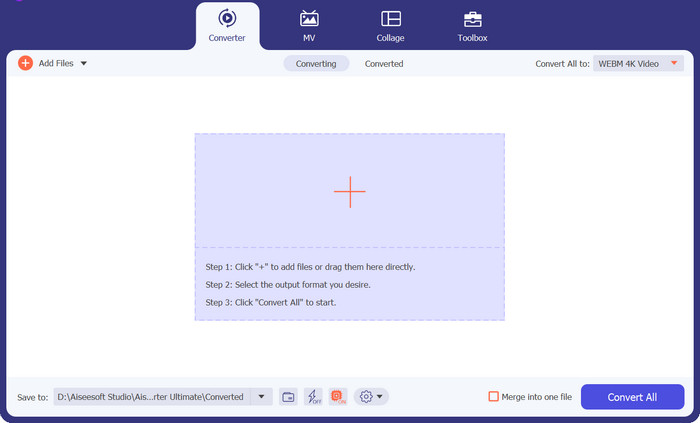
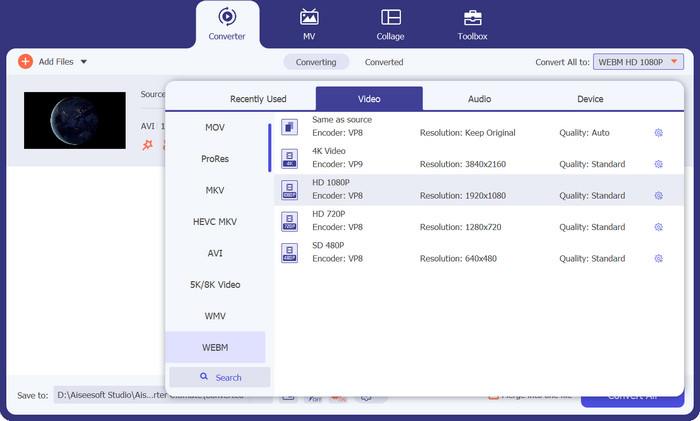
Step 3. Determine the output format
The output format can then be selected by clicking the Audio tab in the drop-down menu, accessible from the tool's upper right corner. You can convert between AVI and WebM using either format.
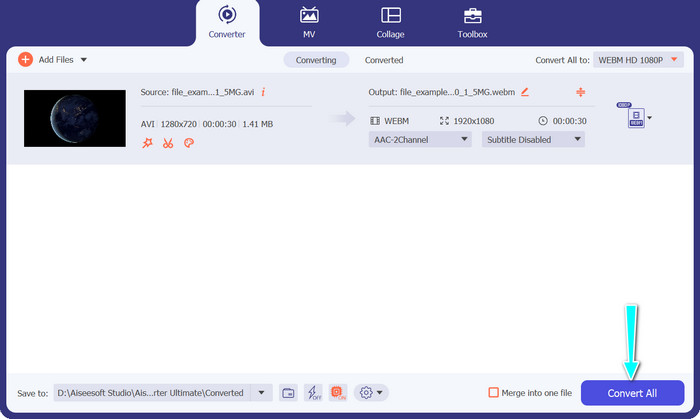
Step 4. Save the results
Select the target folder from the menu at the bottom of the screen. Click the Convert All button when you're ready to start the conversion.
長所
- AVI や WebM など、幅広いビデオ形式をサポートしています。
- 高度なビデオカスタマイズオプションを提供します。
- 高速変換処理。
短所
- 無料版には制限があり、製品版を購入するには購入が必要です。
2.FFmpeg
FFmpeg は、AVI から WebM への変換など、マルチメディア タスクを処理する多用途性で広く知られている強力なコマンド ライン ツールです。ビデオパラメータを広範囲に制御できるため、経験豊富なユーザーや開発者の間で人気があります。この AVI から WebM コンバーターを使用する手順は次のとおりです。
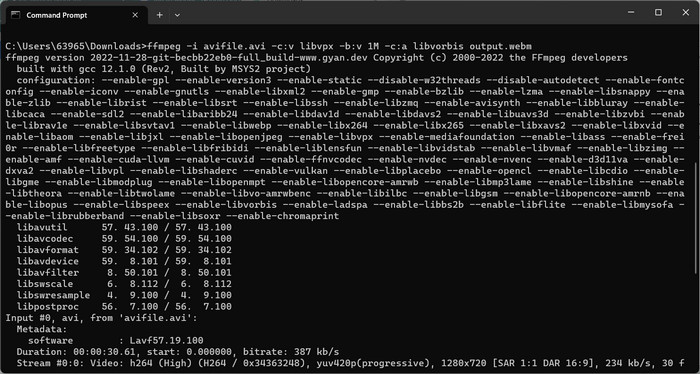
Step 1. Install FFmpeg on your computer, or ensure you have it already installed. Open the command prompt or terminal.
Step 2. Enter the following command: ffmpeg -i input.avi -c:v libvpx -b:v 1M -c:a libvorbis output.webm.
Step 3. This command instructs FFmpeg to convert the AVI file to WebM with specified video and audio codecs, bitrate, and output file names. Then, press Enter to execute the command.
長所
- ビデオとオーディオの設定を包括的に制御します。
- 幅広いビデオおよびオーディオ コーデックをサポートしています。
- 上級ユーザーや開発者に適しています。
短所
- コマンドライン インターフェイスに精通している必要があります。
- 初心者にとっては、学習曲線が急になる可能性があります。
3.VLCメディアプレーヤー
AVI から WebM へのコンバーターの無料プログラムをお探しなら、VLC Media Player が最適なプログラムです。メディア プレーヤーとしての多用途性で知られており、AVI から WebM への変換などのオフライン ビデオ変換機能も提供します。
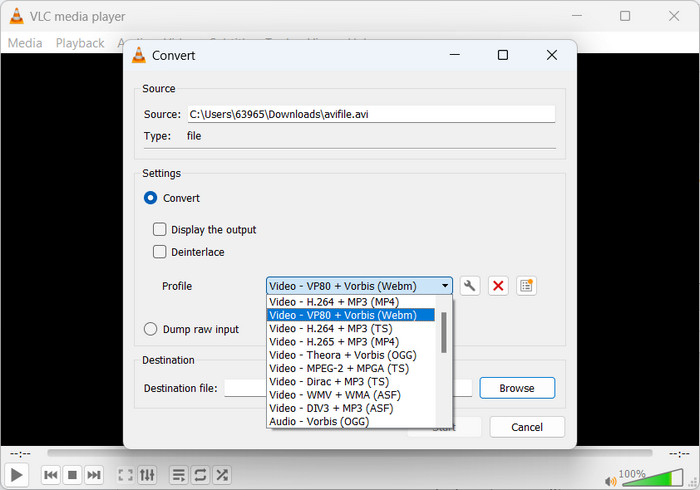
Step 1. Install and open VLC Media Player on your computer. Next, click on Media in the menu bar and select Convert/Save.
Step 2. In the File tab, click on the Add button to import the AVI file. Then, hit the Convert/Save button at the bottom.
Step 3. In the Profile dropdown menu, select Video - WebM + VP8 or Video - WebM + VP9. Then, specify the destination folder and the output file name.
Step 4. Tick the Start button to begin the conversion process.
長所
- 使い慣れた使いやすいインターフェース。
- ビデオとオーディオの設定をカスタマイズできます。
- メディア再生、ストリーミングなどの追加機能。
短所
- 専用コンバータに比べて、変換オプションが制限される場合があります。
- 速度とパフォーマンスはシステム仕様によって異なる場合があります。
4.Freemakeビデオコンバータ
Freemake Video Converter は、AVI から WebM への変換やその他のさまざまな形式をサポートする人気のオフライン ビデオ変換ソフトウェアです。また、使いやすいユーザーフレンドリーなインターフェイスと、使いやすいさまざまなプリセット変換プロファイルも提供します。
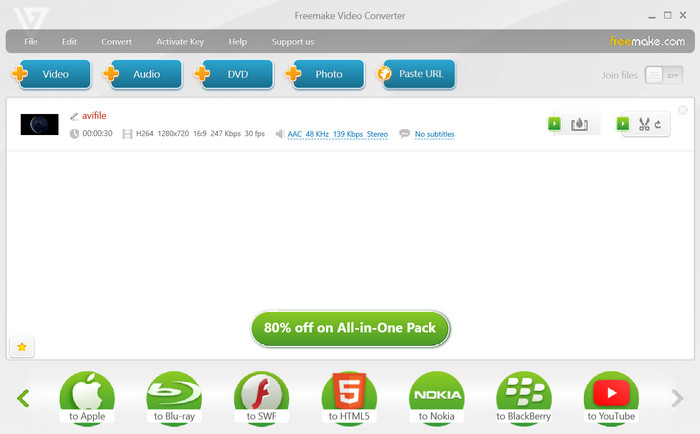
Step 1. Install and launch Freemake Video Converter on your computer. After that, hit the +Video button to import the AVI file you wish to convert.
Step 2. Now, select WebM as the output format from the bottom panel and customize video settings if desired.
Step 3. Afterward, choose a destination folder to save the converted WebM file. At last, click the Convert button to initiate the conversion process.
長所
- さまざまなデバイスやプラットフォーム向けにプリセットされた変換プロファイルを提供します。
- 基本的なビデオ編集機能を提供します。
- 高速かつ効率的な変換プロセス。
短所
- 無料版では広告が表示されます。
- 一部の高度な機能は、プレミアム バージョンでのみ利用できます。
5. FVC無料ビデオコンバーターオンライン
If you are into AVI to WebM converter online tools, Free Video Converter Online is for you. Free Video Converter Online is a web-based tool that allows users to convert AVI to WebM without the need for software installation. It offers a simple and convenient way to perform file conversion online.
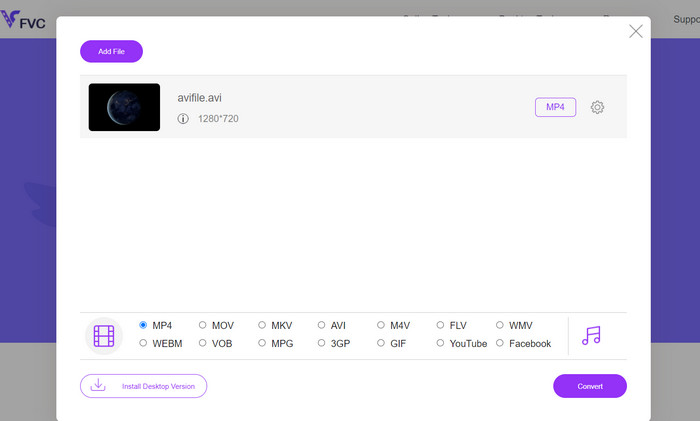
Step 1. Visit the FVC Free Video Converter Online website. Then, tick on the Add Files to Convert button.
Step 2. Next, choose the AVI file you want to convert from your computer. After that, select WEBM as the output format.
Step 3. Lastly, click the Convert button to commence the conversion process and wait for the conversion to complete.
長所
- ソフトウェアのインストールは必要ありません。
- シンプルで使いやすいインターフェース。
- さまざまなプラットフォームやデバイスで動作します。
- 迅速かつ手間のかからない変換プロセス。
短所
- 安定したインターネット接続が必要です。
- オフライン ソフトウェアと比較して、カスタマイズ オプションが限られています。
さらに詳しく読む:
Methods to Convert AVI to M4V Using Online and Offline Tools
Convert MOV to WebM to Boost Your Website’s Performance
パート 2. AVI から WebM への変換に関する FAQ
必要に応じて WebM を AVI に変換できますか?
WebM を AVI に変換して戻すことは技術的には可能ですが、変換するたびに品質がある程度低下することに注意することが重要です。一般に、不必要な品質の低下を避けるために、元の AVI ファイルのバックアップを保存するか、元の形式で維持することをお勧めします。
AVI から WebM への変換にはどれくらい時間がかかりますか?
変換時間は、AVI ファイルのサイズ、コンピュータのハードウェア仕様、使用するソフトウェアや変換方法などの要因によって異なります。一般に、ファイルが小さく、システムが強力であればあるほど、変換時間は速くなります。
AVI から WebM への変換に関して法的な考慮事項はありますか?
変換する AVI ファイルを変換して使用するために必要な権利またはアクセス許可を持っていることを確認することが重要です。著作権で保護されたコンテンツを扱う場合は、著作権法と利用規約を尊重してください。
字幕を保持したまま、字幕付きの AVI ファイルを WebM に変換できますか?
はい、字幕が埋め込まれた AVI ファイルを WebM に変換し、字幕トラックを維持することができます。ただし、字幕を保存できるかどうかは、使用されているソフトウェアまたはコンバーターによって異なる場合があります。選択したソフトウェアが字幕変換をサポートしていることを確認し、変換プロセス中に適切なオプションを選択してください。
暗号化または保護された AVI ファイルを WebM に変換できますか?
デジタル著作権管理 (DRM) で暗号化または保護されている AVI ファイルは、適切な認証または復号化がなければ、WebM またはその他の形式に直接変換できない場合があります。著作権保護措置を尊重し、作業中のファイルを変換して使用するために必要な権利を持っていることを確認してください。
結論
The conversion from AVI to WebM emerges as a valuable solution for transcoding videos while ensuring optimal quality and compatibility across diverse online platforms.
-
 デスクトップまたはオンラインで無料で AVI を MP4 に変換する方法 [2023]
 携帯電話で映画を見ると、使用するプレーヤーから、AVI形式がサポートされていないためにビデオを再生できないというプロンプトが表示されることがあります。では、どうすれば品質を損なうことなくAVIをMP4にすばやく変更できますか?ここにあなたが試すことができるいくつかの無料の方法があります。
-
 [解決済み]コンピューター上でWebMファイルをロスレスで1つにマージする方法
 WebMビデオファイルをマージしてビデオを継続的に視聴する場合、またはWebMファイルに従って新しいビデオを作成する場合、品質を損なうことなくWebMファイルを結合する2つの効率的な方法があります。
-
 AVI を 3GP に即座に変換するための 3 つのヒント [無料コンバーター]
 AVIを3GPに変換する方法は?この記事では、最高の無料コンバーターを使用して、AVIファイルを3GPにすばやく変換する最も簡単な方法を示します。
