


 ビデオコンバーター究極
 スクリーンレコーダー
 ビデオ修復
ビデオ修復ベスト 3 ソフトウェアで M4V を AVI Free に変換する方法 [オンライン & オフライン]
Appleユーザーなら、映画や音楽、テレビ番組の再生に使うローカルメディアプレーヤーとしての iTunes をすでにご存じでしょう。実際、そのデフォルト形式のひとつとして M4V もよく使われています。しかしこの形式は、標準の Windows プレーヤーでは再生できず、一部のサードパーティ製プレーヤーも対応していません。とはいえ落ち込む必要はありません。M4V ファイルは、変換することで別のデバイスでも視聴できるようになります。また、2つの形式の比較も確認できます。ここでは、以下のリストで無料で M4V を AVI に変換する方法を解説します。
パート 1. M4V および AVI 形式の簡単な説明
それでは、冒頭で述べた 2 つの形式の違いを見てみましょう。以下に進むと、2 つの形式を別の観点から理解できます。始める前に、最高の無料の M4V から AVI へのコンバーターが何であるかを知っています。以下を読んで、まず 2 つの形式を区別しましょう。
M4V
◆ このファイル形式は iTunes 独自のものであり、著作権の問題を実装する DRM によって保護されています。
◆ ビデオ、オーディオ、テレビ番組、映画の再生に使用されるメディア ファイルのエンコードにも使用されます。
◆ この形式でのファイルの保存と転送は、はるかに簡単かつ高速です。
◆MP4フォーマットとほぼ同じ構造です。
◆ この形式は保護されており、Apple デバイスに限定されているため、他のメディア プレーヤーで再生する場合ほど柔軟ではありません。
AVI
◆ 詳細なビデオおよびオーディオ ファイルの再生と保存に使用されるよく知られた形式。
◆ 連続再生を格納するためのファイル コンテナ。
◆ エンコードされていないため、他のファイル形式に比べてファイルサイズが大きくなります。
◆ ファイルを小さくするために、コンプレッサーまたはコーデックを使用する必要があります。
パート 2. M4V を AVI に変換する 3 つの方法を学ぶ
第一の方法。 FVCビデオコンバーターアルティメット
FVC Video Converter Ultimate は、PC または Mac にダウンロードして使える、非常に優れた M4V から AVI への変換ソフトのひとつです。高性能かつ高度な機能を備えながら、ユーザーが変換で手間取らないよう配慮されています。他のコンバーターとは多くの点で大きく異なります。対応している形式が非常に多く、編集機能も簡単に使え、パフォーマンス面でも高速かつ高品質、など数え上げればきりがありません。
ここでの変換は無料で制限はありませんが、使用する前に最初に購入する必要がありますが、非常に安価です。このコンバーターを使用してフォーマットを新しいフォーマットに変換するために必要なことを見てみましょう。ファイルの変換方法を知りたい場合は、以下の同期手順に従ってください。
ステップ1. まず PC または Mac にソフトをダウンロードします。ダウンロードが完了したら、インストールと初期設定を行います。
無料ダウンロードWindows 7 以降に対応安全なダウンロード
無料ダウンロードMacOS 10.7 以降に対応安全なダウンロード
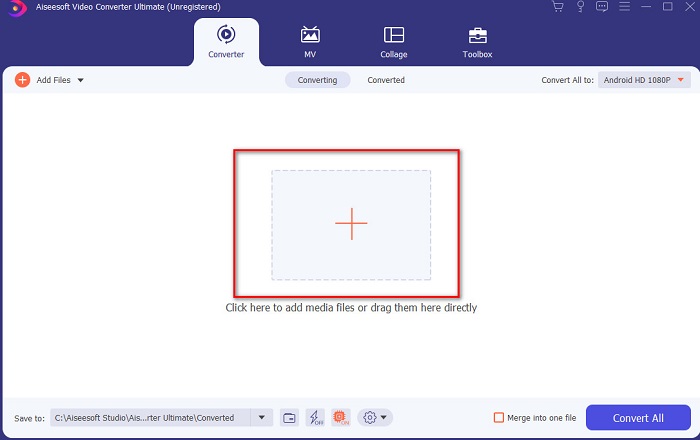
ステップ2. ツールを起動し、インターフェース中央の + ボタンをクリックするとフォルダが表示されます。そこでファイルを探してクリックし、開くを押して M4V ファイルを読み込みます。
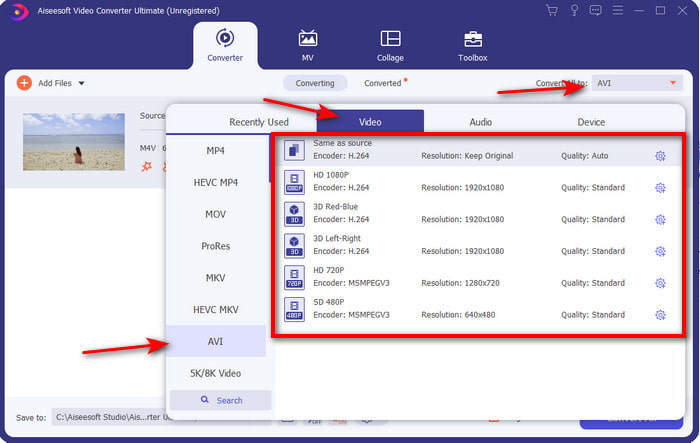
ステップ3. Mac または PC で M4V から AVI への変換を開始する前に、まずドロップダウンボタンをクリックして AVI 形式を選択します。
ステップ4. 形式を選択したら、いよいよ変換です。インターフェース下部にあるすべて変換ボタンをクリックします。
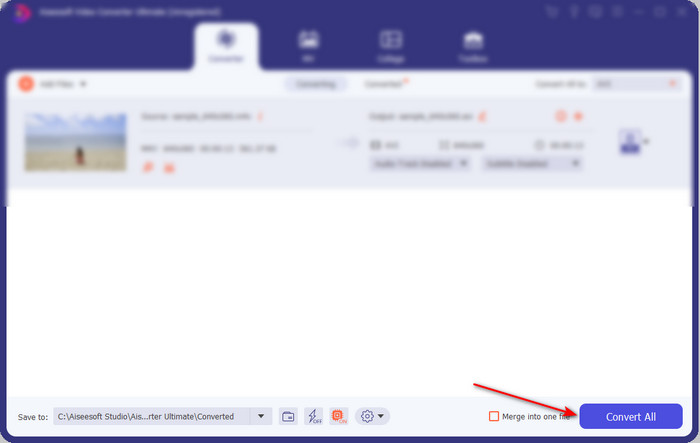
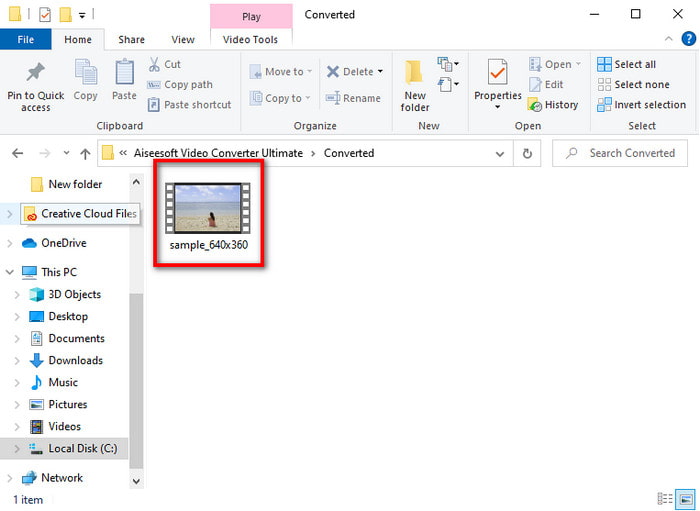
ステップ5. 数秒ほど処理が完了するのを待ちます。完了すると、先ほど変換したファイルが入ったフォルダが表示されるので、それをクリックしてすぐに再生できます。
セカンドウェイ。 FVC 無料動画変換
上記のソフトを購入したくない場合は、Web 上で利用できる無料の M4V から AVI へのコンバーター、FVC Free Video Converter を使うのが最適です。FVC Video Converter Ultimate と同等の高品質な変換をオンラインで実現したいなら、このツールが候補になります。このツールは適切な変換を行えますが、対応形式は少なめで、編集機能はなく、変換速度もデスクトップ版と比べるとかなり遅くなります。また、利用にはインターネット接続が必須です。それでもオンラインコンバーターを探しているなら、これが最適な選択といえるでしょう。では、以下の手順に従って使い方を確認してみましょう。
ステップ1. このリンクをクリックして、FVC コンバーターの公式サイトにアクセスします。
ステップ2. 初めて利用する場合は、変換するファイルを追加をクリックしてランチャーをダウンロードします。ダウンロードが完了したら、再度クリックして起動し、フォルダからファイルを選択して開くをクリックします。
ファイルを一括変換するには、デスクトップ版をダウンロードしてください。
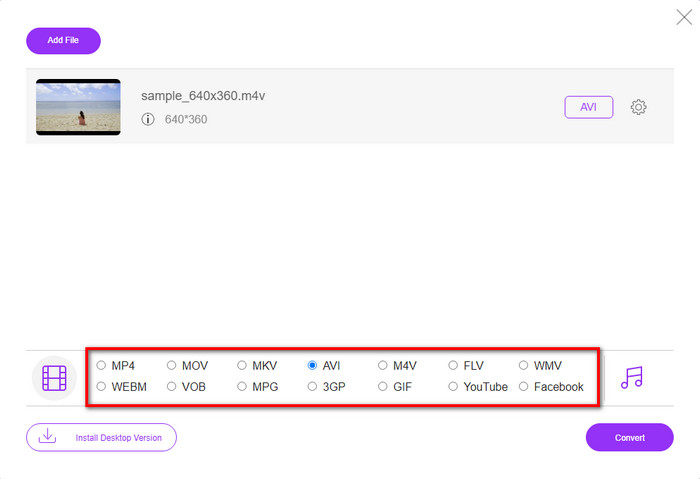
ステップ3. 変換を実行する前に、画面下部に表示されている形式から目的の形式をクリックして選択します。
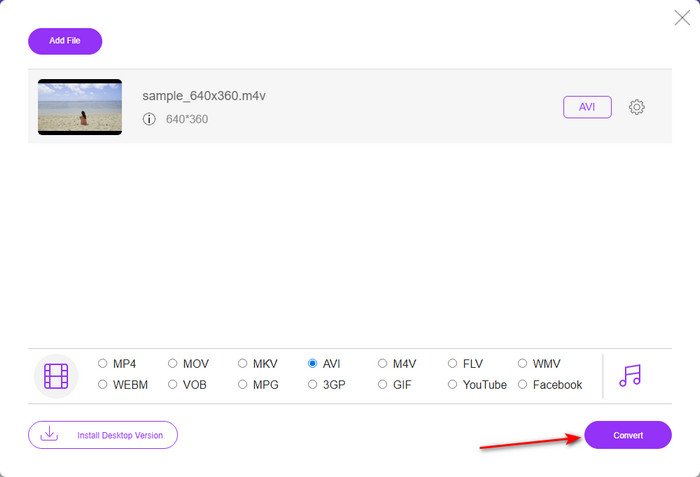
ステップ4. 形式を選択したら、変換をクリックして形式変換の処理を開始します。
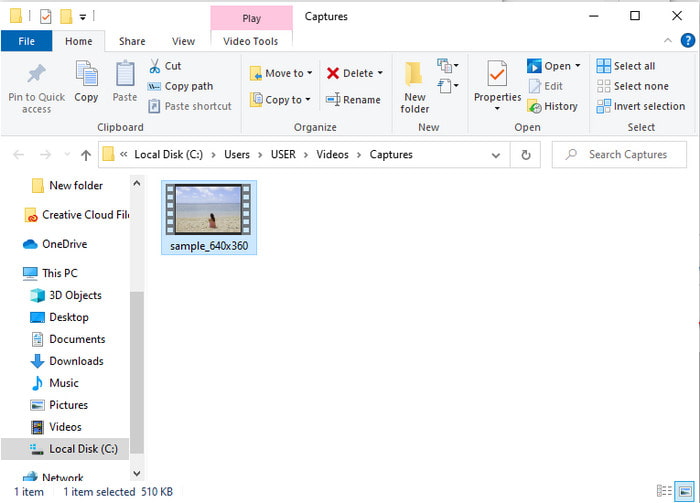
ステップ5. 数分ほど待ち、ファイルの変換が完了すると、変換後のファイルが入ったフォルダが表示されます。次にそれをクリックして再生します。
第三の道。 WinX ビデオ コンバーター フリー
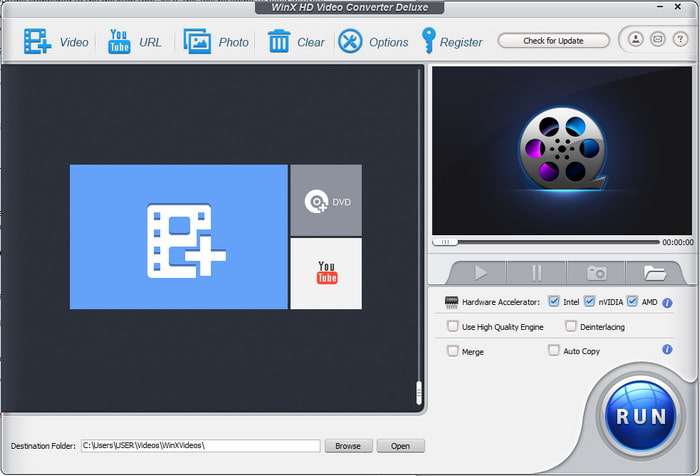
もうひとつ、ファイル形式の変換に役立つソフトとしてWinX Video Converter Free をご紹介します。このツールも高品質な変換を提供し、対応形式も豊富です。M4V から AVI へのコンバーターとして Mac や PC にインストールして使うには十分な性能があります。ただし、先ほどのツールとは異なる点もいくつかあります。試してみたい場合は、次の手順に従ってください。
ステップ1. ソフトを PC または Mac にダウンロードします。
ステップ2. その後、Video をクリックしてファイルを追加し、PC General Manager を選択してから AVI Video をクリックし、最後にOKを押します。
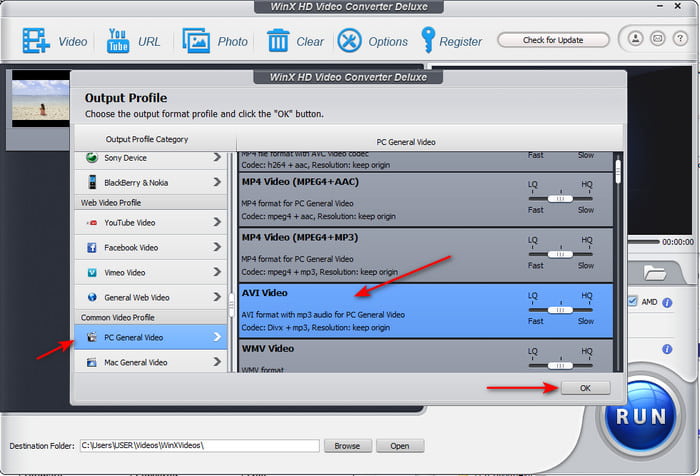
ステップ3. Run をクリックして変換を開始します。
パート 3. 3 M4V から AVI へのコンバーターの比較表
| 特徴 | FVCビデオコンバーターアルティメット | FVC無料ビデオコンバーター | WinX ビデオ コンバーター フリー |
| フォーマットの変換 |  | | |
| 複数の変換 | |  | |
| ハードウェアアクセラレーション | | | |
| 超高速変換 | | | |
| サポートされているプログラム | すべてのプラットフォームで利用可能 | すべてのプラットフォームで利用可能 | すべてのプラットフォームで利用可能 |
M4VとAVI
M4VはAppleによって開発されており、MPEG 4も使用しています。M4Vファイルは、音楽ビデオやTVエピソードなど、AppleiTunesストアからダウンロードしたビデオを保存するためによく使用されます。 AppleのFairPlayDRM著作権保護。
Resource Interchange File Format(RIFF)に基づいて、AVI形式は1992年にMicrosoftによって導入されました。圧縮率が低いため、高品質のビデオ/オーディオを保存できます。ただし、これによりAVIファイルのファイルサイズが大きくなり、スペースが限られている場合に問題になる可能性があります。
パート 4. M4V および AVI 形式に関する FAQ
なぜ M4V 形式に変換する必要があるのですか?
M4V 形式は基本的に Apple デバイス専用の形式なので、このファイル形式を Windows やその他のデバイスに転送しても再生できません。そのため、再生するには M4V ファイルを MP4 や AVI などの別形式に変換しておくほうがよいでしょう。
M4V に変換した後、品質が失われますか?
実際、M4V やその他の新しい形式に変換された形式では、品質の低下が発生する可能性は低くなります。ただし、これにより、ソフトウェアまたはコンバーターの誤動作も発生する可能性があります。したがって、完全に機能し、使いやすいコンバーターを選択するのが最善です。
M4V を変換するとファイル サイズが小さくなりますか?
まあ、それはあなたが選択しようとしていたフォーマットに依存します.ファイルが圧縮されていないため、AVI に変換する場合と同様に、ファイルが少し大きくなることが予想されます。とは異なり、MP4 に変換すると、ファイル サイズは維持されるか、小さくなります。選択しようとしていた形式に関係なく、ファイル サイズは変更されますが、最終的に優れた出力が得られます。
結論
まとめると、ここで紹介した 3 つの Web/デスクトップツールはいずれもコンバーターとして十分に機能します。それぞれのソフトを詳しく検証した結果、FVC Video Converter Ultimate が最もおすすめできる選択肢であるとわかりました。使いやすさ、価格の手頃さ、柔軟性、高度な機能など、さまざまな点で優れているからです。まだどれを選ぶか迷っているなら、この高性能コンバーターを試して、素早く簡単な変換プロセスを体験してみてください。
-
 M4VからMP3へのコンバーター–M4VファイルからMP3を抽出するための4つの最良の方法
 M4VビデオからMP3オーディオを簡単に抽出したい場合は、記事から目的のオーディオファイルを取得するための4つの最高のM4VからMP3へのコンバーターについて詳しく知ることができます。
-
 GIFをAVIに変換する最良の方法は何ですか[オープンソースとプレミアム]
 ビデオの品質を損なうことなくGIFをAVI形式に変換しますか? GIFファイルをAVIに変換する方法を学ぶために読み続けてください。
-
 PCとMacでMOVをAVIに変換する4つの効率的な方法[2021]
 Web上で最高のMOVからAVIへのコンバーターを知りたいですか?そして、なぜFVC Ultimate VideoConverterがあなたにぴったりなのか。

