


 ビデオコンバーター究極
 スクリーンレコーダー
 ビデオ修復
ビデオ修復
 安全なダウンロード
MPEG を M4V に変換するための一流のテクニック
MPEG ファイルが QuickTime Player で再生できませんか?もしそれが問題であれば、最もおすすめの解決策は MPEG ファイルを M4V 形式に変換することです。M4V ファイルなら、QuickTime Player はもちろん、他のメディアプレーヤーでも再生できます。本ガイドでは、Mac 用ソフトとオンラインツールを使って、MPEG を M4V に即座に変換できる最良の 3 つの方法を紹介します。さらに、MPEG と M4V のファイル形式の違いについても解説します。両方の形式のイメージをつかめるようになりますので、さっそくこの記事を読み進めて、各種方法を詳しく学んでいきましょう。

パート 1: MPEG と M4V の違いは何ですか
以下の表を見て、MPEG および M4V ファイル形式に関する情報を確認してください。
| MPEG | M4V | |
| 説明 | MPEG-1 が 1993 年に作成されると、オーディオとビデオの両方のストレージ形式として急速に普及しました。現在、世界中で最も互換性のあるメディア タイプです。この形式が最初に登場したとき、それは革新的で時代を先取りしており、適度な品質のファイルを提供しながらサイズを小さくしてデータを圧縮し、ファイルのアップロードとダウンロードを簡単にしました。これらの機能により、デジタル オーディオ、デジタル TV、およびビデオの放送が可能になりました。 MPG は時代遅れであり、もはや特許によって保護されていないため、多数のハードウェア、Mac および Windows ソフトウェアには、MPEG ビデオおよびオーディオのネイティブ サポートが装備されています。 | M4V は、iTunes ファイルがオーディオおよびビデオ データを保存できるビデオ コンテナの一種です。オーディオまたはビデオ ファイルが無許可の表示やコピーから保護されている Apple FairPlay DRM である場合は、iTunes ストアから購入することをお勧めします。形式は MPEG-4 構造に基づいているため、実際には、現在のすべてのプレーヤーで保護されていないファイルを表示できます。 |
| ファイル カテゴリ | ビデオ | ビデオ |
| ファイル拡張子 | .mpeg | .m4v |
| 開発者 | ISO、IEC | 林檎 |
| 関連プログラム | VLCメディアプレーヤー ビデオLAN ウィンドウズメディアプレイヤー | Quicktimeプレーヤー VLCメディアプレーヤー アップル アイチューンズ |
パート 2: Mac を使用して MPEG を M4V に変換する優れた方法
Mac で MPEG を M4V に簡単に変換するには、Video Converter Ultimate をダウンロードできます。本ソフトは他のコンバーターより最大 30 倍高速の変換速度を備えています。また、一括変換にも対応しているため、MPEG ファイルを M4V 形式に変換しつつ、同時に複数ファイルをまとめて変換することも可能です。このような処理により、短時間で多数のファイルを変換できることが保証されます。さらに、MPEG ファイルを MOV、MKV、WMV、MP4、AVI、FLV など、100 種類以上の他形式に変換することもできます。加えて、Video Converter Ultimate は変換だけにとどまらず、信頼性の高い編集機能も備えています。例えば、変換前に MPEG 動画をトリミングしたい場合、このアプリケーション内で作業できます。本コンバーターには、不要な部分を切り取ってカット・クロップできるトリミングツールが搭載されています。また、フォトコラージュを作成したいときにも、このアプリケーションを利用できます。コラージュメーカー機能が用意されており、さまざまなデザインの無料テンプレートや豊富なフィルターを使用できます。これにより、魅力的なコラージュを簡単に作成することが可能です。このアプリケーションについてもっと知りたい場合は、ぜひ実際に使って体験してみてください。
機能
◆ M4V、MPEG、MKV、WMV、MOV、FLV、AVI、MP4 など、100 以上のビデオ ファイル形式を変換します。
◆ 無料のテンプレートとフィルターでコラージュを作成できます。
◆ ビデオ エンハンサー、圧縮、色補正、クロッパーなどのさまざまな編集ツールを提供します。
◆自由なテーマで魅力的なミュージックビデオが作れます。
◆ ビデオを 0.125x から最大 8x までスローダウンおよびスピードアップできます。
◆ ビデオとオーディオを圧縮できます。
長所
- プロではないユーザーに最適です。
- 通常の変換速度の 30 倍の速さでファイルを変換できます。
- 直感的なインターフェースを備えています。
- バッチ変換プロセスを提供します。
短所
- プロ版の優れた機能を楽しむには、ソフトウェアを購入する必要があります。
以下の簡単なガイドに従って、Mac を使用して MPEG を M4V に変換します。
ステップ 1: Mac に Video Converter Ultimate をダウンロード・インストールするには、ダウンロードボタンをクリックします。その後、アプリケーションを起動します。
無料ダウンロードWindows 7 以降に対応安全なダウンロード
無料ダウンロードMacOS 10.7 以降に対応安全なダウンロード
ステップ 2: アプリケーションを開くと、画面上部に 4 つのオプションが表示されます。コンバーターオプションを選択し、画面中央のプラスアイコンをクリックして、変換したい MPEG 動画を追加します。ファイルを追加ボタンをクリックして追加することもできます。
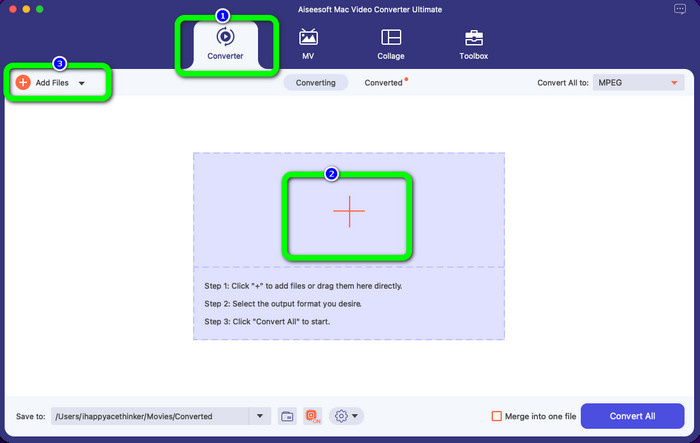
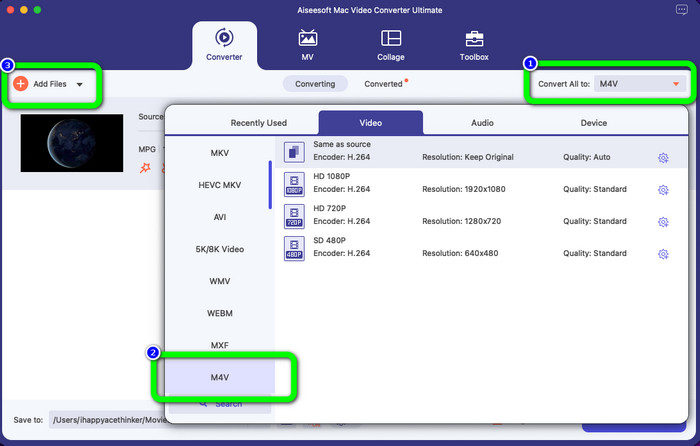
ステップ 3: MPEG 動画ファイルを読み込んだら、画面右上の[一括変換先]ボタンを選択します。すると、形式のオプションが画面に表示されます。出力形式として希望する M4V ファイルをクリックします。本ツールは一括変換に対応しているため、ファイルを追加ボタンをクリックして、変換したいファイルをさらに追加することもできます。
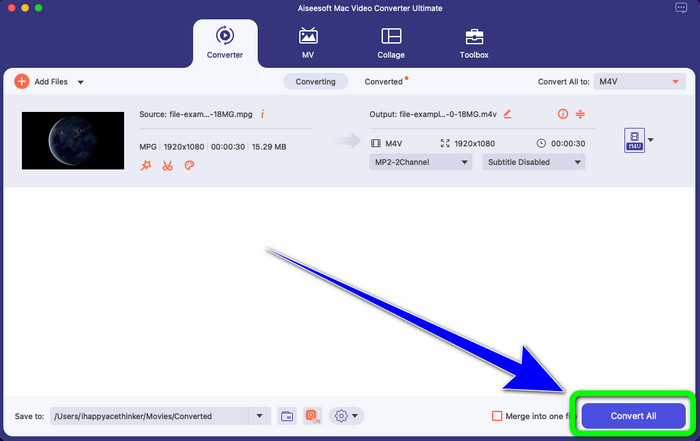
ステップ 4: MPEG ファイルの出力形式を希望どおりに設定できたら、すべて変換ボタンをクリックして、M4V ファイル形式の最終動画を保存します。
パート 3: オンラインで MPEG を M4V に変換する最良の方法
オンラインツールで MPEG を M4V に変換する最良の方法は、FVC Free Video Converter Online を利用することです。この汎用性の高いビデオコンバーターは、AVI、MOV、MP4、FLV、TS など、ほぼすべての形式に対応して変換できます。また、MPEG ファイルを変換しても元の画質を維持することが可能です。さらに、このコンバーターは 100% 無料で利用できるため、費用をかけずに制限なく使い続けられます。以下の簡単な手順に従って、FVC Free Video Converter Online を使い、MPEG を M4V に変換してください。
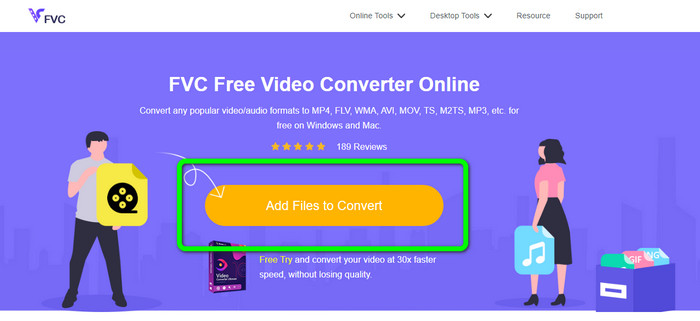
ステップ 1: ブラウザを開き、FVC Free Video Converter Online の公式サイトにアクセスします。次に、ファイルを追加して変換ボタンをクリックします。フォルダーが画面に表示されるので、変換したい MPEG ファイルを選択します。
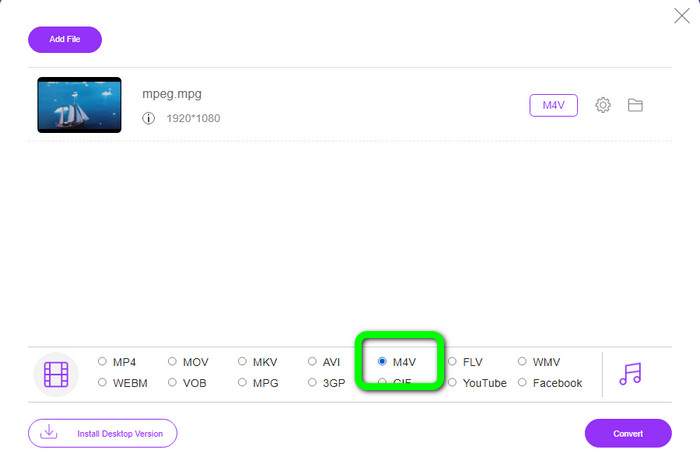
ステップ 2: MPEG 動画ファイルを追加すると、画面下部に形式オプションが表示されます。出力形式として、M4V ファイルを選択します。
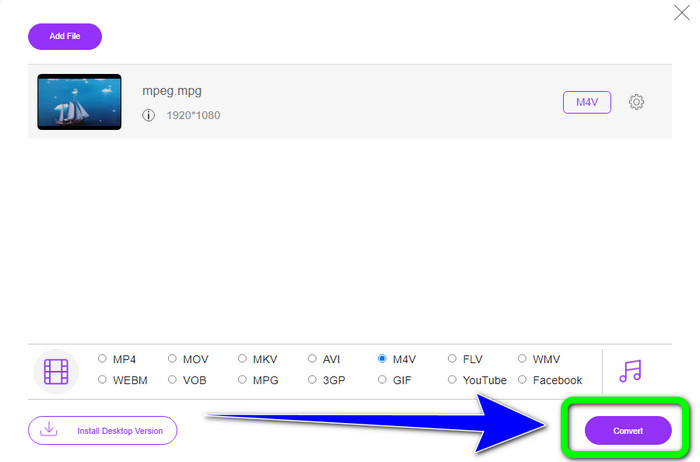
ステップ 3: 最後に、M4V ファイル形式を選択したら、変換ボタンをクリックします。その後、保存先を指定します。変換処理が完了するまで待ち、OK をクリックします。このツールは、オンラインでMP4 を M4V に変換する際にも役立ちます。
パート 4: MPEG から M4V への変換に関する FAQ
FFmpeg を使用して MPEG を M4V に変換する方法は?
コンピューターに FFmpeg をダウンロードします。次に、コマンド プロンプトを開きます。コマンドラインを「デスクトップ」に切り替えます。変換コマンドは FFmpeg -i で始まり、その後にソース ファイルの名前とファイル タイプ、出力ファイルの名前とファイル タイプが続きます。次に、「Enter」を押して、変換プロセスを待ちます。変換後、変換されたファイルがデスクトップに表示されます。
VLC は MPEG を MP4 に変換できますか?
はい。人気のあるクロスプラットフォーム対応メディアプレーヤーである VLC は、MP4、MPEG、AVI、MOV など、主要なファイル形式をすべて再生できます。また、ファイル変換機能も備えているため、MPG ファイルを MP4 に変換する用途にも素早く簡単に利用できます。
優れたオンライン ツールを使用して、MPEG ファイルを他の形式に変換できますか?
はい、もちろんです。FVC Free Video Converter Online を利用できます。このオンラインツールは、画質を落とさずに MPEG ファイルを別の形式へ即座に変換することができます。
結論
上記で紹介した 2 つの方法は、MPEG を M4V ファイル形式に変換するための最良の解決策です。ダウンロードして使えるコンバーターを希望する場合は、Video Converter Ultimate を利用できます。一方、オンラインツールを使いたい場合は、FVC Free Video Converter Online を使用してください。
-
 WindowsおよびMacでMPGを3GPに変換する3つの方法[無料]
 MPGを3GPに変換する方法をお探しの場合は、この記事を読んで、WindowsおよびMacでMPGを3GPに変換するための最良の方法を確認してください。
-
 品質を落とさずに MPG を DivX に変換する方法
 MPG を DivX に変換するために使用できるトラブルのないアプリケーションをお探しですか?この記事では、試してみるべきさまざまな効果的な方法を紹介します。
-
 Macで無料でM4VをDivXに変換する方法[ベストツール]
 M4VをDivXに無料で変換する方法をお探しですか? MacでM4VファイルをDivXに変換するのに最適なコンバーターをリストアップしました。
