


 ビデオコンバーター究極
 スクリーンレコーダー
 ビデオ修復
ビデオ修復
 安全なダウンロード
あなたが知る必要がある4つの方法でDreamstime透かしを削除します
プレゼンテーションやプロジェクトですぐに使用できる画像が必要な場合は、Dreamstimeを選ぶのに間違いはありません。このアプリは、いつでも使用できるロイヤリティフリーのストックフォトを提供します。それはすでに、低価格で高品質の出力を備えた特定の画像を探しているユーザーを支援します。ここから15枚の画像を無料でダウンロードできますが、この製品は、ここからダウンロードした画像を使用すると、アプリを宣伝するための透かしを残します。
使いやすさが優れていて画像の価格も安いことに異論はありませんが、すべての人がクレジットを購入できるわけではありません。そんなときも心配はいりません。以下で紹介する情報では、最終的な出力画像に残ってしまうDreamstimeのウォーターマークを削除する方法をご案内します。

パート1。クレジットを購入してDreamstime透かしを削除する方法
購入オプションは、使用できる最も効果的なDreamstime透かし除去オプションであるため、取り残せません。先に進む前に、透かしのない画像を購入できるように、Dreamstimeに必要なものがあることを知っておく必要があります。名前のクレジットはDreamstime通貨です。リアルマネーを使用して、Dreamstimeが受け入れるデジタルマネーに変換します。 Dreamstimeにクレジットがないとします。その場合は、以下の手順でクレジットを購入してダウンロードし、商品のロゴが残っていない画像を入手できます。
ステップ1. Dreamstimeの公式サイトを開き、クレジットを購入する前にアカウントを作成します。すでにアカウントをお持ちの場合は、まずログインして正しく利用できるようにしてください。
ステップ2. Dreamstimeでアカウントにログインしたら、Price and Download Plansをクリックし、次にCredit Packageに進んで、その中に含まれている利用可能な料金プランを確認します。
ステップ3. 指示される情報をすべて正確に入力し、ツール上で指定した支払いを処理するために「Complete Checkout」をクリックします。これで、Dreamstimeで画像を購入する際に使えるクレジットを通貨のように簡単に購入できるようになります。
パート2。Web上で無料でDreamstime透かしを削除する方法
FVC無料透かしリムーバーオンライン
オンラインで使用できる最も有名なDreamstime透かしリムーバーの1つは、FVC Free WatermarkRemoverOnlineに他なりません。このツールを利用して、画像に含まれている透かしを削除できます。パフォーマンス面では、このオンラインツールは、特に画像上のロゴ、透かし、スタンプ、日付、オブジェクトなどを削除する際に、あなたが考えることをより可能にします。あなたはまだこのツールを疑っていませんか?その場合は、以下に追加した手順をお読みください。また、それらの手順に従って、Dreamstimeが追加した透かしを削除することもできます。
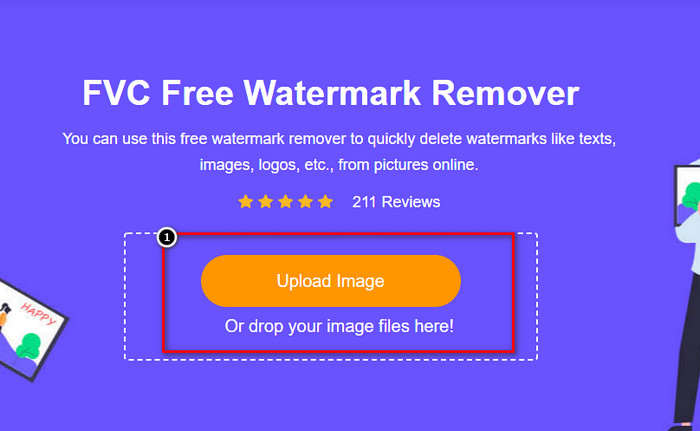
ステップ1. このリンクをクリックすると、ブラウザで新しいタブが開きます。
ステップ2. Upload Imageをクリックして、Dreamstimeから出力したウォーターマーク付きの写真をインポートします。
ステップ3. ウォーターマークをなぞるためのツールを利用できます。1つ選択し、それを使ってウォーターマーク部分をトレースします。
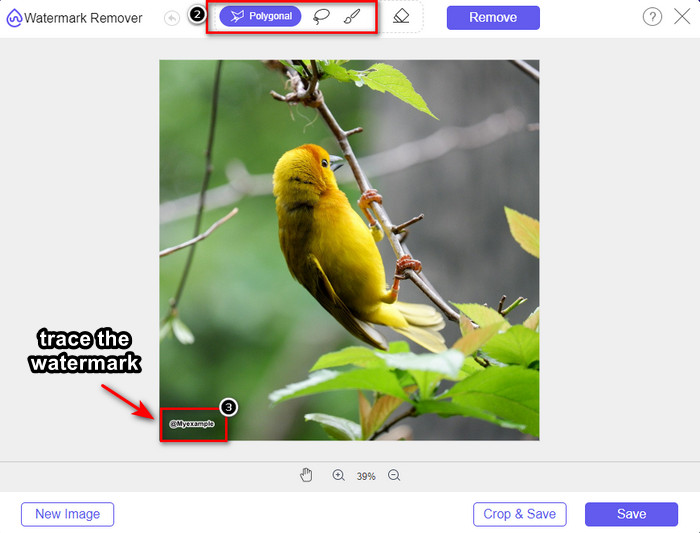
ステップ4. 画像を書き出す前に、まずRemoveアイコンをクリックします。

ステップ5. 最後にDownloadをクリックして、ここで指定した埋め込みウォーターマークのない画像を保存します。

WatermarkRemover.IO

WatermarkRemover.ioは、Dreamstimeの写真からウォーターマークを削除するためにオンラインで使えるツールで、この作業をサポートしてくれます。このツールは、前述のオンラインウォーターマークリムーバーと同様に無料で利用できます。どのブラウザからでも利用できるため、サインアップなどを心配する必要はありません。また、このツールを使うと、AI技術によって画像からウォーターマークが自動的に削除されます。実際の手順を知るために、以下の説明を読み進めてください。
ステップ1. ブラウザで検索して、このウォーターマークリムーバーの公式サイトを開きます。
ステップ2. 「Upload Image」アイコンをクリックして、削除したいウォーターマークが入った写真をアップロードします。
ステップ3. ウォーターマーク付きの画像をアップロードし終えたら、「Download Image」をクリックします。これだけで、画像からウォーターマークが自動的に削除されます。
パート3。究極のソリューションを使用してビデオのDreamstime透かしを削除する方法
Dreamstimeのウォーターマークが入った動画には、FVC Video Converter Ultimateのような究極のDreamstimeウォーターマークリムーバーをダウンロードして利用できます。これは非常に柔軟で、いつでもすぐに使えて、作業を完了できるツールです。このツールは、音質の低さ、解像度の問題、非対応フォーマット、邪魔なウォーターマークなど、動画で発生しがちなトラブルに対応します。ほかのウォーターマーク削除ソフトと比べても、このソフトは性能、処理速度、使いやすさの面で非常に優れています。ここでは、動画からウォーターマークを削除する具体的な手順を順を追ってご紹介します。
ステップ1. まず最初に、以下のダウンロードボタンをクリックしてデスクトップにソフトウェアをダウンロードします。インストールする正しいバージョンを選択し、簡単なセットアップを完了させてから、ソフトを起動してください。
無料ダウンロードWindows 7 以降に対応安全なダウンロード
無料ダウンロードMacOS 10.7 以降に対応安全なダウンロード
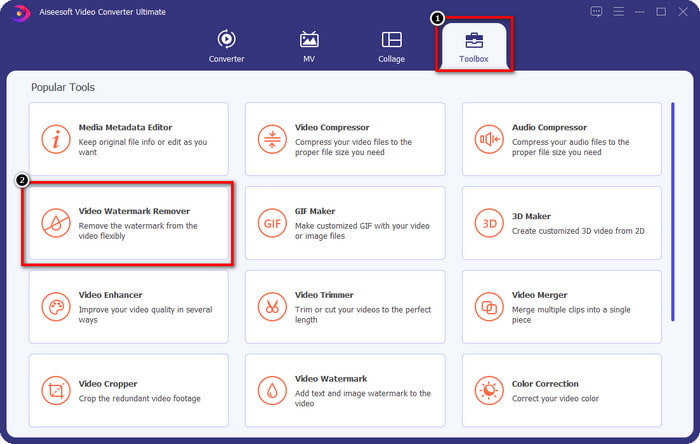
ステップ2. ソフトに搭載されている多機能なToolboxを開き、Video Watermark Removerを選択します。
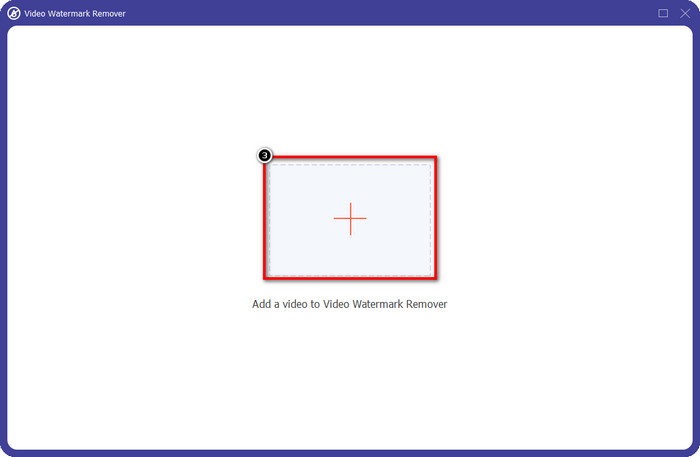
ステップ3. 続いて、+アイコンをクリックして、ダウンロードした動画をアップロードし、Dreamstimeのウォーターマークの削除を開始します。
ステップ4. その後、Add Watermark Removing Areaをクリックして、ウォーターマークに選択範囲ボックスを配置します。
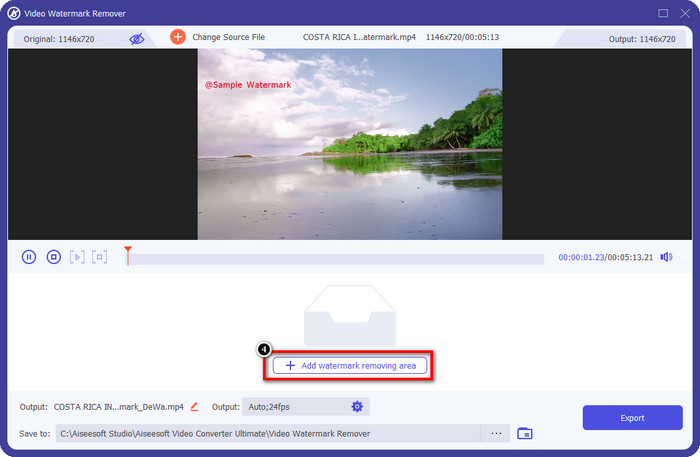
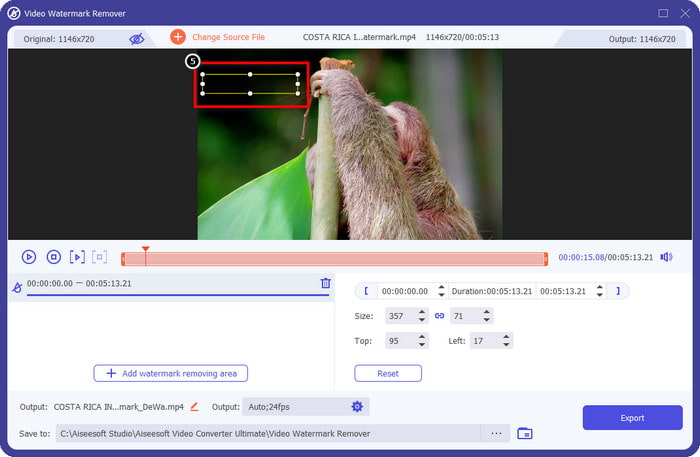
ステップ5. Add Watermark Removing Areaをクリックすると、画面上に長方形の枠が表示されるので、それをウォーターマーク部分に合わせて配置し、削除します。
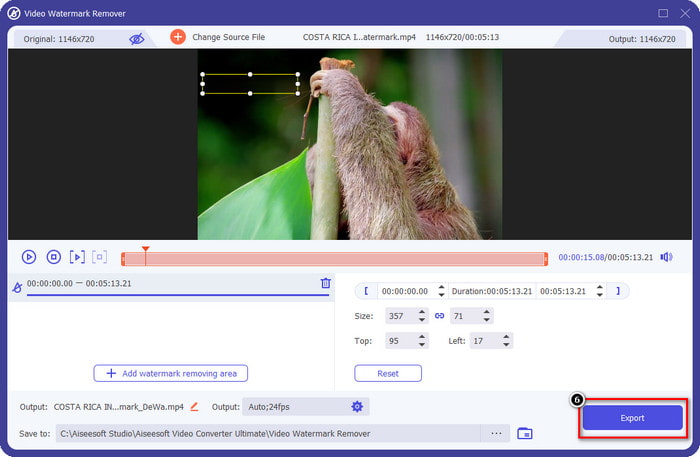
ステップ6. 「Export」ボタンをクリックして、Dreamstimeのウォーターマークが入っていない動画をダウンロードします。
関連記事:
パート4。Dreamtime透かしを削除する方法に関するFAQ
購入後にDreamtimeの透かしを無制限に削除できますか?
クレジットを購入した場合はできませんが、先に進んでもう少し下にスクロールすると、これを定期的に使用している場合に利用できる無制限の画像アクセスがあることがわかります。その価格は、世界中のさまざまな地域や場所で同じではありません。
Dreamstimeはどのタイプのカードをサポートしていますか?
ここでクレジットまたはサブスクリプション料金を購入することにしたので、マスターカード、Visa、AMEX、およびその他の主要なクレジットカードを使用できます。公式サイトでチェックして、他の人を知ることができます。
Dreamstimeのクレジットを使用して、透かしのない動画を購入できますか?
クレジットを使用して、このプラットフォームにあるビデオまたは任意の製品を購入できます。クレジットの目的は、画像や動画だけではありません。こちらでオーディオを購入することもできます。
結論
Dreamstime透かしを削除する方法は?さて、あなたはすでに、私たちが参加している2つのツールと、使用できる究極の透かし除去機能を備えたビデオを使用して、画像の透かしを処理する方法を知っています。したがって、ビデオや画像に透かしの問題がある場合は、上記のソフトウェアを自由に使用して、追加したチュートリアルに従うことができます。それが解決されたので、問題に別れを告げないでください!
-
 WindowsとMacでVSDC透かしをすばやく削除する2つの方法
 動画のVSDC透かしを削除する方法をお探しですか?この記事では、透かしを取り除くために使用できるツールを提供します。
-
 動画のAnimoto透かしを簡単かつ効果的に削除する
 ビデオのAnimoto透かしを削除するにはどうすればよいですか?それを行う方法についての完全なチュートリアルを提供したので、この記事を読み続けてください。
-
 FinalCutProを使用してビデオから透かしを削除する方法[完全ガイド]
 ビデオの透かしに問題がありますか? FinalCutProを使用してビデオから透かしを削除する方法についてのチュートリアルを提供したためです。
