


 ビデオコンバーター究極
 スクリーンレコーダー
 ビデオ修復
ビデオ修復
 安全なダウンロード
WindowsとMacでビデオに低速モーションと高速モーションを追加する方法
動画にスローモーションと早送りを適用することで、人間の目には新鮮に映るような錯覚を簡単に作り出せます。スマートフォンでも一眼レフカメラでも、好みに合わせてさまざまな速度で動画を撮影することは簡単ですが、その場で素早く再生速度を変更できる編集機能を備えた機器は多くありません。速度変化が視聴者に与える効果の大きさから、再生速度を変更できるツールの需要は一気に広まりました。それでは、どのツールを選ぶべきなのでしょうか。どれが最適な選択かを知るには、この記事を読み進めて、あなたが実現したい2種類のモーションについての解説をご覧ください。

パート1。これは最高です|ファストモーションとスローモーション
ビデオを撮ると、通常、高速、低速の3種類のモーションがあります。ほとんどの場合、何らかの理由で速度を希望の再生に変更します。ただし、ビデオに高速スローモーション効果を使用する理由については説明しません。以下の情報は、効果が互いに異なる理由とその使用法を簡単に確認するためのものです。
| ファストモーション | VS. | スローモーション |
| 動きが速いため、この速度に設定されている場合、ビデオの長さは当然短くなります。これは、ビデオが高速で再生されるためです。 | ビデオの長さ | こことは異なり、動画の自然な速度をスローモーションに変更すると、スローモーション状態であるため、動画の長さが長くなります。 |
| 高速モーションでは、投影FPSはキャプチャFPSよりもはるかに高くなります。通常のモーションとは異なり、それが提供する速度は、投影FPSとキャプチャFPSの両方に等しくなります。 | ビデオのFPS | スピードアップよりも高いキャプチャFPSをサポートしていますが、速度を落とすと犠牲になるため、投影FPSが低くなることがわかります。 |
| ほとんどのシネマトグラフィーは、アクションごとに必要なアクションに優れているため、スローモーションよりも速い移動速度を使用します。そして、この動きでビデオや映画を見ると、時間を節約できます。 | のために使用される | このモーションスピードでは、最初のビデオよりも詳細にビデオを見ることができますが、提供される期間が長すぎて、ファイルサイズが前のものよりも大きくなっていることがわかります。 |
編集で作成されるスローモーションとファストモーションのさまざまな効果がわかったので、次に、使用できる最高のスピードコントローラーを確認します。あなたがプロのビデオスピードエディタを持っていないなら、次の部分は見つけることです。詳細については、この記事を読み続けてください。
パート2。デスクトップに必要な最高の高速およびスローモーションビデオスピードコントローラー
動画の速度を的確かつ効率的に調整したいなら、強力なスピードコントローラーは必須です。その点で、FVC Video Converter Ultimateは最適なソフトといえます。このソフトの動画速度オプションを使えば、他の動画編集ソフトにはあまりない0.125倍の超スローから8倍速まで、選んだ速度をかんたんに適用できます。さらに、スピード調整したいあらゆる形式の動画を読み込むことが可能です。このツールは、手持ちの動画の再生速度やモーションを変更することにほとんど制限を設けていません。まさに、早送りとスローモーション用の必携ツールといえるでしょう。興味を持った方は、このあとに続くチュートリアルを読みながら操作方法を学び、実際にインストールして使ってみてください。
ステップ1 デスクトップで最高のソフトを入手するには、下のダウンロードボタンをクリックして、WindowsまたはMacに直接ダウンロードします。ダウンロードが完了したらインストールを行い、1分ほどのかんたんなセットアップ手順に従って完了させ、その後ソフトを起動します。
無料ダウンロードWindows 7 以降に対応安全なダウンロード
無料ダウンロードMacOS 10.7 以降に対応安全なダウンロード
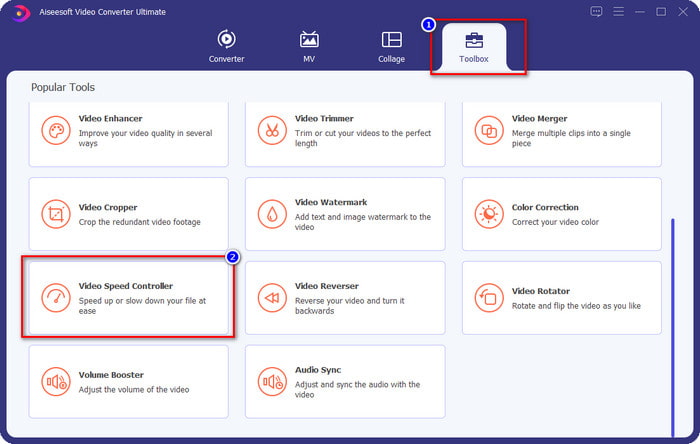
ステップ2 ツールボックスを開き、動画スピードコントローラー機能を探してクリックします。
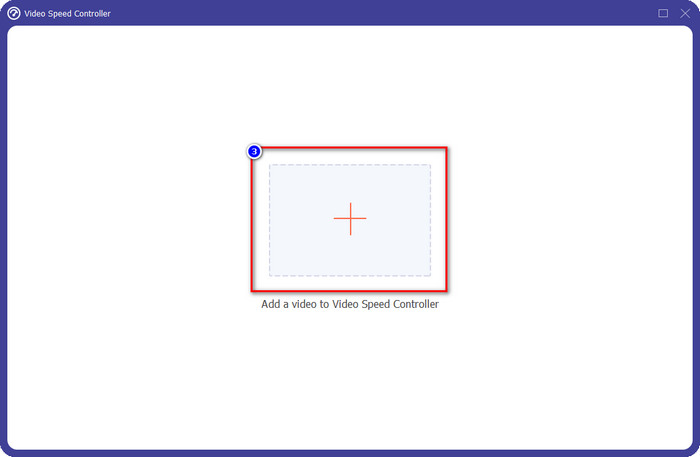
ステップ3 +ボタンをクリックし、モーション(速度)を変更したい動画を選択して、開くをクリックし、このソフトに読み込みます。
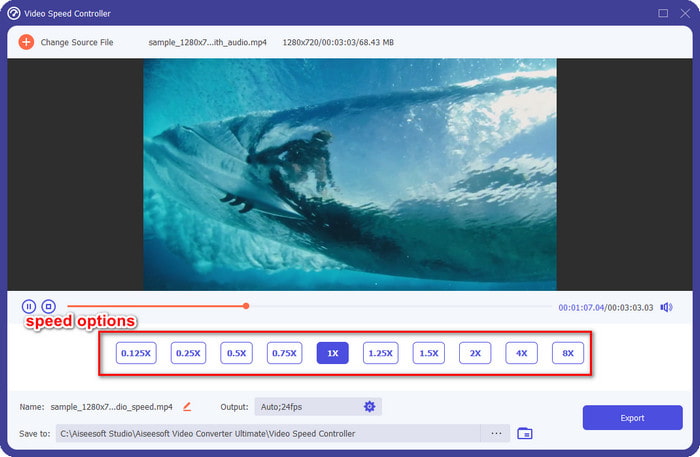
ステップ4 ファイルを読み込むと、速度コントローラーツールのウィンドウが画面に表示されます。このソフトに用意されている動画速度オプションの中から、動画に適用したい速度を選びます。それぞれをクリックすると、その速度で再生したサンプルプレビューを画面上で確認できます。
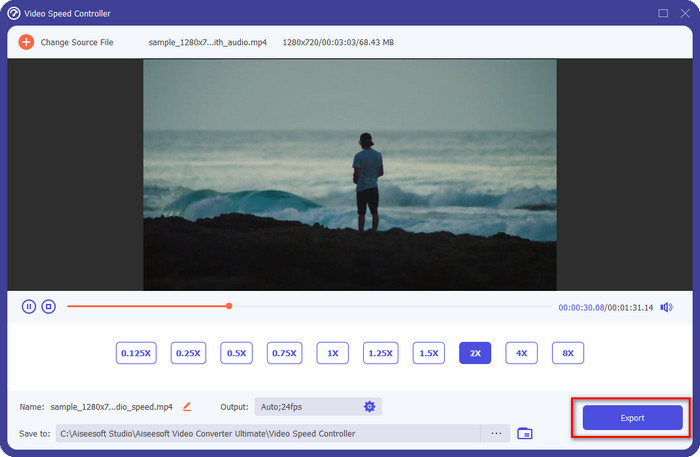
ステップ5 速度を変更した動画を保存するには、書き出しをクリックします。これだけで、WindowsでもMacでも、この究極ソフトを使って動画の再生モーションを変更できます。
パート3。高速および低速モーションに関するFAQ
デスクトップで高速およびスローモーションのビデオを視聴できますか?
さまざまなメディアプレーヤーを使用すると、好みに応じて、視聴しているビデオの速度を簡単に変更して、速度を遅くしたり速くしたりできます。 Blu-rayプレーヤー、VLCメディアプレーヤー、Quicktime、Windows Mediaプレーヤー、およびその他のメディアプレーヤーに組み込まれているスピードコントローラーを押すと、デスクトップに表示できます。ただし、ビデオの速度が恒久的に変わるわけではないことを忘れないでください。必要に応じて、この記事で紹介するツールをお読みください。
なぜ高速とスローモーションの効果を使用する必要が生じたのですか?
ビデオの速度を変更することで、他のエフェクトやフィルターでは不可能ないくつかのエフェクトに簡単にアクセスできます。したがって、編集者で他の効果を試したい場合は、速度コントローラーを使用してビデオの速度を変更する必要があります。プロである必要はありません。簡単で、確実にビデオを素晴らしいものにすることができるからです。
再生速度の変更に制限はありますか?
再生速度にはどうしても限界があることは否めません。どんな動画でも速度変更自体は簡単に行えますが、速くしすぎると、映像がフリーズしたように見え、元に戻せない場合もあります。同様に、スローモーションにしすぎると、フレーム数が足りずコマ落ちして、非常にカクついてしまうことがあります。このような問題を避けるには、動画の再生速度を変更する際によく検討し、慎重に調整することが大切です。
結論
スローと早送りに関するあらゆる要素を踏まえたうえで、上記の内容は、私たちが行ったリサーチや実際の速度変更の経験に基づいてまとめています。速度調整自体は簡単に見えますが、実際に変更する前に基本をきちんと理解しておく必要があります。プロレベルの知識と高機能なツールがなければ、思い通りの速度を適用するのは決して容易ではありません。FVC Video Converter Ultimateをダウンロードすれば、優れたスピードコントローラーであると同時に、多機能を備えたオールインワンツールを手にすることができます。そのとおり、このソフトには本記事でご紹介した以上に多くの機能があります。もっと知りたい方は、実際にダウンロードして、その実力を確かめてみるのが一番確実な方法です。
-
 QuickTimeスローモーションについて知っておくべき重要な事実
 QuickTime Media Playerを使用してスローモーションでビデオを再生してみましたか?このメディアプレーヤーの優れたサービスについて詳しくは、この記事をお読みください。
-
 Windows /Mac/オンライン用の5つのプロのスローモーションビデオメーカー
 ビデオをスローモーションで再生する方法を知りたいですか?次に、この記事を読んで、5人のプロのスローモーションビデオメーカーが何であるかを理解してください。
-
 スローモーションビデオを作成する際にiMovieを使用する最良の方法[解決済み]
 iMovieアプリを使用して、通常の速度のビデオをスローモーションに変換したことがありますか?これは、このアプリケーションについてもっと知る機会ですので、読み続けてください。
