


 ビデオコンバーター究極
 スクリーンレコーダー
 ビデオ修復
ビデオ修復ファイルからメタデータを表示するための4つの効果的なメタデータビューアツール
As part of a video element, the metadata contains the data you'll need to know about the file. But the question is, how can you view the file's metadata? So, if you want to see the meta information inside your video, this is the perfect post for you. Keep on reading this article because we will review for you the best metadata viewer you can use to see the metadata, and if possible, you can edit it as well.

パート1.2 2022年のWindowsおよびMac用の最高のメタデータビューア
ビデオコンバーターアルティメット[最高のビデオおよびオーディオメタデータビューアおよびエディタ]
Video Converter Ultimate offers you the best video metadata viewer on Mac and Windows. With this tool, you can easily add and view the metadata in all video and audio formats with just a few clicks. Even though you didn't have experience dealing with this particular task, you can depend on the best viewer to help you. Unlike the other tools that offer to view metadata, this software provides a great function to help you do more in different tasks, such as editing the metadata. Want to know what these are? If so, read the key features you can have once you attain this software.

FVCビデオコンバーターアルティメット
5,689,200以上のダウンロード- これは、すべてのビデオまたはビデオのメタデータを表示および編集するための最良のツールです。
- MP4、AVI、MOV、MKV、FLVなどのさまざまなメディア形式をサポートします。
- ここに大きなビデオファイルとオーディオファイルを挿入して、メタデータを確認できます。
- 手始めに、これはユーザーフレンドリーなインターフェースを備えた最高のメタデータビューアです。
- WindowsやMacなどのさまざまな種類のデスクトッププラットフォームで利用できます。
無料ダウンロードWindows 7 以降に対応安全なダウンロード
無料ダウンロードMacOS 10.7 以降に対応安全なダウンロード
したがって、メタデータの表示方法を学びたい場合は、最初に以下に示す適切なダウンロードボタンをクリックしてツールをダウンロードし、次にインストールしてから開く必要があります。
無料ダウンロードWindows 7 以降に対応安全なダウンロード
無料ダウンロードMacOS 10.7 以降に対応安全なダウンロード
Video ConverterUltimateでメタデータを表示する方法
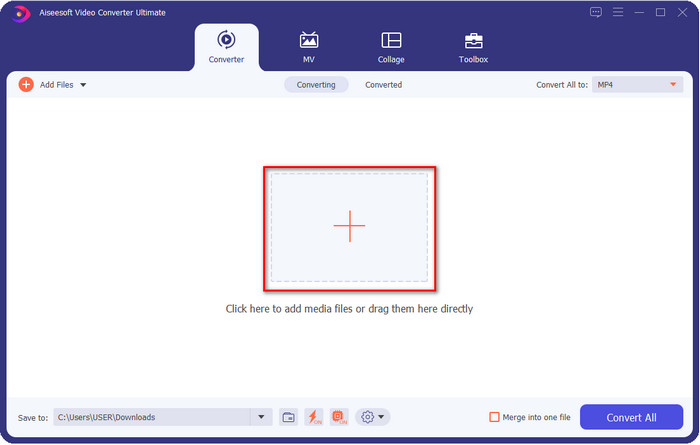
Step 1. By clicking the + button, a file folder will show on your screen where you can locate the video or audio file you want to check the metadata. Once you've chosen the file, click Open and proceed to the next step.
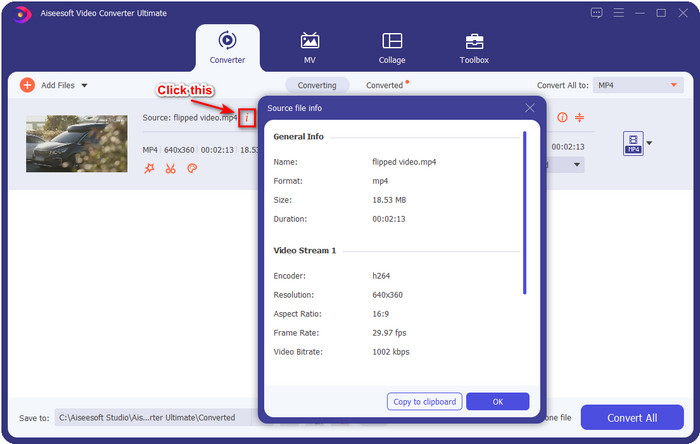
Step 2. While the file is on queue, click the i icon; voila, you have now viewed the metadata of your video file saved on your computer.
最高のメタデータエディタを使用してビデオまたはオーディオファイルのメタデータを追加または編集する方法
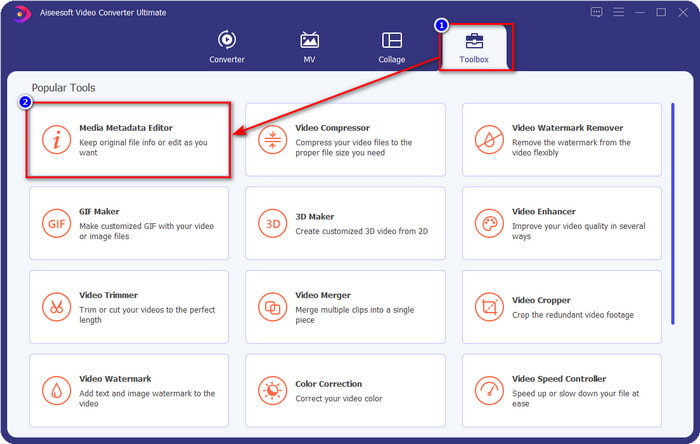
Step 1. After you've opened the software, you must go to the Toolbox section, and in that section, you will see a feature Media Metadata Editor, then click it.
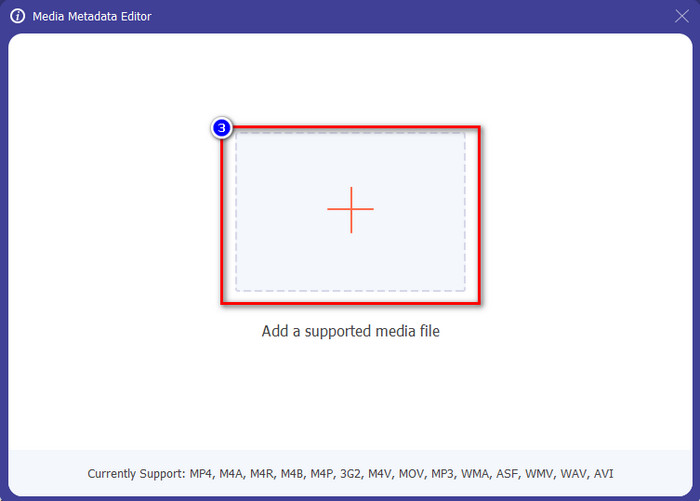
Step 2. New windows will show, click the + button, find the video or audio file on the computers folder, and click Open.
Step 3. Add or edit the data about the file according to your needs; after that, click Save to apply the changes you add.

Photoshop [プロフェッショナル向けの最高のメタデータビューア]
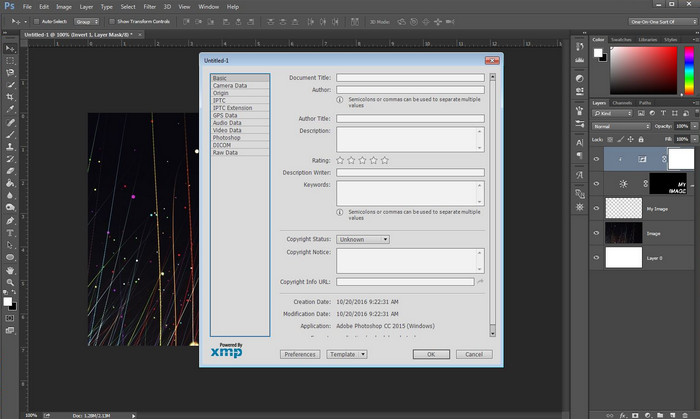
Photoshop became known as the top photo editor you can use as a professional. This tool offers users the high-end editing you will need to make your photo look better than before. Although the tool offers advanced editing, viewing the file's metadata, this tool is too expensive for some users. Maybe you are asking why we add this editor to the list, well it is popular, and many users already use this, so why not? Although it can add metadata on every PSD file, the metadata it supports is minimal, which means it is mostly about basics. So, if you want to view metadata in Photoshop, you must purchase the tool.
長所
- それはあなたがウェブ上で見つけることができる最高のエディタです。
- 挿入して後でメタデータを確認できるさまざまな画像ファイル形式をサポートしています。
- デスクトップで一流のエディタソフトウェアになるためのエディタの選択。
短所
- ツールを購入する場合は、高価になることを期待してください。
- より良い使用体験を得るには、ハイエンドのデスクトップが必要です。
- 初心者が最初から始めるのに最適な選択ではありません。
関連記事:
How to Add Watermark in Photoshop
パート2.2Webで利用可能な無料のメタデータビューア
ジェフリーの画像メタデータエディタ
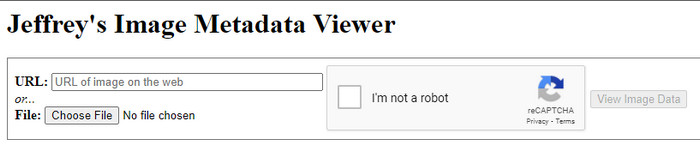
If you want a simple free metadata viewer on the web, try to use Jeffrey's Image Metadata Editor. This web tool is an effective tool to view the metadata of every media file you have for free. However, the users' interface of the web tool isn't as impressive as the others; it still serves its purpose as a metadata editor and viewer. Moreover, if you want to try and access this tool, you must beware because the website isn't protected on different web browsers, which means signing in to the website can lead to hacking or losing some files. Remember that you'll need to beware if you try to access the tool to view your metadata or edit it. So far, there aren't any reports of some who have been hacked while using the website.
長所
- すべてのWebブラウザで無料でアクセスできます。
- さまざまな形式をサポートしています。メタデータをアップロードして表示できます。
- ファイルの代わりにURLを挿入して、スペースを節約できます。
短所
- メタデータを表示したい場合、キャプチャは少し面倒です。
- Webサイトは保護されていません。
Metadata2go
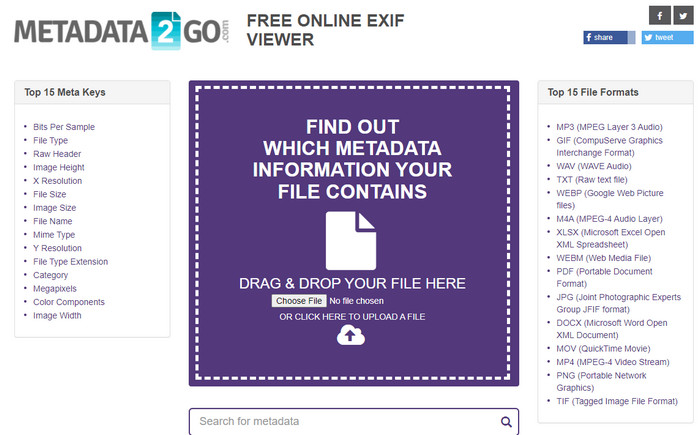
Metadat2go offers a wide range of image formats to insert and later view the metadata. Even though the GUI is much heavier than the first web tool we introduced, it is still easy to use for anyone who would like to access the tool. Although the tool is safer to use than the first one, there are some limitations on the functions, and most of the time the drag and drop function of it doesn't do well. But if you want to learn how to open and read metadata from video, this tool will suffice your needs.
長所
- さまざまな検索エンジンで無料で安全にアクセスできます。
- それはスムーズにタスクを実行します。
- 多数の画像形式をサポートしています。
短所
- ドラッグアンドドロップなどのオプションがうまく機能しない場合があります。
- 他のフォーマットもサポートしていますが、選択されているものはほとんどありません。
パート3.4メタデータビューアに関する比較チャート[オンラインおよびオフライン]
| 特徴 | FVCビデオコンバーターアルティメット | Photoshop | ジェフリーの画像メタデータエディタ | Metadata2go |
| メタデータを簡単に表示および編集 |  | | | |
| 安全に使用できます | | |  | |
| 予算にやさしい | | | | |
| 使いやすい | | | | |
| 利用可能な高度な機能 | | | | |
| プログラムベース | デスクトップベース-プログラム | デスクトップベース-プログラム | Webベースのプログラム | Webベースのプログラム |
パート4。メタデータビューアに関するFAQ
メタデータの内部には何がありますか?
メタデータ内には、作成者の名前、ジャンル(音楽の場合)、ファイルタイトル、ファイルサイズなど、ファイルに関するさまざまな情報が表示されます。
メタデータを表示する必要があるのはなぜですか?
メタデータは、ファイルに表示されないファイルに関する短い情報を知るのに役立ちます。メタデータを表示することで、画像、ビデオ、オーディオ、PDFなど、特定のファイルのデータについて知ることができます。
メタデータを使用してファイルを保護できますか?
はい、メタデータを追加して、これを盗もうとする人々からファイルを保護することができます。このようにして、誰かがあなたからこれを盗もうとした場合に、あなたが作成した資格情報を機能させることができます。ただし、ファイルのメタデータを削除する方法はいくつかあります。誰かがデータを削除することはできますが、追加の簡単な保護のためにファイルにメタデータを追加することをお勧めします。
結論
Now that we have the metadata viewer presented, it is time to choose one and use it to see your file's inside. Moreover, the first two tools we presented are undoubtedly the best on viewing metadata; but we can see that Photoshop is too expensive to use compared to the ultimate tool. So, therefore, if you want a cheap and safe way to view your metadata or edit it, you must use the FVC Video Converter Ultimate because it is the perfect tool for this task. Still, are you not convinced with the review we did on the tool? Well, you can download the tool on your software and try it for yourself!
-
 ビデオから透かしを簡単に削除する方法に関する3つのベストソリューション
 ビデオの迷惑な透かしを削除したいですか?このブログでは、ビデオの透かしを削除するためのさまざまなアイデアを学ぶことができます。
-
 任意のビデオに透かしをすばやく追加する方法に関する4つの最良の方法
 この記事を読んだら、詳細な手順を使用して、Windows、Mac、オンライン、iOS、およびAndroid上のビデオに透かしを追加する方法を学びましょう。
-
 TiktokビデオからTiktok透かしを削除する4つの効果的な方法
 エクスポートしたTiktokビデオからTiktok透かしを削除する必要がありますか?私たちが提示するツールの助けを借りて、ここでそれを行うことができます。あなたはそれを簡単に行うことができます。
