


 ビデオコンバーター究極
 スクリーンレコーダー
 ビデオ修復
ビデオ修復
 安全なダウンロード
Coub透かしをオンラインおよびオフラインで削除する簡単な方法
Coubは、オンラインで動画を共有するために使われているウェブサイトです。ユーザーが最長10秒の動画を作成して共有できる人気サイトです。GIFと違い、Coubの動画には高品質なサウンドが付いているため、多くの人に好まれています。しかし、Coubから動画を保存・ダウンロードすると、動画にはウォーターマークが入っています。そのため、Coubのウォーターマークを消したい場合は、ウォーターマークを削除できるツールを使う必要があります。この記事では、動画のCoubウォーターマークを削除するのに役立つ、便利で優れたツールをご紹介します。

パート1。Coubウォーターマークを削除する4つの方法
現在、多くの人がCoubビデオをオンラインで視聴およびダウンロードすることに関心を持っています。ただし、Coubからビデオをダウンロードすると、透かしが含まれます。これらの4つの簡単な方法を使用して、Coubの透かしを削除する方法を理解できます。
FVCビデオコンバーターアルティメット
FVC Video Converter Ultimateは、動画からあらゆるウォーターマークを削除できるデスクトップアプリケーションです。このツールはユーザーインターフェースがシンプルで、ダウンロードも簡単なため、扱いやすいのが特徴です。さらに、対応しているファイル形式も非常に多く、MP4、MKV、AVI、MOV、M4V、WEBM、FLVなど、1000種類以上のフォーマットに対応しています。
また、ツールボックスのメディアメタデータエディター、ビデオマージ、ビデオコンプレッサーなどの高度な編集機能も備えています。また、ビデオから透かしを削除すると、削除領域のサイズを設定できます。また、ビデオの出力を確認できるように、ファイルのプレビュービデオも表示されます。このコンバーターを使用してCoub透かしを削除する場合は、以下の手順に従ってください。
ステップ1. 下のダウンロードボタンをクリックして、デスクトップにFVC Video Converter Ultimateをダウンロードします。インストール手順に従ってセットアップし、アプリを起動します。
無料ダウンロードWindows 7 以降に対応安全なダウンロード
無料ダウンロードMacOS 10.7 以降に対応安全なダウンロード
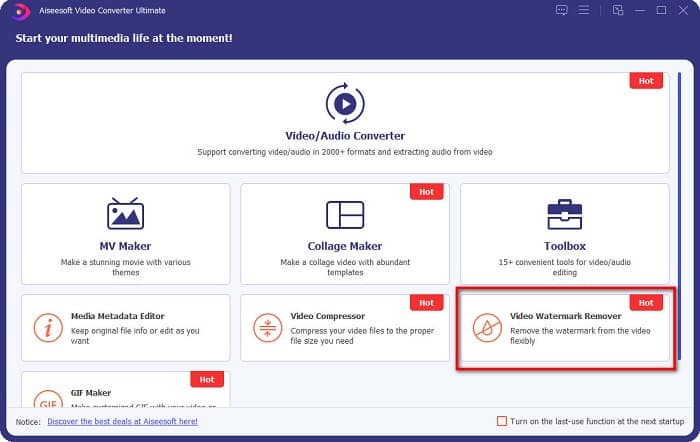
ステップ2. そして、ソフトの最初の画面でビデオウォーターマーク除去を選択します。最初の画面で見つからない場合は、ツールボックスをクリックしてください。
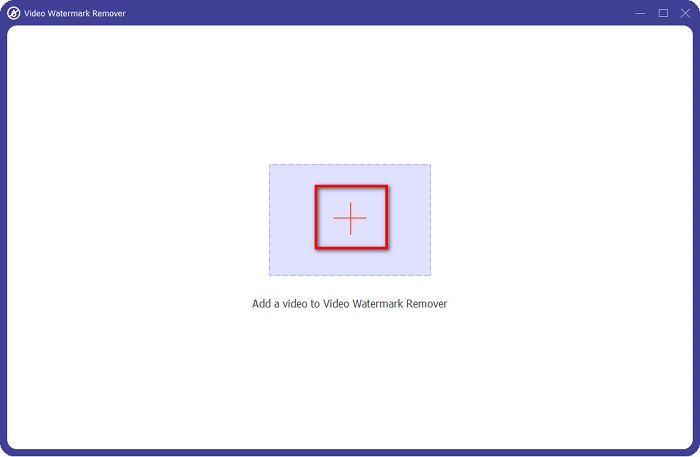
ステップ3. 次の画面で、+ボタンをクリックしてCoub動画をアップロードします。パソコンのファイル画面が表示されるので、動画を選択して開くをクリックします。
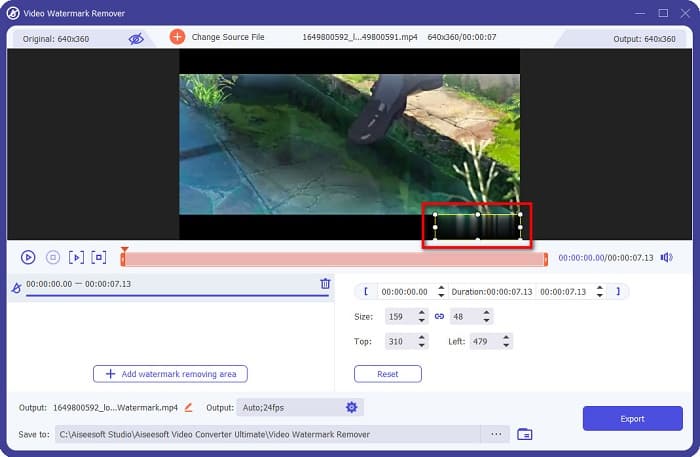
ステップ4. 続いて、ウォーターマーク削除エリアを追加ボタンをクリックして、削除エリアを表示させます。そして、そのエリア枠をCoubのウォーターマークの位置まで移動させます。選択した部分がぼかされて表示されるのが確認できます。
ステップ5. 最後に、エクスポートボタンをクリックしてCoubウォーターマークを削除します。出力ファイルは自動的にパソコン内のフォルダに保存されます。

簡単ですよね。上記の手順に従うだけで、動画からCoubのウォーターマークを削除できます。TikTokのウォーターマークを削除する方法については、こちらをクリックしてご覧ください:TikTokのウォーターマークを削除。
ヒットポーウォーターマークリムーバー
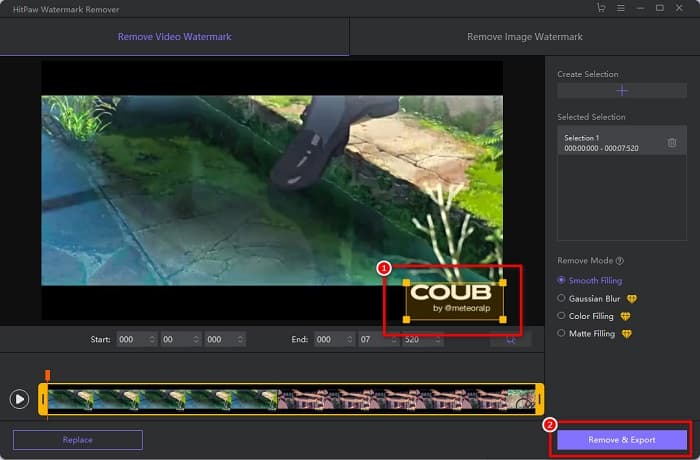
Hitpaw Watermark Removerは、Coubのウォーターマークを動画から簡単に削除できる、人気のダウンロード型ウォーターマーク除去ツールです。ウォーターマークのないCoub動画を作成したい場合、このツールを使って削除できます。さらに、このツールもインターフェースがシンプルで、初心者でも扱いやすい設計になっています。
スライダーを動かすことで、ビデオの特定の部分の透かしを簡単に削除することもできます。さらに、透かしを削除するときにスムーズに塗りつぶすことができます。また、ほとんどすべてのメディアデバイスに無料でダウンロードできます。
ステップ1. まず、Hitpaw Watermark Removerをダウンロードし、インストール手順に従ってセットアップしてからアプリを起動します。
ステップ2. 次に、ソフトのメイン画面でファイルを選択ボタンをクリックし、Coub動画をアップロードします。パソコンのファイル画面が表示されるので、Coub動画を開きます。
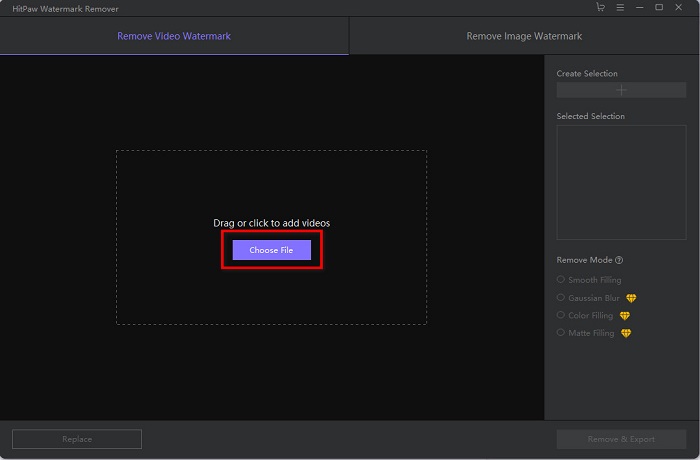
ステップ3. 削除エリアをCoubのウォーターマークの位置まで移動させ、画面右下の削除してエクスポートボタンをクリックして、ウォーターマークを完全に削除します。
Media.io
Media.ioは、動画用のオンラインウォーターマーク除去ツールです。このオンラインツールでは、ロゴ、テキスト、スタンプなどのウォーターマークを削除できます。ウォーターマーク除去ツールを初めて使う場合でも、操作が簡単なので、難しく感じることはないでしょう。さらに、MP4、MKV、AVI、FLV、MOVなど、一般的な動画フォーマットを幅広くサポートしています。Dropbox、Google Drive、YouTubeから動画ファイルを選択することも可能です。加えて、安全に利用でき、無料です。Media.ioは、Google、Firefox、Safariなど、あらゆるウェブブラウザからアクセスできます。
ステップ1. 利用しているブラウザでMedia.ioと検索し、Webページにアクセスします。ソフトのメイン画面でファイルを選択ボタンをクリックします。
![[ファイルの選択]をクリックします](/images/2022/05/click-choose-files.jpg)
ステップ2. 新しい画面が表示されるので、そこでファイルを選択ボタンをクリックするか、Coub動画を画面上にドラッグ&ドロップします。動画のアップロードが完了したら、次のステップに進みます。
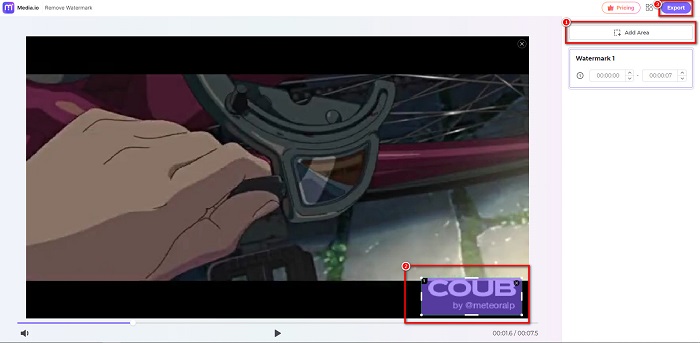
ステップ3. その後、画面左側のエリアを追加をクリックし、削除エリアをCoubのウォーターマークの位置に移動させます。エクスポートボタンをクリックしてウォーターマークを削除すると、ファイルは自動的にデバイスに保存されます。この方法は、動画のウォーターマークを削除する場合にも利用できます。
BeeCut
BeeCutも、オンラインでCoubのウォーターマークを削除できるツールのひとつです。このツールは、デバイスに何もダウンロードする必要がないため、とても便利です。さらに、無料かつ安全に利用できます。加えて、このツールはMP4、AVI、MKV、FLVなど、さまざまな一般的なファイル形式をサポートしています。
さらに、操作が簡単なユーザーインターフェースを備えているため、初心者向けのツールです。ただし、インターネットに依存しているため、インターネット接続が遅い場合は、動作プロセスが遅くなる可能性があります。 BeeCutを使用してCoubの透かしを削除するには、以下の簡単なガイドに従ってください。
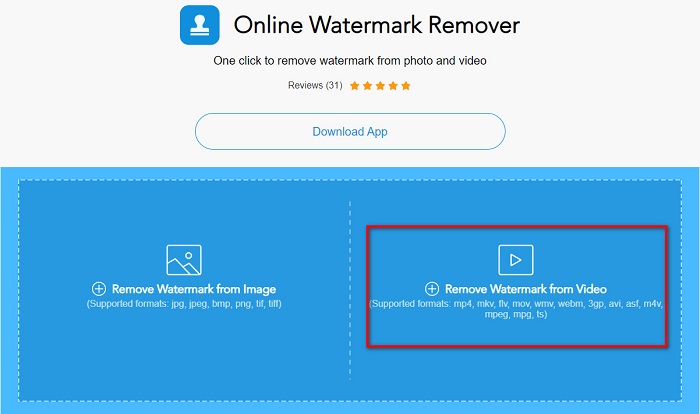
ステップ1. ブラウザでBeeCutと検索し、ソフトのメイン画面で動画からウォーターマークを削除をクリックします。パソコンのファイルから動画を開いてアップロードします。
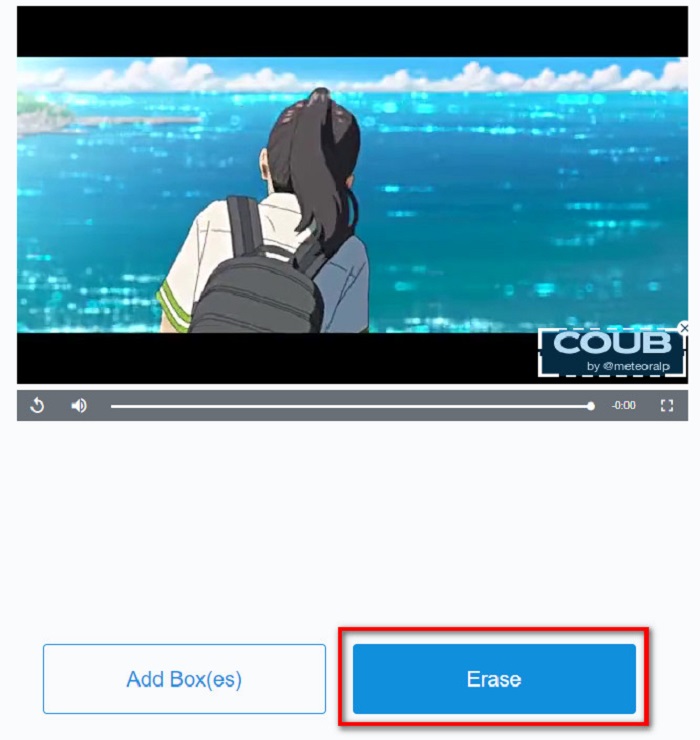
ステップ2. 次の画面で、削除エリアを削除したいCoubウォーターマークの位置に移動させます。動画内に別のウォーターマークやロゴ、スタンプなどがある場合は、ボックスを追加をクリックして、さらに削除用のボックスを追加できます。
ステップ3. 最後に、消去ボタンをクリックして、動画からCoubウォーターマークを削除します。処理が完了すると、出力ファイルはパソコン内のフォルダに保存されます。
パート2。Coub透かしの削除に関するFAQ
透かしなしでCoubビデオを入手できますか?
残念ながら、透かしなしでCoubビデオをダウンロードするための特定の方法やツールはありません。ただし、透かしリムーバーは、透かしのないcoubビデオを作成するのに役立ちます。
透かしを削除すると、ビデオのファイルサイズが小さくなりますか?
いいえ。ビデオから透かしを削除しても、ビデオのファイルサイズには影響しません。
透かし領域を削除した後、透かし領域にぼやけが生じるのはなぜですか?
ツールが画像やビデオの透かしを削除する方法であるため、削除した透かし領域にぼかしがあります。
結論
動画からCoubウォーターマークを削除するのは、一見すると難しそうに思えるかもしれません。しかし、この記事で紹介したツールを使えば、簡単に動画からCoubウォーターマークを削除できます。中でも、高速処理ができ、豊富な機能を備えたウォーターマーク除去ツールを使いたい場合は、FVC Video Converter Ultimateをダウンロードしてみてください。
-
 GIFから透かしを削除する4つの最も優れた方法[オンラインおよびオフライン]
 GIFから透かしを削除する必要がありますか?この記事のツールを使用すると、プラットフォームで使用可能なさまざまな透かし除去機能を使用してさまざまなスタイルを学習できます。
-
 オンラインおよびオフラインで優れたPhotobucketウォーターマークリムーバー
 これらの素晴らしいPhotobucket透かしリムーバーを使用して写真からPhotobucket透かしを削除する方法を学びます。方法を学ぶためにこの記事を読んでください。
-
 簡単な手順でPDFから透かしを簡単に削除
 これらの簡単な手順に従って、PDFから透かしを削除します。これらのすばらしいツールを使用して、PDFファイルから透かしを簡単に削除する方法を学びます。
