


 ビデオコンバーター究極
 スクリーンレコーダー
 ビデオ修復
ビデオ修復
 安全なダウンロード
Power Director の透かしを無料で取り除く方法 [100% Working]
フル機能を備えた動画編集・作成ソフトを選ぶなら、お使いのデバイスに PowerDirector を入れておけばまず間違いありません。プレゼン用動画、Vlog、チュートリアル、デモなどを編集すると、きっと素晴らしい仕上がりになるはずです。ただし、無料版を利用している場合、編集した動画にはウォーターマーク(透かし)が入ることを知っておきましょう。苦労して作った動画にウォーターマークが入ってしまい、がっかりするユーザーも少なくありません。とはいえ、イライラするよりも、この記事を読んでみませんか?この記事では、この問題を根本的に解決するために、PowerDirector のウォーターマークを無料で消す方法について学んでいきます。

パート 1. 市場でトップのソリューションを使用して Power Director の透かしを無料で取り除く方法
FVCビデオコンバーターアルティメット
FVC Video Converter Ultimate のアップデート バージョンには、透かしなしで PC 用の PowerDirector でビデオを保持するために使用できるビデオ ウォーターマーク リムーバーがあります。このツールは、多目的タスクを同時に実行し、高速処理で専門的に実行できる完全なツールになりました。このツールの驚くべき点は、その使いやすさです。これを使えば、動画の透かしを削除するのに専門家になる必要はありません。最高の透かし除去ツールを探しているユーザーは、デスクトップにこのソフトウェアを無料でダウンロードすることをお勧めします。まだ納得できませんか?究極のパフォーマンスを発揮することを納得させる唯一の方法は、私たちが追加したチュートリアルをコピーして従うことです.
ステップ 1. 下のダウンロードボタンをクリックすれば、このソフトを Windows または macOS 用に無料でダウンロードできます。ダウンロードしたいバージョンを選択したら、すぐにインストールし、ソフトを起動します。
無料ダウンロードWindows 7 以降に対応安全なダウンロード
無料ダウンロードMacOS 10.7 以降に対応安全なダウンロード
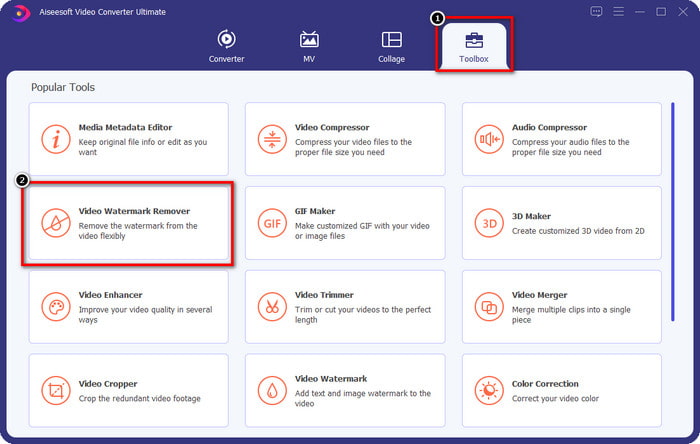
ステップ 2. ソフトが起動したら、ツールボックスへ進み、機能一覧の中から動画ウォーターマーク削除を探します。
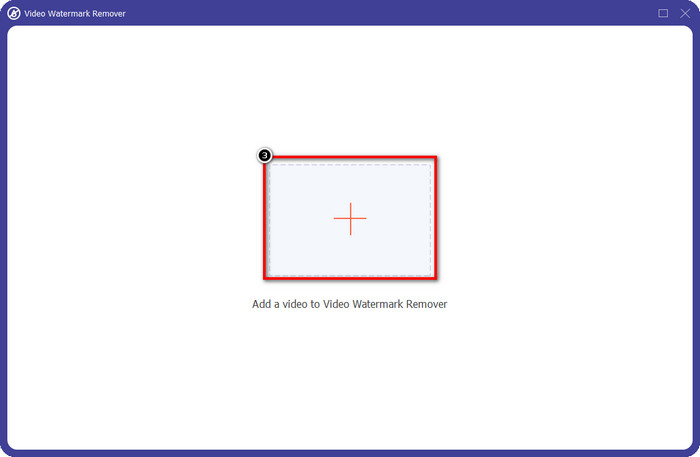
ステップ 3. その後、+ アイコンをクリックして、問題のある動画ファイルをアップロードします。
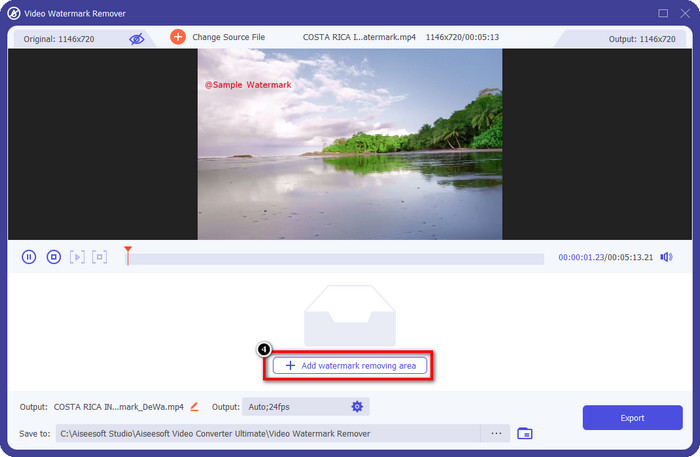
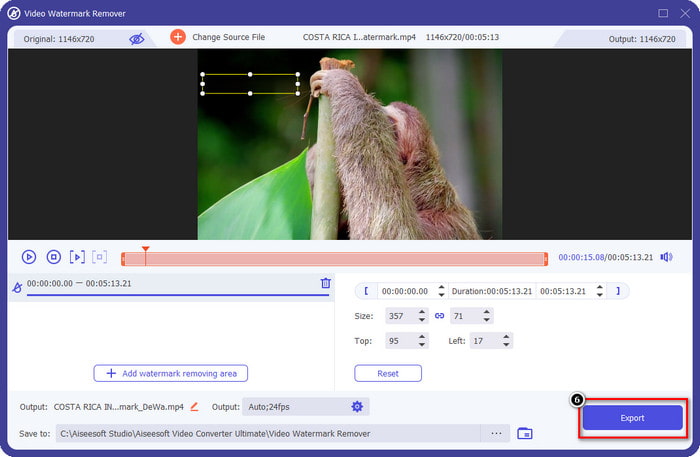
ステップ 4. ウォーターマーク削除範囲を追加をクリックして、このソフトのツールの使用を開始します。
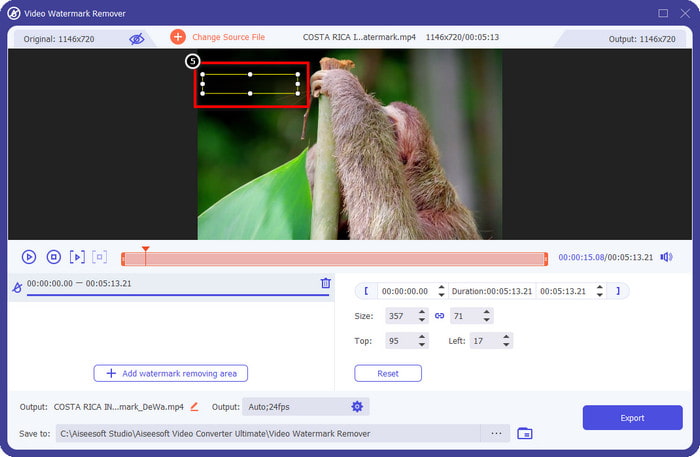
ステップ 5. マウスを使って長方形の枠をウォーターマークのある部分までドラッグし、離します。ウォーターマークをしっかり囲めるように、この長方形の大きさや位置は自由に調整できます。
ステップ 6. 書き出しボタンをクリックして、ウォーターマークの削除処理を開始します。完了するとポップアップでフォルダが表示されるので、その中のファイルをクリックして、ウォーターマークのなくなった動画を再生します。
VLCメディアプレーヤー
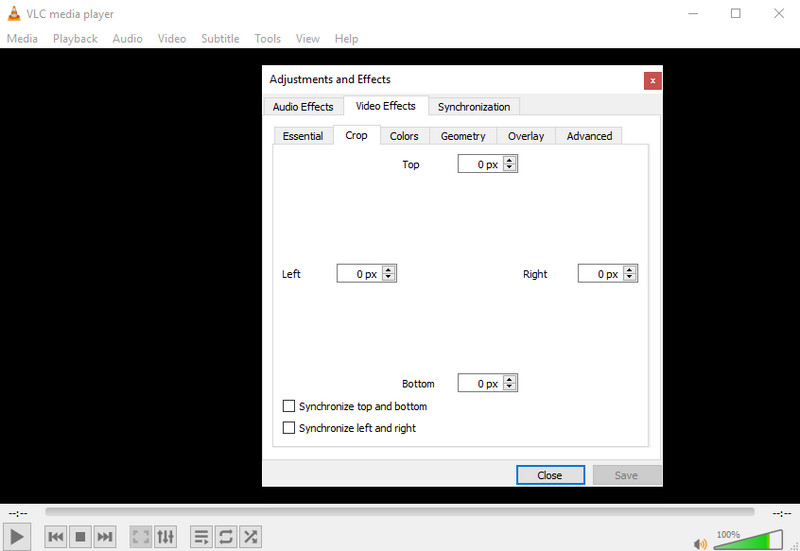
VLC メディアプレーヤーは、元々ウォーターマーク削除専用のソフトではありませんが、動画をトリミング(クロップ)することで、ウォーターマークを画面外に切り取ってしまうことは可能です。このツールは単なる動画プレーヤーやトリミングソフトではなく、ほかにもさまざまな機能を備えた人気のメディアプレーヤーです。ただし、プロ向け編集や簡単操作ができると期待しすぎないでください。そのような用途には向いていません。トリミングでウォーターマークを消すには、どれくらいの幅・高さで切り取るか、正確な数値を入力する必要があります。動画の x 座標と y 座標を正確に把握している場合は、このメディアプレーヤーを使って「edited by PowerDirector」のウォーターマークを消す方法を以下の手順で実行できます。
ステップ 1. VideoLAN.org からソフトをダウンロードしたら起動し、メディアをクリックしてからファイルを開くを選びます。画面に表示されるローカルドライブから、PowerDirector で編集している動画ファイルを探して開きます。
ステップ 2. 動画の再生が始まったら、ツールをクリックし、続いてエフェクトとフィルターを選択します。ショートカットを使う場合は、Windows ではCtrl + E、Mac ではCommand + Eを押します。
ステップ 3. ビデオエフェクトタブのクロップに進み、ウォーターマーク部分を切り取れるように数値を入力してトリミングします。
ステップ 4. 行った調整を反映させるには、保存をクリックします。
Kapwing
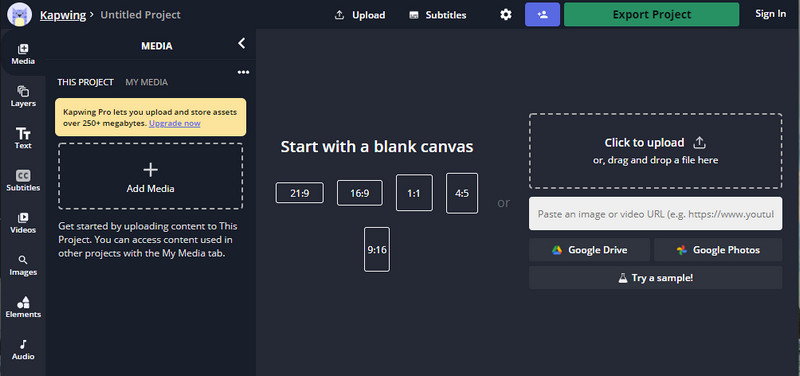
オンラインのビデオ エディターが必要ですか? Kapwing を使用してみてください。 Power Director と同じようにビデオを編集できる直感的な Web ツールです。それでも、パワー ディレクターの標準レベルには達していません。透かしのトリミングなど、必要なビデオ編集のほとんどは既にここにあります。このツールは透かしを削除する際に VLC と同じ機能を果たしますが、このツールには、エクスポートする前にトリミングされたビデオを確認できるプレビュー ペインがあります。したがって、ビデオを保存したい場合は、PC 用の透かしなしで Powerdirector で編集します。ここで最初にそれらを切り取る必要があります。
ステップ 1. ブラウザでこのオンラインツールを検索して開き、Add Mediaをクリックしてここに動画ファイルをアップロードします。アップロード処理が行われるので、アップロードした動画が編集可能になるまで少し待ちます。
ステップ 2. インターフェース左側のCropをクリックして、トリミング機能を開きます。
ステップ 3. 枠線(フレーム)を調整し、動画内のウォーターマークがフレームに入らないようにします。
オプション: 動画のサイズを手動で変更したくない場合は、下部に用意されているプリセットのオプションを自由に利用できます。
ビデオの透かしがフレームに含まれていないことを確認してください。」 /]ステップ 4. 調整が完了したら、Done Croppingをクリックして、Kapwing でトリミングした動画を保存します。
関連記事:
Renderforest で書き出した動画からウォーターマークを削除する方法
VivaVideo のウォーターマークを動画から削除する方法
パート 2. Power Director ウォーターマークの削除に関する FAQ
Powerdirector no watermark apk を Android 用に無料でダウンロードしても安全ですか?
はい、Play ストアにアクセスしてその名前を検索し、Power Director アプリをダウンロードできます。ただし、このツールの無料試用版では透かしが追加されます。サードパーティの Web サイトでアプリをダウンロードしてフル バージョンを入手しようとするとします。その場合、Android にダウンロードしたファイルに悪意のあるウイルスが含まれている可能性があるため、実行しないでください。 Powerdirector の透かしを削除するには、ライセンス キーを購入する必要があります。
PC の Power Director アプリの料金はいくらですか?
毎月 $ 4.08 の開始価格で Power Director 365 を入手できます。公式 Web サイトでプランとサブスクリプションにアクセスできます。また、選択したプランを利用できるようになると、含まれている機能も確認できます。
Cyberlink PowerDirector には透かしがありますか?
はい、アプリの無料版でビデオをエクスポートすると、透かしが追加されますが、回避できます。任意のプランまたはサブスクリプションのソフトウェアを購入する場合、エクスポート後に製品の透かしが追加されることはないため、透かしについて心配する必要はありません。
結論
ビデオをエクスポートする場合は、PowerDirector for PC で透かしなしで作成します。このプログラムのライセンス キーを購入する必要があります。ただし、少なくとも 1 セントも使いたくない場合は、この記事に追加したツールを選択してください。これらのツールを使用すると、編集したビデオの透かしを効果的に削除できます。この記事で追加したツールにまだ納得できませんか?次に、Power Director の透かしを削除するための究極のツールから始めて、最初にそれらを試してみると役立ちます。
-
 動画のAnimoto透かしを簡単かつ効果的に削除する
 ビデオのAnimoto透かしを削除するにはどうすればよいですか?それを行う方法についての完全なチュートリアルを提供したので、この記事を読み続けてください。
-
 FinalCutProを使用してビデオから透かしを削除する方法[完全ガイド]
 ビデオの透かしに問題がありますか? FinalCutProを使用してビデオから透かしを削除する方法についてのチュートリアルを提供したためです。
-
 インスタント効果でWeVideo透かしを削除する方法の3つの方法
 WeVideoが残す透かしの問題を解決するのに問題がありますか?あなたが知っておくべき情報を追加するので、もう心配する必要はありません。
