


 ビデオコンバーター究極
 スクリーンレコーダー
 ビデオ修復
ビデオ修復
 安全なダウンロード
AfterEffectsでビデオを簡単にスピードアップする方法
動画を速くしたい場合は、スピード調整ツールを使う必要があります。ただし、すべてのツールが同じ機能を備えているわけではありません。数あるツールの中でも、おそらくインターネット上で見つけられる最良のツールが、Adobe After Effects で動画の再生速度を変更する方法です。多くのプロは、スピードアップツールを使う際、真っ先にこのツールを選びます。本記事では、最高のスピードアップツールを紹介するとともに、After Effects で動画の再生速度を上げる方法を学ぶことができます。

パート1。AfterEffectsでビデオをスピードアップまたはスローダウンする方法
Adobe After Effects は、市場で最もよく使われているスピード調整ツールのひとつと言えるでしょう。多くのプロがこのツールを使うのは、エフェクトの追加、テンプレートの作成、テキストアニメーションなどの高度な機能が備わっているからです。このツールの優れている点は、ハイクオリティなモーショングラフィックスやビジュアルエフェクトを作成できるところです。プロの映像制作者であれば、こうした豊富な機能やツールがあるため、きっと使いたくなるはずです。さらに、Windows と Mac の両方に対応しています。
プロフェッショナルな出力を作成できますが、そのユーザーインターフェイスは理解しにくいものです。インターフェイスをマスターするには、ガイドが必要です。それにもかかわらず、多くの映画製作者やプロの編集者はこのツールを使用しており、最高のビデオスピードアップツールとしてそれを見つけています。また、After Effectsのスピードアップビデオツールの使用に興味がある場合は、以下の手順に従ってください。
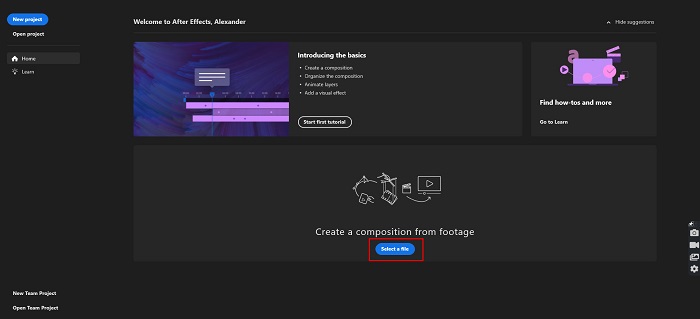
ステップ 1. まず、パソコンに Adobe After Effects をダウンロードします。その後、アプリケーションを起動します。ソフトのメイン画面で Select a File ボタンをクリックして、速度を変更したい動画を読み込みます。すると、パソコンのファイルブラウザが表示されるので、対象の動画を選択してアップロードします。
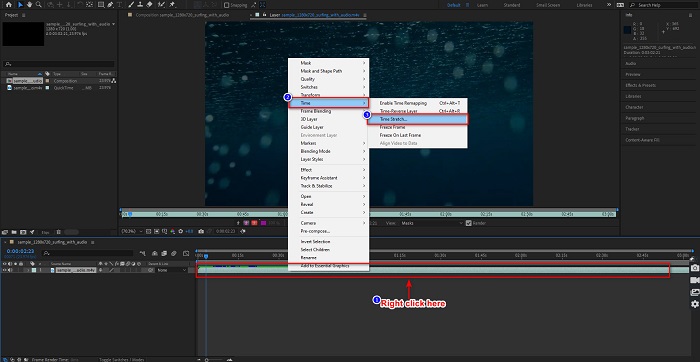
ステップ 2. 次に、動画のタイムライン上で右クリックします。メニューが表示されるので、Time > Time Stretch をクリックします。
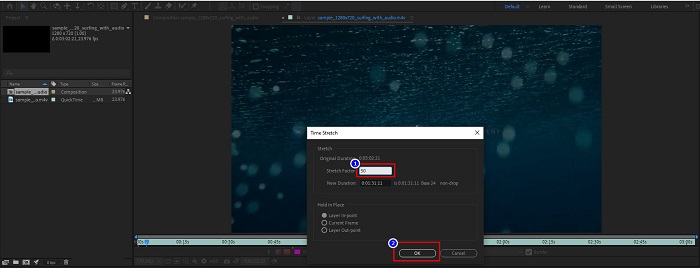
ステップ 3. その後、希望するストレッチ比率(パーセンテージ)を入力し、OK ボタンをクリックします。すると、動画の再生速度の変化が反映されます。
長所
- このツールは、映画製作業界と映画製作のキャリアで使用されています
- 3Dの作成、バーチャルリアリティ、効果の追加など、多くの高度な機能があります。
- WindowsやMacを含むほぼすべてのメディアプラットフォームで利用できます
短所
- ツールを長期間使用するには、サブスクリプション料金を支払う必要があります。
- 使いにくいソフトウェアインターフェースを備えています。
パート2。ビデオをスピードアップする簡単な方法
もし、もっと簡単なインターフェースを備えたツールを探しているなら、このツールがおすすめです。FVC Video Converter Ultimate も、動画のスピードアップやスローダウンに使える人気のツールです。シンプルなユーザーインターフェースを備えており、多くのユーザーが動画の速度調整に利用しています。さらに、0.125倍、0.25倍、0.5倍、0.75倍、1.25倍、1.5倍、2倍、4倍、8倍といった速度に変更することができます。
さらに、このツールは、ビデオトリマー、GIFメーカー、3Dメーカーなど、使用できる機能をさらに提供します。このツールでさらに印象的なのは、ビデオの解像度とフレームレートを変更できることです。このツールに関する詳細については、以下の説明をお読みください。

FVCビデオコンバーターアルティメット
5,689,200以上のダウンロード- WindowsとMacでビデオを高速化します。
- ビデオリバーサー、ビデオ透かし、ボリュームブースターなどの高度な機能を備えています。
- MP4、WMV、AVI、M4V、FLVなどの多数のファイル形式をサポートしています。
- ビデオのビットレートと解像度を調整できます。
無料ダウンロードWindows 7 以降に対応安全なダウンロード
無料ダウンロードMacOS 10.7 以降に対応安全なダウンロード
ここでは、動画の速度を上げるために FVC Video Converter Ultimate を使う方法を紹介します。
ステップ 1. Windows または Mac 用の Download ボタンをクリックして、FVC Video Converter Ultimate をダウンロードします。インストール手順に従ってセットアップを完了し、アプリケーションを起動します。
無料ダウンロードWindows 7 以降に対応安全なダウンロード
無料ダウンロードMacOS 10.7 以降に対応安全なダウンロード
ステップ 2. メイン画面上部のパネルから Toolbox オプションをクリックします。その後、Video Speed Controller オプションをクリックします。
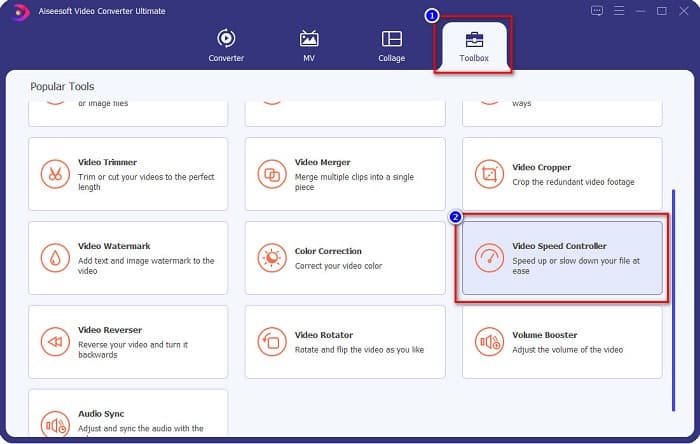
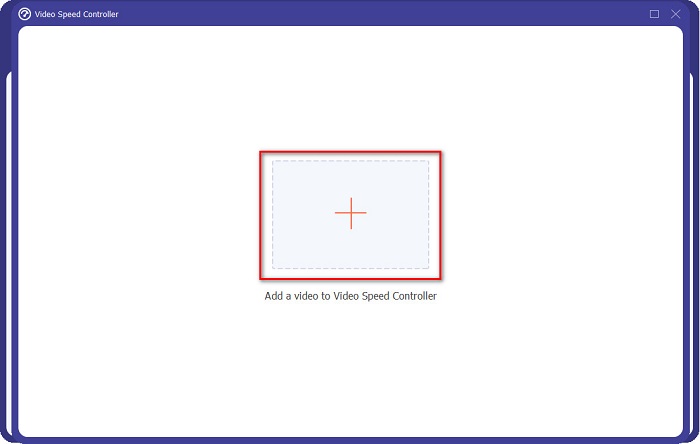
ステップ 3. Video Speed Controller をクリックすると、別の画面に移動します。+ ボタンをクリックするか、ドラッグ&ドロップで動画を + の部分に追加します。
ステップ 4. 次に、動画プレビューの下にあるオプションから希望する再生速度を選択し、Export ボタンをクリックします。
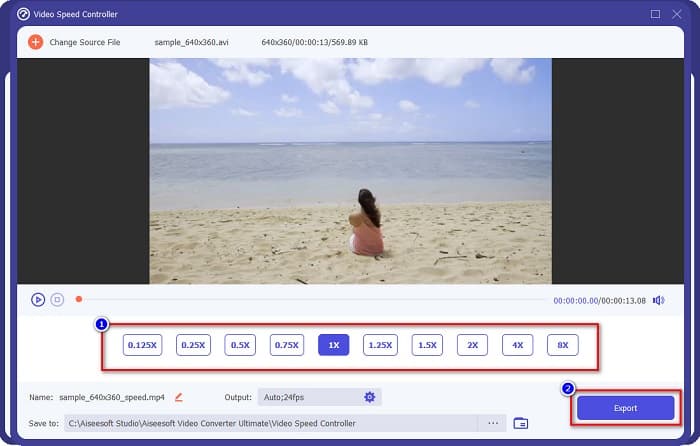
完了すると、デスクトップファイルに自動的に保存されます。
パート3。AdobeAfterEffectsとFVCVideoConverter Ultimate
使用するのに最適なスピードアップビデオツールを選択するのに苦労していませんか?次に、上記のツールに関するより詳細で明確な洞察を提供するため、心配する必要はありません。それにもかかわらず、これら2つのツールは優れたユーザー評価を備えており、動画の速度を上げたり下げたりすることができます。
| 対。 | Adobe After Effects | FVCビデオコンバーターアルティメット |
| 互換性 | WindowsとMac | WindowsとMacを含むほぼすべてのメディアプラットフォーム |
| 使いやすい |  |  |
| 使用する他の機能があります | | |
| 価格 | 価格は$20.99/月から | その1ヶ月バージョンの価格は$23.30です |
| に最適 | 映画制作 | ビデオの変換と編集 |
違いと類似点がわかったので、使用するスピードアップビデオツールは手元にあります。
パート4。AfterEffectsでビデオを高速化する方法に関するFAQ
ビデオスピードアップオンラインツールを使用する方が良いですか?
はい。あなたがインターネット上で見つけることができる多くのオンラインスピードアップビデオツールがあります。ただし、高速化オンラインツールはインターネットに依存します。つまり、インターネット接続が遅い場合、読み込みプロセスが遅くなる可能性があります。
After Effectsを使用してGIFを作成できますか?
いいえ。AdobeAfterEffectsにはGIFメーカーがありません。ただし、アニメーションGIFを作成できるツールが必要な場合は、FVC VideoConverterUltimateを使用してください。使いやすいGIFメーカーが内蔵されています。
Adobe After Effectsはすべてのファイル形式をサポートしていますか?
Adobe After Effectsは、MPEG、WAV、WMV、SWF、FLV、MP4、M4Vなどの多数のビデオ/画像ファイル形式をサポートしています。
結論
以上の内容から分かるように、Adobe After Effects による動画スピードアップは、非常にユニークで優れたツールです。搭載されている機能や、プロレベルの仕上がりはどれも抜きん出ています。多くのプロの映像制作者や動画編集者が、さまざまな用途でこのツールを使用している理由も、これではっきりしたはずです。しかし、初心者で、もっとシンプルなインターフェースを持つスピード調整ツールを探している場合は、FVC Video Converter Ultimate が最適な動画スピードコントローラーです。さあ、今すぐダウンロードして、その素晴らしい機能を試してみてください。
-
 PremiereProとその代替でビデオを高速化する方法
 Premiere Proを使用してビデオを高速化する方法を知りたいですか?次に、手順やその他の手頃な代替案を提供するので、正しい記事になります。
-
 TikTokでビデオをスピードアップする方法に関する2つの簡単な方法
 TikTokでビデオを高速化する方法の秘密を知りたいですか?次に、この記事を読んで、それを行う方法についてのアイデアを持ち、あなたを助ける他の2つのツールが何であるかを知ってください。
-
 2021年の優れたヒント:iMovieでビデオを高速化する方法
 あなたの友人は、iOSオペレーティングシステムを使用してビデオを高速化する方法の問題を解決するためにiMovieを提案していますが、どうしたらよいかわかりませんか?この記事を読んで、これについてもっと見てください。
