


 ビデオコンバーター究極
 スクリーンレコーダー
 ビデオ修復
ビデオ修復[実績]WindowsとMacで使用できる最高のタグエディタの2つ
私たちが Windows で録音した音声ファイルのほとんどは WMA 形式で保存されており、そのメタデータはWMA メタデータエディターを使って編集できます。しかし、デスクトップで使える最適なメタデータエディターを選ぶのは、個人にとって少し難しい作業かもしれません。ところが現在では、Windows と Mac で使える 2 つのエディターを活用すれば、その作業は思っているほど難しくはありません。この 2 つのソフトとはいったい何でしょうか。この記事を読み進めていただければ、ダウンロード可能な 2 つのソフトを公平な視点で比較し、どちらがより優れているかをご紹介します。2022 年に見逃したくない優秀な 2 つのツールを知るために、ぜひ最後までお付き合いください。

パート1。WindowsおよびMacで利用可能なUltimateWMAタグエディタを使用してWMAタグを編集する
私たちのリストの最初は、最高のWMAメタデータエディターであるFVC Video Converter Ultimateです。これは、誰もが愛するタグ用の強力なエディターを提供するツールです。このツールを使用すると、WMAタグの編集経験がなくても、プロのようにこの問題を簡単に処理できます。他のタグエディタとは異なり、このメタデータエディタの使用方法に関する幅広い知識は必要ありません。数回クリックして一瞬のうちに、汗をかくことなくWMAにタグを付けることができます。
さらに知りたいですか? このツールが備える最高の機能のひとつが「ツールボックス」で、ここでは他のツールではできないような、さまざまな処理を行えます。たとえば圧縮、トリミング、ウォーターマーク(透かし)の追加や削除、逆再生など、まだまだたくさんあります。つまり、思いつくほぼあらゆるメディアファイルの作業を、このツールのサポートを受けながら簡単にこなせるということです。加えて、超高速な変換プロセスにより、WMA 形式を 1000 種類以上の新しい形式へ素早く変換することもできます。注目すべき機能だと思いませんか。これこそが、この究極ツールの実力なのです。そして、WMA にタグを追加する方法を学びたい場合は、以下の手順に沿って操作すれば、プロのように扱えるようになります。
ステップ 1. まずは、下のダウンロードボタンをクリックし、ご使用の OS が Windows か Mac かを選択します。すぐにインストールを行い、完了したらソフトを起動します。
無料ダウンロードWindows 7 以降に対応安全なダウンロード
無料ダウンロードMacOS 10.7 以降に対応安全なダウンロード
ステップ 2. 画面上部で ツールボックス をクリックし、同様に メディアメタデータエディター をクリックします。
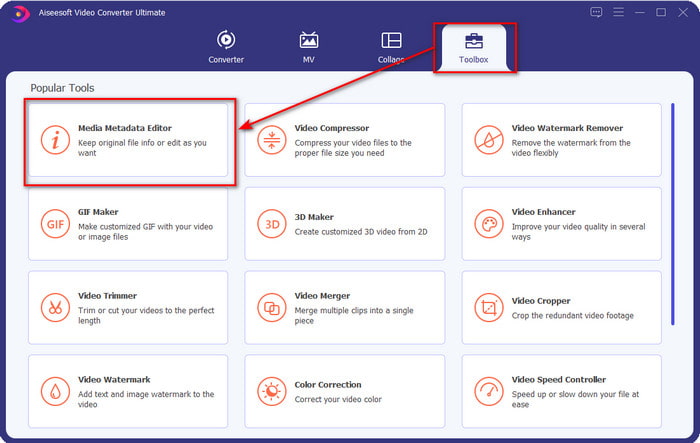
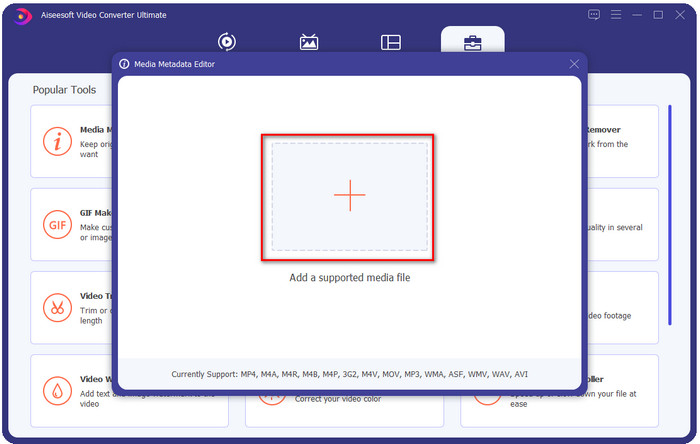
ステップ 3. 表示される小さなウィンドウで + アイコンをクリックしてファイルを読み込み、フォルダー内から WMA ファイルを探して選択し、開く を押して次の手順に進みます。
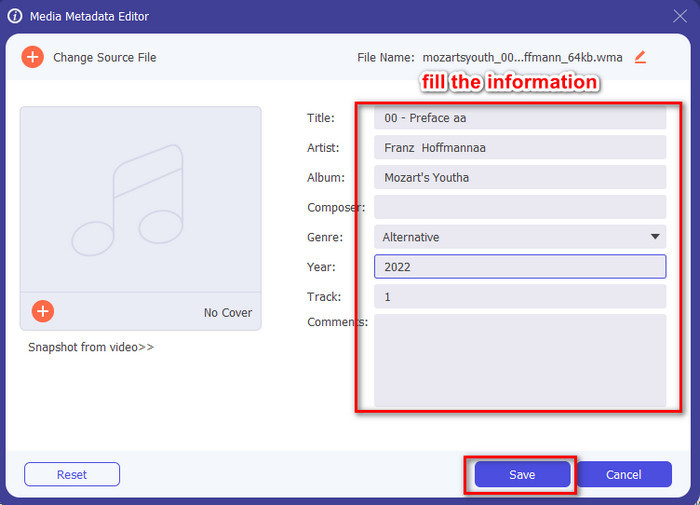
ステップ 4. ここで、WMA 内のメタデータまたはタグを編集し、各テキストボックスを適切に入力できます。すべての編集が終わったら[保存]をクリックして、音声ファイルに加えた変更を適用します。これで、1・2・3 と数える間もなく、音声ファイルにメタデータタグを付与できたことになります。
パート2。WindowsおよびMacで利用可能な無料のWMAタグエディタを使用してWMAメタデータを変更する
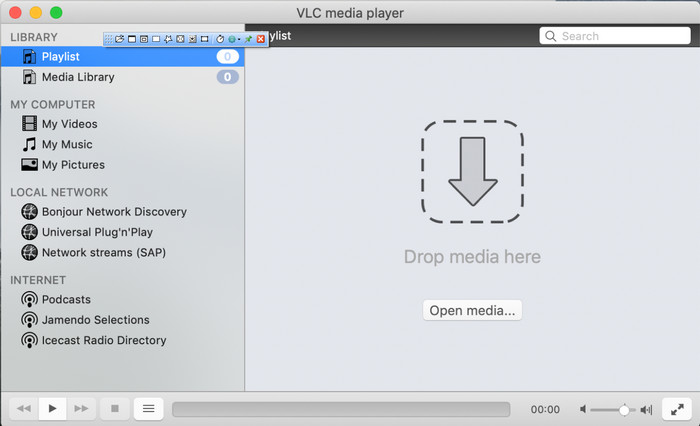
VLC プレーヤーは、Windows と Mac の双方で無料ダウンロードできる、もうひとつの WMA タグエディターです。このメディアプレーヤーは、動画や音声ファイルのタグ編集を手助けしてくれます。ただし、最初に紹介したソフトとは異なり、このツールはあらゆるメディアファイルにメタデータを追加することを目的として作られているわけではありません。主な用途は、標準のメディアプレーヤーでは追加のコーデックをインストールしないと再生できないような、さまざまなメディアファイルを再生することです。タグの追加は可能ではあるものの、専用のタグエディターと比べると、やはりその有効性は劣ります。
さらに、このツールは信頼性が高く安全にダウンロードできるため、多くのことが証明されています。その機能に加えて、このツールは、必要に応じて、変換、簡単な編集、および画面記録も可能です。それは他の機能ではそれほど優れていないが、ビデオの再生では間違いなく市場で最高の多目的ツールであると言えます。
パート3。無料と究極のWMAタグエディタの比較チャート
レビューをさらにわかりやすくするために、ドライブにダウンロードするのに適したツールを知るための比較表が含まれています。よく読んで、FVCビデオコンバーターとVlCプレーヤーを比較対照し、最高のWMAメタデータエディターであると判断してください。
| FVCビデオコンバーターアルティメット | VS | VLCプレーヤー |
 | WindowsとmacOSで利用可能 | |
| タグを編集するための幅広いフォーマットをサポート |  |
| トリミング、カット、編集などの多目的機能 | |
| 使いやすい | |
| 最高のグラフィックユーザーインターフェイス | |
パート4。WMAメタデータエディタに関するFAQ
VLCでWMAを再生できますか?
はい、VLC は WMA に対応しているため、WMA ファイルを簡単に再生できます。VLC についてさらに詳しく知りたい場合は、この記事をお読みください。このリンクをタップしていただくと、VLC と、そのほか利用可能な代替プレーヤーについて学べます。
WMAとは何ですか?
WMA は、Microsoft が作曲家 Stan LePard の協力を得て開発した、一連のオーディオコーデックを格納するための音声フォーマットです。この音声形式は、標準的な音声フォーマットである MP3 の有力なライバルのひとつです。しかし、この形式は期待するほどは普及していないため、拡張子 .wma のファイルを送信したい場合、相手が Windows を使っていなければ、サードパーティ製アプリが必要になることを覚悟しておくべきです。それでは、どうすればよいのでしょうか。互換性を高めるために、WMA を MP3 に変換することはできるのでしょうか。本記事では、Windows、Mac、オンラインで WMA を MP3 に変換する方法を解説します。
WMAを再生するには追加のコーデックが必要ですか?
現在使用しているプログラムによって異なります。 Windowsユーザーの場合、デスクトップでオーディオファイルを再生するために追加のコーデックをダウンロードする必要はありません。ただし、すべてがWindowsユーザーであるとは限らないため、WMAをデバイスと互換性を持たせるには、オーディオファイルを変換するのが最善の方法です。コンバーターをお探しの場合は、WindowsおよびMacにダウンロードできる最高のオーディオコンバーターであるFVC VideoConverterUltimateを選択することをお勧めします。ノウハウが必要な場合は、次の手順に従ってください。デスクトップにツールをダウンロードして、次にインストールします。ツールを開き、[+]アイコンをクリックしてWMAファイルをアップロードします。右上の[すべて変換]をクリックして、リストで使用可能なオーディオ形式を選択します。 [すべて変換]を押して、変換プロセスを開始します。そのように簡単です。
結論
FVC Video Converter UltimateとVLCプレーヤーについてのアイデアが得られたので、次に、使用するのに最適なWMAタグエディターを選択します。これらのツールは、WMAファイルのタグを編集するのに最適なので、必要に応じて、タグの編集をすばやく処理できます。ただし、このタスクをプロのツールで処理したい場合は、究極のツールを選択してください。ダウンロードボタンを押すと、両方のオペレーティングシステムでこれを使用して、WMAタグを調整できます。
-
 メタデータとは:メタデータに関する基本情報を学ぶ
 メタデータとは何ですか?これは重要ですか?メタデータの部分は何ですか?同じ質問がありますか?この記事では、メタデータに関する基本的な情報を学習します。
-
 オンラインとオフラインで最高のメタデータ ビューアー 4 つ [2025 年更新]
 ファイルのメタデータを確認できますか?はい、できます。この投稿を利用して、使用できるさまざまなメタデータビューアを紹介します。
-
 Snapchatの6つのお気に入りの選択肢SnapchatアニメーションSnapchatフィルター
 Snapchatビデオにフィルターを追加するための最良の方法を知りたいですか?これをクリックして、Snapchatビデオに適用するために使用できるさまざまなフィルターを学ぶことができます。
