


 비디오 컨버터 궁극
 스크린 레코더
 비디오 수리
 안전한 다운로드
MOV to MP3 – MOV에서 MP3 파일을 쉽게 추출하는 4 가지 최고의 방법
비디오에서 배경 음악 파일을 추출하려면 MOV를 원래 품질로 MP3로 변환하는 방법은 무엇입니까? MOV는 대부분의 장치에서 자주 사용되는 비디오 형식이며 MOV에서 MP3 파일을 쉽게 추출하는 가장 효율적인 4 가지 방법에 대해 자세히 알아볼 수 있습니다. 지금 귀하의 요구 사항에 따라 원하는 방법을 선택하십시오.

파트 1 : MOV를 MP3로 쉽게 변환하는 5 가지 최고의 방법
방법 1 : MOV를 온라인으로 MP3로 변환하는 방법
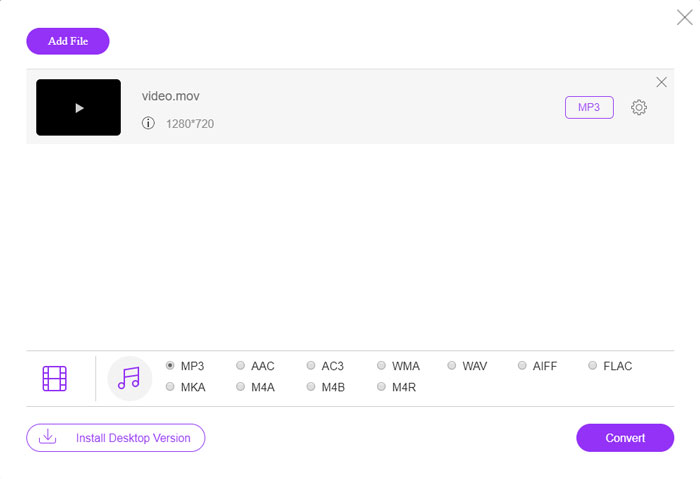
FVC Free Online Video Converter is a versatile online MOV to MP3 converter that enables you to convert most of the video/audio files, tweak the audio and video settings, and even stable and safe conversion without any watermark, or size restriction.
Step 1. Go to the online video converter on any web browser, you can click the Add Files to Convert button to load the MOV files you want to convert. It requires installing the PKG program beforehand.

Step 2. Once you have imported the MOV file, you can choose the MP3 from the Audio menu within the user interface. Moreover, you can also tweak the settings, such as the sample rate, audio channels and more others.

Step 3. After that, you can click the Convert button to convert MOV to MP3. It takes a few seconds to get the desired video. Then you can download the MP3 file to your computer or share to social media website.
방법 2 : Windows에서 MOV를 MP3로 설정하는 방법
Windows 및 Mac에서 원본 품질로 MOV를 MP3로 변환하려는 경우 FVC Video Converter Ultimate는 대부분의 비디오 형식을 트랜스 코딩하고, 오디오 / 비디오 설정을 조정하고, 출력 파일을 편집하거나, 적용하기 위해 원하는 MOV-MP3 변환기입니다. 쉽게 여러 비디오 필터.
- 1. MOV를 MP3, WAV, WMA 등의 원본 품질로 변환합니다.
- 2. 비디오 코덱, 샘플 속도, 오디오 비트 전송률 및 기타 오디오 설정을 조정합니다.
- 3. 클립, 다듬기, MOV 병합 필터를 적용합니다.
- 4. 70 배 빠른 속도로 비디오 파일을 변환하는 고급 하드웨어 가속.
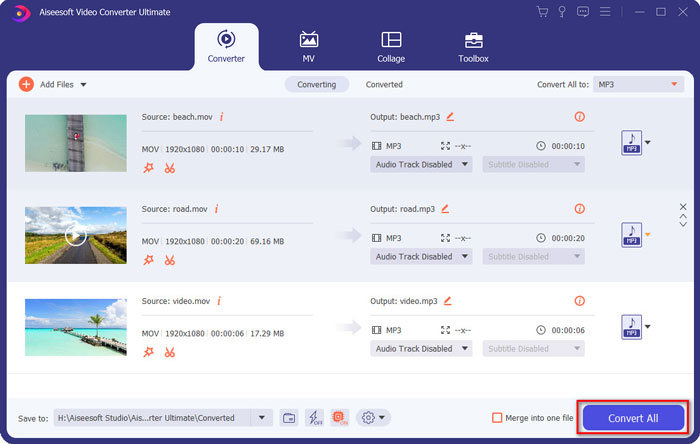
Step 1. Download and install MOV to MP3 converter, then you can launch the program on your computer. Click the Add Files option to load the MP4 files or drag the video into the program directly.
Free DownloadFor Windows 7 or laterSecure Download
Free DownloadFor MacOS 10.7 or laterSecure Download

Step 2. Once you have imported the MP4 video, you can choose the Audio menu and select the MP3 as the output format. After that, you can tweak the profile settings, such as the bitrate, sample rate and more.

Step 3. Select a destination folder for the converted files. Then you can click the Convert All button on the main interface to start changing MOV to MP3 on your computer according to your requirement.
방법 3 : Android에서 MOV를 MP3로 변환하는 방법
Android 장치에 일부 MOV 파일이있는 경우 비디오를 컴퓨터로 전송할 필요가 없습니다. Video Converter Android는 몇 번의 클릭만으로 MOV 비디오를 원하는 오디오로 변환하는 권장되는 간단한 MOV to MP3 변환기 앱입니다.
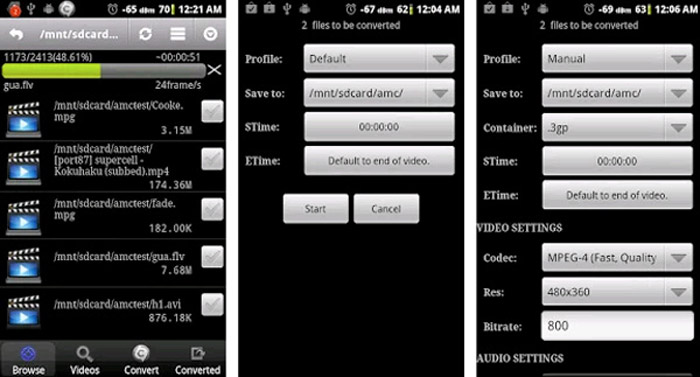
Step 1. Once you have installed the MP3 converter, you can open the app to browse and add the MOV from your Android Gallery. Then you can tap on the Refresh icon on the top.
Step 2. Then you can choose the STime and ETime to trim the background music from the MOV file and tweak the sample rate and other settings before the conversion.
Step 3. After that, you can move to the Convert tab and select the MP3 as the output format from the codec list. Click on the Start button to proceed with MOV to MP3 conversion process.
방법 4 : iOS에서 MOV를 MP3로 변환하는 방법
Media Converter는 iPhone 및 iPad 용 MOV to MP3 변환기 앱입니다. 대부분의 비디오 및 오디오 형식을 재생할 수있는 내장 미디어 플레이어가 있습니다. 또한 zip 및 RAR로 오디오 파일을 쉽게 압축 할 수도 있습니다.
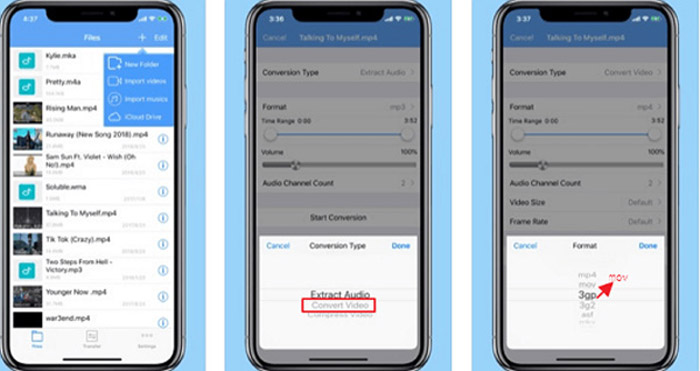
Step 1. If you have already installed the MOV to MP3 converter, you can launch the program on your iOS device. Once you have loaded the MOV files, you can tap on the Extract Audio option.
Step 2. Choose the MOV as the input format and the MP3 file as the output format. Then you can tweak the audio settings, such as the sample rate and more others according to your requirement.
Step 3. After that, you can click the Convert button to start converting MOV to MP3. When you get the desired file, you can export the converted MP3 file to your device from Photos accordingly.
파트 2 : Win / Mac에서 MOV를 MP3로 변환하는 방법에 대한 FAQ
1. 모든 장치에서 MOV를 MP3로 변환하는 다양한 방법이 있습니까?
VLC 미디어 플레이어는 미디어 플레이어 그 이상입니다. 컴퓨터와 스마트 폰에서 MOV를 MP3로 변환 할 수도 있습니다. 또한 몇 가지 기본 편집 기능을 사용하여 다양한 설정을 조정하고 비디오를 편집 할 수도 있습니다. 그러나 만족스러운 출력을 얻으려면 전문 비디오 변환기를 사용해야합니다.
2. MOV 변환에 가장 적합한 출력 형식, MP3 또는 WAV는 무엇입니까?
MOV를 MP3로 변환 할 때 대부분의 장치에서 오디오 형식을 사용할 수 있습니다. 컴퓨터 또는 기타 호환 가능한 미디어 플레이어에서 오디오 파일을 추출하려면 WAV 오디오를 요구 사항으로 출력 형식으로 선택할 수 있습니다.
3. MP3 변환기에 원하는 온라인 MOV를 선택하는 방법?
온라인 MOV to MP3 변환기를 선택해야하는 경우 변환하기 전에 크기 제한, 워터 마크, 계정 등록 등에 특별한주의를 기울여야합니다. FVC 무료 온라인 비디오 변환기는 제한없이 오디오 파일을 추출하는 다목적 프로그램입니다.
결론
MOV 비디오에서 MP3를 추출하려면 기사에서 최고의 MOV to MP3 변환기 4 개에 대해 자세히 알아볼 수 있습니다. 비디오를 컴퓨터에서 MP3로 트랜스 코딩해야하거나 iOS / Android 장치에서 쉽게 MOV 파일을 변경해야하는 경우 문서에서 요구 사항에 따라 원하는 솔루션을 선택할 수 있습니다.
-
 데스크탑 및 온라인에서 OGG 음악 파일을 MP3로 변환하는 방법
 컴퓨터 또는 모바일 장치에서 듣기 위해 OGG 파일을 MP3 형식으로 변환하는 방법은 무엇입니까? 여기에서는 데스크톱 또는 온라인에서 가장 쉬운 5 가지 방법을 공유합니다.
-
 Windows / Mac / iPhone / Android / Online에서 MP4를 MP3로 변환하는 방법
 MP4 비디오에서 MP3 오디오를 추출하려면이 기사를 확인하고 8 가지 솔루션을 얻을 수 있습니다. 휴대폰이나 컴퓨터에서 MP4를 MP3로 쉽게 변환하는 온라인 및 오프라인 방법이 있습니다.
-
 Windows, Mac, iPhone 및 Android에서 MOV 파일을 압축하는 방법
 이 문서에서는 휴대폰이나 컴퓨터에서 QuickTime MOV 비디오를 압축하는 방법을 자세히 보여줍니다. MOV 비디오가 너무 커서 보내거나 공유하거나 저장할 수없는 경우 여기에서 4 가지 실행 가능한 솔루션을 얻을 수 있습니다.
