


 비디오 컨버터 궁극
 스크린 레코더
 비디오 수리
 안전한 다운로드
[해결됨] 다른 사람 모르게 Snapchat에서 스크린샷을 찍는 방법
요즘에도 스냅챗은 여전히 인기 있는 메신저 앱 중 하나입니다. 사진, 동영상, 그리고 열람 후 사라지는 메시지를 쉽게 주고받을 수 있을 뿐만 아니라, 다양한 방식으로 창의성을 발휘할 수도 있죠. 한편, 우리는 중요한 정보를 보관하거나 웃긴 순간을 남기고 싶을 때처럼, 스크린샷을 자주 찍곤 합니다. 하지만 스냅챗은 누군가가 자신의 콘텐츠를 캡처하면 상대에게 이를 알려 줍니다. 그래서 상대방이 모르게 스냅챗에서 스크린샷을 찍고 싶다면, 이 글을 참고해 보세요. 눈치채이지 않고 할 수 있는 네 가지 방법을 정리해 두었습니다.

1부: 사람들이 모르게 Snapchat에서 스크린샷을 찍을 수 있나요?
다른 소셜 미디어 플랫폼과 비교하여 Snapchat은 사용자가 플랫폼 내의 다른 사용자에게 보내는 데 사용하는 창의적이고 매력적인 카메라 및 비디오 필터 때문에 일반적으로 사용됩니다. 그러나 스크린샷 촬영과 관련하여 Snapchat은 다른 사람이 자신의 스냅샷을 스크린샷하면 다른 사람에게 알립니다.
Snapchat에서 다른 사람이 모르게 스크린샷을 찍을 수 없다고 생각한다면 착각입니다!
다행히도 다른 사람에게 알리지 않고 Snapchat에서 스크린샷을 찍는 데 사용할 수 있는 방법이 있습니다. 이는 화면 녹화 도구를 활용하거나, 다른 장치를 사용하여 스냅을 캡처하거나, 화면 미러링 기능을 활용하여 수행할 수 있습니다.
2부: 사람들이 모르는 사이에 Snapchat에서 어떻게 스크린샷을 찍을 수 있나요?
다행스럽게도 Snapchat에서 상대방이 모르게 스크린샷을 찍는 데 사용할 수 있는 다양한 방법이 있습니다.
방법 1: FVC 스크린 레코더
상대방에게 알림을 보내지 않고 스냅챗에서 스크린샷을 찍을 수 있는 가장 좋은 방법 중 하나는 서드파티 도구인 FVC Screen Recorder를 사용하는 것입니다. 이 도구는 Windows와 Mac 컴퓨터에서 사용할 수 있으며, 안드로이드와 아이폰 기기를 연결해 사용할 수 있습니다. 이들 기기를 프로그램이 실행 중인 컴퓨터에 연결하면, 도구의 폰 레코더 기능을 통해 스냅을 캡처할 수 있습니다. 이 기능을 사용하면 상대방에게 알림이 가지 않도록 스크린샷을 찍을 수 있습니다.
1단계. 먼저 FVC Screen Recorder를 컴퓨터에 다운로드하여 실행합니다.
무료 다운로드Windows 7 이상용안전한 다운로드
무료 다운로드macOS 10.7 이상용안전한 다운로드
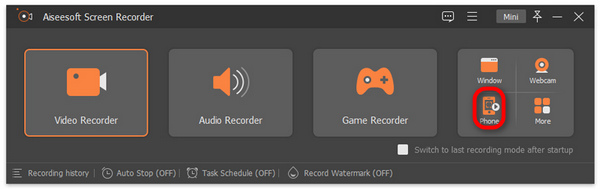
2단계. 이제 ‘Phone recorder(폰 레코더)’ 옵션을 클릭합니다. 이 옵션은 도구 화면 오른쪽에 있는 다른 세 가지 옵션과 함께 배치되어 있습니다.
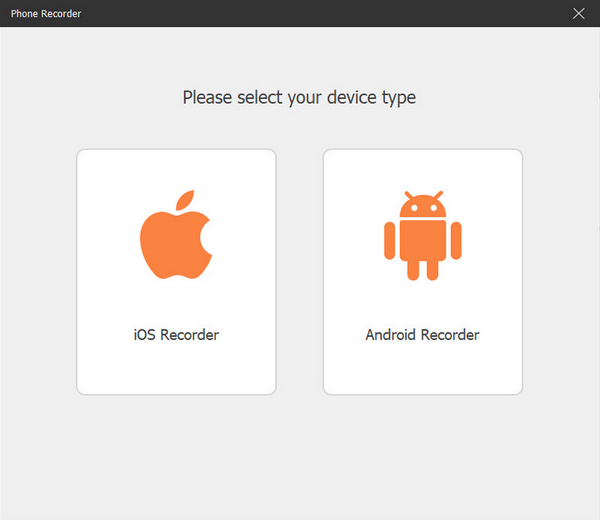
3단계. 다음으로, 안드로이드 사용자라면 ‘Android Recorder(안드로이드 레코더)’를, 아이폰 사용자라면 ‘iOS Recorder(iOS 레코더)’를 선택합니다.
4단계. 그러면 화면에 안내 창이 새로 나타납니다. 여기에서 ‘Screen Mirroring(화면 미러링)’과 ‘Audio Mirroring(오디오 미러링)’ 중에서 선택할 수 있는데, 이 경우에는 ‘Screen Mirroring(화면 미러링)’을 선택합니다.
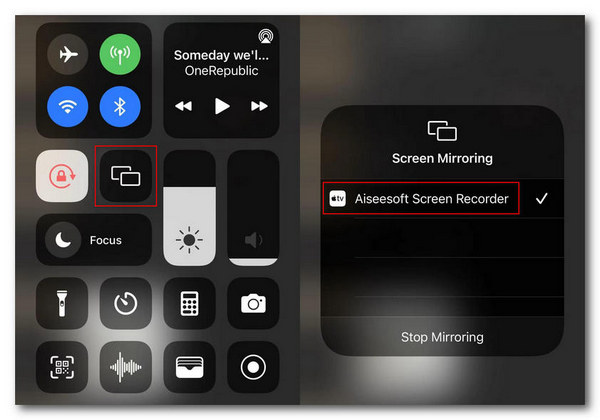
5단계. 이제 아이폰에서 제어 센터를 열고, 그 안에서 화면 미러링을 탭해 드롭다운 목록을 엽니다. 그런 다음 Aiseesoft Screen Recorder를 선택해 아이폰을 컴퓨터와 연결합니다.
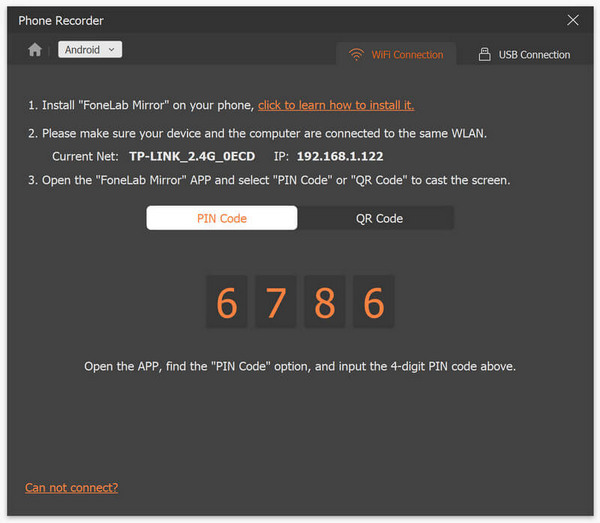
한편 안드로이드 사용자는 먼저 FoneLab Mirror 앱을 다운로드해야 합니다. 다음으로 안드로이드 폰과 컴퓨터가 동일한 WLAN에 연결되어 있는지 확인합니다. 마지막으로 앱을 열고 Detect, PIN Code, QR Code 중 하나를 사용해 화면을 미러링합니다.
6단계. 설정이 끝났다면, 아이폰이나 안드로이드 기기에서 스냅챗 앱을 엽니다.
7단계. 그다음, 스크린샷을 찍고 싶을 때 ‘Snapshot(스냅샷)’ 아이콘을 클릭합니다.
8단계. 마지막으로, 캡처된 스크린샷 이미지는 이미 Windows 컴퓨터의 지정된 폴더에 바로 저장되어 있으므로, 해당 폴더에서 파일을 확인합니다.
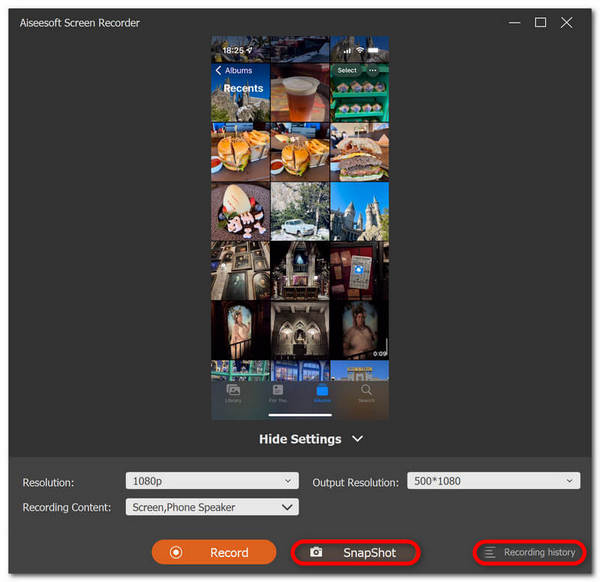
이제 Snapchat에서 상대방도 모르게 스크린샷을 찍을 수 있습니다. 단계를 따르기만 하면 되며, 확실히 직관적인 인터페이스를 통해 모든 사용자가 빠르게 작업을 수행할 수 있습니다.
방법 2: 다른 전화 사용
Snapchat을 상대방이 모르게 스크린샷하는 또 다른 방법은 다른 휴대폰을 사용하여 사진을 찍는 것입니다. Snapchat 콘텐츠의 사진이나 동영상을 찍으려면 사진을 찍기만 하면 됩니다. 이렇게 하면 사용자는 보낸 사람에게 알림이나 경고를 표시하지 않고도 스냅을 캡처할 수 있습니다.
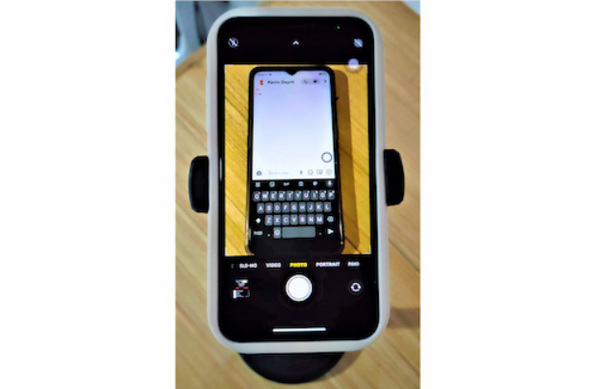
1단계. 먼저 휴대폰 두 대를 준비합니다. 한 대에는 스냅챗이 설치되어 있어야 하고, 다른 한 대는 선명한 사진을 찍을 수 있는 좋은 카메라가 있어야 합니다.
2단계. 그런 다음, 스냅챗 앱에서 캡처하려는 스냅이 있는 메시지를 엽니다.
3단계. 마지막으로, 두 번째 휴대폰의 카메라 앱을 이용해 첫 번째 휴대폰 화면의 스냅을 촬영합니다.
이 방법을 사용하면 캡처 품질이 낮아질 수 있으며 모든 상황에 적합하지 않을 수 있다는 점에 유의하는 것이 중요합니다.
방법 3: iPhone 사용자를 위한 Quicktime Player
사람들이 모르게 Snapchat에서 스크린샷을 찍는 또 다른 방법은 Mac이 있고 iPhone 사용자인 경우 Quicktime Player를 사용하는 것입니다. 이 도구는 Snapchat에서 스크린샷을 찍는 데 도움이 되는 macOS에 내장된 소프트웨어입니다.
1단계. 먼저 아이폰을 라이트닝 케이블로 Mac에 연결합니다.
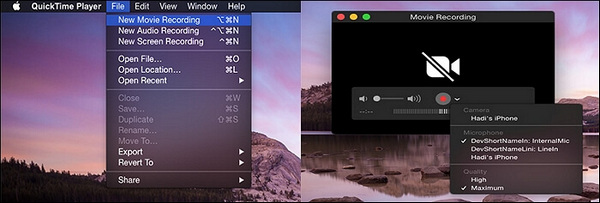
2단계. 다음으로 Mac에서 QuickTime 앱을 실행합니다. 상단 메뉴에서 ‘File(파일)’을 클릭한 뒤 ‘New Movie Recording(새 동영상 녹화)’을 선택합니다.
3단계. 그러면 녹화 창이 나타나고, 여기에서 녹화 장치로 아이폰을 선택해야 합니다.
4단계. 아이폰 화면에서 ‘Record(녹화)’ 버튼을 누른 뒤, iOS 기기에서 스냅챗을 엽니다.
5단계. 마지막으로 ‘Stop(정지)’ 버튼을 눌러 녹화를 종료한 후, 저장된 동영상에서 원하는 화면을 캡처해 스크린샷을 얻습니다.
이 방법을 사용하면 실제로 알림 없이 스냅챗에서 스크린샷을 찍을 수 있습니다. 다만, 이 방법은 아이폰과 Mac 사용자에게만 해당됩니다. 또한 영상을 녹화한 뒤 그 안에서 다시 스냅 화면을 찾는 과정은 시간이 많이 걸릴 수 있습니다. 게다가 QuickTime Player가 아이폰이나 Mac에서 제대로 작동하지 않을 수도 있습니다.
방법 4: 화면 미러링
Android와 iPhone에는 모두 Snapchat의 스크린샷에 사용할 수 있는 화면 미러링 기능이 있습니다. 이 기능은 Snapchat 콘텐츠를 공유할 수 있는 휴대폰 화면을 미러링하거나 투영합니다.
1단계. 먼저 iOS 또는 안드로이드 기기에서 화면 미러링 기능을 활성화한 뒤, 스냅챗 화면을 스크린샷을 찍을 수 있는 다른 기기로 미러링합니다.
2단계. 다음으로, 두 번째 기기에 미러링된 상태에서 스크린샷을 찍고 싶은 스냅챗 화면을 찾습니다. 다른 화면에 제대로 투사되었다면, 그 화면에서 스크린샷을 캡처합니다.
이 방법은 Snapchat에서 자신도 모르게 쉽게 스크린샷을 찍는 데 이상적으로 들리지만, 장치 호환성 및 화면 미러링 기능의 잠재적인 변화로 인해 이 방법이 보편적으로 사용되지 않을 수 있습니다.
파트 3: 스냅샷에서 스크린샷 찍기에 대한 FAQ
Snapchats에서 스크린샷을 찍으면 어떻게 되나요?
물론 Snapchat에서 누군가의 스냅샷을 캡처하면 해당 사람이 이에 대한 알림을 받을 것이라고 예상할 수 있습니다. 그 이유는 Snapchat이 사용자를 위한 안전한 공간을 구축하기를 원하기 때문입니다. 따라서 이를 통해 사용자에게 스냅샷의 스크린샷을 찍는 사람이 누구인지, 그 반대의 사람이 누구인지 알 수 있습니다.
다른 사람의 Snap을 스크린샷으로 찍는 것이 불법인가요?
합법성에 관해서는 실제로 스냅샷의 스크린샷이 맥락에서 어떻게 사용되도록 의도되었는지에 따라 달라집니다. 동시에 개인적인 용도로 스크린샷을 찍는 것이 반드시 불법은 아닐 수도 있습니다. 그러나 다른 사용자가 알지 못하는 사이에 이를 배포하는 것은 해당 사용자의 개인정보 보호 권리를 침해합니다. 이러한 맥락에서 스냅의 스크린샷을 찍는 것은 불법이 됩니다.
Snapchat 콘텐츠를 캡처할 때 개인정보를 보호하는 방법은 무엇입니까?
Snapchat에서 스크린샷을 찍기 전에 먼저 서로의 개인 정보를 보호하고 존중하는지 확인해야 합니다. 따라서 다른 사람의 스냅샷을 캡쳐하려면 허가를 받아야 합니다. 또한, 스크린샷의 사용에 있어서 타인에게 해를 끼치려는 의도로 공유하거나 배포하는 행위는 삼가해주시기 바랍니다.
결론
Snapchat에서 자신도 모르게 스크린샷을 찍는 것은 우리 중 일부에게는 불편하게 들리겠지만, 올바른 의도를 염두에 두고 수행하는 것은 사용자가 걱정할 필요가 없는 일입니다. 항상 다른 사람의 개인정보 보호와 경계를 우선시해야 한다는 점을 기억하세요. 그래서 당신은 무엇을 기다리고 있습니까? 좋은 의도로 이 작업을 수행하고 있다면 지금 방법을 시도해 보고 알림 없이 Snapchat에서 무제한으로 스크린샷을 찍으세요.
-
 HP에서 스크린샷을 쉽게 캡처하는 방법 [2025년 가이드]
 단계별 가이드를 통해 Dell 컴퓨터에서 스크린샷을 찍는 방법을 알아보세요. 이 간단한 프로세스를 통해 효율성을 높이고 시간을 절약하세요. 지금 읽어라!
-
 이 기본 가이드로 쉽게 비디오 스크린샷 찍기 [2025]
 이러한 간단한 방법으로 동영상에서 스크린샷을 찍는 방법을 쉽게 알아보세요. 지금 저희 가이드를 따라 좋아하는 비디오의 스크린샷을 찍어보세요!
-
 이 기본 가이드를 통해 Mac에서 쉽게 스크린샷을 찍는 방법
 Mac에서 스크린샷을 찍고 싶지만 방법을 모르시나요? 우리는 당신을 잡았습니다! 화면의 이미지를 스크린샷으로 저장하고 저장하는 가장 간단하고 빠른 방법을 알려드리겠습니다.
