


 Video Converter Ultimate
 Perakam Skrin
 Pembaikan Video
Semakan Lengkap untuk Perisian Rakaman Audio untuk Merakam Audio dengan Berkesan
Jika anda seorang pakar atau amatur, anda mesti mempunyai perisian rakaman audio untuk mengendalikan dan menggilap audio bagi kegunaan tertentu. Selain itu, memilih perakam audio yang sesuai pada peranti anda pasti mencabar kerana terdapat banyak pilihan di pasaran. Daripada menguji berbilang program rakaman audio, kami akan membawa empat perakam yang kami dapati sesuai dengan keperluan anda untuk mengelakkan anda memuat turun atau mengakses perisian berniat jahat. Senarai perakam audio di bawah telah dipilih dengan teliti untuk hanya menawarkan yang terbaik dan bukannya perakam audio yang prestasinya lemah.

Bahagian 1. 4 Perisian Rakaman Audio Terbaik pada Windows & macOS
1. Perakam Skrin FVC
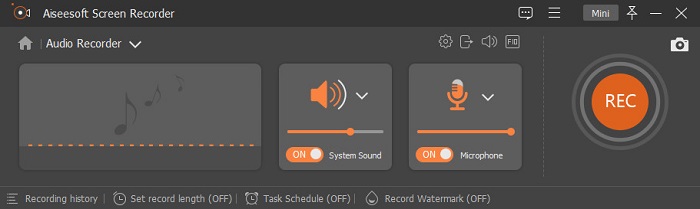
Adakah anda perlu merakam audio daripada komputer tetapi tidak tahu hendak guna apa? Jika begitu, kami memperkenalkan perakam terbaik dan setakat ini paling banyak dipilih di pasaran, iaitu FVC Screen Recorder. Ia mempunyai antara muka pengguna yang cemerlang yang membolehkan pengguna berinteraksi dengan perisian tanpa perlu melakukan perkara yang rumit. Selain itu, pengguna selalunya menghadapi masalah bunyi latar, jadi dengan bantuan fungsi pembatalan hingar baharu yang ditambah, anda boleh merakam tanpa terganggu oleh bunyi latar yang kecil. Tambahan pula, ia mempunyai pelbagai ciri yang akan membantu anda merakam dengan berkesan. Mahu tahu apakah ciri-ciri tersebut? Jika begitu, mari kita telusuri ciri utama FVC Screen Recorder.

Perakam Skrin
4,988,518+ Muat Turun- Ia merakam bunyi dengan kualiti audio ultra tinggi.
- Rakam audio 24/7 selagi anda mempunyai storan yang mencukupi pada pemacu komputer anda..
- Anda boleh merakam bunyi sistem dengan mikrofon pada masa yang sama.
- Peningkatan mikrofon tersedia untuk pengalaman merakam suara anda yang lebih baik.
- Anda boleh menyemak audio mikrofon jika perlu.
Muat Turun PercumaUntuk Windows 7 atau lebih baharuMuat Turun Selamat
Muat Turun PercumaUntuk MacOS 10.7 atau lebih baharuMuat Turun Selamat
Kelebihan
- Program ini membolehkan pengguna mengalami keseronokan yang tinggi untuk merakam audio pada Mac atau Windows.
- Ciri penyuntingan asas tersedia, seperti memotong atau memangkas audio.
- Ia mempunyai sejarah rakaman terbina dalam untuk mencari audio yang dirakam dengan mudah.
Keburukan
- Ia tidak menyokong penambahan kesan pada audio semasa merakam.
- Beli sebelum anda guna.
2. Keberanian
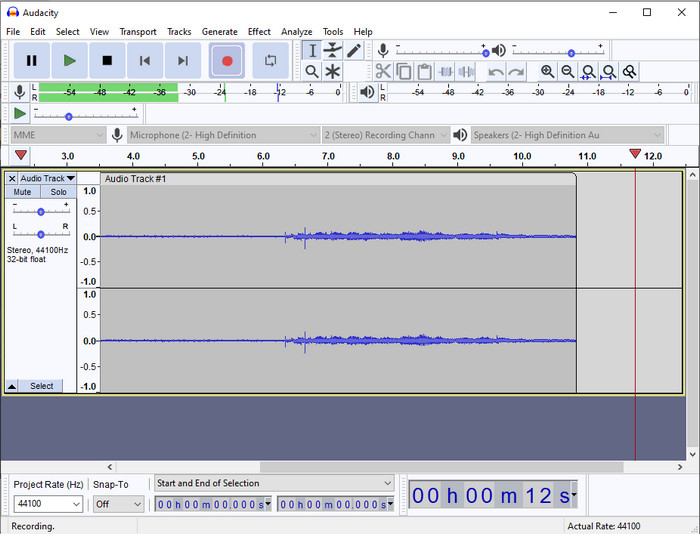
Jika anda memerlukan alat profesional untuk mengendalikan rakaman audio anda, maka Audacity amat membantu. Perakam audio profesional ini telah pun membantu berjuta-juta podcaster dalam perjalanan rakaman audio mereka. Jika anda memerlukan perakam lanjutan secara percuma, perakam audio ini adalah salah satu pilihannya. Walaupun ia menyokong rakaman profesional, masih sukar untuk membiasakan diri dengan alat ini kerana GUI-nya yang kurang baik. Walaupun ia menyokong rakaman secara profesional, beberapa cirinya masih perlu dinaik taraf, seperti pembatalan hingar. Namun begitu, Audacity merakam audio komputer secara profesional dengan cara yang tidak dapat disediakan oleh semua perakam lain.
Kelebihan
- Percuma untuk dimuat turun pada semua platform desktop.
- Ia menawarkan ciri penyuntingan pakar untuk profesional.
- Ia mempunyai beberapa ciri lanjutan yang anda perlukan untuk membuat podcast.
Keburukan
- GUI perisian sudah lapuk.
- Peningkatan memerlukan beberapa cirinya.
- Bukan pilihan terbaik untuk amatur dan mereka yang tidak tahu cara merakam.
3. Pemain QuickTime
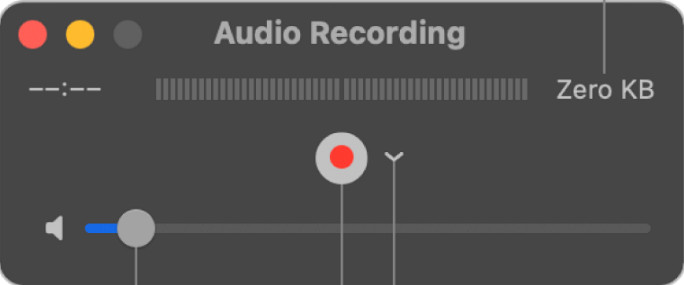
QuickTime Player juga boleh digunakan sebagai perakam audio pada Mac jika anda memerlukannya. Walaupun pemain ini tidak begitu mencukupi dan berkesan untuk rakaman, anda akan mengalami kelewatan dan kualiti output audio yang lebih rendah. Namun, jika anda memerlukan rakaman audio pantas pada Mac anda, ini adalah satu pilihan kerana anda tidak perlu memuat turun dan ia sememangnya selamat digunakan. Tetapi jika anda seorang profesional yang mencari perisian rakaman audio terbaik, ini bukan alat yang sesuai.
Kelebihan
- Ia sudah tersedia pada setiap macOS.
- Percuma, selamat dan mudah digunakan.
Keburukan
- Ia tidak berkesan seperti perakam audio lain dalam senarai ini.
- Kualiti output akhir audio adalah rendah.
- Bukan pilihan terbaik untuk rakaman dan penyuntingan profesional.
Berkaitan:
Cara Merakam Skrin dengan Audio pada Mac Menggunakan QuickTime
Cara Menukar QuickTime kepada MP4
4. Ocenaudio
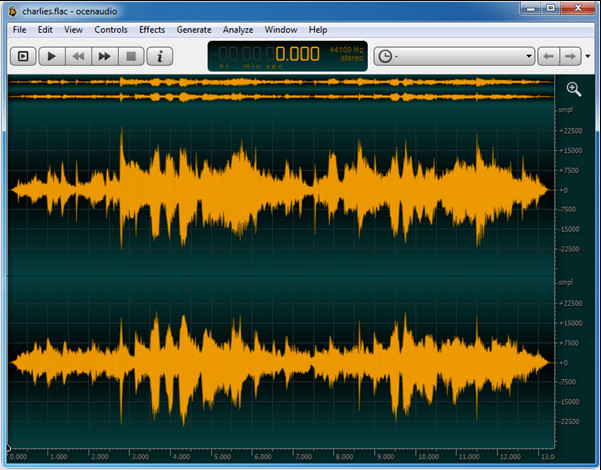
Jika anda memerlukan perakam pelbagai fungsi untuk merakam audio pada Windows 10 atau lebih baharu, maka Oceanaudio akan membantu anda. Alat ini mempunyai antara muka yang hampir sama dengan Audacity, tetapi GUI alat ini lebih mudah difahami. Penjelasan lanjut, perakam ini menawarkan kerumitan dan beberapa ciri yang anda perlukan untuk rakaman audio. Walaupun ia agak sukar untuk digunakan dan anda mungkin perlu menonton tutorial cara menggunakannya, ia tetap berbaloi pada akhirnya. Jadi, jika anda memerlukan penyunting dengan antara muka yang lebih baik daripada Audacity, ini sepatutnya menjadi pilihan anda.
Kelebihan
- Ia menggunakan teknologi canggih untuk rakaman.
- Ia adalah pilihan pakar untuk melakukan rakaman audio.
- Anda boleh mendengar suara anda semasa merakam.
Keburukan
- Ia tidak mesra pengguna.
- Pemula mungkin keliru semasa menggunakan alat ini.
Bahagian 2. Carta Perbandingan tentang Perisian Perakam Audio
| Ciri-ciri | Perakam Skrin FVC | Keberanian | Pemain QuickTime | Ocenaudio |
| Bunyi Sistem Rakam dan Mic |  | | | |
| Edit rakaman | | |  | |
| Pecutan Perkakasan | | | | |
| Pra-mendengar masa nyata | | | | |
| Simpan Kualiti Asal | | | | |
| Antara Muka Pengguna Terbaik | | | | |
Bahagian 3. Soalan Lazim tentang Perisian Perakam Audio
Adakah Perakam Audio Cinch perakam audio terbaik?
Kami mempunyai ulasan terkini tentang Cinch Audio Recorder. Jadi, jika anda ingin mengetahui lebih lanjut tentang perakam audio tersebut, anda perlu klik pautan ini dan pelajari maklumat lebih terperinci tentang perakam itu.
Apakah kualiti perakam audio yang baik?
Anda perlu mengetahui piawaian asas sebelum memilih perakam audio yang baik. Pertama, ia sepatutnya dapat menangkap audio pada mikrofon anda dengan mudah. Kedua, ia selamat dan bebas perisian hasad. Ketiga, jika anda perlu membeli alat itu, alat itu sendiri harus memberikan kecemerlangan kepada pengguna. Keempat, kadar keberkesanan bermakna alat mestilah sangat berkesan dalam sesuatu rakaman. Kelima, ciri asas atau lanjutan mesti tersedia untuk membantu pengguna merekod. Sebelum memilih perakam audio untuk membantu anda, anda boleh bergantung pada piawaian ini.
Bagaimana untuk merakam audio pada Windows 10?
Sebelum merakam pada Windows 10, anda mesti memilih perakam terbaik seperti FVC Video Recorder dengan memuat turunnya pada desktop anda, memasang alat itu serta-merta, dan melancarkannya. Seterusnya, pilih pilihan Audio Recorder dan klik padanya. Kini anda boleh menambahkan bunyi sistem dalam rakaman anda atau mikrofon dengan menghidupkannya pada bar alat terapung. Setelah anda bersedia untuk merakam, klik butang bulat merah untuk mula. Jika anda perlu menamatkan rakaman, klik butang segi empat untuk berhenti; selepas itu, antara muka baharu akan memaparkan senarai rakaman audio yang telah anda buat.
Kesimpulannya
Hari ini, kita sudah mengetahui perisian rakaman audio yang tersedia pada desktop anda. Semua alat yang dibentangkan di sini akan membantu rakaman anda. Namun, jika anda sedang mencari perakam yang mengatasi perakam lain, FVC Screen Recorder sepatutnya menjadi pilihan anda. Masih ragu-ragu tentang perakam audio ini? Jika begitu, memuat turunnya adalah satu-satunya cara untuk mencubanya dan mengetahui sama ada ia berfungsi seperti yang kami katakan dalam artikel ini.
-
 4 Perakam Suara AIFF Percuma yang Menghasilkan Audio Berkualiti Tinggi
 Artikel ini membincangkan tentang AIFF dan beberapa alatan paling popular yang boleh anda gunakan untuk menghasilkan format AIFF berkualiti tinggi.
-
 3 daripada Teknik Terbaik Cara Merakam Audio pada iPhone
 Mengalami kesukaran kerana anda tidak dapat melakukan rakaman audio dengan betul pada iPhone? Kemudian baca artikel ini untuk mengetahui cara merakam audio pada iPhone dan apakah alat yang tersedia.
-
 7 Perakam Suara Magnificent Boleh Diakses dalam semua Platform
 Adakah anda ingin belajar cara melakukan rakaman audio? Kemudian pergi ke artikel ini sambil kita bercakap tentang perakam audio terbaik yang sesuai dengan keperluan anda.
