


 Video Converter Ultimate
 Perakam Skrin
 Pembaikan Video
 Muat Turun Selamat
Bagaimana untuk Memperlahankan Video di Tiktok? 2 Cara Terbaik dan Percuma
Pada masa kini, anda akan menemui banyak video tular di internet daripada TikTok. Aplikasi ini sangat digemari kerana mempunyai pelbagai ciri dan alat untuk menghasilkan kandungan video, daripada meme kelakar, video pendidikan, video tarian, dan banyak lagi. Jika anda baru menggunakan TikTok, anda mungkin mahu belajar cara memperlahankan video di TikTok. Nasib baik, TikTok mempunyai alat terbina dalam untuk memperlahankan atau mempercepatkan video yang membolehkan anda menghasilkan video gerak perlahan. Anda berada di landasan yang betul kerana anda akan mengetahui cara memperlahankan video di TikTok.

Bahagian 1. Perlahankan Video dengan Mudah di Tiktok
Apl Tiktok mempunyai alat slow-mo terbina dalam yang boleh anda gunakan untuk memperlahankan atau mempercepatkan video yang anda rakam. Dan jika anda sudah mempunyai video yang disimpan dalam galeri anda dan mahu ia disiarkan di TikTok, anda masih boleh memperlahankannya pada apl Tiktok. Dalam bahagian ini, anda akan tahu cara memperlahankan video anda di TikTok.
Perlahankan Video anda Semasa Merakam
Inilah jawapannya jika anda tertanya-tanya bagaimana anda memperlahankan video TikTok semasa merakam. Ikuti langkah mudah di bawah untuk merakam video slow-mo.
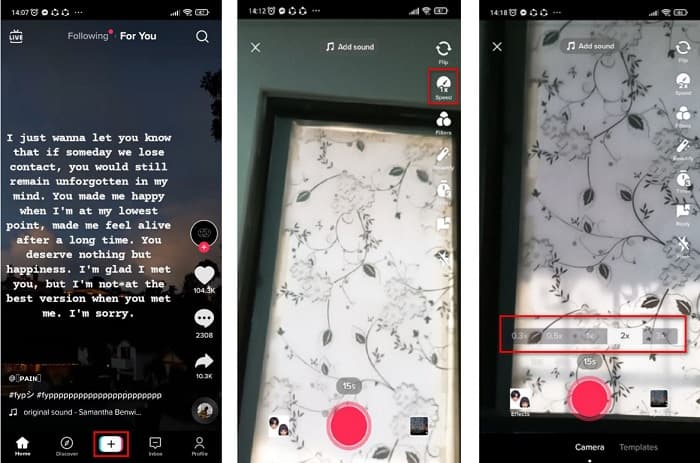
Langkah 1. Mula-mula, buka aplikasi TikTok anda dan ketik tanda + di bahagian tengah skrin anda.
Langkah 2. Apabila anda berada pada antara muka kamera, ketik pilihan Speed.
Langkah 3. Akhir sekali, pilih kelajuan yang anda mahukan. 0.3x dan 0.5x akan menjadikan video anda lebih perlahan. Manakala 2x dan 3x akan menjadikan video anda lebih laju.
Kemudian hanya ketik butang rekod untuk mula merakam video anda, dan apabila anda selesai, ketik butang berhenti. Anda akan melihat bahawa kelajuan video yang anda rakam berubah.
Perlahankan Video yang Dirakam
Jika anda sudah mempunyai video yang dirakam, anda masih boleh memperlahankan atau mempercepatkan video anda di TikTok. Ikuti langkah mudah di bawah untuk memperlahankan video yang dirakam. Walau bagaimanapun, apabila video anda sudah dirakam, satu-satunya pilihan anda ialah memperlahankan video anda tanpa pilihan kelajuan.
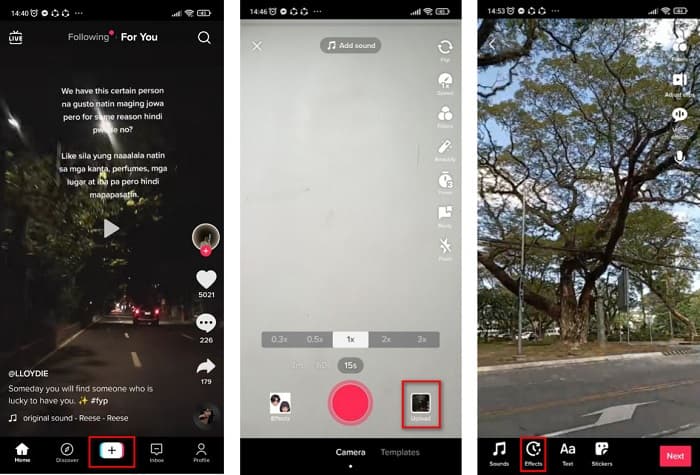
Langkah 1. Buka aplikasi TikTok, dan ketik butang tanda + di tengah antara muka perisian.
Langkah 2. Seterusnya, ketik pilihan Upload di sebelah butang rakam. Kemudian pilih video yang telah anda rakam, lalu klik Next.
Langkah 3. Akhir sekali, ketik Effects dan kemudian ketik pilihan Slow-mo. Kemudian laraskan kelajuan yang anda mahukan.
Selepas melaraskan kelajuan video anda, ketik butang Simpan untuk menyimpan rakaman video anda.
Mudah, kan? Dengan menggunakan apl Tiktok, anda boleh membuat video slow-mo tanpa menggunakan sebarang alat lain.
Bahagian 2. Perlahankan Video TikTok Anda yang Dirakam Menggunakan Alat Penukar Kelajuan Video Terbaik
Menggunakan penukar kelajuan apl TikTok adalah mudah dan tanpa kerumitan. Walau bagaimanapun, ia hanya boleh memperlahankan video anda kepada kelajuan sehingga 0.3x dan hanya boleh mempercepatkan video anda sehingga 3x. Jika anda ingin memperlahankan video anda sehingga kelajuan 0.125x, kami mempunyai alatan dalam talian dan luar talian alternatif.
FVC Video Converter Ultimate
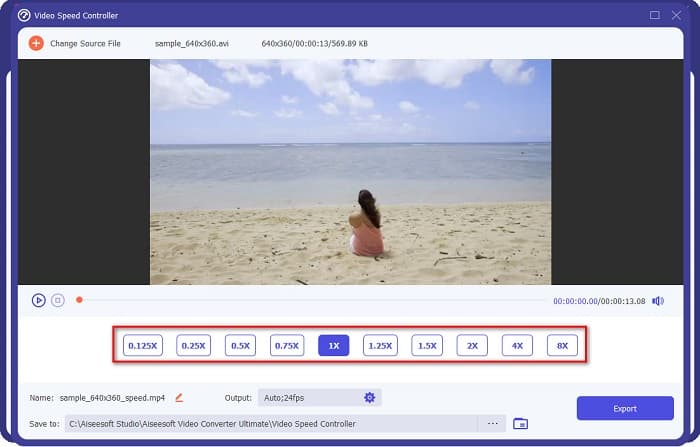
FVC Video Converter Ultimate ialah alat luar talian yang membolehkan anda menukar kelajuan video anda. Menggunakan alat ini, anda boleh memperlahankan atau mempercepatkan video mengikut kehendak anda. Alat ini boleh melaraskan kelajuan video anda kepada 0.125x, 0.25x, 0.5x, 0.75x, 1.25x, 1.5x, 2x, 4x dan 8x.
Tambahan pula, alat ini mempunyai antara muka perisian yang mudah digunakan, menjadikannya mudah untuk digunakan oleh pemula. Alat ini mengagumkan kerana ia mempunyai ciri yang lebih maju, seperti editor metadata media, pemampat video, pembuat 3D dan banyak lagi. Di samping itu, apabila anda menukar kelajuan video anda, anda tidak akan kehilangan kualitinya, tidak seperti alat lain. Jadi, jika anda berminat untuk menggunakan penukar ini, ikuti langkah di bawah.
Langkah 1. Muat turun FVC Video Converter Ultimate dengan mengklik butang Download di bawah. Ikuti proses pemasangan, kemudian jalankan aplikasi.
Muat Turun PercumaUntuk Windows 7 atau lebih baharuMuat Turun Selamat
Muat Turun PercumaUntuk MacOS 10.7 atau lebih baharuMuat Turun Selamat
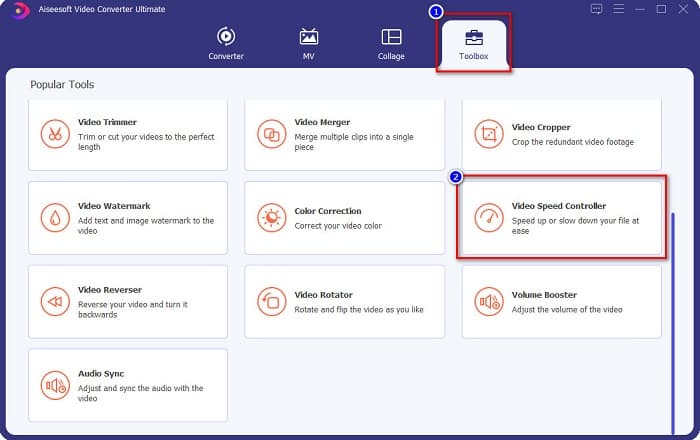
Langkah 2. Kemudian, pada antara muka utama perisian, klik panel Toolbox. Pada antara muka panel toolbox, klik Video Speed Controller.
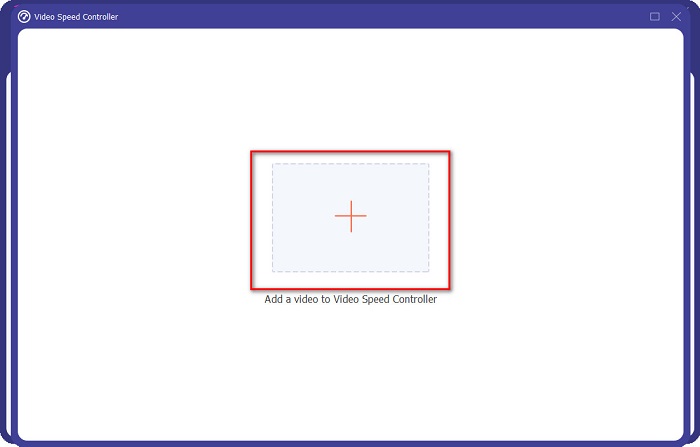
Langkah 3. Klik butang tanda + untuk memuat naik video yang anda mahu perlahankan pada antara muka seterusnya.
Langkah 4. Kemudian, pilih kelajuan video yang anda mahukan, kemudian teruskan ke langkah terakhir.
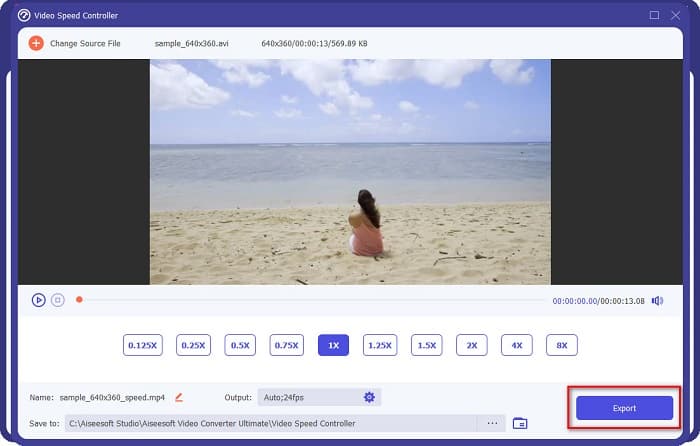
Langkah 5. Akhir sekali, klik butang Export untuk menerapkan kelajuan video pada video anda. Video keluaran akan disimpan secara automatik dalam folder komputer anda.
Kelebihan
- Ia boleh melaraskan kelajuan video anda daripada kelajuan 0.125x kepada 8x.
- Ia mempunyai antara muka pengguna yang intuitif.
- Ia mempunyai ciri pengeditan lanjutan seperti pembuat GIF, pembuat 3D, Tera Air Video dan banyak lagi.
- Tersedia pada semua platform silang media, termasuk Windows dan Mac.
Keburukan
- Anda mesti membeli apl itu sebelum mengakses ciri uniknya.
Kapwing
Kapwing ialah alat dalam talian yang merupakan salah satu penukar kelajuan video yang paling banyak digunakan. Alat ini mempunyai antara muka yang ringkas menjadikannya mesra pengguna. Ia juga membolehkan anda memangkas dan memotong video dengan mudah. Selain itu, ia boleh menukar kelajuan video anda kepada 0.25x, 0.5x, 0.75x, 1.15x, 1.25x, 1.75x, 2x dan 4x. Di samping itu, anda boleh menukar saiz keluaran video anda. Namun begitu, kerana ia adalah aplikasi berasaskan web, anda mungkin mengalami proses pemuatan yang perlahan apabila menggunakan alat ini. Walau bagaimanapun, ramai orang menggunakan penukar ini untuk mengubah kelajuan video mereka.
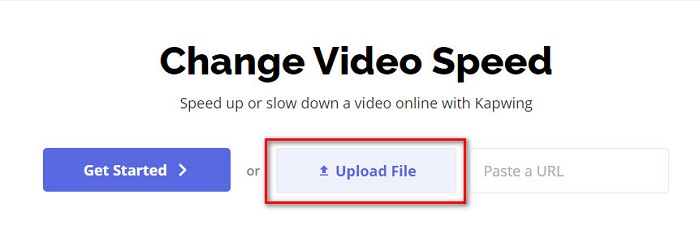
Langkah 1. Mula-mula, cari Kapwing pada pelayar anda, dan klik butang Upload File. Fail komputer anda akan muncul dan anda perlu memilih video yang anda mahu tukar kelajuannya.
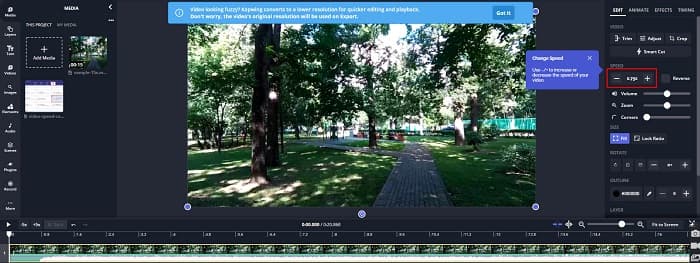
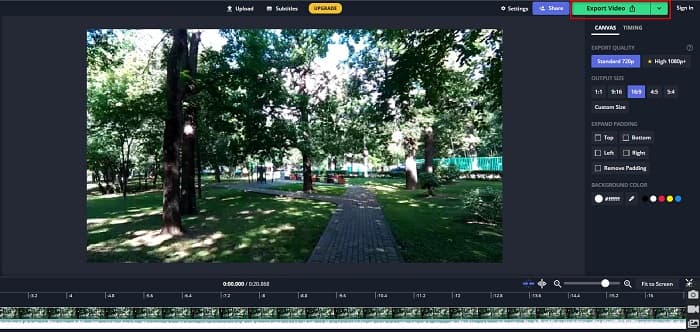
Langkah 2. Kemudian, laraskan kelajuan video pada antara muka seterusnya dengan mengklik tanda - atau + pada panel kelajuan.
Langkah 3. Klik butang Export untuk menukar kelajuan video anda. Kemudian tunggu beberapa minit, dan siap!
Kelebihan
- Ia mempunyai antara muka perisian yang mudah digunakan.
- Membolehkan anda memangkas output video anda.
Keburukan
- Apabila sambungan internet perlahan, proses pemuatan aplikasi menjadi perlahan.
Bahagian 3. Soalan Lazim tentang Cara Memperlahankan Video di Tiktok
Adakah memperlahankan video di Tiktok mengurangkan kualiti?
Tidak. Memandangkan Tiktok mempunyai penukar kelajuan video terbina dalam, ia tidak akan menjejaskan kualiti video anda apabila anda memperlahankan video di TikTok.
Adakah mengeksport video slow-mo di TikTok mengandungi tera air?
Ya. Setiap video yang dieksport daripada TikTok mengandungi tera air (watermark). Tetapi jika anda mahu membuang tera air daripada video TikTok anda, baca artikel ini untuk mengetahui caranya.
Berapa lama anda boleh merakam video Tiktok?
Satu rakaman video Tiktok mempunyai panjang maksimum 15 saat. Walau bagaimanapun, jika anda menyusun empat video 15 saat, ia mempunyai maksimum 60 saat.
Kesimpulannya
Dengan semua yang telah diterangkan, tugasan tentang cara memperlahankan video di TikTok telah diselesaikan. Dan kini anda tahu cara memperlahankan atau mempercepatkan video pada aplikasi TikTok. Tetapi jika anda mahu melaraskan kelajuan video-video anda yang lain, FVC Video Converter Ultimate ialah alat yang boleh membantu anda.
-
 Fakta Teratas yang Perlu Anda Ketahui tentang QuickTime Slow Motion
 Pernahkah anda mencuba menggunakan QuickTime Media Player untuk memainkan video dalam gerakan perlahan? Baca artikel ini untuk mengetahui lebih lanjut tentang perkhidmatan cemerlang pemain media ini.
-
 5 Pembuat Video Slow Motion Profesional Tersedia untuk Windows/Mac/Dalam Talian
 Adakah anda ingin tahu cara membuat video anda dimainkan dalam gerakan perlahan? Kemudian baca artikel ini untuk mengetahui apakah 5 pembuat video gerakan perlahan profesional itu.
-
 Cara Terbaik untuk Menggunakan iMovie dalam Membuat Video Gerak Perlahan [Diselesaikan]
 Pernahkah anda menggunakan apl iMovie untuk menukar video kelajuan biasa anda kepada gerakan perlahan? Ini adalah peluang untuk mengetahui lebih lanjut mengenai aplikasi ini, jadi teruskan membaca.
