


 Video Converter Ultimate
 Perakam Skrin
 Pembaikan Video
 Muat Turun Selamat
Cara Menukar MTS ke FLV dengan 3 MTS ke FLV Converter
Mahukah anda menukar fail MTS kepada FLV? Video yang dirakam dengan kamera video AVCHD biasanya disimpan dalam format MTS atau M2TS. Fail MTS tidak banyak disokong oleh sesetengah pemain media, dan juga tidak boleh dimuat naik ke YouTube atau Facebook. Jika anda mempunyai kamera video AVCHD seperti Sony, Panasonic atau Canon, anda mungkin mahu menukar video MTS yang dirakam kepada format video flash. Dengan itu, ia boleh dimainkan pada kebanyakan pemain media. Itulah sebabnya anda perlu terus membaca hantaran kami, kerana kami akan menyediakan 3 kaedah untuk menukar fail MTS kepada FLV pada Windows dan Mac.

Bahagian 1. Cara Profesional untuk Menukar MTS ke FLV secara percuma
Untuk menukar fail MTS anda kepada video flash untuk dimuat naik, anda memerlukan alat profesional seperti FVC Free MTS Converter. Ia ialah penukar MTS ke FLV yang boleh menukar secara kelompok fail MTS kepada FLV, MP4, WMV, MOV dan format video serta audio yang lain. Dengan alat penyunting video terbina dalam, anda boleh menyunting fail MTS sebelum menukarnya.

Penukar MTS Percuma FVC
1,286,400+ Muat turun- Tukar MTS ke FLV pada Windows 10/8/7 / Vista / XP dan Mac OS X.
- Memampatkan, menggabungkan dan menambahkan kesan video lain ke fail MTS.
- Tambahkan tema khas ke fail MTS anda, seperti percutian, keluarga, hari jadi.
- Batch menukar MTS ke FLV, MP4, MKV, dan lain-lain pada kelajuan 50x lebih pantas.
Muat Turun PercumaUntuk Windows 7 atau lebih baharuMuat Turun Selamat
Muat Turun PercumaUntuk MacOS 10.7 atau lebih baharuMuat Turun Selamat
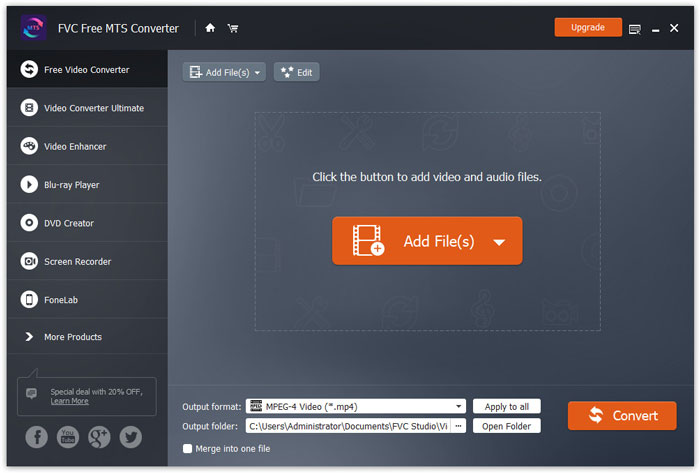
Langkah 1. Tambah fail MTS
Muat turun, pasang dan lancarkan FVC Free MTS Converter secara percuma. Klik butang Add File(s) untuk mengimport fail MTS anda. Anda juga boleh menyeret lebih daripada satu fail MTS ke dalam program secara percuma.
Langkah 2. Sunting fail MTS
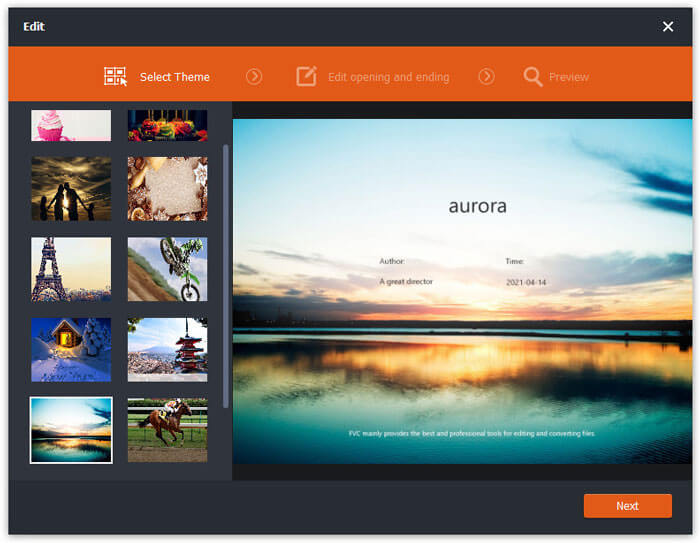
Klik butang Edit untuk mula menyunting fail MTS anda. Anda boleh memilih tema tertentu, menyunting tajuk, pengarang, masa pada permulaan dan penutup.
Langkah 3. Tetapkan FLV sebagai output
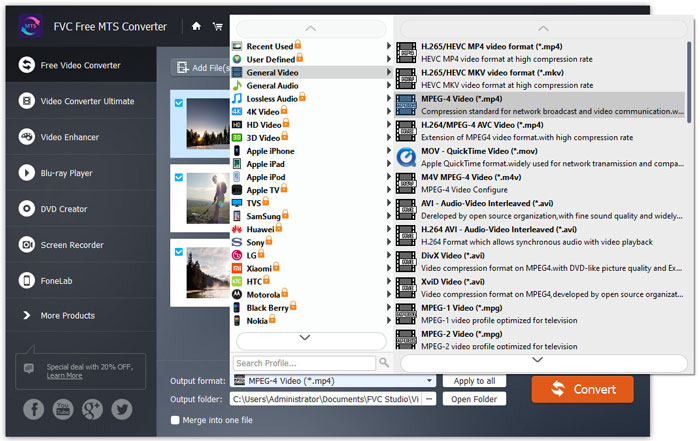
Kemudian pergi ke kawasan Output format dan pilih kategori General Video. Cari FLV - Flash Video Format (.flv) dan tetapkannya sebagai format output. Format ini ialah format media penstriman video rangkaian yang digunakan secara meluas.
Langkah 4. Tukar MTS kepada FLV
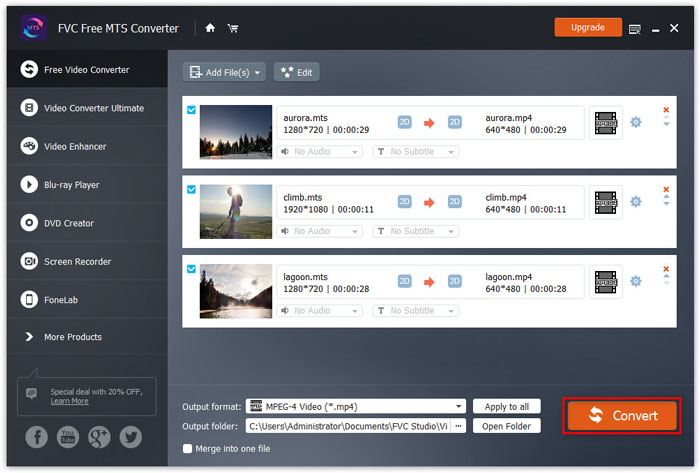
Akhir sekali, pergi ke kawasan Output folder dan pilih destinasi tempat fail FLV yang telah ditukar akan disimpan. Anda boleh klik butang Convert untuk mula menukar fail MTS kepada FLV secara percuma.
Selepas itu, anda boleh memuat naik fail FLV yang ditukar ke YouTube, Vimeo, Facebook, video Google, atau platform media lain.
Bahagian 2. Cara Menukar MTS ke FLV Percuma Dalam Talian
Jika anda mahu mencari alat dalam talian tanpa memuat turun sebarang perisian, anda boleh pergi ke FVC Free Online Video Converter. Ia ialah penukar MTS ke FLV dalam talian yang mudah digunakan dan percuma yang membantu menukar mana-mana format video/audio popular seperti MTS ke FLV, MP4, WMV, AVI, MOV, MP3 dan lain-lain, semuanya secara percuma pada Windows dan Mac. Anda boleh menyemak langkah terperinci untuk menukar MTS kepada FLV dengan alat dalam talian percuma ini.
Langkah 1. Lawati laman web rasmi FVC Free Online Video Converter (https://www.free-videoconverter.net/free-online-video-converter/). Klik butang Add Files to Convert untuk memuat turun dan memasang pelancar.

Langkah 2. Pilih fail MTS anda yang hendak ditukar daripada komputer anda.
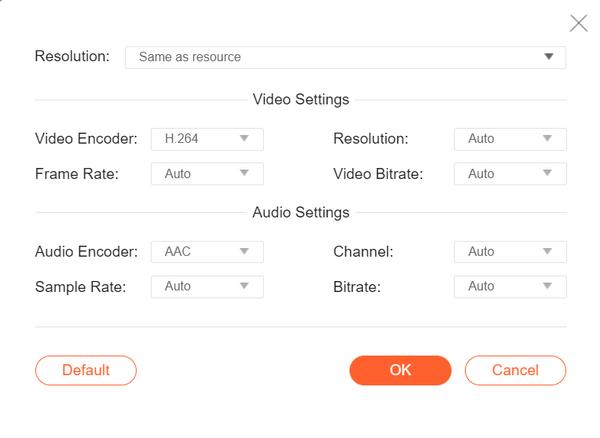
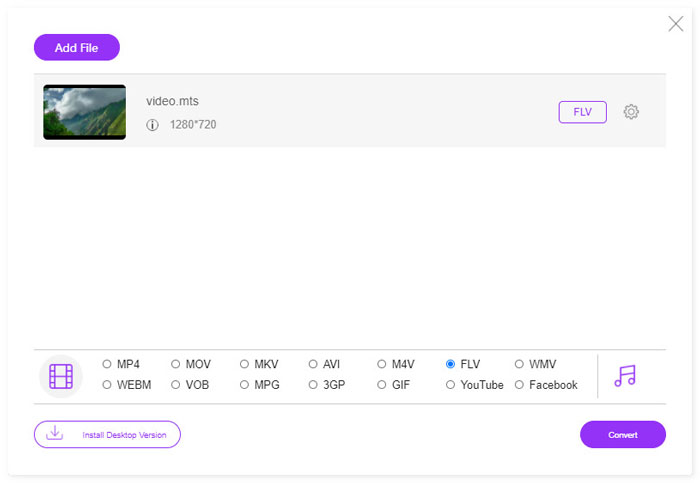
Langkah 3. Tetapkan FLV sebagai format output di bahagian bawah. Jika anda mahu melaraskan lebih banyak tetapan, anda boleh klik ikon gear untuk melaraskan pengekod video, resolusi, kadar bingkai, bitrate dan tetapan audio lain seperti pengekod audio, saluran, kadar sampel dan bitrate.
Langkah 4. Klik butang Covert untuk mula menukar fail MTS anda kepada FLV.
Bahagian 3. Eksport Video Flash Percuma dari Fail MTS dengan VLC
VLC Media Player bukan sahaja pemain video/audio yang ringkas, tetapi juga penukar video yang dilengkapi dengan ciri berguna. Ia berfungsi sebagai penukar MTS ke FLV yang baik yang mengendalikan pelbagai jenis fail yang disokong untuk penukaran. Ia benar-benar percuma tanpa sebarang had. Dengan VLC, anda boleh mengeksport video Flash daripada fail MTS pada Windows atau Mac secara percuma. Untuk menukar fail MTS kepada FLV, anda perlu memuat turun dan memasang VLC pada komputer anda.
Langkah 1. Lancarkan VLC Media Player, pergi ke Media dan klik butang Convert / Save.
Langkah 2. Klik butang Add untuk menambah fail MTS, dan klik butang Convert / Save untuk meneruskan.
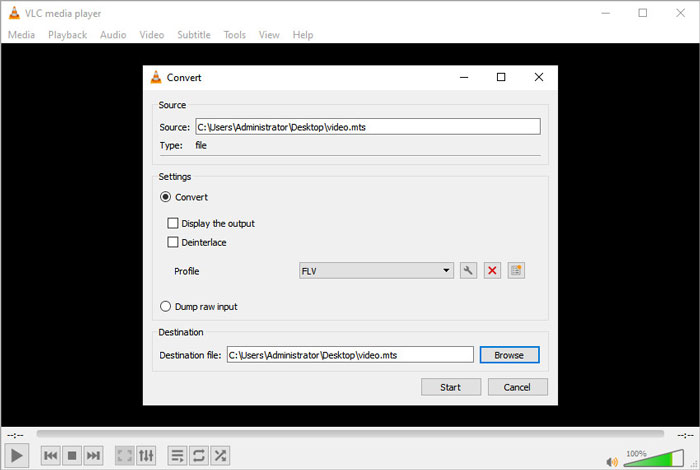
Langkah 3. Tanda Convert di kawasan Settings, dan klik anak panah jatuh bawah untuk memilih FLV sebagai format output. Jika tiada output fail FLV, anda boleh klik ikon Create a new profile dan cipta profil FLV yang baharu.
Langkah 4. Kemudian pergi ke kawasan Destination dan klik butang Browse untuk menetapkan folder output.
Langkah 5. Pastikan semua tetapan telah dibuat, dan klik butang Start untuk mula menukar MTS kepada FLV dalam VLC.
Bahagian 4. Soalan Lazim Menukar MTS ke FLV
Apakah format video MTS?
Fail MTS ialah video yang disimpan dalam format Advanced Video Coding Definition (AVCHD). Fail MTS ialah format video standard yang digunakan oleh banyak kamera video HD Sony dan Panasonic. Ia juga digunakan untuk menyimpan video definisi tinggi pada cakera Blu-ray.
Bagaimana cara menukar fail MTS ke MP4?
Dengan FVC Free MTS Converter, anda juga boleh menukar fail MTS kepada MP4. Klik butang Add File(s) untuk mengimport fail MTS. Kemudian pergi ke Output format dan pilih MP4 sebagai format output. Selepas itu, klik butang Convert untuk mula menukar MTS kepada MP4 secara percuma.
Bolehkah Windows 10 memainkan fail MTS?
Ya. Anda boleh menggunakan Windows Media Player untuk memainkan fail MTS anda. Sekiranya fail MTS gagal untuk dimainkan semula, anda boleh mencuba pemain MTS lain seperti Pemain Media VLC, Pemain 5K, Pemain Video Percuma FVC dan banyak lagi.
Kesimpulannya
Dalam artikel ini, kami terutama membincangkan 3 kaedah untuk menukar fail MTS ke FLV secara percuma. Anda boleh mencuba semua penukar MTS ke FLV di atas untuk mengeksport fail video flash untuk dimuat naik. Penukar MTS Percuma ini dapat menukar fail MTS anda dengan mudah ke FLV, MP4, WMV, VOB, MP3 dan banyak lagi dengan kelajuan pantas.
-
 10 Pemain FLV teratas untuk Windows, Mac, iOS dan Android pada tahun 2021
 Pemain FLV membantu anda mengakses fail FLV dengan mudah pada peranti Windows, Mac, Android, iOS anda. Lihat pemain fail FLV terbaik yang boleh anda muat turun sekarang.
-
 Cara Terbaik untuk Menukar VOB kepada FLV
 Ingin menukar fail VOB ke fail FLV? Anda boleh menyelesaikan tugas dengan mudah dengan penukar desktop atau dalam talian. Baca panduan ini dan pelajari cara mengubah VOB menjadi FLV dengan mudah dan cepat.
-
 MTS VS M2TS - Perbezaan Antara MTS dan M2TS
 Apakah fail MTS atau M2TS? Apakah perbezaan antara M2TS dan MTS? Bagaimana saya dapat menonton fail MTS atau M2TS yang dirakam camcorder? Cari semua jawapan dalam catatan ini.
