


 Video Converter Ultimate
 Perakam Skrin
 Pembaikan Video
 Muat Turun Selamat
Cara Menukar M2TS ke Format yang Sesuai dengan iPad pada Windows / Mac / Online
Bolehkah anda memainkan M2TS pada iPad secara langsung? Malangnya, jawapannya Tidak. M2TS tidak serasi dengan iPad. Jika anda mahu main balik M2TS pada iPad, anda perlu memasang aplikasi pemain M2TS pada iPad, atau anda boleh menukar M2TS kepada format iPad. Jelas sekali, artikel ini memilih penyelesaian yang kedua. Teruskan membaca dan pelajari cara menukar format video pada iPad daripada M2TS.

Bahagian 1: Cara Menukar M2TS ke iPad pada Windows dan Mac
Apa format yang disokong oleh iPad? Sebenarnya, iPad menerima format video biasa H.264, MP4, M4V, MOV, MPEG-4 dan M-JPEG. Untuk meletakkan M2TS pada iPad, anda perlu menukar M2TS ke format video iPad terlebih dahulu.
Cara Menukar M2TS ke iPad di Windows secara Percuma
FVC Free M2TS Converter ialah penukar kelompok M2TS ke iPad yang sepenuhnya percuma untuk digunakan. Anda boleh menukar berkelompok fail M2TS ke iPad dengan kelajuan 50x lebih pantas berbanding penukar M2TS biasa. Oleh itu, tidak menjadi masalah jika anda perlu menukar fail video M2TS yang besar ke iPad secara pukal. Penukar M2TS ke iPad percuma ini boleh menanganinya dengan sempurna.
Selain itu, anda boleh menggabungkan fail M2TS dan menambah tema sebelum penukaran M2TS ke iPad. Tetingkap pratonton masa nyata boleh menunjukkan kesan video kepada anda serta‑merta. Ringkasnya, anda boleh menyunting dan menukar AVCHD M2TS ke iPad pada Windows secara percuma dalam satu langkah lengkap.

Penukar M2TS percuma
113,456+ Muat turun- Tukar M2TS ke iPad H.264, MP4, MOV, MPEG-4 dan format lain yang serasi.
- Kelajuan 50x lebih pantas dengan sokongan penukaran kumpulan.
- Kekalkan tahap kualiti yang tinggi semasa menukar ke iPad dari semua kamkoder HD.
- Penukar M2TS ke iPad berfungsi dengan komputer Windows 10/8/7.
Muat Turun Percuma Untuk Windows 7 atau lebih baru Muat Turun Selamat
Muat Turun Percuma Untuk MacOS 10.7 atau lebih baru Muat Turun Selamat
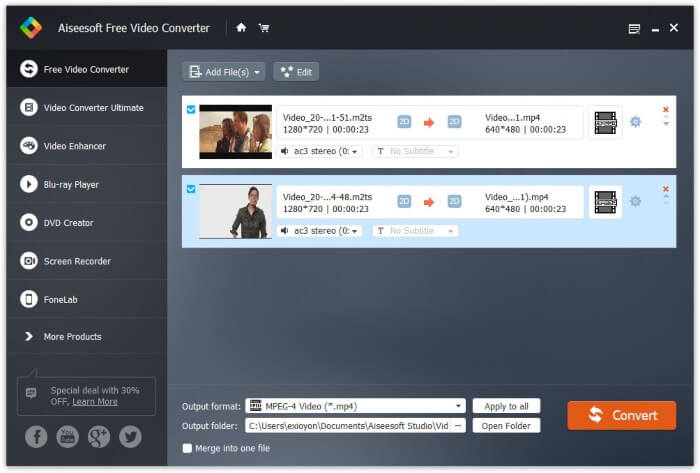
Langkah 1: Muat turun, pasang dan lancarkan FVC Free M2TS Converter secara percuma. Seret dan lepas fail M2TS ke dalam antara muka utama.

Langkah 2: Kembangkan senarai Format keluaran berhampiran bahagian bawah. Untuk menukar M2TS ke iPad pada Windows, anda boleh tetapkan format keluaran terus daripada kategori Apple iPad.

Langkah 3: Klik ikon gear Settings untuk melaraskan pengekod video, kadar bingkai dan lain‑lain. Akhir sekali, klik Convert untuk menukar video daripada format M2TS kepada format iPad.
Cara Menukar M2TS ke iPad di Mac secara Percuma
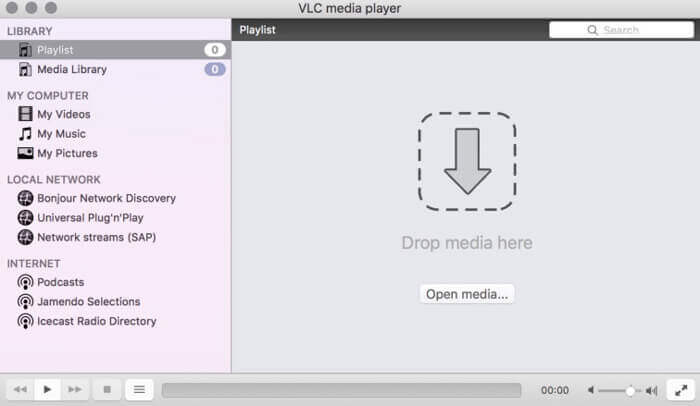
Sekiranya anda ingin menukar video M2TS ke iPad di Mac secara percuma, VLC Media Player boleh menjadi pilihan anda. Ia adalah pemain dan penukar M2TS sumber bebas dan terbuka untuk pelbagai platform.
Langkah 1: Buka VLC Media Player pada Mac. Pilih Convert/Save daripada senarai tarik turun Media.
Langkah 2: Klik Add untuk mengimport fail M2TS. Kemudian pilih fail tersebut dan klik Open di bawah untuk meneruskan proses.
Langkah 3: Klik Convert/Save di bahagian bawah untuk beralih ke tetingkap seterusnya.
Langkah 4: Pilih format iPad daripada senarai tarik turun Profile. Anda boleh klik ikon Tools di sebelah untuk melaraskan tetapan video.
Langkah 5: Klik Start untuk mula menukar fail M2TS ke iPad pada Mac melalui VLC.
Bahagian 2: Cara Menukar M2TS ke iPad Dalam Talian
Bagi pengguna mudah alih, menggunakan penukar M2TS ke iPad dalam talian juga merupakan pilihan yang baik. Anda boleh menukar fail M2TS ke iPad secara percuma tanpa syarat muat turun, pemasangan atau pendaftaran.
Langkah 1: Buka penukar dalam talian M2TS ke iPad, seperti FVC Free Online Video Converter.

Langkah 2: Muat turun FVC launcher dengan mengklik Add Files to Convert dan pasang.

Langkah 3: Cari fail M2TS dalam komputer anda untuk ditukar. Dan jangan lupa untuk memilih formatnya.

Langkah 4: Klik Start Converting untuk menukar M2TS ke iPad secara percuma dalam talian.
Bahagian 3: Soalan Lazim Menukar M2TS ke iPad
Apa yang berlaku sehingga tiba-tiba tidak ada audio dalam fail M2TS di iMovie?
M2TS tidak disokong secara asli oleh peranti Apple. Anda perlu menukar format M2TS ke Mac untuk menyelesaikan masalahnya.
Bagaimana cara membuka fail M2TS di iPhone dan iPad?
AVCHD M2TS tidak serasi dengan peranti iOS. Sekiranya anda berkeras untuk memainkan video M2TS di iPad, anda boleh menggunakan aplikasi Pemain Media VLC untuk mendapatkan main balik video.
Ada aplikasi pemain video yang bagus untuk iPad?
Anda boleh mendapatkan skrin paparan yang lebih besar di iPad daripada iPhone. Oleh itu, pengalaman menonton video juga akan menjadi lebih baik. Pemain video yang disyorkan termasuk PlayerXtreme Media Player, KMPlayer, VLC, AirPlayer dan banyak lagi. Anda boleh memilih mana-mana untuk mendapatkan kawalan video secara fleksibel.
Itu sahaja tentang cara menukar M2TS ke iPad dengan alat dalam talian dan luar talian. Penukar video M2TS tersebut adalah percuma dan selamat digunakan. Tidak kira berapa banyak fail M2TS yang anda ingin tukar kepada format serasi iPad, anda boleh mendapatkan kelajuan terpantas di sini.
-
 Cara Menukar M2TS ke MP4 tanpa Mengurangkan Kualiti
 Ingin menukar video dari camcorder HD ke MP4 biasa? Berikut adalah 4 cara mudah dan percuma untuk menukar fail M2TS ke MP4 pada Windows dan Mac.
-
 Cara Menukar M2TS ke MKV tanpa Kehilangan Kualiti
 Ingin menukar M2TS ke MKV sambil mengekalkan kualiti asal? Catatan ini menunjukkan kaedah percuma dan dalam talian untuk menukar M2TS menjadi MKV tanpa kerugian.
-
 Apakah Perbezaan Antara MTS dan M2TS
 Apakah fail MTS atau M2TS? Apakah perbezaan antara M2TS dan MTS? Bagaimana saya dapat menonton fail MTS atau M2TS yang dirakam camcorder? Cari semua jawapan dalam catatan ini.
