


 Video Converter Ultimate
 Perakam Skrin
 Pembaikan Video
 Muat Turun Selamat
Cara Menukar M2TS ke WMV pada Windows / Mac / Online (Benar-benar Bebas Digunakan)
Beberapa kamera Canon dan Sony menggunakan M2TS sebagai format output lalai. Video M2TS berukuran besar. Keserasian format M2TS juga tidak bagus. Sekiranya anda ingin mengimport fail M2TS ke Windows Movie Maker untuk pengeditan lebih lanjut, anda perlu menukar M2TS ke video WMV terlebih dahulu.
Artikel ini akan menunjukkan kepada anda cara dalam talian dan luar talian untuk menukar video daripada format M2TS kepada WMV langkah demi langkah. Dengan itu, anda boleh menukar format video M2TS kepada WMV pada telefon atau komputer anda dengan mudah.

Bahagian 1: Cara Menukar M2TS ke WMV pada Windows dan Mac
Sekiranya anda hanya mahu menukar format video, penukar video M2TS ke WMV percuma sudah cukup. Anda tidak perlu membayar untuk ciri tambahan yang tidak anda perlukan. Inilah 2 perisian percuma penukar M2TS ke WMV yang boleh anda pilih.
Tukar M2TS ke WMV di Windows secara percuma
Untuk menukar fail M2TS kepada WMV pada komputer Windows anda, anda boleh menggunakan FVC Free M2TS Converter. Ia ialah penukar M2TS kelompok yang boleh menukar fail M2TS kepada WMV, MOV, MP4 dan format video serta audio lain secara pukal. Alat penyuntingan video terbina dalam juga boleh digunakan secara percuma. Anda boleh menyunting dan menyesuaikan video M2TS sebelum menukarnya. Berikut ialah ciri utama perisian penukar M2TS ke WMV percuma ini.

Penukar M2TS percuma
112,356+ Muat turun- Tukar M2TS ke WMV pada Windows 10/8/7 / Vista / XP secara percuma.
- Sokong penukaran kumpulan M2TS ke WMV.
- Kelajuan penukaran 50x lebih pantas.
- Memampatkan, menggabungkan dan menggunakan kesan video lain ke fail M2TS.
- Tambahkan tema khas ke fail M2TS anda, seperti keluarga, hari jadi, cuti, dll.
Muat Turun Percuma Untuk Windows 7 atau lebih baru Muat Turun Selamat
Muat Turun Percuma Untuk MacOS 10.7 atau lebih baru Muat Turun Selamat
Langkah 1: Muat turun, pasang dan lancarkan FVC Free M2TS Converter secara percuma. Klik Add File(s) untuk mengimport lebih daripada satu fail video M2TS.

Langkah 2: Dalam senarai output format, semak dan tetapkan WMV sebagai format video output.

Langkah 3: Jika anda mahu menyunting video M2TS, hanya klik Edit di bahagian atas. Kemudian anda boleh menyunting tajuk, pengarang dan masa M2TS pada bahagian pembukaan dan penutup dalam FVC Free M2TS Converter.

Langkah 4: Klik Convert untuk menukar M2TS kepada WMV secara percuma pada Windows.
Tukar M2TS ke WMV di Mac secara percuma
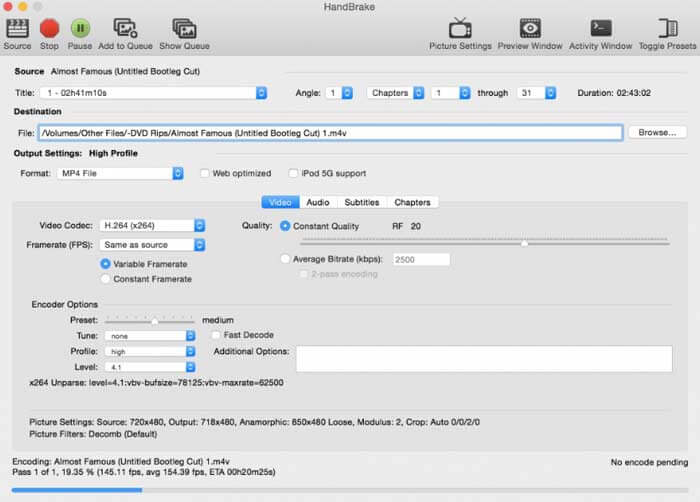
Untuk pengguna Mac, anda boleh menggunakan HandBrake sebagai penukar percuma M2TS ke WMV anda. Berikut adalah langkah terperinci untuk menukar M2TS ke WMV secara percuma di Mac menggunakan HandBrake.
Langkah 1: Jalankan HandBrake. Dalam tetingkap timbul Source, pilih fail M2TS anda dan kemudian klik Open.
Langkah 2: Kembangkan senarai Format. Pilih format video sebagai WMV.
Langkah 3: Klik Browse untuk menukar folder destinasi.
Langkah 4: Klik Start untuk melengkapkan penukaran video M2TS ke WMV pada Mac.
Bahagian 2: Cara Menukar M2TS ke WMV Dalam Talian
Jika anda tidak mahu memasang apa-apa pada komputer anda, anda juga boleh menggunakan penukar video dalam talian. Bahagian ini akan mengambil FVC Free Online Video Converter sebagai contoh.
Langkah 1: Layari FVC Free Online Video Converter dalam pelayar anda.

Langkah 2: Jika anda belum memuat turun FVC launcher, klik Add Files to Convert untuk memuat turun dahulu. Kemudian pasang launcher tersebut dan kemas kininya.

Langkah 3: Buka dan tambah fail M2TS. Kemudian pilih format WMV sebelum mula Convert.

Langkah 4: Selepas mengesahkan folder simpanan, tunggu dengan sabar fail WMV anda.
Bahagian 3: Soalan Lazim Menukar M2TS ke WMV
Bolehkah Android memainkan fail M2TS?
Tidak. Anda boleh menggunakan Pemain Media VLC sebagai aplikasi pemain M2TS anda. Atau anda boleh menukar format M2TS ke format WMV untuk pemutaran mudah di Android dan iPhone.
Adakah terdapat perbezaan antara MTS dan M2TS?
Sebenarnya, jawapannya ialah tidak. Tiada perbezaan fungsi antara MTS dan M2TS. Kedua-duanya ialah fail video definisi tinggi yang dikaitkan dengan AVCHD.
Adakah M2TS lebih baik daripada WMV?
M2TS direka khas untuk kamkorder. Jadi fail M2TS dalam definisi tinggi dan saiz fail yang besar. Anda boleh menjadikan video lebih kecil dengan menukar M2TS ke WMV. Berbanding dengan M2TS, WMV adalah format video yang biasa dan disokong secara meluas. Sekiranya anda ingin memampatkan M2TS dan menukar ke format video yang popular, ini adalah cara yang baik untuk menukar M2TS ke format WMV.
Itu sahaja untuk menukar video daripada M2TS kepada format WMV. Anda boleh menukar format video dan menggunakan kesan video asas secara percuma pada Windows, Mac dan dalam talian. Ia benar-benar percuma dan selamat digunakan. Tiada risiko tersembunyi atau pembelian dalam aplikasi. Jadi anda boleh menukar fail M2TS kepada format WMV dengan yakin.
-
 Cara Menukar M2TS ke MOV pada Windows / Mac
 Perlu menukar M2TS ke MOV kerana memainkan fail video pada sebilangan pemain dan platform? Artikel ini akan membantu anda mencari kaedah Online / Offline terbaik untuk menukar M2TS ke MOV pada Windows / Mac.
-
 Cara Menukar Fail M2TS ke MP3 secara Percuma
 Bolehkah fail M2TS ditukar menjadi MP3? Dalam catatan ini, kami telah menyenaraikan 6 cara teratas dan percuma dalam talian untuk membantu anda menukar M2TS ke MP3, AAC, AIFF, dan lebih banyak format audio.
-
 5 Cara Mudah Menukar TS ke AVI / MKV / MOV / WMV pada Windows / Mac
 Ingin menukar fail TS ke AVI / MKV / MOV / WMV dengan cepat? Artikel ini menunjukkan penukar video dalam talian dan luar talian dengan panduan lengkap. Mungkin anda boleh mendapatkan penukar TS percuma terbaik di sini.
