


 Video Converter Ultimate
 Perakam Skrin
 Pembaikan Video
Cara Cepat Menukar MTS kepada MKV secara Percuma
Ringkasnya, untuk Sistem Pengangkutan MPEG, fail MTS ialah format fail standard yang menyokong video 720p dan 1080i. Namun begitu, saiz output fail bagi format ini boleh menjadi sangat besar. Oleh itu, anda mesti menukarnya kepada format fail yang disokong secara meluas dan mempunyai saiz lebih kecil seperti format MKV. Dan dalam artikel ini, kami membentangkan cara terbaik untuk menukar MTS kepada MKV secara percuma.

Bahagian 1. 2 Alat Dalam Talian Percuma Terbaik yang Menukar MTS kepada MKV
FVC Penukar Video Percuma Dalam Talian
Pada masa kini, orang ramai lebih cenderung menggunakan penukar dalam talian berbanding memasang perisian penukar. FVC Free Online Video Converter ialah penukar dalam talian yang membolehkan anda menukar fail seperti MTS kepada MKV, MP4, WMV, AVI, FLV, dan banyak lagi. Walaupun merupakan penukar dalam talian percuma, ia tidak menjejaskan kualiti fail anda semasa penukaran. Selain itu, ia mempunyai fungsi untuk menyunting resolusi serta bitrate video atau audio.
Berikut ialah langkah bagaimana anda akan menukar fail MTS anda kepada MKV menggunakan alat dalam talian percuma ini:
Langkah 1. Untuk menggunakan penukar ini, klik pautan ini untuk dibawa terus ke laman web mereka.
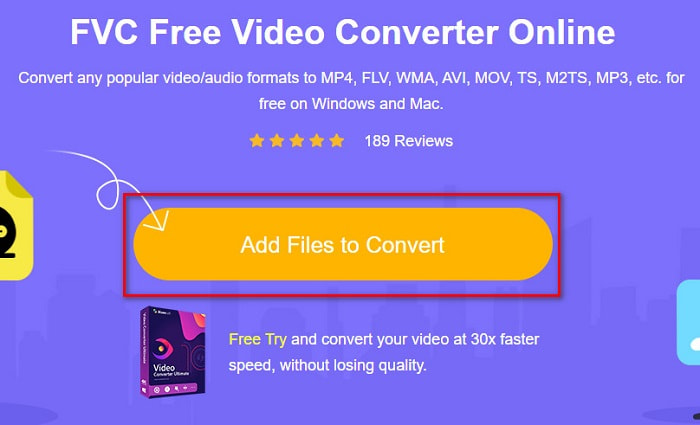
Langkah 2. Langkah seterusnya ialah klik butang Tambah Fail untuk Ditukar untuk memuat turun pelancar. Selepas pelancar dimuat turun, fail komputer anda akan dipaparkan, kemudian pilih fail MTS anda untuk dimuat naik.
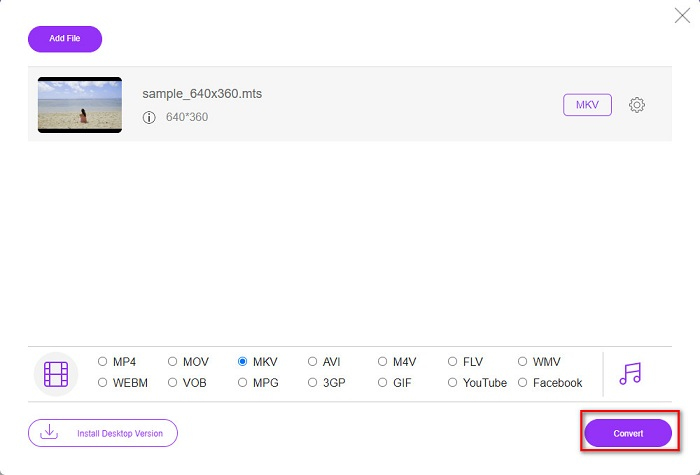
Langkah 3. Selepas memilih fail MTS anda, klik fail MKV di bahagian bawah antara muka perisian.
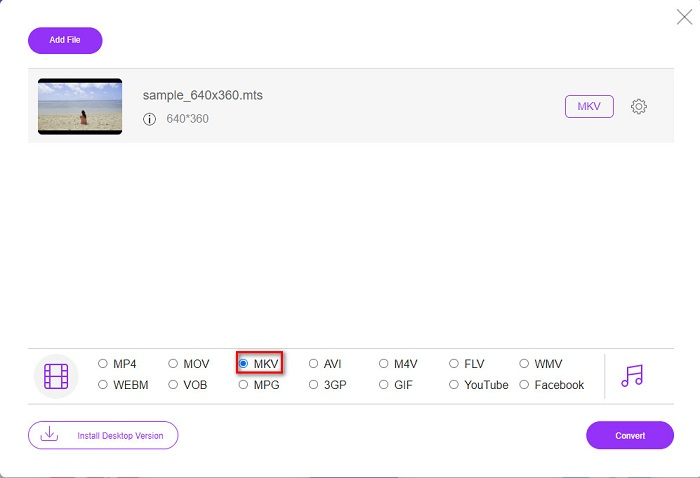
Langkah 4. Akhir sekali, klik butang Tukar untuk menukar fail MTS anda kepada fail MKV. Kemudian tunggu sehingga fail anda siap ditukar.
Dengan mengikuti langkah mudah ini, anda boleh menukar MTS ke MKV secara percuma dan dalam talian.
AnyConv
Satu lagi penukar dalam talian yang boleh anda gunakan untuk menukar fail tanpa kehilangan kualiti ialah dengan menggunakan Penukar Fail AnyConv. Penukar ini juga menukar banyak format fail, termasuk MTS kepada MKV, AVI, MP4, MOV, MPEG, dan sebagainya. Namun, ia hanya mempunyai fungsi terhad. Anda tidak boleh menyunting atau menukar resolusi fail anda. Ia juga berasaskan web; oleh itu, anda mungkin mengalami proses penukaran yang perlahan. Walau bagaimanapun, ia digunakan oleh ramai orang kerana kemudahannya.
Langkah tentang cara menggunakan AnyConv File Converter:
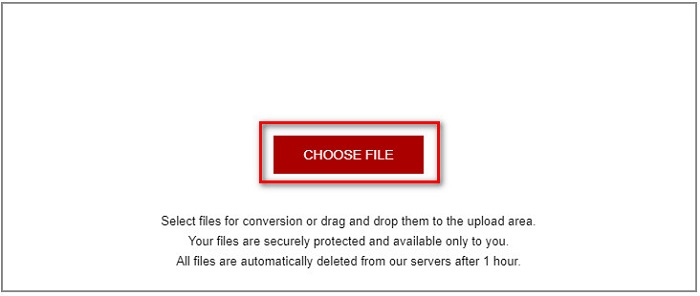
Langkah 1. Cari AnyConv File Converter pada pelayar anda. Selepas masuk ke laman web mereka, klik butang Pilih Fail untuk memilih fail MTS anda dalam fail komputer anda.
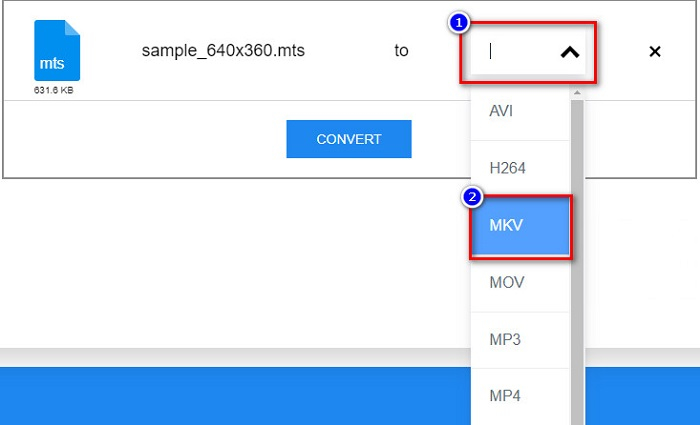
Langkah 2. Selepas memilih fail MTS anda, klik butang juntai bawah dan pilih format fail MKV.
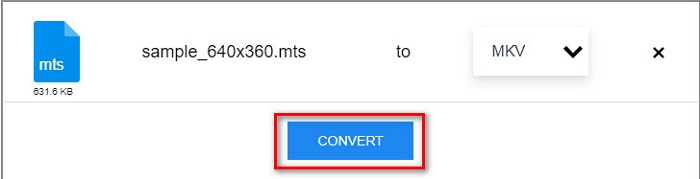
Langkah 3. Akhir sekali, klik butang Tukar untuk memulakan penukaran fail MTS kepada MKV anda.
Bahagian 2. Tukar MTS kepada MKV pada Windows 10/11 Tanpa Kehilangan
Jika anda sedang mencari penukar untuk Windows 10/11 anda, FVC Video Converter Ultimate ialah alat terbaik untuk anda. Ia menyokong pelbagai format fail dan boleh menukar MTS kepada MKV, MP4, WebM, VOB, MPG, AVI dan banyak lagi. Di samping itu, penukar ini mempunyai ciri di mana anda boleh membuat GIF, dan juga mencipta video 3D. Anda juga boleh menukar MTS kepada MKV dengan cepat dan mudah tanpa kehilangan kualiti fail anda.

FVC Video Converter Ultimate
5,689,200+ Muat Turun- Anda boleh menukar kumpulan fail anda dengan penukar ini.
- Membolehkan anda menukar pelbagai format fail seperti MTS, MKV, MP4, WMV, dll.
- Mempunyai ciri yang membolehkan anda mempunyai penukaran sangat pantas.
Muat Turun PercumaUntuk Windows 7 atau lebih baharuMuat Turun Selamat
Muat Turun PercumaUntuk MacOS 10.7 atau lebih baharuMuat Turun Selamat
Berikut ialah cara anda boleh menggunakan FVC Video Converter Ultimate dengan langkah mudah ini:
Langkah 1. Mula-mula, muat turun aplikasi dengan mengklik butang Muat Turun di bawah untuk Windows. Kemudian jalankan aplikasi perisian tersebut untuk meneruskan ke langkah seterusnya.
Muat Turun PercumaUntuk Windows 7 atau lebih baharuMuat Turun Selamat
Muat Turun PercumaUntuk MacOS 10.7 atau lebih baharuMuat Turun Selamat
Langkah 2. Selepas membuka penukar, klik butang Tambah Fail, atau anda boleh seret dan lepas fail anda ke butang tanda + untuk memuat naik fail MTS anda. Kemudian fail anda akan dimuat naik ke dalam senarai.
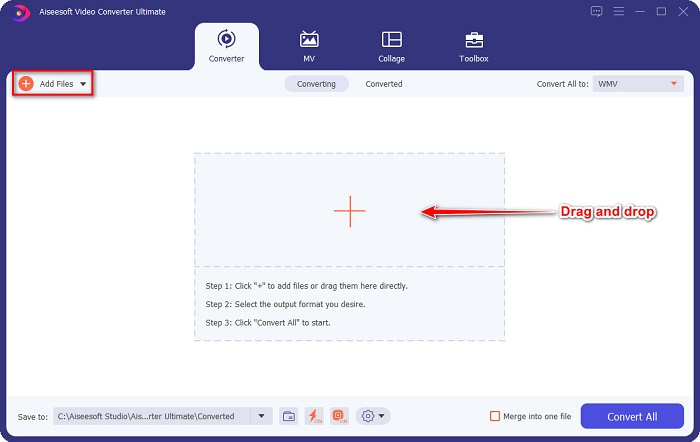
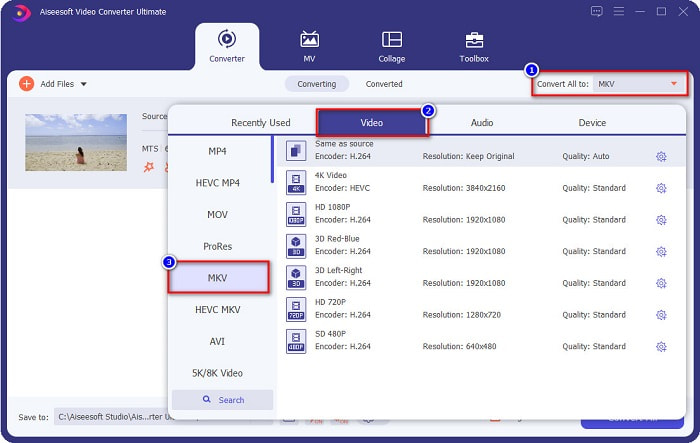
Langkah 3. Untuk memilih format fail yang anda mahu tukarkan fail MTS anda, klik butang Tukar Semua kepada dan pilih fail MKV.
Langkah 4. Untuk menghabiskan proses, klik butang Tukar Semua untuk mula menukar fail MTS anda kepada fail MKV. Dan siap! Dalam beberapa saat sahaja, fail yang telah ditukar akan sedia digunakan.
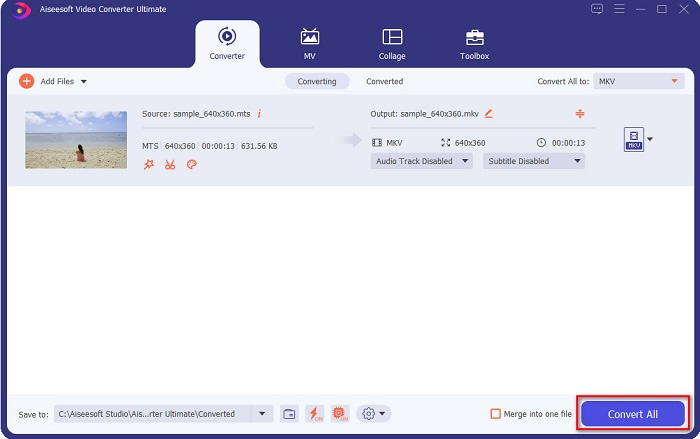
Dengan mengikuti langkah mudah tersebut, anda boleh menukar MTS kepada MKV secepat 1-2-3!
Bahagian 3. Mengapa Menukar Fail MTS kepada Format Fail MKV
Fail MTS, ringkasnya untuk Sistem Pengangkutan MPEG, ialah format fail standard yang digunakan terutamanya oleh kamkoder SONY dan Panasonic HD. Ia ialah fail yang menggunakan pemampatan video MPEG4/H.264. Selain itu, ia menyokong video 720p dan 1080i, yang tidak disokong oleh format fail lain. Memandangkan Panasonic dan Sony membangunkan fail ini, ia menggunakan Fail Pengekodan Audio Lanjutan yang berkaitan dengan format fail AVCHD. Sebaliknya, fail MKV atau Matroska ialah format fail standard yang menyokong banyak codec audio dan video. Ia biasanya digunakan untuk menyimpan klip video pendek dan filem.
Selain itu, ia juga menyokong lagu sari kata. Itulah sebabnya ramai orang yang suka menggunakan format fail ini. Jadi mengapa menukar MTS kepada MKV? Semata-mata kerana saiz fail MKV lebih kecil daripada format fail MTS yang terkandung.
Bahagian 4. Carta Perbandingan tentang Penukar Dalam Talian & Luar Talian
| CIRI-CIRI | Penukar Dalam Talian Percuma FVC | Penukar Fail AnyConv | FVC Video Converter Ultimate |
| Kelajuan Penukaran | Biasa | Biasa | Sangat laju |
| Format Fail untuk Ditukar | MKV, MP4, MTS, MPG, MOV, AVI, WMV, FLV dan format fail lain | MTS, MKV, AVI, MOV, MP4, MPEG dan format lain | Menyokong lebih 1000 format fail |
| Ciri Penyuntingan | – | – |  |
| Penukaran Kumpulan | – | – | |
| Sambungan internet | Diperlukan | Diperlukan | Tidak diperlukan |
Bahagian 5. Soalan Lazim tentang Menukar MTS kepada MKV
Bolehkah anda menurunkan saiz fail fail MTS?
Ya. Anda boleh memampatkan saiz fail MTS dengan menggunakan alat pemampat yang tersedia dalam talian dan luar talian, seperti Free Video Compressor.
Di manakah anda boleh memainkan format fail MKV?
Anda boleh memainkan fail MKV dalam Windows Media Player, VLC Media Player, DivX Player, MX Player, dan banyak lagi. Anda juga boleh menggunakan codec media untuk mengekod dan menyahkod fail media. Atau, anda boleh menukar fail MKV anda kepada format fail MP4, yang merupakan format yang digunakan secara meluas.
Bolehkah anda menukar MTS kepada MKV dalam Handbrake?
ya. Penukar ini juga membolehkan anda menukar fail MTS anda kepada format fail MKV. Walau bagaimanapun, ia tidak menyokong berbilang fail dan tidak boleh menggabungkannya menjadi satu.
Kesimpulannya
Terdapat banyak penukar dalam talian dan luar talian yang tersedia di pasaran pada masa kini. Dan penukar yang kami senaraikan di atas ialah antara penukar fail yang digunakan oleh ramai orang dan terbukti hebat untuk digunakan. Selain itu, penukar ini mempunyai ciri serta keupayaan yang berbeza dalam menukar MTS kepada MKV secara percuma dalam talian. Tetapi jika anda mencari penukar yang mudah dan cekap, kami mengesyorkan menggunakan FVC Video Converter Ultimate. Penukar berkelajuan kilat ini tidak akan mengecewakan jangkaan anda terhadapnya. Jadi, jika anda sudah bersedia untuk menukar fail, muat turunnya sekarang!
-
 [Percuma & Dalam Talian] 6 Cara Menukar MTS kepada MP4 dalam Kualiti Tinggi
 Tidak tahu bagaimana menukar fail MTS ke MP4? Dalam panduan ini, anda akan menemui 6 cara percuma dan mudah untuk menukar format MTS ke MP4 pada Windows atau Mac tanpa kehilangan kualiti.
-
 Bagaimana untuk Menukar MTS kepada WMV tanpa Kehilangan Kualiti
 Adakah anda bergelut untuk menonton rancangan kegemaran anda kerana pemain media anda tidak menyokong format video MTS? Cuba tukarkannya kepada WMV dengan penukar baharu dan terbaik ini hadir dalam artikel ini.
-
 Cara Menukar MTS ke MP3 tanpa Kehilangan Kualiti (AVCHD ke MP3)
 Adakah anda perlu mengeluarkan audio MP3 dari fail MTS tetapi tidak tahu caranya? Apakah penukar MTS ke MP3 yang terbaik? Catatan ini berkongsi 2 cara mudah untuk membantu anda menukar MTS / M2TS ke MP3 dengan kualiti audio yang tinggi.
