


 Video Converter Ultimate
 Skjermopptaker
 Videoreparasjon
Detaljer du trenger for å bli opplyst når du konverterer MPG til AVI
Generelt sett er en MPG-fil en typisk videofil som bruker et digitalt videoformat standardisert av Moving Picture Experts Group (MPEG). Den lagrer video, lyd og metadata i én enkelt, sammenflettet fil. Det er vanlig å bruke MPG-filer til å lage filmer som leveres over internett. Denne typen videoformat er ikke lett å konvertere hvis du ikke har kunnskap eller bakgrunn i en omformer som støtter eller konverterer MPG til AVI. Les videre i denne artikkelen for å få mer innsikt i detaljene og valgene du bør vurdere for å oppnå den konverteringsprosessen du ønsker.
Del 1. MPG og AVI - En oversikt
MPEG er et videofilformat utviklet av Moving Picture Experts Group, de samme som står bak formater som MP3 og MP4. Avhengig av hvordan det skal brukes, benytter MPEG enten MPEG-1- eller MPEG-2-filkomprimering.
For å komprimere råvideo på VHS-nivå og CD-musikk ned til 1,5 megabit per sekund uten å ofre for mye kvalitet, ble MPEG-1 laget. Som følge av dette har det blitt et av de mest populære og mest kompatible video-/lydformatene i verden. Videodata for MPEG-1 overføres vanligvis med 30 bilder per sekund (fps), med en oppløsning på rundt 352×240 piksler.
Windows-maskiner bruker imidlertid AVI som standard videoformat. I et multimediakontainerformat, som DivX eller XviD, kan lyd og video lagres ved hjelp av flere forskjellige kodeker. Mange alternative videoformater, som MPEG og MOV, bruker mindre komprimering og mer lagringsplass enn en AVI-fil. Det er også mulig å lage AVI-filer uten komprimering. Dette gir svært store filstørrelser – rundt 2–3 GB per minutt video – fordi filene da er tapsfrie. Uansett hvor mange ganger du åpner eller lagrer filen, beholder en tapsfri fil kvaliteten sin. Ytterligere fordeler er avspilling uten at det kreves ekstra kodeker.
Del 2. Mest effektiv programvare for å konvertere MPG til AVI
Hvis du noen gang har lurt på hvordan du kan konvertere en MPG-videofil til AVI gratis, er denne nye og beste programvaren det denne artikkelen anbefaler at du bruker. Video Converter Ultimate er et gratis nedlastbart program for Windows og Mac som kan konvertere MPG-filen din til AVI mye raskere enn nettbaserte konverteringstjenester. I tillegg til disse to videoformatene støtter denne programvaren også en rekke andre formater du kan velge mellom. Den regnes som den beste på grunn av den høye kvaliteten på resultatet du får hvis du bruker dette programmet. Nå som du har en forhåndsvisning av hva denne programvaren kan gjøre, gjør deg klar, så finner vi ut hvordan den fungerer:
Trinn 1. For å komme i gang klikker du bare på knappen Free Download nedenfor. Når nedlastingen er fullført, kan du velge å laste ned programvaren til enten Windows eller Mac. Når programvaren er installert på datamaskinens skrivebord, kan du begynne å bruke den ved å klikke på knappen Start Now.
Gratis nedlastingFor Windows 7 eller nyereSikker nedlasting
Gratis nedlastingFor MacOS 10.7 eller nyereSikker nedlasting
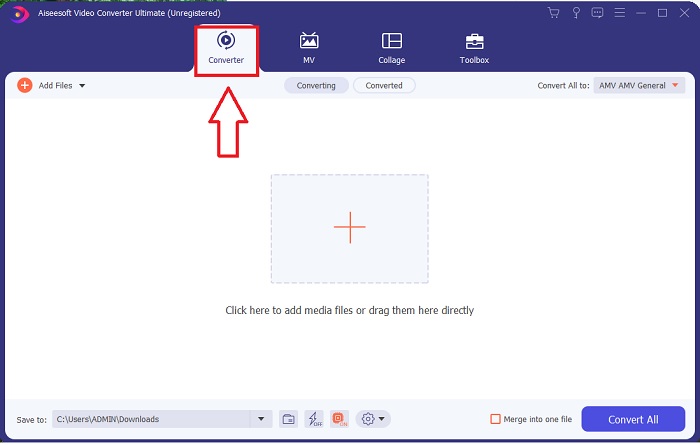
Trinn 2. Åpne programvaren du nettopp har lastet ned. Når du åpner programmet første gang, vil du se et vindu med Converter-grensesnittet. Det er her du starter prosessen med å transkode videoen din.
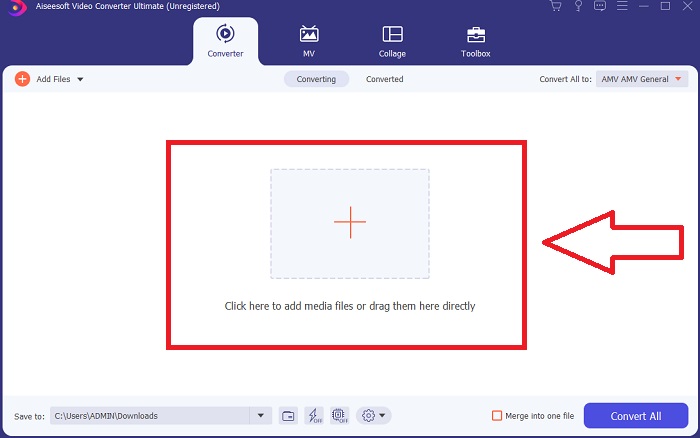
Trinn 3. Du kan starte konverteringsprosessen ved å importere filene dine til programmet. Å konvertere en video er like enkelt som å dra den over på Plus-symbolet.
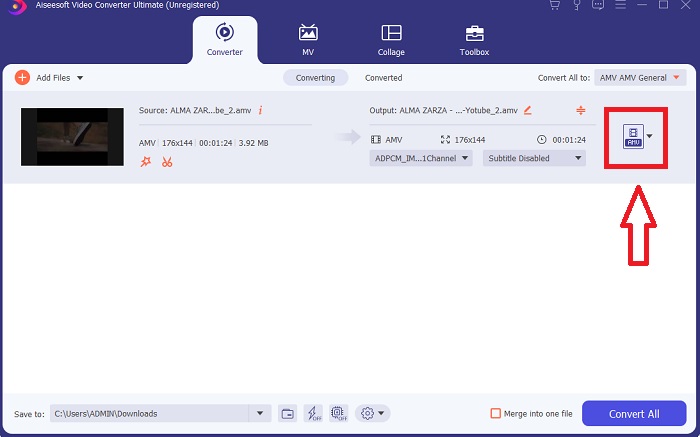
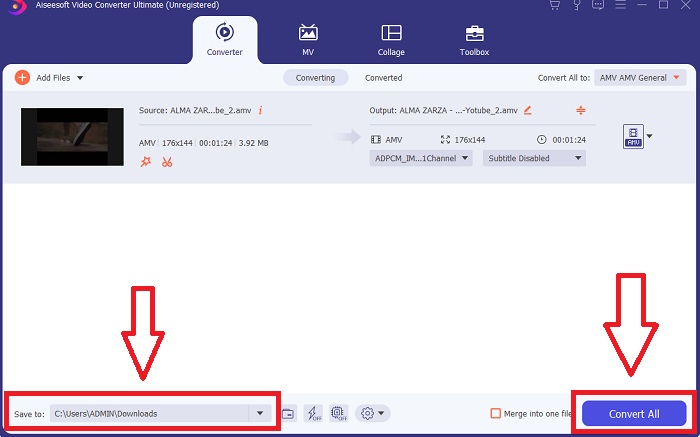
Trinn 4. Høyreklikk på et videoformat og velg Save to eller Save to external storage. Søk etter og velg deretter en AVI-filtype fra rullegardinmenyen. Innstillingene for videokvalitet er mange når du først har valgt en AVI-filtype. Du kan endre kvalitetsinnstillingene hvis ønsket videoresultat ikke er oppført. Gir-ikonet lar deg endre skjermens oppløsning, bildefrekvens og lydkvalitet. For å lagre endringene dine klikker du på knappen Create New.
Trinn 5. Klikk på Convert All når du har redigert videoen du har valgt, og den er klar til å overføres til datamaskinen din.
Del 3. Raske tips: Andre effektive verktøy du bør vurdere
Metode 1. Bruk CloudConvert
CloudConvert er en online videokonverterer. Denne online-konverteren støtter også MP4, WEBM og AVI, blant andre formater. Du kan velge kvalitet, oppløsning og filstørrelse på videoen. Hvis du tenker på hvordan du konverterer MPG til AVI i dette nettbaserte verktøyet, her er prosedyren for hvordan du bruker det:
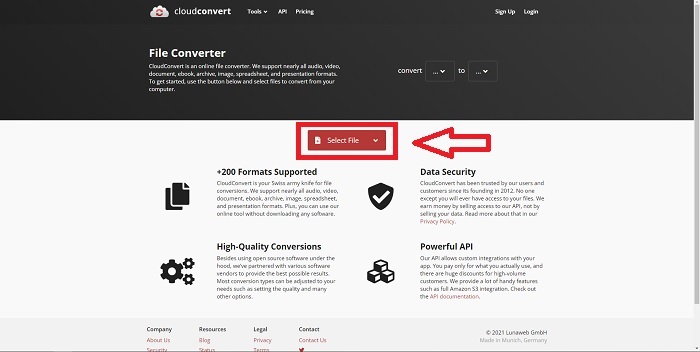
Trinn 1. Last opp en fil fra datamaskinen ved å klikke på Select the File.
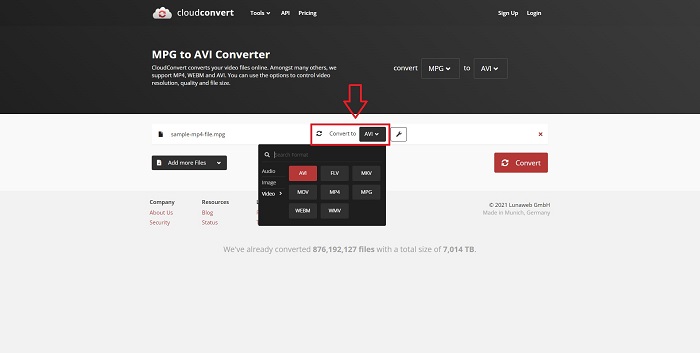
Trinn 2. Gå deretter videre med å velge hvilket format filen din skal konverteres til ved å klikke på formatseksjonen ved siden av skiftenøkkelikonet. Du har også muligheten til å legge til flere filer som skal konverteres.
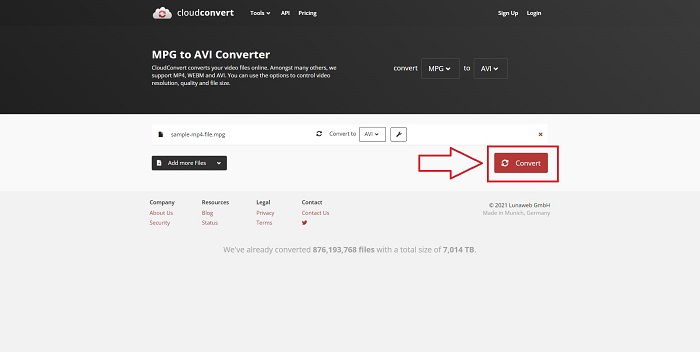
Trinn 3. Klikk på Convert for å konvertere alle filene du har lastet opp.
Metode 2. Bruk Zamzar
Zamzar er et nettbasert verktøy for konvertering av filer. Konverteringer kan utføres i en rekke formater uten å måtte laste ned programvare. Zamzar kan konvertere en fil fra ett format til et annet, for eksempel en Adobe PDF til et Microsoft Word-dokument, ved å skrive inn en URL eller laste opp en eller flere filer (så lenge de alle er i samme format). For å få kunnskap om dette nettbaserte verktøyet, her er fremgangsmåten for deg:
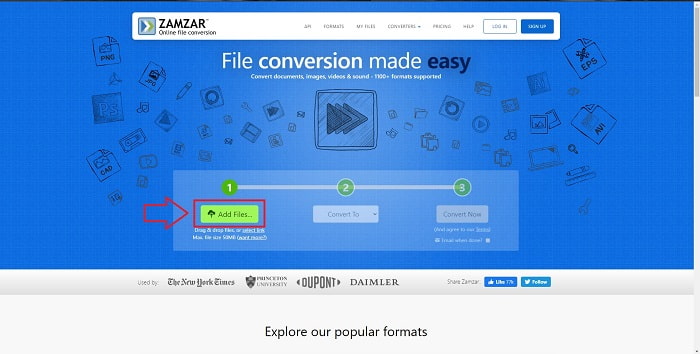
Trinn 1. Søk etter Zamzar i en hvilken som helst søkemotor. Når du har klikket deg inn på nettstedet, kan du laste opp en fil i grensesnittet ved å klikke på Add Files.
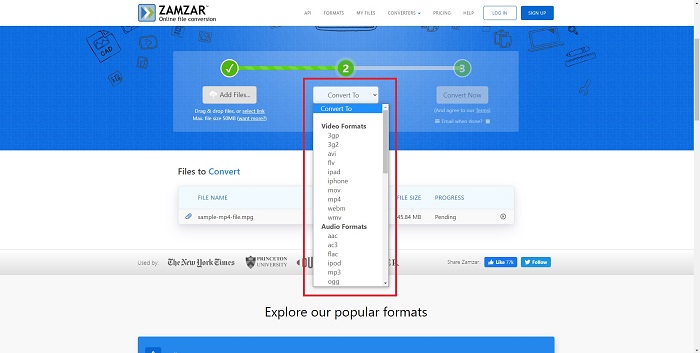
Trinn 2. Deretter kan du konvertere filen ved å velge filen du ønsker. Klikk på Convert To for å se alle formatene dette nettbaserte verktøyet støtter.
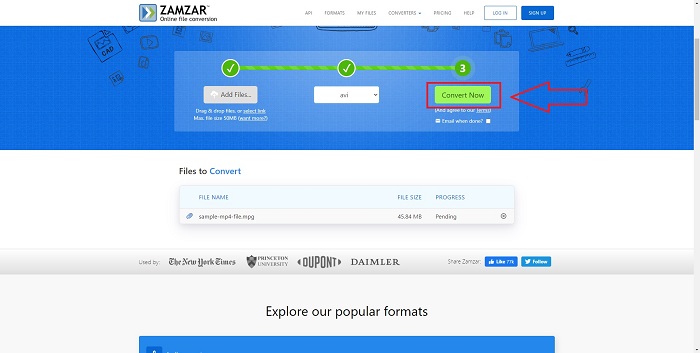
Trinn 3. For å konvertere filen klikker du på Convert Now.
Del 4. Vanlige spørsmål om MPG og AVI
Er AVI eller MPG bedre?
Lagring er mulig med AVI-filer, mens videoopptak gjøres med MPEG-filer. AVI er litt bedre enn MPEG; Hvis MPEG er formatet du skal bruke, vil du imidlertid brenne DVD-videoer. Microsoft Windows utviklet AVI-filformatet som svar på Apples MOV-filformat, mens Moving Picture Group utviklet MPG-formatet.
Hva er fordelene og ulempene med AVI?
Sammenlignet med de andre filformatene kan AVI-filer være ekstremt store hvis de ikke komprimeres. Du må være villig til å gi fra deg litt diskplass i bytte for fordelene med AVI-filen, siden du ikke vil kunne lagre så mange filer som du ellers ville gjort. Hvis du komprimerer en AVI-fil online utover et visst punkt, vil videokvaliteten reduseres som et resultat.
Hva er mindre størrelse AVI eller MPG?
Når det gjelder internett, tar større filer lengre tid å laste ned. Det er derfor fornuftig å kode filmer i mindre filstørrelser, selv om det gir et lite kvalitetstap. Når det gjelder avspilling, foretrekkes AVI fortsatt fremfor MPG fordi flere set-top-bokser kan spille av AVI-filer enn MPG-filer. Vil du spille av MPG-filene dine på datamaskinen, klikker du her for å lære mer.
Konklusjon
For å oppsummere alt vi har diskutert, er Video Converter Ultimate den beste omformeren du bør vurdere å bruke fremfor alle nettbaserte MPG-til-AVI-omformere som er nevnt ovenfor. Denne programvaren er gratis, og den har en raskere konverteringsprosess enn det nettbaserte verktøyet. Den støtter også mange formater og gir deg høy videokvalitet. Utover dette finnes det ingen grunn til at du ikke skulle bruke denne programvaren.
-
 Hvordan konvertere MPEG til MP4-filer gratis på Windows, Mac, Online
 Les og få 3 gratis måter å konvertere MPEG til MP4-filer på datamaskinen din. Du kan bruke online og stasjonære videokonverterere til å slå MPEG til MP4-format uten problemer.
-
 [2025] Beste verktøy og enkle måter å konvertere MPEG til MP3
 Denne artikkelen snakker hovedsakelig om hvordan du kan konvertere MPEG-videoene dine til MP3 ved å bruke de mest pålitelige verktøyene på listen.
-
 4 effektive måter å konvertere MOV til AVI på PC og Mac [2025]
 Vil du vite hva som er den beste MOV til AVI-konverteren på nettet? Og hvorfor FVC Ultimate Video Converter kan være noe for deg.
