


 Video Converter Ultimate
 Skjermopptaker
 Videoreparasjon
Hvordan øke hastigheten på TikTok-videoer på Tiktok eller bruke den andre alternative programvaren
En av de raskest voksende video-underholdningsappene du kan bruke på mobilen, er TikTok. Selv om TikTok ble lansert i 2016, ble den umiddelbart svært populær i løpet av få måneder etter lanseringsdatoen. En populær redigeringseffekt her er å gjøre videoer raskere for å skape en visuell effekt. Så hvis du er en av dem som vil vite hvordan du gjør dette, er du på rett sted. Her går vi gjennom ulike verktøy som vil hjelpe deg å lære hvordan du kan øke hastigheten på video på TikTok.

Del 1. Hvordan øke hastigheten på en video på TikTok
Som nevnt tidligere har TikTok blitt en av de mest kjente plattformene for korte videoklipp, så det er enkelt å redigere en video her. Legg merke til at du kan gjøre videoen raskere mens du filmer, og ikke først etter at videoen er ferdig. Hvis du prøver å øke hastigheten på en video på TikTok, må du dessuten anslå total hastighet uten å vite om det faktisk er den hastigheten du ønsker. Men hvis du ikke vil laste ned et tredjepartsverktøy for å øke hastigheten på en video, vil TikTok gjøre jobben. Følg derfor trinnene nedenfor for å øke hastigheten på en video på TikTok.
Fremgangsmåte for hvordan du filmer en speed‑up‑video på TikTok:
Trinn 1. Last først ned TikTok på mobilen din og åpne appen når nedlastingen er fullført.
Trinn 2. Trykk på +-tegnet for å begynne å filme. Trykk deretter på «legg til lyd» for å sette inn bakgrunnsmusikk og eventuelt filter. For å gjøre videoen raskere trykker du på Speed og velger et av alternativene under. Trykk på den runde knappen for å starte opptaket, og trykk på den igjen hvis du vil stoppe.
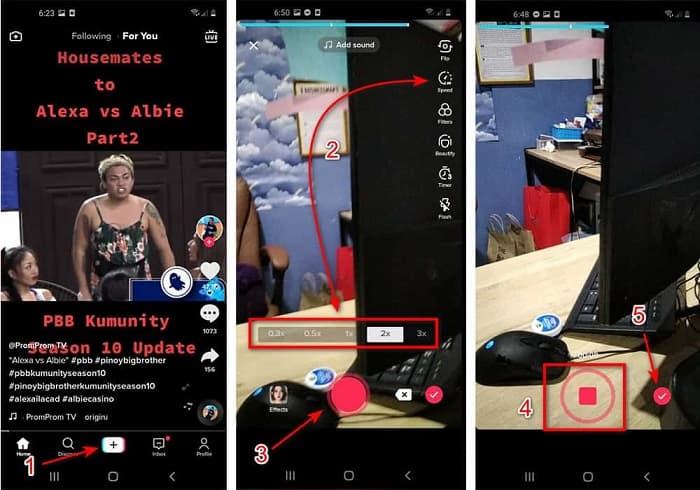
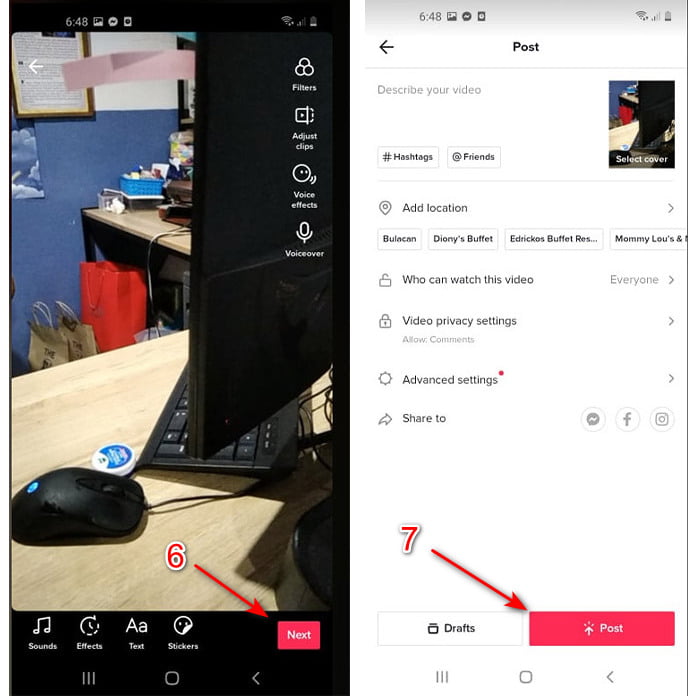
Trinn 3. For å sjekke videoen trykker du på check-knappen og deretter på Next. Trykk så på Post for å laste den opp til TikTok.
Del 2. Hvordan få fart på alle TikTok-videoer på Video Converter Ultimate
I motsetning til den innebygde redigeringsfunksjonen TikTok gir deg, lar Video Converter Ultimate deg øke hastigheten manuelt, men på en enklere måte. Dessuten får du en forhåndsvisning mens du gjør videoen raskere, slik at du ser om hastigheten passer din smak. Denne fenomenale programvaren lar dessuten brukerne oppleve avanserte, profesjonelle redigeringsfunksjoner, men gjennom forenklede trinn. På grunn av de avanserte funksjonene dette verktøyet tilbyr, må du betale noen få dollar. Men du trenger ikke å bekymre deg – det vil verken koste tusenvis eller engang hundrevis. Hvis du vil vite hvilke fordeler eller nøkkelfunksjoner du får med dette verktøyet, ta en titt på listen.
Beste nøkkelfunksjoner du finner i Video Converter Ultimate:
◆ Dette er en plattformuavhengig programvare som betyr at du kan laste den ned på din PC, Mac eller Linux.
◆ All avansert redigering, konvertering, GIF-maker og mer er tilgjengelig i dette verktøyet.
◆ Brukervennligheten av verktøyet er veldig nyttig for alle, selv for profesjonelle eller nybegynnere innen redigering.
◆ Det lar brukerne uttrykke sin kreative side gjennom ulike redigeringsfunksjoner som er tilgjengelige her.
◆ Selv om verktøyet fortsatt betales, er det rimeligere og svært rimelig for alle som vil prøve det.
Så nå, hvis du vil vite hvordan du kan gjøre TikTok‑videoer raskere med denne fenomenale alternative redigereren, kan du lese og følge instruksjonene nedenfor for å oppnå full suksess.
Fremgangsmåte for hvordan du øker hastigheten på TikTok‑videoer med Video Converter Ultimate:
Trinn 1. For å bruke programvaren må du først laste den ned på PC eller Mac. Installer den, gjør det enkle manuelle oppsettet og klikk «Finish» for å fortsette.
Gratis nedlastingFor Windows 7 eller nyereSikker nedlasting
Gratis nedlastingFor MacOS 10.7 eller nyereSikker nedlasting
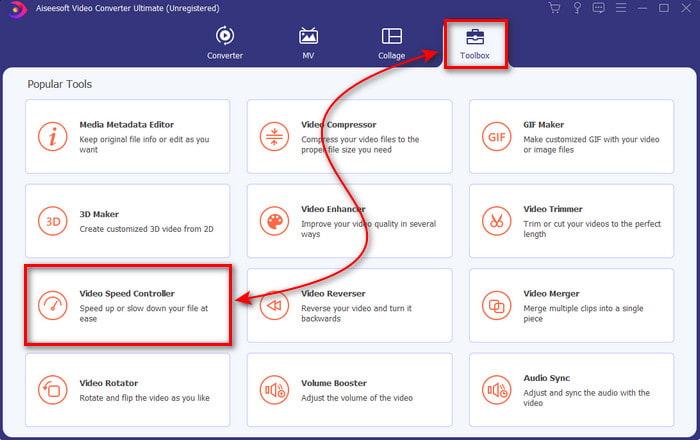
Trinn 2. Trykk på Toolbox og velg Video Speed Controller under.
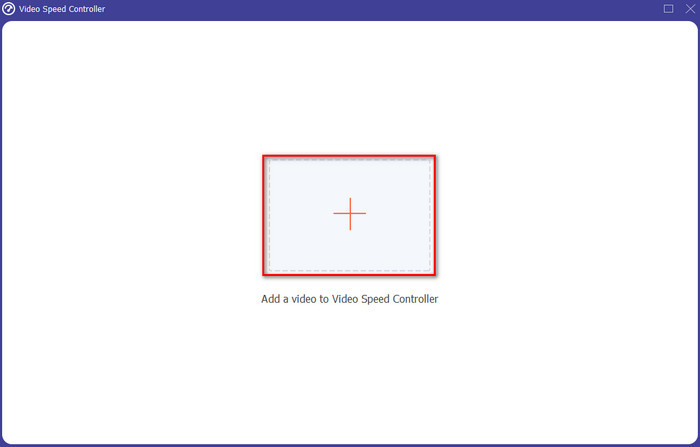
Trinn 3. For å legge til filen du vil gjøre raskere, klikker du på +-knappen. Velg deretter filen i mappen som dukker opp, og klikk Open for å fortsette.
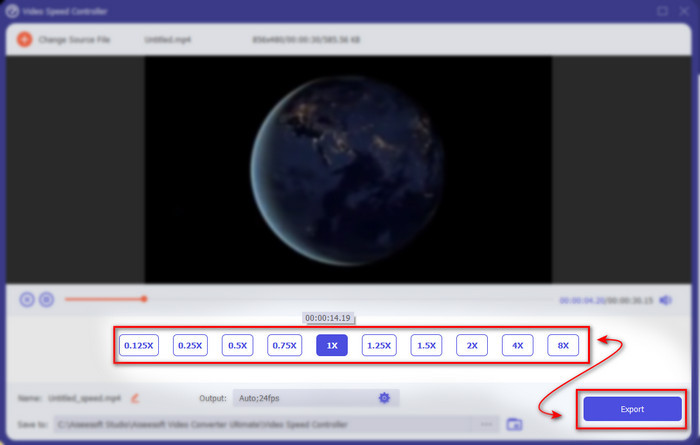
Trinn 4. For å justere hastigheten på videoen velger du et speed-alternativ nedenfor. For å laste ned filen klikker du på Export for å starte eksportprosessen.
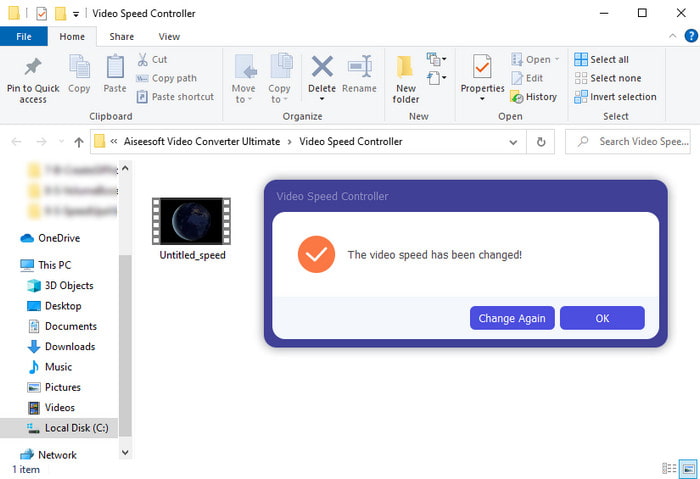
Trinn 5. Du trenger ikke å vente i et minutt, for filen vil være klar etter noen få sekunder. Hvis det dukker opp en mappe på skjermen, betyr det at filen allerede er eksportert. Klikk på filen for å se videoen du har gjort raskere.
Relatert:
Hvordan øke hastigheten på MP4
Hvordan senke hastigheten på MP4
Del 3. Vanlige spørsmål om å øke hastigheten på en video på Tiktok
Hvordan øke hastigheten på en TikTok-video som ikke er din?
Hvis du vil øke hastigheten på en video som ikke er din, må du først laste ned TikTok‑videoene. Trykk på +-knappen og Upload, og velg deretter videoen i galleriet. Velg hastighetsalternativet og klikk Next for å laste den opp. Eller bruk Video Converter Ultimate for å gjøre den raskere ved å følge trinnene ovenfor.
Kan jeg ta opp en 3-minutters video på Tiktok?
Absolutt Ja, det kan du hvis de er tatt opp separat, men du kan ikke ta opp en video på 3 minutter. Fordi lengden på opptak med denne appstøtten er 15 til 60 hele sekunder. Så hvis videolengden du vil ta opp er mer enn et minutt, er det bedre å ta den opp separat. Men hvis du er en av brukerne som har blitt valgt ut av Tiktok til å prøve 3-minutters opptaket, så er du heldig fordi dette bare ble testet for en liten gruppe mennesker.
Kan jeg legge til MP3 til videoene mine på Tiktok?
Da TikTok først ble utgitt, fikk brukere legge til musikk i videoen deres, men nå har de fjernet denne funksjonen. På grunn av opphavsrettsproblemet som er arkivert til TikTok. Så for å unngå problemet fjerner de det og legger til en prøvemusikk tilgjengelig, eller du kan bruke en annen app til å gjøre det for deg.
Har Tiktok en aldersbegrensning?
I henhold til vilkårene og betingelsene til TikTok, må 13 år eller eldre være alderen til brukeren som skal bruke denne appen. Tiktok har heller ikke aldersbekreftelse når du registrerer deg, så forvent at 16+ innhold dukker opp på feeden din.
Konklusjon
Nå som du vet hvordan du kan øke hastigheten på en video på TikTok, er det på tide å ha det gøy. Velg dessuten den løsningen du mener passer deg best. Hvis du synes de innebygde funksjonene for å øke hastigheten i TikTok er tilstrekkelige, kan du bruke dem. Men hvis du vil oppleve en enda bedre hastighetsendring med forhåndsvisning, kan du bruke Video Converter Ultimate. Uansett hvilket alternativ du velger, kan du forvente et flott resultat på grunn av funksjonene og den generelle ytelsen.
-
 7 enkle trinn for hvordan du fikser problemer med OBS-lydforsinkelser [løst]
 Sliter du med å se videoklippet ditt etter opptak på grunn av lydforsinkelsen når du bruker OBS Studio? Les artikkelen nedenfor for å lære hvordan du fikser usynkronisert lyd effektivt.
-
 Utmerkede måter mulige | Slik fikser du VLC-lydforsinkelse [2021]
 Har du vanskelig for å se favorittfilmen din på VLC-mediespilleren din på grunn av lydusikkerheten? Fortsett å lese denne artikkelen for å vite alle mulige måter å fikse VLC-lydforsinkelse på.
-
 Beste måter å øke MP4-volumet online og offline
 Sliter du med å høre lyden av videoklippet ditt? Les artikkelen nedenfor for å vite hvordan du kan øke mp4-volumet på forskjellige måter.
