


 Video Converter Ultimate
 Skjermopptaker
 Videoreparasjon
Offline og online konverteringsprosess: Den beste måten å konvertere OGV til FLV
When using OGV videos, this lossy file compression video format may irritate you since they blur after the adjustments. However, things will improve if you convert OGV to FLV format first before sharing online; the only challenge will be finding an easy-to-use yet powerful video converter program. Fortunately, we have the best one for offline and online usage to easily convert OGV to FLV file format. Just follow the steps provided in this article for your convenience.

Del 1. Hvordan konvertere OGV til FLV enkelt [frakoblet]
To be honest, there are a lot of video converters available online, but only a handful of them can support an OGV conversion. Since the said format is not common to most video consumers, converters do not mind including them in their file format support. For this reason, is where Video Converter Ultimate comes in handy. It completely supports OGV input and enables you to convert OGV video files to FLV formats quickly. It's also worth noting that it can transform your OGV videos and edit them with practical tools. Everything you need is in Video Converter Ultimate. Hence, we provide you the most straightforward steps for you to follow:
Step 1: Before you can use the software, you must install it first on your desktop. You can do this by clicking one of the Free Download buttons below, depending on the OS that you use. Wait for the .exe or .dmg file to finish downloading, and once done, open it to start the installation process. Finally, you can launch the software right after finishing by clicking Start Now.
Gratis nedlastingFor Windows 7 eller nyereSikker nedlasting
Gratis nedlastingFor MacOS 10.7 eller nyereSikker nedlasting
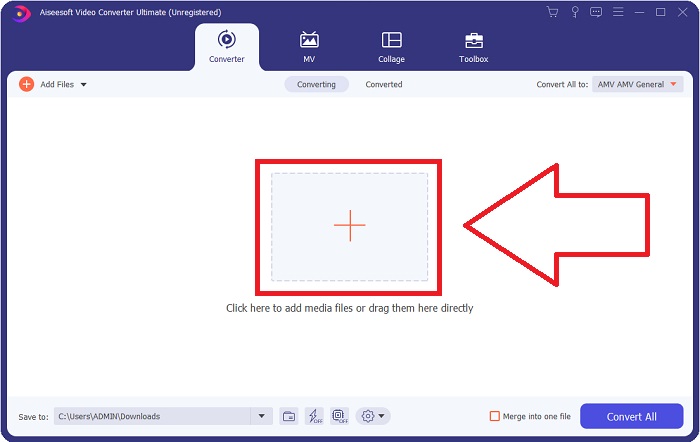
Step 2: Once the window has a pop-up, you will find yourself in an interface with a + button in the middle. To import the video file you wish to convert, click on it or drag and drop the file itself to the program.
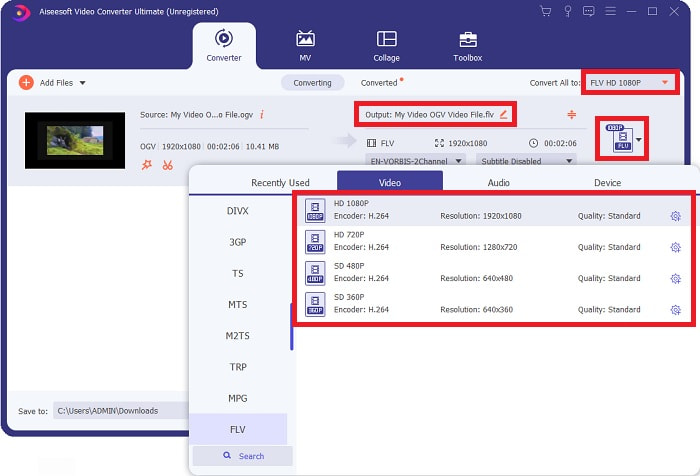
Step 3: On the right, it shows you the current file format of your video is. Click on it, and it will show you all the formats you can choose. In this case, scroll down and select FLV, or you can just search it in the search bar below. Now on the right side of the tab, you can also choose which video quality you want for your converted file.
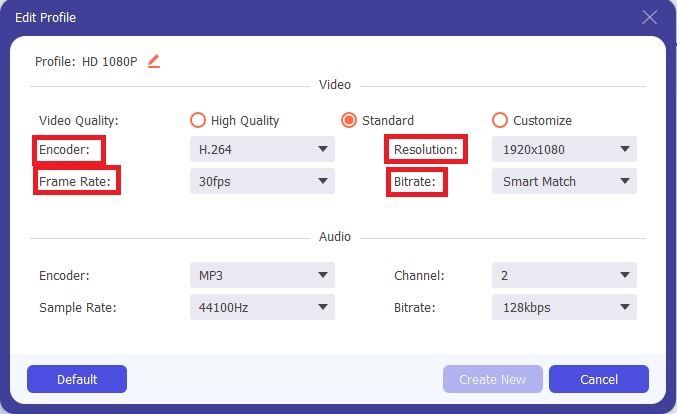
Step 4: If you are looking for more options, you can find those by clicking the gear icon beside your selected video quality. With this, you can further edit the video resolution and other options like frame rate, sample rate, bitrate, and encoder. Once satisfied, just click the Create New button on the bottom right corner to save the changes.
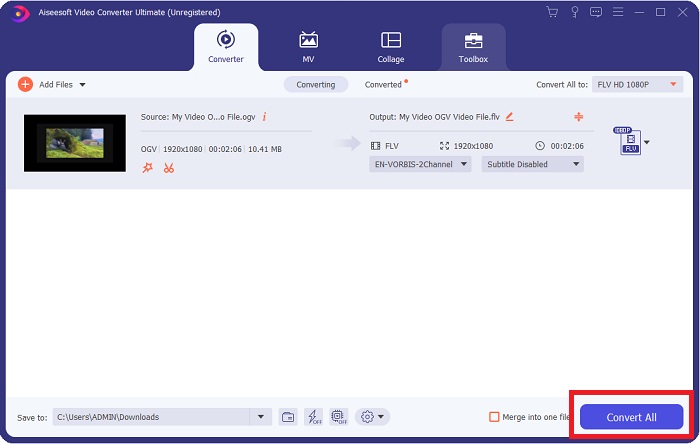
Step 5: When you finish with all the adjustments, you can start the conversion properly by clicking the Convert All button on the lower right corner, waiting for it to finish.
Del 2. En annen metode tilgjengelig for å konvertere OGV til FLV [Online]
If time does not permit and you need to convert your OGV file to FLV as quickly as possible, you need not worry because we still got you covered. You can use the online counterpart of the said software while still providing you utmost convenience following a smooth process of conversion. FVC Free Video Converter Online is a web tool that can easily turn OGV files into FLV and still offer the exact resolution and audio quality options. To use it, here are the steps you need to follow:
Step 1: Click this link, and it will redirect you to the online converter itself. In the middle of the page, there is a button saying Add Files to Convert. You have to click it to download the launcher; you need to import the video file you wish to convert.
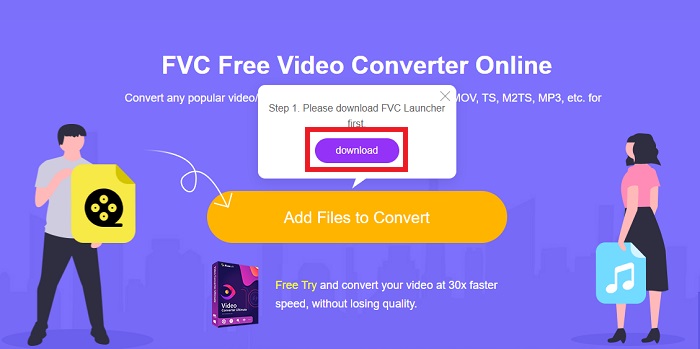
Step 2: Once you have finished, you can now upload your file by clicking once again the said button. An interface will appear if the upload is successful. From there, you can now select FLV among the other formats offered at the bottom of the window.
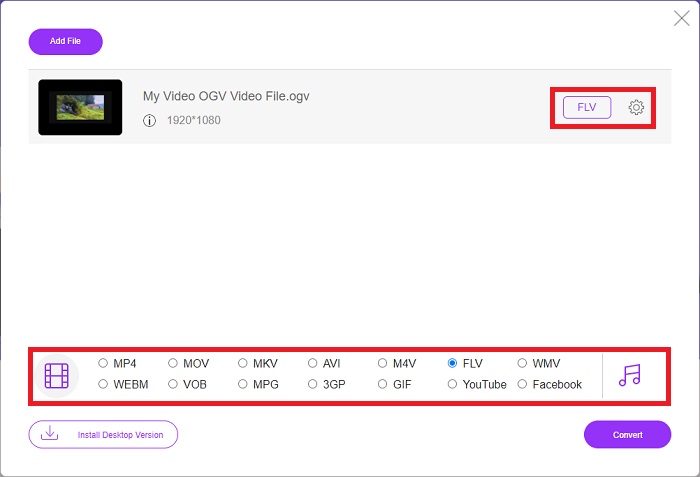
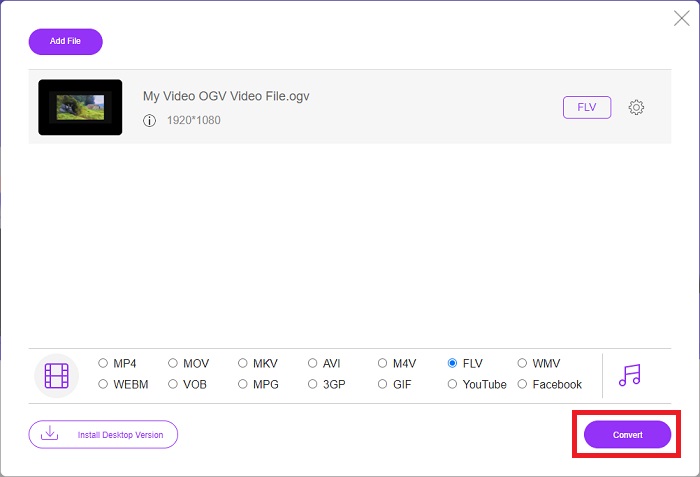
Step 3: Similarly, you can also find a gear icon on the far right in which you can further edit your video. By clicking it, you can find the video and audio settings for you to edit the encoders, resolution, frame rate, and more. Click OK and click the Convert button on the bottom right corner to start the conversion process.
Del 3. Utvidet kunnskap om OGV og FLV
Hvis du vil vite mer om de to filene som sammenlignes, gir vi deg her all nødvendig informasjon du kanskje vil lese:
Ogg Vorbis-videokodingsmetoden kan vanligvis kobles til filer som har filtypen .ogv. Ogg Vorbis er et åpen kildekode, ikke-patentert lydkomprimeringsformat. Beholderformatet for lyd-, video- og informasjonsfiler er kjent som Ogg, mens lydkomprimeringsteknologien Vorbis er oppkalt etter. OGV-filformatet er en beholder for videofiler. Videostrømmer koblet med en eller flere videokodeker, som Theora og DivX, kan finnes i OGV-filer. Brukere kan spille av det innspilte materialet inne i innholdsfilen på flere medieenheter ved å bruke disse filene.
På den annen side er en videofil som er lagret i Adobe Flash Video (FLV)-beholderformatet en FLV-fil. Adobe Flash Player bruker den hovedsakelig til å tilby online videoinnhold som filmer og TV-episoder. Det er også viktig å merke seg at det er et åpent format som støttes av en rekke ikke-Adobe/Macromedia-apper. For en mer spesifikk sammenligning av de to har vi laget en tabell for deg.
| Ogg Vorbis (OGV) | Adobe Flash Video (FLV) | |
| Filutvidelse | .ogv | .flv |
| Utvikler | Xiph.Org Foundation | Adobe Systems Incorporated |
| Støtteprogrammer | MPlayer Classic, VLC Media Player, Jriver Media Center, MPUI | RealPlayer, Apple QuickTime Player, Mplayer, VLC Media Player |
| Fordeler | OGG har fordelen av å være patentfri, generelt anerkjent og naturlig støttet av de fleste nettlesere. Som et resultat, hvis du vil laste opp en film til nettstedet ditt, er dette formatet et godt alternativ. | Det fine med Flash er at det kan hjelpe nettsteder som ønsker å inkludere bevegelse og interaktivt innhold. Prosedyren er enkel og kan til slutt ha en betydelig innvirkning. Alle brukte også Flash for rudimentære spill i sin beste alder. |
| Ulemper | Til tross for den utbredte bruken, har OGG-videoformatet noen få ulemper. Safari og Internet Explorer, for eksempel, støtter det bare delvis; dermed kan det hende at brukere ikke ser videoen din riktig i disse nettleserne. | Ulempen er selvfølgelig at FLV-formatet har blitt mer upopulært de siste årene. Oppretting av FLV-innhold kan ta lang tid og være dyrt. En annen ulempe er at Flash-materiale ikke kan spilles av på iOS-enheter, noe som begrenser muligheten til å tiltrekke seg nye følgere sterkt. |
Del 4. Vanlige spørsmål om OGV- og FLV-konvertering
Er OGG og OGV det samme?
Det er et passende undersett av Ogg-videomedietypen video/Ogg med filtypen. ogv. Andre Ogg-apper bruker filtypen. ogv med medietypen applikasjon/ogg siden. ogx er et supersett av video/ogg.
Er FLVs kvalitet bedre enn MP4?
MP4 is said to contain high-quality video and audio digital coding. The public's opinion on FLV is less clear, although the benefits and drawbacks of FLV can seldom focus on the file format's quality. With higher degrees of compression, MP4 has less loss of quality. Here you can check the ways to convert FLV files to MP4.
Er FLV tapsfri eller tapsløs som OGV?
FLV-filformatet for Flash Video støtter to versjoner av skjermdelingskodeken (Skjermvideo), som er en screencast-kodingsmetode. Disse formatene er basert på bitmap-fliser og har tap når fargedybder reduseres og komprimeres med Zlib.
Konklusjon
Uansett hvor mye tid du har på å konvertere videofilene dine, vil både programvaren og dens motstykke på nettverktøyet gi deg det mest praktiske. Så kort fortalt er Video Convert Ultimate og Free Video Converter de som må være det første du tenker på når det kommer til videokonvertering for at du skal spare tid på å surfe på internett og finne den beste. Her gir vi deg det beste.
-
 Beste måter å konvertere VOB til FLV [Gratis og online inkludert]
 Vil du konvertere en VOB-fil til en FLV-fil? Du kan enkelt fullføre oppgaven med enten stasjonære eller online-omformere. Les denne guiden og lær hvordan du transformerer VOB til FLV enkelt og raskt.
-
 Topp 4 gratis RMVB til FLV Converter-apper på skrivebordet eller online
 Denne artikkelen vil fortelle deg den beste RMVB til FLV-omformerprogramvaren og webappene som kan konvertere RMVB (RealMedia Variable Bitrate) -filer til FLV-video.
-
 Hvordan komprimere en OGV-fil uten å miste kvalitet
 Kan ikke sende store OGV-filer til andre? Vel, denne artikkelen vil introdusere deg 2 enkle måter å hjelpe deg med å komprimere OGV-filer enkelt.
