


 Video Converter Ultimate
 Skjermopptaker
 Videoreparasjon
Slik fjerner du vannmerke fra videoer raskt
Need to remove a watermark from a video in an easy way? Well, you need to use the perfect tool. For instance, users want to remove this watermark text or logo to watch a video in a complete experience. However, this task is complicated for some editors because not all provide an effective watermark remover on their toolset. Ideally, you'll need to purchase an expensive editor for this task, and somehow, not all perform well. But today, we will present the best solution to your problem, whether you are using a computer or an iOS device. Additionally, all the software we offer you has sifted out carefully. So without further ado, let's dive into this article to know how to remove the watermark on any video.

Del 1. Ultimate løsning for å fjerne vannmerke fra alle videoer på Windows og Mac
Learning how to remove a watermark from a video is a simple task for the best video editor Video Converter Ultimate. For you, there is no need to have vast experience in editing because this tool provides an interactive interface and easy-to-understand. Moreover, it also offers numerous advanced features you can use like merging, cutting, color correction, reverser, enhancer, and more.
Når det gjelder i dag, har mange brukere allerede lastet ned dette verktøyet, og alle er fornøyde fordi de gjorde det. Imponerende ikke sant? Vil du prøve å bruke dette verktøyet? I så fall, la oss sjekke trinnene nedenfor og se om dette verktøyet er den beste løsningen på problemet vårt på vannmerket.

FVC Video Converter Ultimate
5 689 200+ nedlastinger- Det er det beste valget for alle som ønsker å fjerne vannmerket på alle videoer.
- Dette ultimate verktøyet er det eneste som fungerer som omformer, cropper, fusjon, kutter.
- Tilgjengelig på alle skrivebordsplattformer for nedlastinger, som Windows og Mac.
- Den er enkel å bruke, men den er den mest utvalgte angående problemet på videoen deres.
Gratis nedlastingFor Windows 7 eller nyereSikker nedlasting
Gratis nedlastingFor MacOS 10.7 eller nyereSikker nedlasting
Step 1. Download the ultimate tool on your computer, choose whether you are using a Windows or Mac. After the downloading process, follow the installation process and click Start Now to run the tool on your system.
Gratis nedlastingFor Windows 7 eller nyereSikker nedlasting
Gratis nedlastingFor MacOS 10.7 eller nyereSikker nedlasting
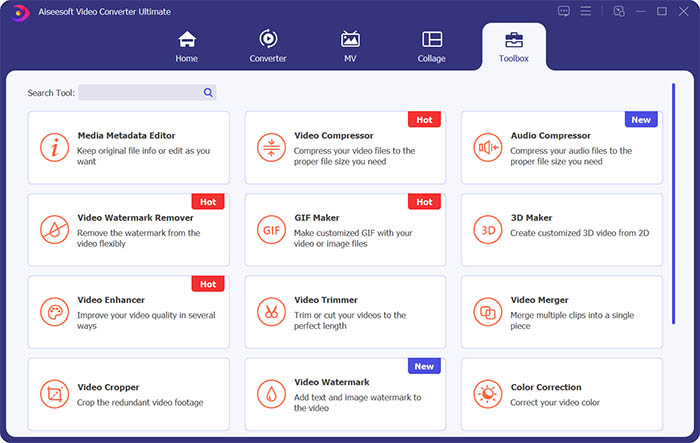
Step 2. Go to the Toolbox section and click Video Watermark Remover to erase the watermark from the video.
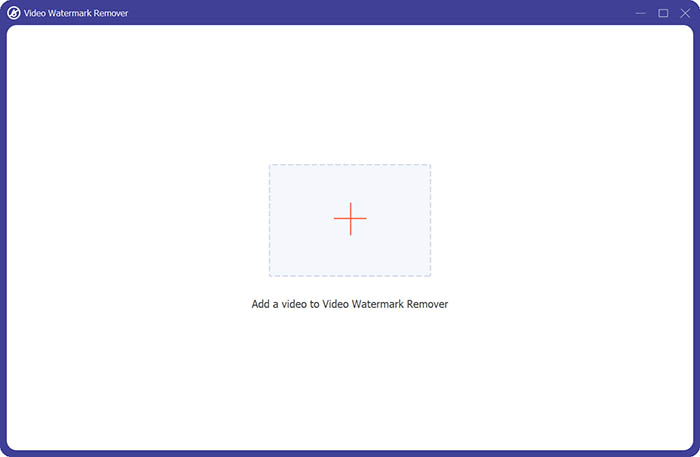
Step 3. Next, you need to click the central plus sign to import the video you want to remove the watermark.
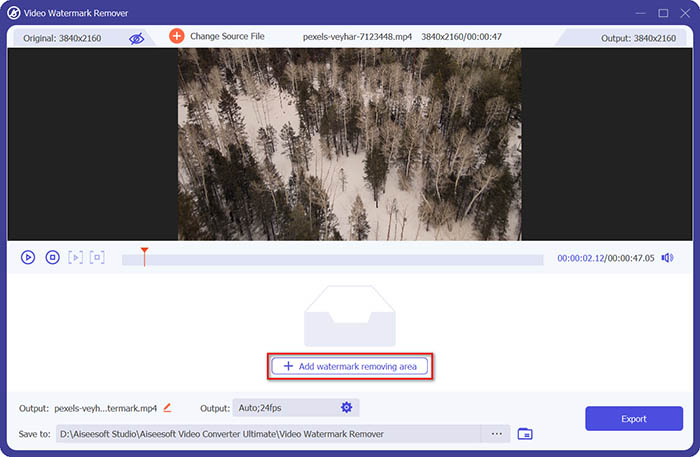
Step 4. After adding the video to the watermark remover, you should click the Add watermark removing area button to select the watermark area.
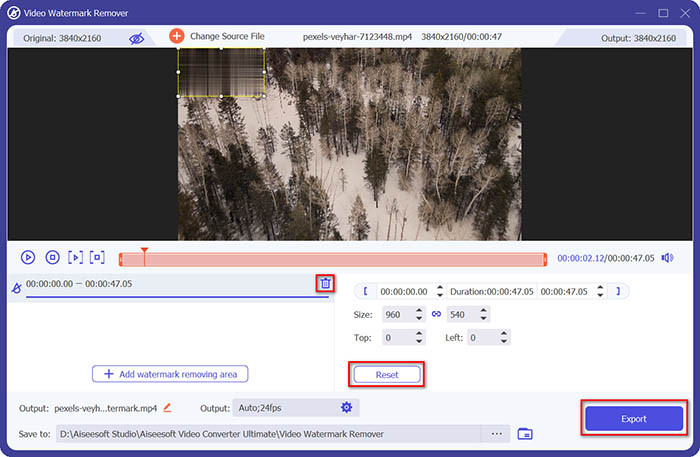
Step 5. Finally, you can click the Export button to get the video without the watermark.
Del 2. Slik fjerner du vannmerket fra en hvilken som helst video på iPhone
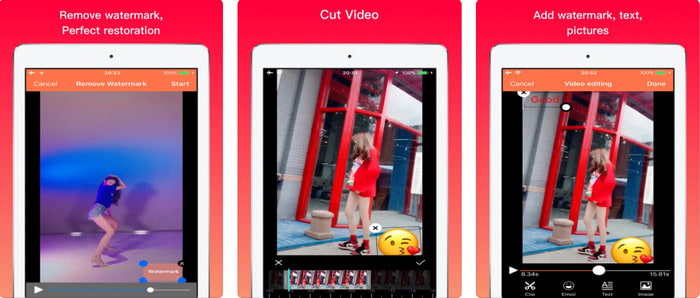
Video Eraser - Remove Logo 4+ already helps a lot of iOS users with their problems in regards to watermark. This app is free to download on every Appstore, but it also provides an app-in purchase to purchase the pro version. Although the tool offers an effective way of removing the watermark, it still encounters some problems, like the video quality won't be the same after you export it here. The watermark is blurred rather than removed. Also, uploading the file here became a problem because it takes much time even though the video is under 30 seconds. But if you want to learn how to remove watermark from video on iPhone, follow the steps below.
Step 1. Download the tool on the App Store, then open it, and press + to import the video with a watermark.
Step 2. Click the information button and click Remove Watermark, click the watermark, and press Start.
Step 3. After the process, the watermark is removed from the video.
Del 3. Hvordan bli kvitt vannmerket på videoer på nettet
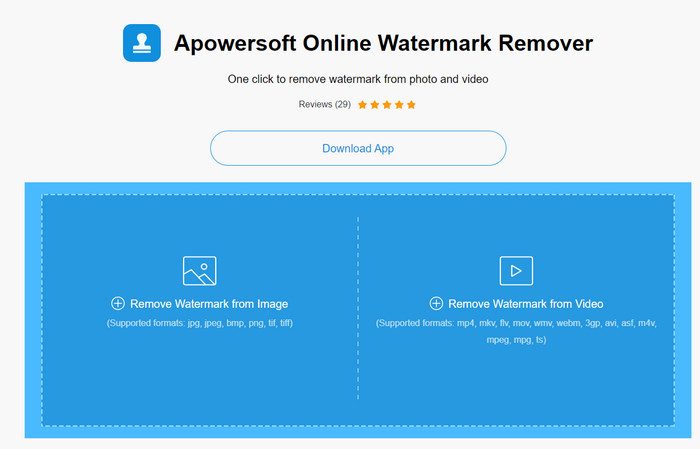
Apowersoft Online Watermark Remover is a free and accessible web tool you can use to remove watermarks. This online tool provides an effective way of removing the watermark even though you didn't download it because it is web-based. Even though it is an effective watermark remover, you will need to have a stable internet connection to finish the process, or else you'll need to repeat to one. So now, if you are on a tight budget and want to learn how to remove watermark from video online, then this is the tool for you.
Step 1. Search the Apowersoft Online Watermark Remover on your favorite web browser and open it.
Step 2. Press Remove Watermark from Video to upload the file with watermark on it. Wait for the uploading process to take place.
Step 3. On the video, hold the left click on your mouse and drag it on the watermark; once it is inside the broken line, you can now release it. Press Erase to begin the removing process, click Download to save it on your computer.
Del 4. Vanlige spørsmål om fjerning av vannmerker fra videoer
Hvorfor må jeg bli kvitt vannmerket på videoen?
Vi må fjerne det irriterende vannmerket for å nyte videoen som helhet. Det gjelder kun for personlig bruk, men det kan være en konsekvens hvis du bruker det til å dra nytte av at du legger det ut på nettet og tjener på den andres arbeid.
Hva er de andre måtene å fjerne vannmerker på?
Du kan dekke til vannmerket eller erstatte det med vannmerket ditt hvis du vil. Denne prosessen er overliggende; det fungerer bare best hvis vannmerket er lite eller på siden av videoen. Eller du kan klippe videoen med et vannmerke på den og slå den sammen med den andre videoen. Denne skjæreprosessen fungerer bare best hvis vannmerket dukker opp. Det er to forskjellige måter å fjerne vannmerker på: uskarphet og beskjæring av videoen. Disse to jobber med verktøyene vi presenterte ovenfor.
Hvordan legge til et vannmerke i Photoshop?
If you want to add a watermark on Photoshop, click this link and read it thoroughly to grasp the idea.
Konklusjon
With the tool presented in this article, you can easily remove the watermark from the video for free, or you can also use the ultimate tool and purchase it. Although the watermark remover available in this article are easy to use, we still believe that the Video Converter Ultimate presents the most straightforward interface yet most effective one. So, if you want to have the, you can click the download button above to test it out and see if it suits you well.
-
 Topp 2 måter å konvertere DivX til MKV-format [løst]
 Hvorfor trenger jeg å konvertere DivX til MKV? Hvilke omformere kan jeg bruke? Har du samme tanke? Deretter vil denne artikkelen hjelpe deg å vite mer om DivX og MKV.
-
 2 Ultimate MPG-konverterere for å konvertere MPG til WMV gratis
 Vil du konvertere MPG til WMV gratis? I så fall er du heldig fordi vi fant ut at det er to verktøy du kan bruke til å konvertere MPG-filene dine.
-
 Hvordan endre iTunes M4V til MKV på Mac og Windows [raskeste måten]
 Hvis du trenger å konvertere M4V til MKV på Mac, må du lese denne artikkelen. Som vi gir fakta om konvertererne som vil hjelpe deg med konverteringsprosessen.
