


 Video Converter Ultimate
 Skjermopptaker
 Videoreparasjon
Hva er de beste WMV-tag-editorene for å redigere WMV-metadata [Foolproof]
WMV er et eget filformat du vil støte på hvis du er Windows‑bruker. Med denne filtypen kan du lagre animasjoner, videoklipp, episoder av TV‑programmer i høy oppløsning ved å bruke én eller flere av Microsofts videokomprimeringer. Selv om formatet kan beholde alt dette, er det noen WMV‑tagger som trenger korrigering. Selv om du kan vise metadataene til WMV‑filen i Windows Media Player, kan du ikke justere dem for å rette dem opp. Hvilket verktøy bør du da bruke i Windows? I denne artikkelen gir vi en objektiv gjennomgang av fire WMV‑tagg‑redigerere du kan bruke.

Del 1. Fenomenal WMV Tag Editor for Windows og Mac [Anbefalt]
FVC Video Converter Ultimate er en pålitelig programvare som gir deg de aller beste funksjonene du trenger for enkelt å redigere WMV‑metadata. Programmet er tilgjengelig på både Windows og Mac. Når du bruker dette verktøyet, får du en ny opplevelse av å fjerne, redigere og oppdatere tagger sømløst i over 1000 formater som programmet støtter. For nybegynnere byr verktøyet på et intuitivt grensesnitt, slik at de lett kan forstå alle funksjonene. Men det er også ideelt for profesjonelle til avansert videoredigering. Er ikke det imponerende? Enten du har erfaring med å redigere tagger eller ikke, kan du stole på dette verktøyet. Vil du gjøre suveren metadataredigering med programvaren? Hvis ja, vil de neste avsnittene fokusere på hvordan du bruker denne fantastiske WMV‑tagg‑redigereren, men last den først ned på Windows eller Mac og installer den.
Fordeler med å bruke Ultimate WMV Tag Editor
- 1. Den kan raskt redigere kodene for WMV, AVI, MP4, MKV, MOV og de andre 1000+ formatene som er tilgjengelige.
- 2. Den støtter en alt-i-ett-verktøykasse der du kan trimme, klippe, slå sammen, klippe, reversere video og mer.
- 3. Det er det beste valget for nybegynnere og proffer som trenger et flerbruksverktøy.
- 4. Last ned det ultimate verktøyet på Windows og Mac mens du har de samme avanserte funksjonene.
Gratis nedlastingFor Windows 7 eller nyereSikker nedlasting
Gratis nedlastingFor MacOS 10.7 eller nyereSikker nedlasting
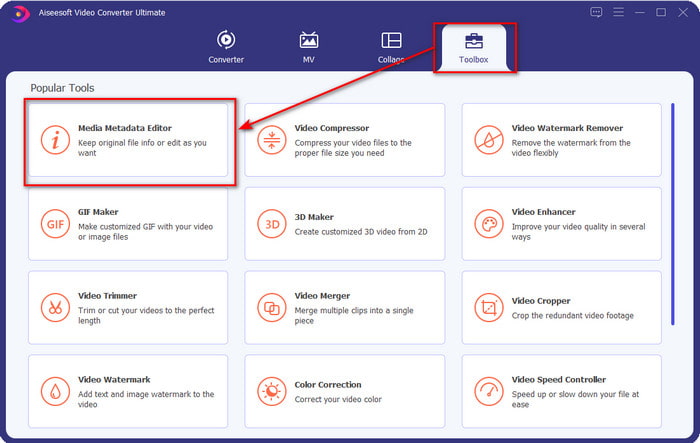
Trinn 1. Når du har installert verktøyet, starter du det med én gang. I programmets grensesnitt går du til delen Toolbox og ser etter Media Metadata Editor; klikk på den for å åpne den.
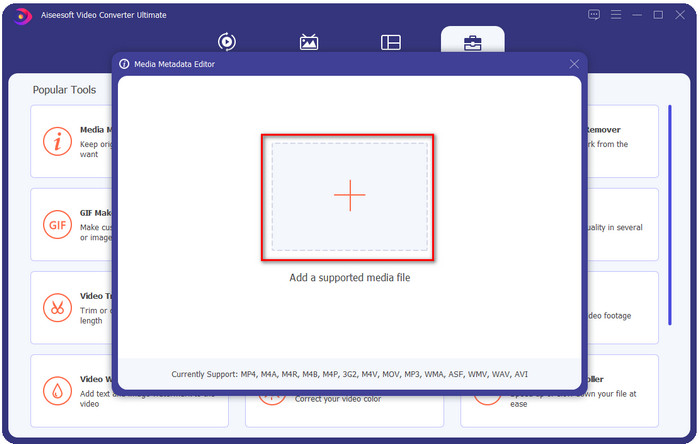
Trinn 2. Klikk på +-ikonet etter at du har åpnet redigeringsverktøyet, og velg WMV‑filen i mappen som vises på skjermen. Trykk Åpne når du har bestemt deg for filen.
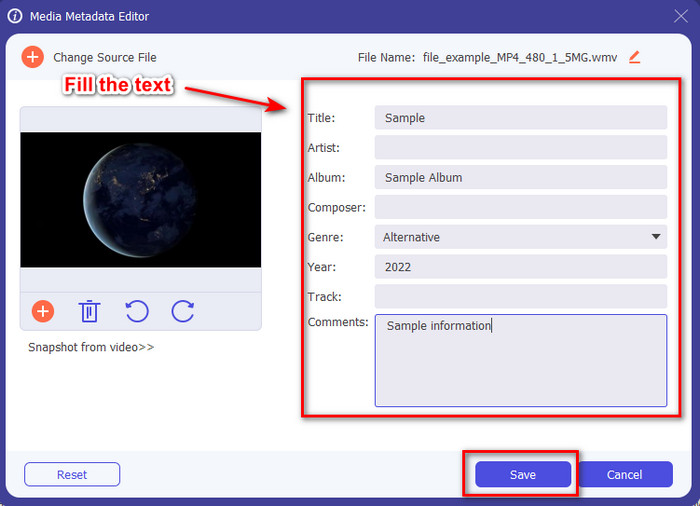
Trinn 3. Fyll ut tekstboksene etter behov, og klikk deretter Lagre for å bruke taggene du har lagt til i filen.
Relatert:
Del 2. Ytterligere 3 beste tag-redigerere på Windows
Machete Video Editor Lite
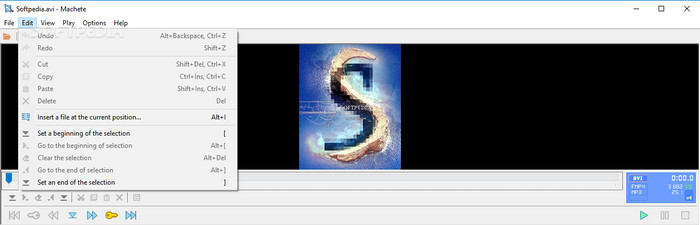
Machete Video Editor Lite er en Windows‑basert WMV‑metadata‑editor du kan laste ned på PC‑en din. Med dette verktøyet kan du bare redigere tagger for AVI og MKV; andre formater enn disse to støttes ikke. Det er en dedikert metadataredigerer for Windows, så du trenger ikke bekymre deg for å bruke dette verktøyet – det vil hjelpe deg med den aktuelle oppgaven. Til tross for at det er en god metadataredigerer, er brukergrensesnittet utdatert og trenger et mer moderne utseende for å kunne konkurrere med metadataredigerere med bedre GUI på markedet. I tillegg støtter dette verktøyet bare to formater, AVI og MKV; dette kan være den største ulempen, ettersom andre tagg‑redigerere støtter en rekke formater som gjør det enklere å laste opp filer.
TigoTago
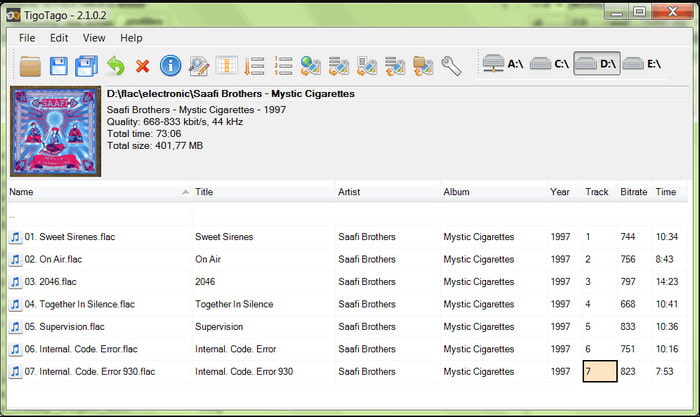
Et annet dedikert WMV‑tagg‑redigeringsverktøy som er tilgjengelig på Windows, er TigoTago. I motsetning til Machete Video Editor Lite støtter dette verktøyet tre videoformater: MP4, WMV og AVI. Hvis du vil redigere lyd‑tagger, kan du laste opp MP3, WMA, WAV og mange flere. Verktøyets brukergrensesnitt ligner veldig på et regneark, der du ser ulike kolonner for ulike tagger til filen din. Til tross for denne regneark‑stilen trenger det fortsatt en oppgradering, for det ser ut som om verktøyet ikke har fått oppdateringer på lenge. Da vi brukte verktøyet, støtte vi på noen forvirrende funksjoner som gjorde at det tok lengre tid å redigere taggene, noe som var litt upraktisk. Selv om disse problemene kan oppstå, kan du fortsatt laste det ned gratis på Windows.
Egenskaper på Windows
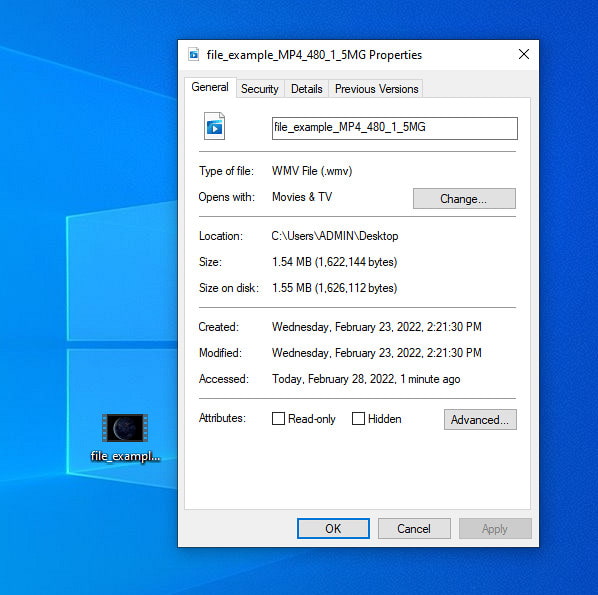
Egenskaper i Windows er en innebygd funksjon du fritt kan bruke i alle Windows‑operativsystemer. Denne funksjonen kan ikke lastes ned eller brukes på nettet, noe som er en stor fordel for oss. Med denne funksjonen kan du enkelt oppdatere taggene på alle mediefiler, for eksempel WMV, med noen få klikk. I det siste har noen brukere, også vi, opplevd at det er upraktisk å bruke denne funksjonen. Da vi prøvde å oppdatere filens metadata til den opprinnelige filen, ble ikke taggene lagret. Det er egentlig forventet, siden dette ikke er en profesjonell metadataredigerer. Men hvis du vil oppdatere WMV‑metadata, kan du fortsatt enkelt redigere dem.
Del 3. Vanlige spørsmål om WMV Tag Editor
Kan jeg redigere WMV-metadata på Mac?
Helt, ja, det kan du. Ved hjelp av det ultimate verktøyet vi presenterer ovenfor, er denne jobben enkel. Så hvis du er en Mac-bruker, last ned verktøyet på enheten din ved å klikke på nedlastingsknappen for Mac, og følg samme prosedyre. Imidlertid kan bildene være litt annerledes på funksjonen på Mac, men taggen du har lagt til lagres uten å svette.
Vil WMV-metadata vises når du ser på Windows Media Player?
Når du spiller på Windows Media Player, den opprinnelige mediespilleren på Windows, vil ikke taggene vises på skjermen. Men du kan få tilgang til dem ved å trykke høyreklikk med musen til filen, klikke Egenskaper, og et minivindu vil vise hvor du kan se taggene på WMV-filen. Husk at du kan se dem, men du kan ikke redigere dem i henhold til dine behov.
Mister overføring WMV på nettet metadataene?
Dette problemet er veldig naturlig å skje i de fleste mediefilene. Metadataene går tapt underveis fordi typen app du brukte må fjerne metadataene for å redusere filstørrelsen for en jevn seiloverføring. Så det er bedre å kopiere metadataene og sende dem separat for å unngå dette problemet.
Konklusjon
Til syvende og sist er alle verktøyene vi har valgt, de mest effektive WMV‑metadata‑editorene du kan laste ned eller bruke fritt på enhver Windows‑PC som støtter rask opplasting av WMV. Selv om verktøyene kan hjelpe deg, kan noen fortsatt skape problemer; derfor er det viktig å velge den perfekte tagg‑editoren for å unngå ytterligere problemer eller skader. Hvis du fortsatt lurer på hvilket verktøy vi mener har en ideell tagg‑editor, et multifunksjonelt Toolbox og er lett å bruke, kan vi stolt slå fast at alt dette finner du i FVC Video Converter Ultimate. I motsetning til konkurrentene på markedet er dette verktøyet dedikert til å hjelpe brukere med daglige videoproblemer, som konvertering, tagg‑redigering, videoredigering osv. Utrolig, ikke sant? Men det er nettopp det dette ultimate verktøyet kan tilby deg.
-
 Hva er metadata: Lær grunnleggende informasjon om metadata
 Hva er metadata? Er dette viktig? Hva er delene av metadata? Har du det samme spørsmålet? I denne artikkelen vil du lære grunnleggende informasjon om metadata.
-
 4 av de beste metadataviserne på nett og uten nett [Oppdatert 2025]
 Kan jeg sjekke metadataene til filen min? Ja, det kan du, ved hjelp av dette innlegget vil vi introdusere deg de forskjellige metadataviserne du kan bruke.
-
 Raske og enkle tips for å konvertere WMV til MOV [Bevist]
 Vil du vite hva som er de beste og brukervennlige omformerne som konverterer WMV til MOV? Fortsett å lese denne artikkelen da den diskuterer alle mulige valg du må vurdere å bruke.
