


 Video Converter Ultimate
 Skjermopptaker
 Videoreparasjon
4 metoder for å redigere eller fikse MP3-metadata på Windows og Mac
Alle er musikkfile, noe som betyr at vi elsker musikk fordi det hjelper oss å føle følelsene til sangerne og forfatterne selv om vi ikke ser dem visuelt. Gjennom musikk kan alle holde kontakten, og den kan hjelpe oss med å lindre stress, forbedre IQen vår og være produktive hver dag. Det meste av musikken er i formatet MP3 fordi det er standard lydbeholder for den. Selv om du kan spille av MP3-en på enheten din, vil du ikke spille riktig arrangement hvis metadataene er feil. Du kan ikke sette den riktige stemningen hvis musikkbiblioteket ditt er i et rot, hva bør du gjøre? Hvorfor prøver du ikke å fikse kodene for å ordne dem riktig? Hvis du vil vite hvordan du redigerer MP3-metadata på Windows og Mac, er dette den rette artikkelen for deg, siden vi viser frem fire forskjellige metoder du kan bruke.

Del 1. Beste metode for å fikse eller redigere MP3-metadata på Windows og macOS [Anbefalt]
FVC Video Converter Ultimate har allerede tatt et steg mot å være et av de beste programmene for å reparere MP3-tagger på Windows og Mac. Dette verktøyet støtter opplasting av MP3, WAV, WMA, AAC og mange flere lydformater for å løse det samme problemet med metadata. Det er også mulig å fjerne skjulte metadata som du ikke får tilgang til med andre tag-redigerere.
Ikke nok med det, den kan konvertere MP3-en til et annet lydformat hvis du vil, og den tilbyr også mange funksjoner og funksjoner som er inne i verktøykassen; du kan sjekke dem ut hvis du laster det ned. I løpet av få minutter kan du få dette programmet til å fikse problemet så raskt som mulig. Ikke så sikker på om det er sant? Heldigvis vil den skriftlige opplæringen nedenfor lære hvordan du redigerer MP3-metadata for å bevise at du kan gjøre det raskt, som vi sier.
Trinn 1. Klikk på nedlastingsknappen nedenfor, og velg hvilket av de to operativsystemene du bruker. Installer det raskt etter nedlasting, åpne verktøyet og gå videre til neste trinn.
Gratis nedlastingFor Windows 7 eller nyereSikker nedlasting
Gratis nedlastingFor MacOS 10.7 eller nyereSikker nedlasting
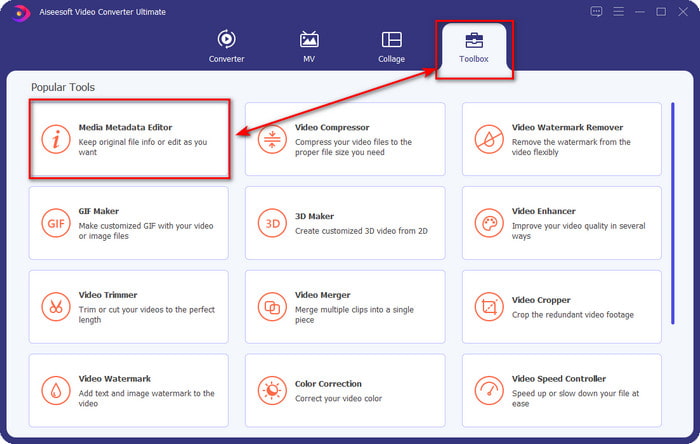
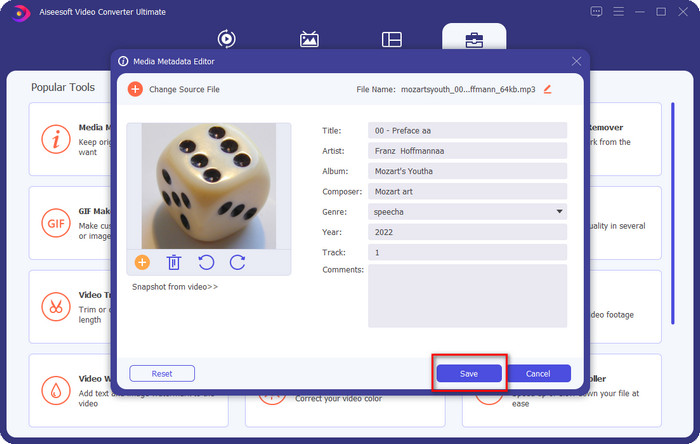
Trinn 2. Velg Verktøykasse og klikk deretter på Redigerer for mediametadata under den. Som vi nevnte i innledningen, finnes det flere funksjoner i Verktøykasse som du kan bruke, som den andre redigereren ikke tilbyr.
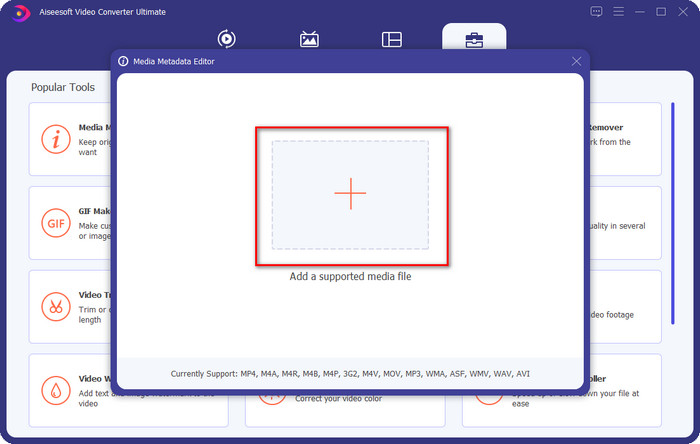
Trinn 3. Et lite vindu vil vises på skjermen; klikk på +-ikonet. Finn lyd- eller MP3-filen i mappen som vises på skjermen, klikk på filen og trykk Åpne for å laste den opp.
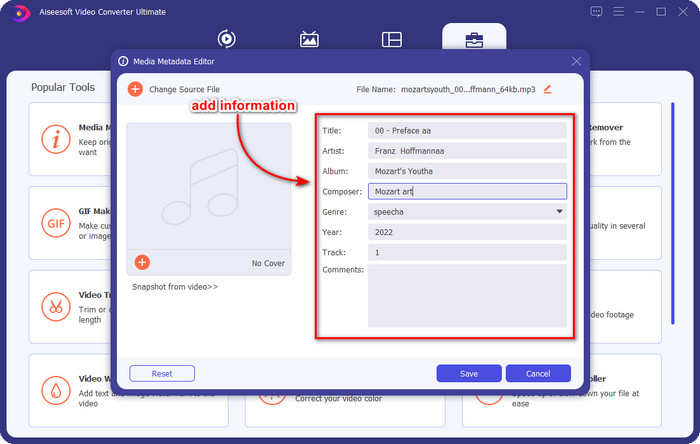
Trinn 4. Rediger og rett opp metadataene etter behov; klikk i hver tekstboks for å legge til informasjon.
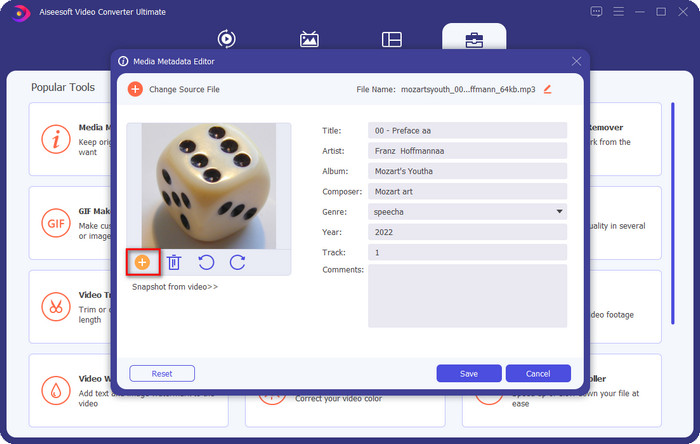
Valgfritt. Med dette verktøyet kan du også legge til eller rette opp MP3 albumgrafikk-metadata på MP3-filen ved å klikke på +-ikonet; velg bildet du vil bruke som omslag i mappen, og klikk Åpne for å fortsette.
Trinn 5. Når du er ferdig med å legge til og rette opp metadataene på MP3-filen din, klikker du på Lagre-knappen for å lagre endringene du har gjort på lydfilen. Voila – dermed har du nå fikset lydtaggene uten anstrengelse ved hjelp av dette ultimate verktøyet.
Del 2. 3 gratis metoder for å endre MP3-tagger på skrivebordet
iTunes
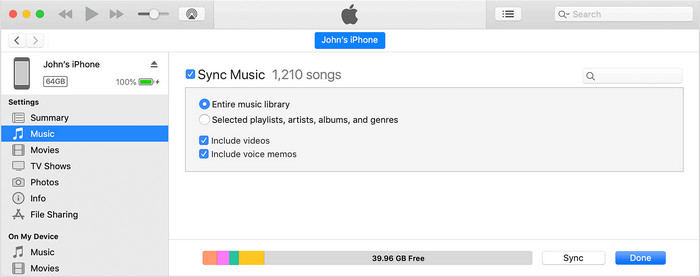
iTunes er et innebygd program som kan hjelpe deg med å redigere MP3-tagger på macOS X. Det gjør det samme som Groove Music når det gjelder å redigere metadataene til lydfilene dine. Men med dette verktøyet kan du også kjøpe musikk og spille den av her så raskt som mulig. I tillegg har musikken som kommer fra denne appen allerede tagger på seg, og hvis musikken du har lastet ned ikke har det, kan du bruke dette til å legge til tagger. Følg trinnene nedenfor for å lære hvordan du gjør det.
Trinn 1. Åpne iTunes på Mac-en din.
Trinn 2. Klikk på lydfilen og velg Hent info.
Trinn 3. Rett opp taggene og klikk OK for å lagre endringene.
MP3Tag
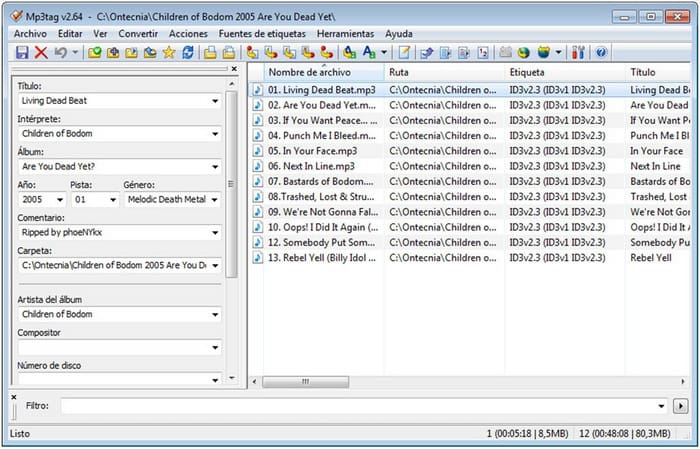
MP3 Tag er et dedikert og utmerket MP3-taggeprogram du kan laste ned til Windows. Med dette verktøyet kan du automatisk få tilgang til musikkdatabasen for å hente korrekte metadata. Selv om verktøyet ikke ligner på annen innebygd programvare, kan vi likevel se at det fortsatt er mulig å justere metadataene ved hjelp av dette verktøyet med et gjennomsnittlig formatstøtte-omfang. Hvis du vil laste ned og bruke dette verktøyet, følger du trinnene nedenfor.
Trinn 1. Last ned programvaren på datamaskinen og åpne den.
Trinn 2. Dra og slipp MP3-filen i midten, klikk på lydfilen, og på venstre side kan du redigere taggene.
Trinn 3. For å lagre redigeringen du har gjort, klikker du på Lagre-ikonet.
Groove musikk
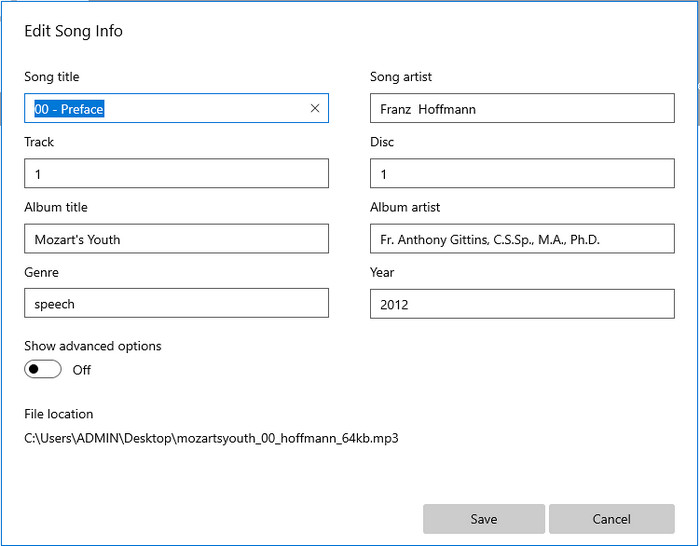
Hvis du ikke har nok plass på disken. Er det da mulig å lære hvordan man redigerer MP3-tagger på Windows 10? Da er Groove Music her for å hjelpe Windows-brukere med å endre taggene på lydfilene sine. Med dette verktøyet kan du enkelt spille av nesten alle lydfiler som er lagret på disken din. Hvis du vil vite hvordan du bruker denne innebygde appen, følger du trinnene nedenfor.
Trinn 1. Klikk på Windows-ikonet på skjermen og skriv Groove Music for å åpne det. Etter at du har klikket på det, vil verktøyet automatisk sette seg opp.
Trinn 2. Høyreklikk på lydfilen og gå til Rediger informasjon.
Trinn 3. Endre metadataene under Rediger sanginformasjon og klikk Lagre når du er ferdig.
Del 3. Vanlige spørsmål om redigering av metadata på MP3
Er det trygt å redigere metadata MP3 online?
Vel, ja, du kan redigere metadataene på MP3-en din online hvis du vil. Men husk at det finnes nettsteder med et usikret nettverk, så å logge på er en dårlig avgjørelse du tar. Så for å unngå dette må du bruke verktøyene vi presenterte ovenfor for å fikse mp3-metadataene dine trygt.
Er metadata viktig?
Ja, det er det. Metadata spiller en betydelig rolle i alle mediefiler vi har. Med dette kan du enkelt fastslå hva som er inni en fil, slik som plassering, tid, dato, informasjon og mer. Dessuten er informasjonen vi legger til her bare enkle ideer om metadata, og hvis du vil vite mer om metadata, må du klikke på denne lenken og lese hva metadata er.
Kan jeg se metadata på MP3-en min?
Ja, absolutt, det kan du, og hvis du ikke vet hvordan du viser metadata, kan du lese denne artikkelen og følge de angitte trinnene for hvordan du viser dem riktig.
Konklusjon
Alle de fire beste .mp3-taggeprogrammene er nå innen rekkevidde, noe som betyr at du nå kan velge verktøyet som passer deg best. Med den faktainformasjonen vi gir i denne artikkelen, kan vi enkelt redigere eller rette opp taggene på MP3-filene våre. Selv om metodene vi presenterer er de beste, velger vi likevel FVC Video Converter Ultimate fremfor andre innebygde programmer eller tredjepartsapper. Dette verktøyet tilbyr nemlig den mest avanserte og kraftige tag-redigeringen du trenger, uten at du må legge ned særlig mye arbeid. Så hvis du vil ha verktøyet, kan du klikke på nedlastingsknappen og følge trinnene vi har skrevet ovenfor.
-
 5 øverste MP4-metadataredigerere [Oppdatert 2022]
 Hvordan kan jeg endre MP4-metadataene mine? Den beste måten å endre metadataene til MP4-en din på er å bruke en tag-editor som støtter MP4-formatet, som eksempelet vi viser nedenfor.
-
 Topp 5 brukervalg AVI Video Tag Editors for 2022
 Hva er den beste AVI-tag-editoren jeg kan bruke? Markedet for tag-editorer for AVI-filer er for bredt. Så i dag vil vi presentere de fem mest valgte redaktørene i år 2022.
-
 4 effektive MKV-metadataredigerere for Windows og macOS
 Jeg finner ikke et MKV-metadataredigeringsprogram på markedet. Hva bør jeg bruke? Har du det samme problemet? I så fall, fortsett å lese denne bloggen for å vite verktøyene du kan bruke.
