


 Video Converter Ultimate
 Skjermopptaker
 Videoreparasjon
VLC Metadata Editor og dens beste alternativer for enkel redigering av metadata
VLC Media Player ble en av de mest kjente videospillerne du kan laste ned på alle enheter som Windows, Mac, Android og iOS. Med formatene og kodekene den støtter, går avspilling av videoer her svært raskt og smidig. I tillegg til at den kan spille av flere ulike formater, har dette verktøyet en rekke funksjoner og egenskaper du vil like å bruke. En av dem er redigering av metadata. Les videre i denne artikkelen for å lære mer om VLC metadata editor og andre konkurransedyktige alternativer.

Del 1. Gjennomgang av VLC Metadata Editor/Fordeler og ulemper/ Beste alternativer for VLC Metadata Editor
Introduksjon til metadataredigeringsfunksjonen til VLC Media Player
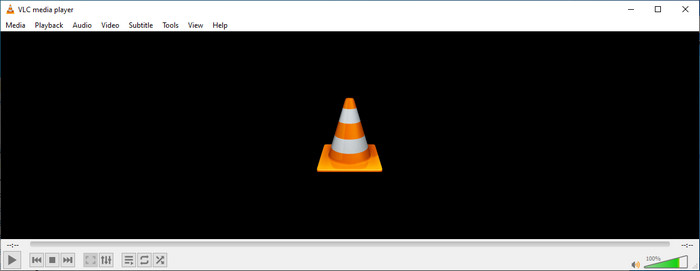
Hovedformålet med VLC-metadataeditoren er ikke som redaktør, men som spiller. Dette verktøyet spiller et bredt spekter format som vår opprinnelige mediespiller ikke støttes. I stedet for å laste ned kodeker på filen din, gjør dette verktøyet jobben problemfri ved å legge til filen og nyte å se den. Etter den første utgivelsen i 2001, forbedret utvikleren den generelle mediespillerfunksjonen og -funksjonene for å konkurrere med den andre programvaren. Selv om mange funksjoner og funksjoner er lagt til verktøyet, er det fortsatt ikke nok til å konkurrere med den andre dedikerte metadataredigereren.
Fordeler ulemper
Nå som vi har en idé om metadataredigeringsevnen til VLC, la oss se om det er en ideell tag-editor du bør bruke. Hvis du vil vite mer om VLC-metadataredigereren på Android, iOS, Windows og macOS, er det best å fortsette å lese fordeler og ulemper.
Fordeler
- Det er et gratisprogram som betyr at du ikke trenger å kjøpe verktøyet for å laste det ned.
- Den støtter et bredt spekter format for å enkelt redigere metadataene dine.
- Den kan optimere avspilling for video og lyd fra din valgte enhet.
- Kan utvides med plug-ins, hvis du kan.
Ulemper
- VLC video metadata editor er ikke den beste for å redigere filens metadata.
- Verktøyet er ikke laget for redigering, så du kan ikke spesielt vurdere det som en profesjonell videoredigerer.
- Krasj og frysing skjer ofte mens du bruker programvaren.
- Dårlig oppdatering på GUI.
Selv om det ikke er det beste valget for redigering av metadata, tror vi fortsatt at dette er den beste mediespilleren du kan laste ned gratis, som kan utkonkurrere de andre innebygde mediespillerne på enheten din. De etterfølgende detaljene vil hjelpe deg med å finne de beste alternativene for å redigere taggene enn VLC.
Del 2. 3 av Konkurransedyktige og beste alternativer for VLC Metadata Editor
Video Converter Ultimate
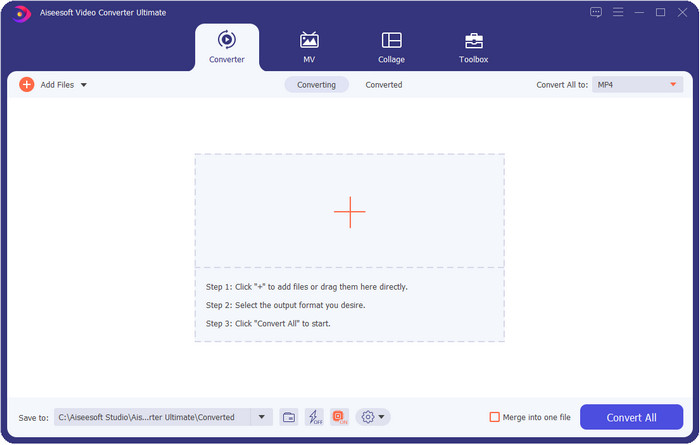
Video Converter Ultimate er det mest konkurransedyktige verktøyet for redigering av tagger; det er bedre enn det VLC metadata editor kan tilby. Med dette verktøyet kan du enkelt endre alle taggene på MP4, MOV, M4V, AVI, WMV og mer enn 1000 andre formater du måtte ha. Å legge til tagger har aldri vært enkelt for de fleste av oss, men hvis du bruker dette verktøyet, kan du legge til titler, artistnavn, album, kommentarer, annen informasjon og til og med bilder i filen som en del av metadataene. Selv om du kan gjøre grunnleggende redigering av tagger i VLC, er det ikke tilstrekkelig, og hvis du vil gjøre mer, må du velge det ultimate verktøyet. For å hjelpe deg med å legge til de nødvendige taggene som VLC eller andre metadataredigerere på markedet ikke enkelt kan gi deg. Hvis du vil vite hva du får ved å laste ned dette ultimate verktøyet, lister vi opp noen av funksjonene du får med det.

Video Converter Ultimate
5 689 200+ nedlastinger- Den kan redigere kodene til mediefilene dine som MP4, AVI, FLV, RMVB og mer.
- Den har en ultrarask konverteringsprosess og maskinvareakselerasjon.
- Ytterligere avanserte funksjoner og funksjoner er på Toolbox.
- Den støtter batchkonvertering for å fullføre oppgaven samtidig
- Tilgjengelig på både Windows og macOS for nedlasting.
Gratis nedlastingFor Windows 7 eller nyereSikker nedlasting
Gratis nedlastingFor MacOS 10.7 eller nyereSikker nedlasting
MetaZ
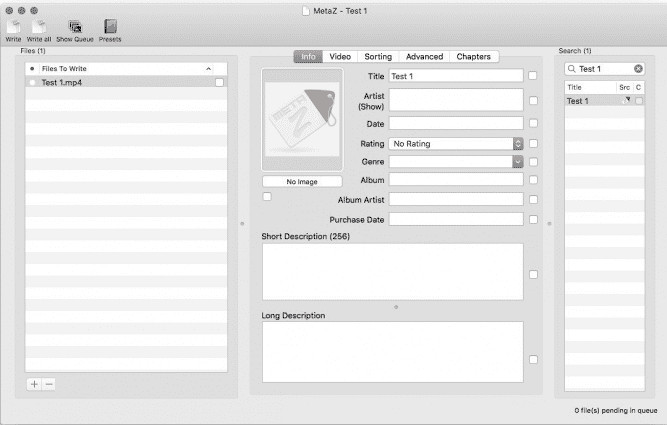
Hvis du vil ha en gratis VLC videometadata-editor på Mac, er MetaZ et verktøy du bør bruke. Dette verktøyet er en dedikert metatag-verktøy du kan laste ned på Mac, og hovedformålet er å legge til eller redigere tagger i mediefiler. Hvis du vil, kan du også automatisk søke etter tagger og legge dem til så lenge du har internettilgang. Med dette verktøyet kan du også overføre taggene ved å bruke funksjonen for arkiveksport, som du bare finner i MetaZ. Selv om verktøyet virker lovende, er kompatibilitet med andre operativsystemer, som Windows, et problem. I tillegg støtter det et begrenset antall formater, så før du bruker det, må du vite at det finnes begrensninger på hvilke filer du kan legge til her. Utover dette er det ingen andre problemer med å bruke verktøyet.
Tag-skanner
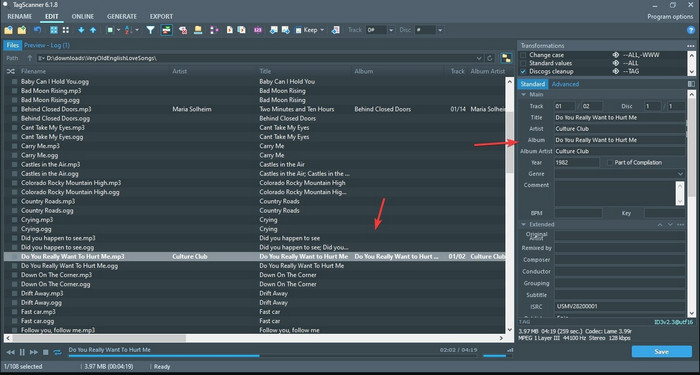
Tag Scanner er en bedre versjon av MKV metadata editor VLC. Dette verktøyet kan enkelt redigere og organisere taggene i mediefiler. Når du bruker verktøyet, vil du legge merke til at det har et mer detaljert brukergrensesnitt enn VLC når det gjelder å redigere tagger, noe som betyr at du kan legge til mer informasjon i fildataene dine. På lik linje med MetaZ kan dette verktøyet finne taggene du trenger til filen din ved å søke etter dem i ulike databaser. Med det tunge grensesnittet det har, er bruken litt annerledes enn en vanlig metadata-editor, noe som betyr at du må bruke litt tid på å bli vant til det. Likevel ser vi tydelig at dette verktøyet er langt bedre enn VLC og andre konkurrenter, men det er ikke like brukervennlig som andre løsninger på markedet.
Del 3. Vanlige spørsmål om VLC Metadata Editor
Hvor kan jeg laste ned VLC?
Du kan laste ned den offisielle VLC på videolan.org. Pass på at du laster den ned på den offisielle nettsiden for å unngå omstendigheter som virus på skrivebordet ditt.
Kan jeg redigere videoen med VLC?
Jo, ja, du kan redigere i VLC. Men det er ikke en profesjonell editor som du trenger for å gjøre avansert videoredigering. Hvis du er en kommende vlogger eller innholdsskaper og ser etter den beste videoredigereren på Windows, klikker du på denne lenken, men hvis du er Mac-bruker, klikker du på denne lenken for å bli kjent med den beste videoredigereren på Mac.
Hvordan fikser jeg lydforsinkelse på VLC?
Klikk på denne lenken for å se den beste løsningen for å fikse lydforsinkelse i VLC med detaljerte trinn.
Konklusjon
VLC er et fantastisk verktøy du kan få gratis. Med dette verktøyet kan du spille av alle typer video og lyd, og til og med redigere taggene deres. Men når det gjelder redigering av tagger i VLC, kan vi si at det ikke er like bra som andre dedikerte taggredigerere som finnes på markedet, selv om det er i stand til å gjøre jobben. Hvis oppgaven din er å redigere eller fikse taggene i mediefiler, er VLC et alternativ, men ikke det beste. Så hva bør du gjøre nå? Vi har listet opp de beste alternativene du kan bruke til å redigere tagger, som er bedre enn VLC, og ett av dem er Video Converter Ultimate. I motsetning til de andre alternativene og VLC metadata editor har dette verktøyet mange avanserte funksjoner å tilby, så last det ned nå for å få alt samlet i ett verktøy.
-
 Hvordan redigere og fikse MP4-metadata på en veldig smart måte
 Vil du vite hvordan du fikser MP4-metadata? Les i så fall hele innholdet i denne artikkelen for å vite triksene for hvordan du enkelt kan fikse MP4-taggene.
-
 4 beste metoder for å fikse og redigere MP3-metadata på Windows og Mac
 Vil du vite hemmelighetene ved å redigere MP3-metadata på en enkel måte? Denne bloggen vil lære deg forskjellige teknikker med de forskjellige verktøyene du enkelt får tilgang til.
-
 2 beste måter å redigere OGG-metadata du bør prøve gratis
 Trenger du å redigere OGG-metadata? Vel, du kan enkelt håndtere redigering av taggene ved å bruke riktig programvare. Hvis du ikke har en som leser denne artikkelen er et must.
