


 Video Converter Ultimate
 Skjermopptaker
 Videoreparasjon
 Sikker nedlasting
Retningslinje for hvordan redigere WebM-metadata for Windows og Mac
Behovet for å legge til en tagg for å tilføre mer informasjon om innholdet i WebM-filen er en av grunnene til at vi må redigere metadataene i dette formatet. Noen ganger må det korrigeres umiddelbart for å gjøre det synlig for brukere, system og program. Hensikten er blant annet å finne ut hvilket spesifikt innhold filen har. Så før du overfører dataene på nettet, er det avgjørende å vite hvordan du redigerer WebM-metadata. Få oversikt og lær hvordan du gjør det ved å lese artikkelen nedenfor.

Del 1. Raskeste måte å redigere WebM-metadata på Windows og Mac [Enkel versjon]
FVC Video Converter Ultimate tilbyr enkel redigering av metadata for en problemfri prosess for brukere og kunder som benytter det. Med denne metadataredigereren kan du raskt justere eller fjerne tagger på WebM-, MOV-, TS-, RMVB- og de over 1000 formatene dette verktøyet støtter, som en proff. Dette verktøyet lever opp til navnet sitt og brukernes forventninger, så hvis du vil ha programvare som er perfekt både for nybegynnere og viderekomne, bør du velge dette verktøyet. I motsetning til annen programvare kan du oppdatere metadataene på WebM-filen med nøyaktig informasjon ved å legge den inn manuelt.
Ønsker mer? Dette verktøyet utmerker seg i å redigere metadata og andre felt for å løse video- og lydproblemene. Som å klippe, trimme, redigere, lage GIF-er, få fart på videoer og gjøre mer med verktøyet på mindre enn ett minutt. Og for å bevise for deg at programvaren er ultimate i navn og ytelse. Den skriftlige demonstrasjonen nedenfor vil lære deg hvordan du redigerer WebM-metadata uten å anstrenge deg for mye på dette problemet.
Trinn for hvordan du redigerer WebM-tagger med FVC Video Converter Ultimate:
Trinn 1. For å få tak i den ultimate programvaren kan du klikke på nedlastingsknappen nedenfor og velge operativsystemet du bruker. Følg installasjonsprosessen etter at du har klikket på den nedlastede filen, og åpne deretter verktøyet ved å klikke Start Now.
Gratis nedlastingFor Windows 7 eller nyereSikker nedlasting
Gratis nedlastingFor MacOS 10.7 eller nyereSikker nedlasting
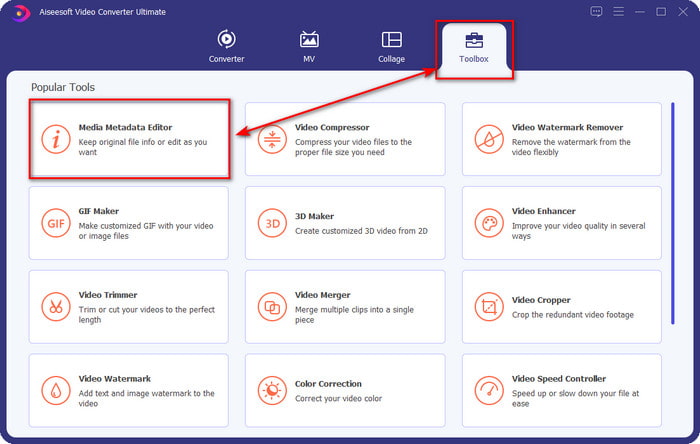
Trinn 2. Åpne delen Toolbox og finn Media Metadata Editor i listen som vises nedenfor.
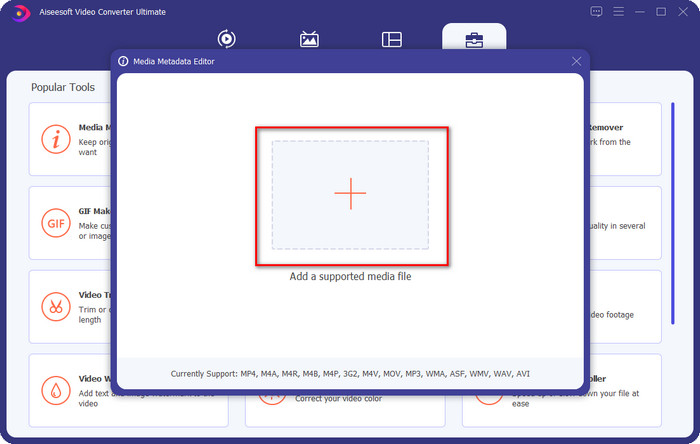
Trinn 3. Legg til WebM-filen ved å klikke på +-knappen, finn den i filutforskeren og klikk Open for å fortsette.
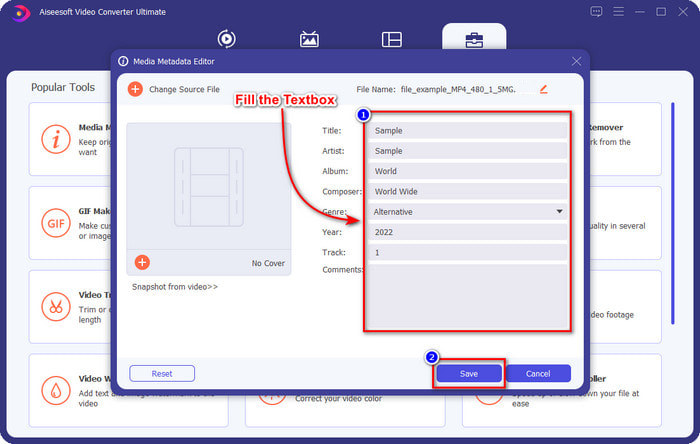
Trinn 4. Skriv inn all informasjonen du vil legge til som tagg på WebM-filen i hver textbox. Når du er ferdig med å legge til all informasjonen som tagg, klikker du Save. Enkelt, ikke sant? Slik legger du til metadata på WebM-filen din ved hjelp av den ultimate løsningen du kan ha på Windows og Mac.
Del 2. Hvordan redigere WEBM-metadata ved hjelp av kommandolinjeprogramvare på skrivebordet
FFmpeg
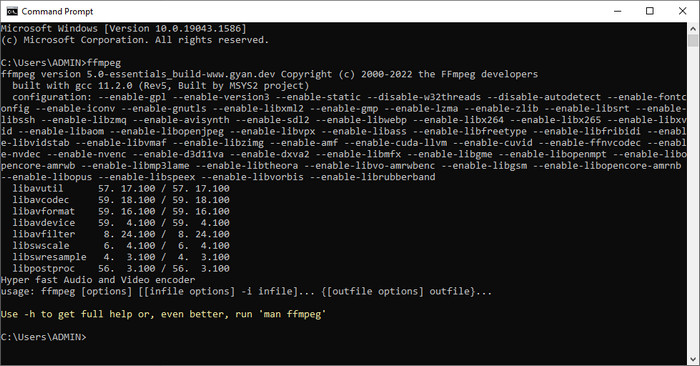
FFmpeg er en kjent løsning på medierelaterte problemer, for eksempel å rette metadata. I motsetning til det første verktøyet må du bruke en bestemt kode som kommando for å utføre en bestemt jobb, som å få det til å redigere metadataene i den aktuelle filen manuelt. Selv om denne åpne programvaren bruker tekniske løsninger som noen brukere ikke forstår, er det fortsatt imponerende hva denne redigereren kan gjøre for oss. Les videre for å lære hvordan du redigerer WebM-metadata ved hjelp av et av kommandolinjeverktøyene på listen.
Trinn for hvordan redigere WebM-tagger med Ffmpeg:
Trinn 1. Last ned og installer programvaren på datamaskinen. Finn plasseringen til WebM-filen og kopier filnavnet.
Trinn 2. Klikk på Windows, skriv command prompt i søkefeltet, og klikk på den for å åpne. Deretter kopierer du denne koden ffmpeg -i fileexample.webm -metadata title='samplemetadata' -c copy fileexample.webm og limer den inn i kommandolinjen.
Merk: Fileexample.webm er navnet på webm-filen vi bruker til denne oppgaven. Legg til filnavnet i henhold til det nøyaktige navnet på filen.
Trinn 3. Trykk Enter for å starte prosessen og la programvaren overskrive originalfilen.
EXIF-verktøy
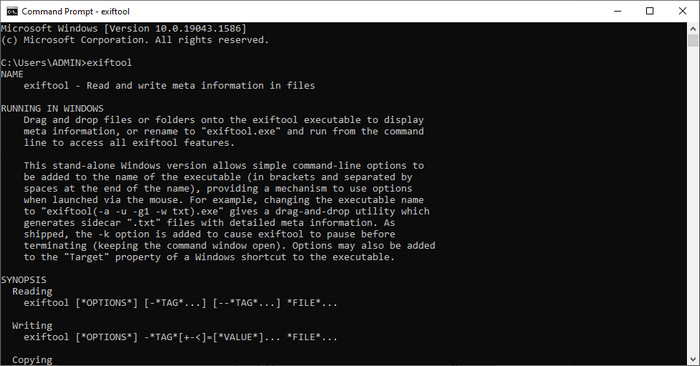
På samme måte som FFmpeg er EXIF Tool et gratis kommandolinjeprogram du kan laste ned til nesten alle stasjonære operativsystemer. Med denne programvaren kan du lese, redigere og opprette metadata på den eksisterende filen din på en måte som andre mediefiler ikke kan tilby deg fullt ut. Programmet kan redigere tagger på video-, lyd-, bilde- og PDF-filer for å gjøre dem helt korrekte. Tidligere sa vi at det er det samme som FFmpeg, og det stemmer, men kodene deres er forskjellige, så hvis du vil bruke dette verktøyet, må du lære et nytt sett med koder som ikke er knyttet til FFmpeg. Er det vanskelig? Heldigvis har vi lagt til en lettfattelig trinnvis fremgangsmåte for å redigere WebM-metadata ved hjelp av dette verktøyet.
Trinn for hvordan redigere WebM-tagger med EXIF Tool:
Trinn 1. Last ned programvaren fra den offisielle nettsiden, og installer den deretter for å gå videre til neste trinn.
Trinn 2. Åpne filutforskeren, velg filen og kopier navnet. Åpne deretter CMD, og skriv inn denne koden exiftool –common fileexample.webm for å se grunnleggende informasjon om WebM-filen din.
Merk: CMD er det samme som ledeteksten; du kan finne dem i vinduene og skrive CDM.
Trinn 3. Legg til denne koden i kommandolinjen for å endre filen exiftool -filename='metadtasample' fileexample.mkv og trykk Enter for å starte prosessen med å legge til metadata.
Del 3. Vanlige spørsmål om WebM Metadata Editor
Hvorfor er WebM-format populært for HTML 5-nettsteder?
WebM-formatet er et av de raskest voksende alternative royalty-formatene som inneholder HTML 5-video- og lydelementer. Dette formatet bruker to forskjellige kodeker, VP8 og VP9, som WebM-prosjektet har utviklet.
Kan jeg slå sammen WebM-filene?
Du kan slå sammen en sekvens av WebM-filer før du legger til metadata i dem. Hvis du vil vite hvordan du enkelt slår sammen flere WebM-filer, klikker du på denne lenken for å finne ut mer.
Som er bedre? WebM eller MP4?
Begge formatene er svært gode til å lagre videofiler på sin egen måte, men formålet deres er forskjellig. Selv om WebM er et av de beste formatene for deling på nettet, er det fortsatt bekymringer knyttet til kompatibiliteten med enkelte enheter. Hvis du har det samme problemet med WebM-filen, anbefaler vi at du konverterer formatet til MP4. For å ha verktøyet lett tilgjengelig kan du lese innholdet i denne artikkelen ved å klikke på denne lenken.
Konklusjon
Nå som vi har all informasjonen vi trenger og har lært hvordan vi redigerer WebM-metadata, er det på tide å velge egnede metoder. Hvis du vil prøve et kommandolinjeverktøy, er FFmpeg og EXIF Tool den beste løsningen for å fikse metadataene i WebM-filen din. Ved å følge veiledningen vi har gitt om dem, kan du raskt fullføre oppgaven. Men hvis du vil ha en enklere måte å redigere metadata på WebM-filen din, er FVC Video Converter Ultimate et verktøy du absolutt bør ha. Hvis du fortsatt er i tvil, anbefaler vi at du laster ned programvaren på datamaskinen din og prøver den nå!
-
 Topp 4 fildatoskiftere for Windows PC og Mac [Oppdatert 2022]
 Har du problemer med å endre klokkeslett- og datotaggene på filen din? Hvis du vil vite hvordan du gjør det, kan du fortsette å lese denne artikkelen for å vite det.
-
 Enkle tips og triks for hvordan du enkelt legger til etiketter i en fil
 Vil du enkelt legge til tagger på filer? Da gir denne artikkelen deg den beste og enkleste måten du raskt kan stole på denne oppgaven.
-
 Topp 3 FLAC-metadataredigerere på Mac og Windows [Oppdatert 2022]
 Vil du endre FLAC-metadata? I dette tilfellet må du lese denne artikkelen siden vi gir tilstrekkelig kunnskap om den nyeste FLAC-metadataredigereren du kan bruke.
