


 Video Converter Ultimate
 Skjermopptaker
 Videoreparasjon
 Sikker nedlasting
Slik fjerner du WeVideo-vannmerket på redigert video som en proff
Vil du ikke laste ned eller benytte deg av et månedlig videoredigeringsprogram på skrivebordet ditt fordi du ikke har nok budsjett til det? WeVideo er et verktøy du må prøve hvis du vil ha en gratis videoredigerer som ikke vil rive av deg penger. Dette nettverktøyet lar deg lage en utrolig videoutgang innen rekkevidde og på en vakrere måte ved å gjøre noen få enkle trinn. På grunn av sin popularitet har verktøyet blitt en av de mest besøkte videoredigererne du kan få tilgang til på nettet.
Fra og med i dag vil sannsynligheten for at brukere besøker nettstedet for videoredigereren øke. Men brukerne har noen spørsmål om denne nettbaserte videoredigereren, og ofte spør de: Har WeVideo et vannmerke påført på den redigerte videoen? For å svare på spørsmålet må du lese hele artikkelen for å finne ut om det faktisk etterlater et vannmerke på videoen du har redigert her.

Del 1. Har WeVideo et vannmerke
Ja, den legger til WeVideo-vannmerket når du eksporterer videoen du redigerer her. Det finnes forskjellige metoder for å fjerne WeVideo-vannmerket, men ikke all vannmerkefjerneren du kan se på markedet er like effektiv som den andre vannmerkefjerneren. I stedet for å prøve alle verktøyene for å se hva som passer deg, vurderes de beste tingene her, ettersom vi gir deg den håndplukkede vannmerkefjerneren etter eget valg som gir det beste resultatet når du fjerner vannmerket. Selv om du er profesjonell eller ikke, kan du bruke denne vannmerkefjerneren for å enkelt fjerne vannmerket i videoen din.
Del 2. Hvordan bli kvitt WeVideo Watermark
FVC Video Converter Ultimate
FVC Video Converter Ultimate gir den beste videokvaliteten for både nybegynnere og profesjonelle. Med sin evne til å fjerne vannmerker fra video har den blitt populær blant mange brukere og er blitt deres førstevalg for å fjerne vannmerker i videoene sine. Den er kompatibel med Windows og macOS, så den støtter flere plattformer fra de eldste til de nyeste versjonene. Selv om verktøyet ikke er gratis å bruke, vil du likevel oppnå det beste resultatet når du bruker denne programvaren. For brukere som ønsker å bruke dette, og de som allerede har prøvd det, men vil vite hvordan man blir kvitt WeVideo-vannmerket, vil trinnene nedenfor lede deg på riktig vei for effektivt å fjerne vannmerket som er i videoen din.
Trinn 1. Du kan laste ned denne programvaren ved å klikke på nedlastingsknappen nedenfor, velge hvilket operativsystem du bruker, og sørge for å klikke på riktig knapp. Deretter installerer du programvaren, følger veiledningen for å sette den opp, og åpner den.
Gratis nedlastingFor Windows 7 eller nyereSikker nedlasting
Gratis nedlastingFor MacOS 10.7 eller nyereSikker nedlasting
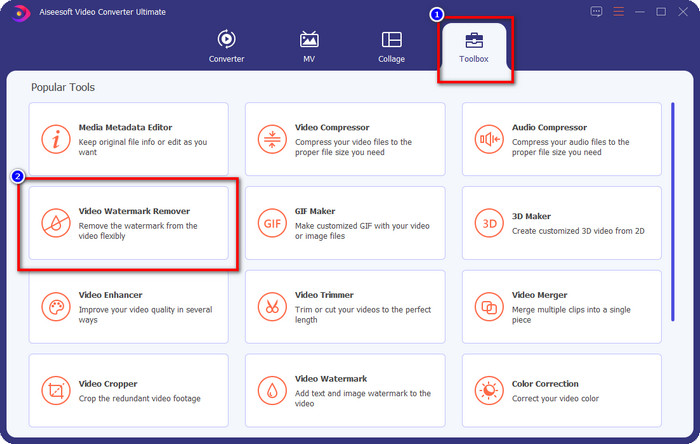
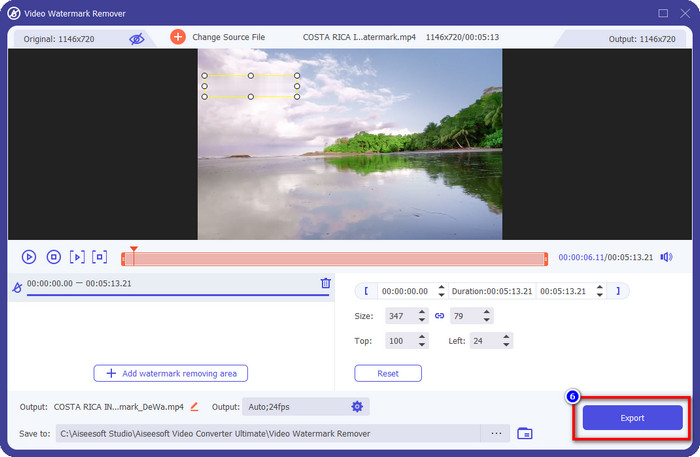
Trinn 2. Gå til Verktøykasse, finn Video Watermark Remover som dette verktøyet har, og klikk på den for å fortsette.
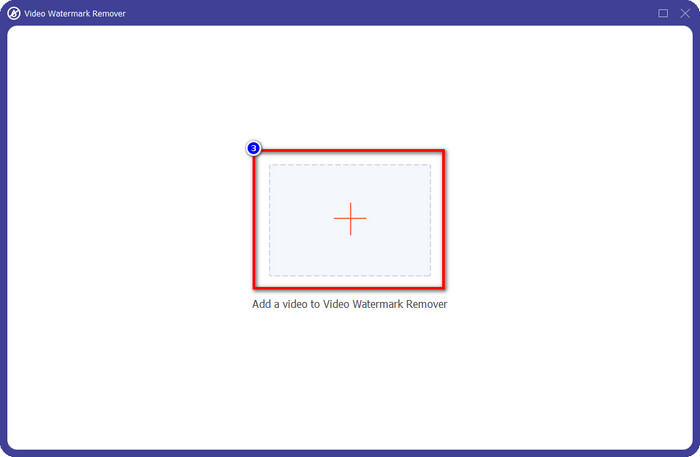
Trinn 3. Ved å klikke på +-ikonet laster du opp videoen som inneholder et vannmerke. Finn den i mappen som vises på skjermen, klikk på filen én gang, og trykk deretter Open for å laste den opp.
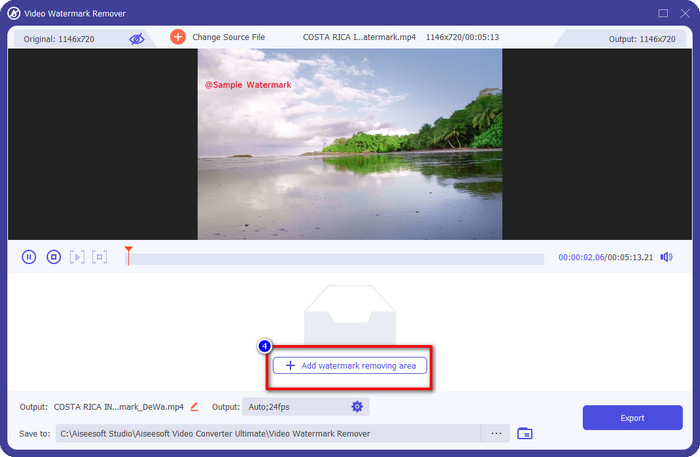
Trinn 4. Etter at du har lastet opp videoen med vannmerke, trykker du på Add Watermark Removing Area og venter på den korte lasteprosessen.
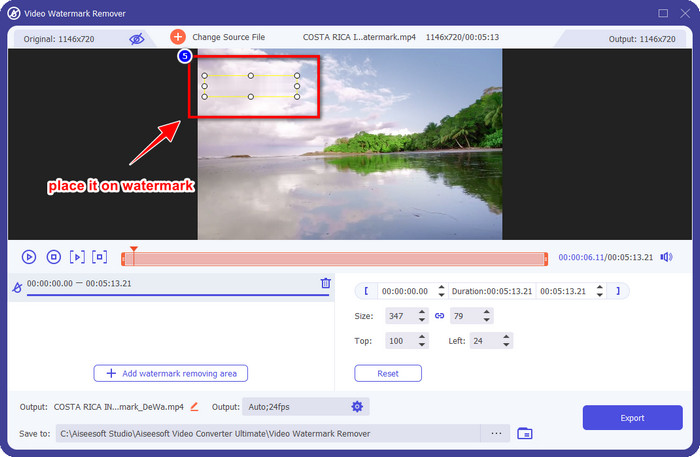
Trinn 5. Plasser markeringsboksen over WeVideo-vannmerket og dekk det helt til, slik at du ikke ser noen spor av vannmerket i slutten av videoen når du eksporterer den.
Trinn 6. Nå kan du lagre videoen der du har fjernet vannmerket ved å klikke på Export-knappen. Lagringsprosessen tar ikke lang tid fordi den støtter ultrarask prosessering og maskinvareakselerasjon.
iMyFone Mark Go
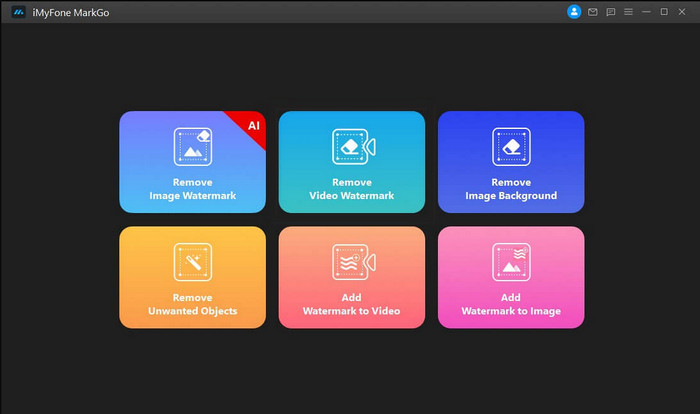
iMyFone Mark Go er et annet verktøy for å fjerne vannmerker som du kan laste ned til Windows og Mac for å hjelpe deg med å fjerne WeVideo-vannmerket. Dette verktøyet fjerner vannmerker i videoen din like effektivt som det ultimate verktøyet kan gjøre. Som med annen offline programvare du kan laste ned til datamaskinen, må du kjøpe verktøyet for å fjerne vannmerket og få full nytte av premiumversjonen for å fjerne vannmerket i videoen din. Selv om det koster penger, er det ikke så dyrt sammenlignet med andre verktøy for fjerning av vannmerker du kan laste ned. Så hvis du vil fjerne vannmerket i videoen din enkelt og effektivt, kan du følge trinnene nedenfor, der vi lærer deg hvordan du gjør det steg for steg.
Trinn 1. Last ned programvaren til datamaskinen ved å gå til dens offisielle nettsted.
Trinn 2. Etter at du har startet programvaren, klikker du på Remove Video Watermark.
Trinn 3. Legg til videofilen ved å klikke på Add the Video. Velg videofilen som har et vannmerke.
Trinn 4. Flytt rektangelet som vises, og plasser det over vannmerket for å dekke det. Selv om det finnes tre andre alternativer for å fjerne vannmerket, kan du ikke få tilgang til dem fordi disse alternativene er for premiumbrukere.
Trinn 5. Klikk på Export-knappen for å lagre videoen du har fjernet vannmerket fra.
Online videokutter – Fjern logo fra video
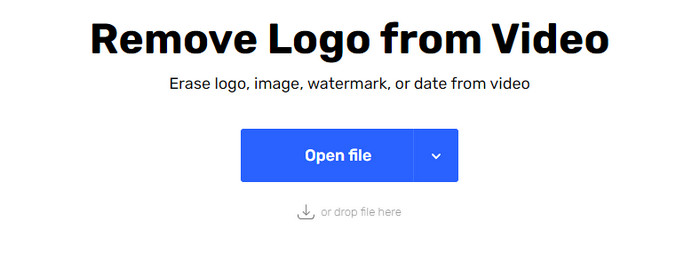
Hvordan fjerne WeVideo-vannmerkene gratis? Bruk Online Video Cutter – Remove Logo From Video. Dette er et gratis nettverktøy du kan bruke til å fjerne vannmerket i videoen din på nettet uten å laste ned noe eller betale noe. Dette verktøyet er like effektivt som andre verktøy for fjerning av vannmerker på markedet hvis vi skal sammenligne, men ikke like bra som den ultimate programvaren. Det kan dekke vannmerket i videoen din slik at videoen ser bedre ut. Men hvis du ikke har internettilgang, er ikke dette verktøyet det beste valget for å fjerne vannmerket i videoen din. Hvis du derimot har det, kan du følge trinnene nedenfor for å begynne å bruke dette verktøyet til å fjerne vannmerket i videoen din.
Trinn 1. Åpne en ny fane og søk etter navnet på verktøyet for å begynne å fjerne vannmerket fra videoen.
Trinn 2. Klikk på Open File for å laste opp WeVideo-videoen hit og generere en forhåndsvisning av videoen du lastet opp.
Trinn 3. Klikk på vannmerket for å bruke fjerningsområdet dette verktøyet har. Når du klikker på en hvilken som helst del av videoen, vil det dukke opp en markeringsboks.
Trinn 4. Trykk på Save for å få videoen uten vannmerket.
Relatert:
Hvordan fjerne Movavi-vannmerket
Hvordan fjerne Weibo-vannmerket
Del 3. Vanlige spørsmål om fjerning av WeVideo-vannmerke
Hvilket verktøy er best for å fjerne WeVideo Watermark?
Uten tvil er det FVC Video Converter Ultimate; dette verktøyet gir det beste resultatet når det gjelder å fjerne vannmerket i videoen. Blant de valgte vannmerkefjerneren kan vi ikke nekte for at det ultimate verktøyet er overlegent det andre vannmerkefjerneren.
Kan jeg beskjære WeVideo-vannmerket?
Ja, du kan beskjære vannmerket som WeVideo etterlater på videoen din. Men dimensjonen til videoen vil bli redusert, og det er en sjanse for at kvaliteten kan reduseres fordi du kutter ut sideforholdet.
Hva gjør WeVideo til den beste videoredigereren på nettet?
Med de komplette grunnleggende videoredigeringsfunksjonene du kan bli vant til, og hvor enkelt det er å bruke verktøyet. Dette er den vanligste kunnskapen om hva som gjør WeVideo til en av de beste videoredigererne du kan bruke på nettet. Men den er ikke like god som den andre videoredigereren Adobe Premiere Pro, Final Cut Pro, etc.
Konklusjon
Endelig, med metodene vi gir ovenfor, har du nå en ide om hvordan du kan bli kvitt WeVideo-vannmerket. Men hva synes du om verktøyet vi bruker? Hvis du fortsatt ikke har en ide om hva du skal bruke, må du teste ut FVC Video Converter Ultimate etter vår mening. Det gir det beste ut av det beste når det gjelder å fjerne vannmerket og er også enkel å bruke. Så, hva venter du på? Klikk på nedlastingsknappen for å få vannmerkefjerneren og bruke den umiddelbart.
-
 123rf vannmerkefjernere – grundig gjennomgang av de ultimate verktøyene
 Hvis du vil vite hva som er de mest fremragende 123rf vannmerkefjernerne, les denne artikkelen grundig. Denne artikkelen gir en grundig gjennomgang av verktøyene.
-
 Slik fjerner du DeviantArt Watermark på Windows og Mac
 Vil du lære hvordan du fjerner DeviantArt vannmerke på bildene dine? Ved å bruke de mest fremragende DeviantArt vannmerkefjernerne, kan du enkelt fjerne disse irriterende vannmerkene.
-
 Ultimate programvare for å fjerne Video Helper Watermark på eksporterte videoer [2022]
 Vil du vite hvordan du fjerner vannmerket på videoen du laster ned på Video Helper? Les i så fall denne artikkelen for å vite det.
