


 Video Converter Ultimate
 Skjermopptaker
 Videoreparasjon
 Sikker nedlasting
Komplette måter å fjerne Picsart-filtervannmerket på videoene dine effektivt
Nå i dag er det et uunnværlig verktøy å ha et program for redigering av visuelle medier på datamaskinen du kan stole på, som Picsart. Med det kan du justere noen få innstillinger for å gjøre et vanlig bilde om til et fotografi som ingen har sett maken til! Du kan få flere kunder eller tilskuere med et blikkfangende bilde du skaper. Men det er et problem med å bruke Picsart, nemlig vannmerket som legges til når du eksporterer. Vannmerket er ganske irriterende og kan virke distraherende visuelt hvis det ikke fjernes. Så hvis du vil ha programvaren og en veiledning i hvordan du kan fjerne Picsart-filtervannmerket, bør du fortsette å lese denne artikkelen og lære mer!

Del 1. Slik fjerner du Picsart-filtervannmerke ved hjelp av gratis programvare på skrivebordet
FVC Video Converter Ultimate - Number One Watermark Remover på Windows og Mac
La oss begynne med å introdusere programvaren med vårt førstevalg som kan hjelpe deg og lære deg hvordan du fjerner Picsart-vannmerket. FVC Video Converter Ultimate er det uunnværlige våpenet i arsenalet som du vil trenge for enkelt å fjerne vannmerket på videoer og samtidig få et profesjonelt resultat. På grunn av ytelsen og de unike funksjonene har mange brukere allerede prøvd den, og verktøyet skuffet dem ikke. Hvis du trenger hjelp til å fjerne vannmerket på videoen din, kan du prøve å kopiere trinnene vi har lagt til nedenfor og følge dem.
Trinn 1. Du kan få denne ultimate programvaren på enheten din ved å klikke på riktig nedlastingsknapp nedenfor. Deretter må du installere programvaren på datamaskinen og klikke Start nå for å åpne programmet.
Gratis nedlastingFor Windows 7 eller nyereSikker nedlasting
Gratis nedlastingFor MacOS 10.7 eller nyereSikker nedlasting
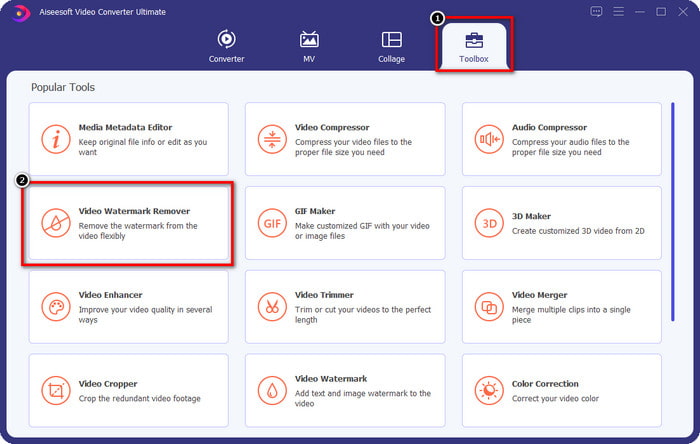
Trinn 2. I delen Verktøykasse vil du se andre funksjoner du kan bruke som kan hjelpe deg med å gi videoen din en flott finish. Men i dag skal du klikke på Video Watermark Remover.
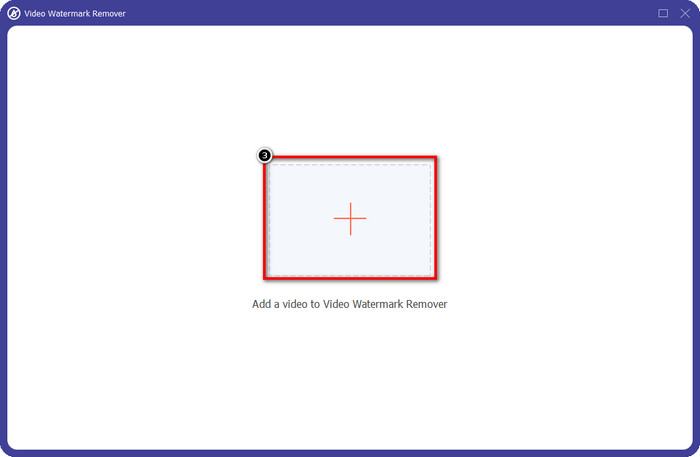
Trinn 3. Last opp videoen du har redigert i Picsart ved å klikke på +-ikonet. Søk etter filen i mappen som vises på skjermen, og klikk deretter Åpne.
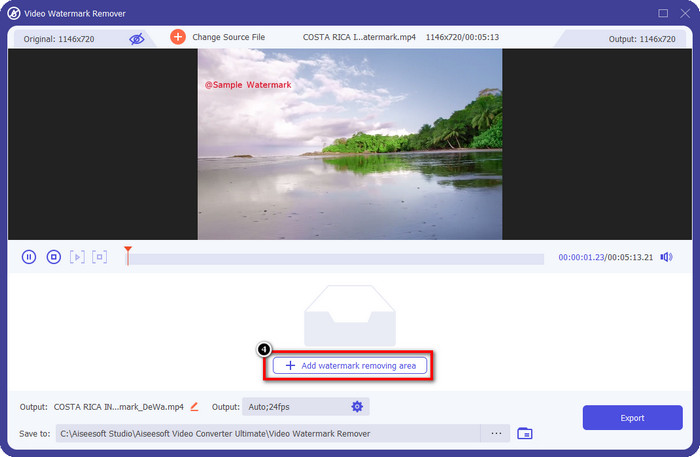
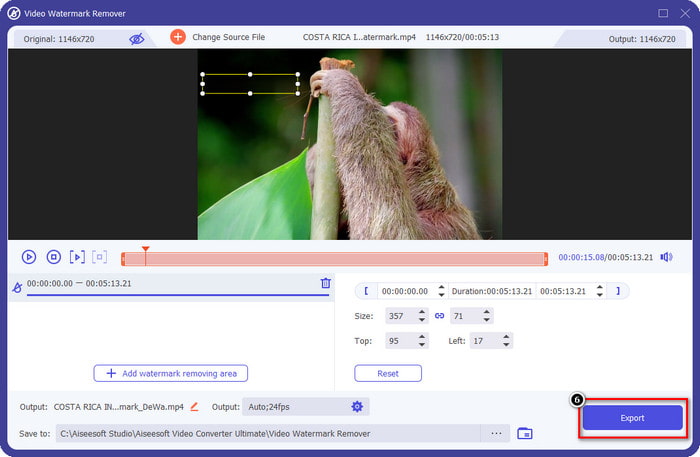
Trinn 4. Trykk på Add Watermark Removing Area for å fjerne vannmerket som er innebygd i videoen du laster opp.
Trinn 5. Hold og plasser markeringsboksen over vannmerket og dekk det til. Du kan forstørre eller redusere boksen etter eget ønske.
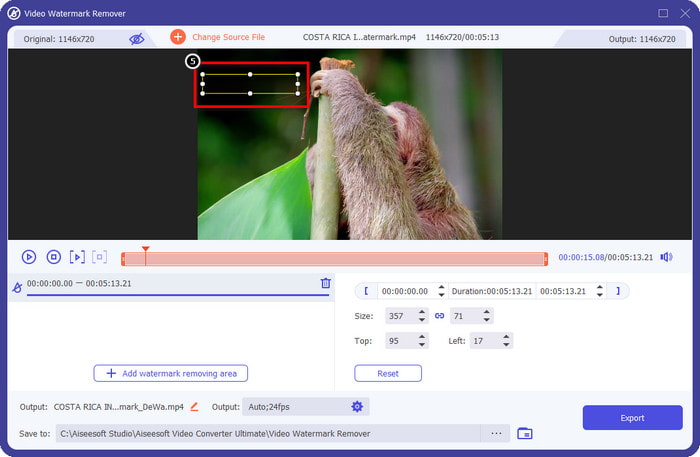
Trinn 6. Nå som du er ferdig med å dekke til vannmerket med markeringsboksen, klikker du på Eksporter for å lagre det endelige resultatet på den lokale disken din.
Bilder på Windows- Dekkvannmerke med 3D-design
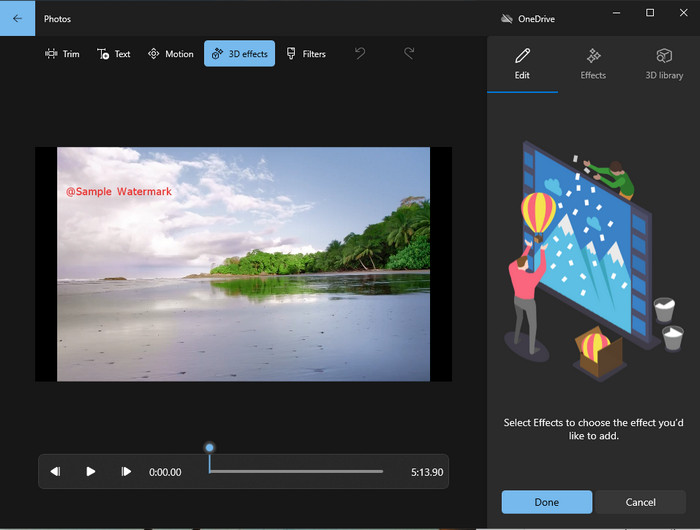
Hvis nedlasting av programvare ikke er din greie og du er Windows-bruker, bør du prøve å bruke Bilder til å redigere vannmerket i videoen din. Å lære hvordan du fjerner Picsart-vannmerket med dette verktøyet blir enda raskere fordi du slipper å laste ned en app. Verktøyet fjerner ikke vannmerket fra videoen, men du kan dekke til vannmerket med 3D-design. Likevel er ytelsen til denne innebygde bilde- og videoviseren og -editoren god. Usikker på det? Da kan du lese trinnene nedenfor og følge dem hvis du vil.
Trinn 1. Klikk på Windows-knappen på oppgavelinjen og søk etter Bilder for å åpne det.
Trinn 2. Etter at du har åpnet den innebygde redigereren, må du klikke på +-tegnet for å laste opp videoen du vil redigere her.
Trinn 3. Gå til 3D-effekter, klikk på 3D-bibliotek, og søk etter designen du vil bruke til å dekke til vannmerket. Plasser designen du har valgt på området som har et vannmerke.
Trinn 4. Trykk på Fullfør video for å lagre det endelige resultatet på den lokale stasjonen i Windows.
PickFrom Blur Video Online

PickFrom Blur Video Online kan hjelpe deg med å fjerne PicsArt-vannmerket på videoene du har på nettet. Verktøyet er ukjent for mange, men vi introduserer det i dag. Vi tar med denne programvaren på grunn av effektiviteten når det gjelder å fjerne vannmerket på videoene du laster opp. Grensesnittet er enkelt og oversiktlig; du vil ikke gå deg vill når du bruker programmet. Så hvis du vil fjerne vannmerket, la oss gå inn i prosessen nedenfor.
Trinn 1. Åpne nettleseren din, søk etter navnet, og klikk på det første resultatet for å åpne det nettbaserte verktøyet for fjerning av vannmerke.
Trinn 2. Klikk på Click to Add File slik at du kan laste opp videoen her.
Trinn 3. Kryss av for Blur Part of the Video, og plasser deretter markeringsboksen over vannmerket.
Trinn 4. Trykk på Start for å laste ned videoen uten vannmerke.
Del 2. Slik fjerner du Picsart-vannmerket ved å kjøpe premiumversjonen
Du må kjøpe programvaren hvis du ikke vil gå i problemer med å fjerne Picsart gullvannmerket. Det vil koste deg et visst beløp fordi du må betale for det før du kan bruke det og deretter eksportere videoen uten innebygd vannmerke. Så hvis du vil ha en trinn-for-trinn-veiledning om å kjøpe Picsart, må du følge den neste opplæringen vi legger til.
Trinn 1. Åpne Picsarts offisielle nettsted og logg inn på kontoen din her. Hvis du ikke har en konto, må du opprette en ved å registrere deg her.
Trinn 2. På hovedsiden klikker du på Pricing og ser prisene for hvert tilgjengelige produkt.
Trinn 3. Velg abonnementet du ønsker, månedlig eller årlig, og klikk deretter på Go to Payment.
Trinn 4. Legg inn faktureringsopplysningene ved å fylle ut informasjonen som kreves, og klikk deretter på Purchase Now.
Relatert:
Fjern vannmerke fra skolebildene
Del 3. Vanlige spørsmål om hvordan du fjerner Picsart vannmerke
Kan jeg kjøpe Picsart Gold permanent?
Den støtter ikke en engangsbetalingsbasis eller -plan, så hvis du vil bruke Picsart Gold, må du benytte deg av den månedlige eller årlige planen. Sjekk ut prisen for hver plan ved å gå til den offisielle nettsiden.
Kan jeg opprette et tilpasset abonnement på Picsart?
Ja, du kan opprette et abonnement for et team på Picsart. Du kan angi antall personer som skal bruke appen.
Hvor kan jeg få tilgang til Picsart?
Du kan laste ned Picsart på Windows, Android og iOS. Dessverre har ikke appen en Mac-versjon akkurat nå, men vær ikke trist fordi du kan bruke annen medieredigeringsprogramvare som er tilgjengelig på systemet ditt.
Konklusjon
Opplæringen vi lærte tidligere gir deg en idé om å fjerne vannmerker ved hjelp av PicsArt og de beste vannmerkefjernerne du kan bruke. Du kan nå nyte videoen du redigerer på Picsart uten å bry deg med produktets vannmerke den legger til den endelige utgangen. Så hvis du fortsatt ikke er overbevist om verktøyene vi presenterer, er det et must å prøve dem først, spesielt FVC Video Converter Ultimate. Klikk på nedlastingsknappen og ha den gratis på Windows og Mac, og nyt funksjonene som du kan dra nytte av.
-
 Slik fjerner du Pond5 vannmerke ved å bruke de ultimate verktøyene
 Lær hvordan du fjerner Pond5 vannmerke ved å følge de enkle trinnene nedenfor. Du kan enkelt fjerne Pond5-vannmerket på bildet ditt ved å bruke disse imponerende verktøyene.
-
 2 kraftige måter å fjerne Dxtory Watermark
 Lær hvordan du fjerner Dxtory Watermark ved å følge de to beste metodene. Hvis du søker etter det mest passende verktøyet for å fjerne Dxtory-vannmerket, les her.
-
 Enestående Arnold Maya vannmerkefjernere du ikke må gå glipp av
 Mange vannmerkefjernere kan fjerne Arnold Maya-vannmerket. Men hvis du vil vite hva som er de beste Arnold Maya vannmerkefjernerne, les denne siden.
