


 Video Converter Ultimate
 Skjermopptaker
 Videoreparasjon
 Sikker nedlasting
Forbedre bildekvaliteten ved å bruke disse raske og enkle metodene
Har du et bilde som er uskarpt eller av lav kvalitet? Den beste løsningen du bør velge, er å øke kvaliteten på bildet ditt. Heldigvis finnes det mange verktøy som kan hjelpe deg med å forbedre bildekvaliteten. Likevel har ikke alle programmer eller verktøy på en datamaskin de beste funksjonene. Derfor har vi lett etter de mest populære bildeforbedrerne på nett, uten nett og på iPhone. For å lære hvordan du kan forbedre bildekvalitet, kan du lese dette innlegget.

Del 1. Hvordan forbedre bildekvaliteten på nett
Det er mer praktisk å bruke en online bildeforsterker enn å laste ned et program på datamaskinen. Fordelen med å bruke et nettbasert verktøy er at du fritt kan få tilgang til det på nettet. Denne delen vil vise deg hvordan du kan øke bildekvaliteten ved å bruke den mest fantastiske online fotoforsterkeren.
FVC Free Image Upscaler er en nettbasert, gratis bildeforbedrer som er populær blant mange. Dette nettverktøyet kan sette forstørrelsen til 2x, 4x, 6x og 8x. I tillegg støtter det de mest vanlige bildeformatene, inkludert PNG, JPG, JPEG og BMP. Du kan også bruke det i alle nettlesere, inkludert Google, Firefox og Safari. Du trenger heller ikke å bekymre deg for datasikkerheten din, fordi dette verktøyet er trygt å bruke.
Dessuten har den en kraftig AI-teknologi som automatisk gjenkjenner de uskarpe delene av bildet ditt. FVC Free Image Upscaler kan også fikse tapte piksler, fargeteksturer og flere detaljer. Hvis du vil bruke denne utmerkede bildeoppskaleren, følg den enkle veiledningen nedenfor.
Hvordan forbedre bildekvaliteten på nettet ved hjelp av FVC Free Image Upscaler:
Trinn 1. Åpne nettleseren din og søk etter FVC Free Image Upscaler i søkefeltet. Du kan gå direkte til hovedsiden ved å klikke på lenken som er oppgitt.
Trinn 2. Klikk deretter på knappen Upload Photo i hovedgrensesnittet for å laste opp bildet du vil skalere opp. Vent til bildet ditt er lastet opp, og gå så videre til neste trinn.
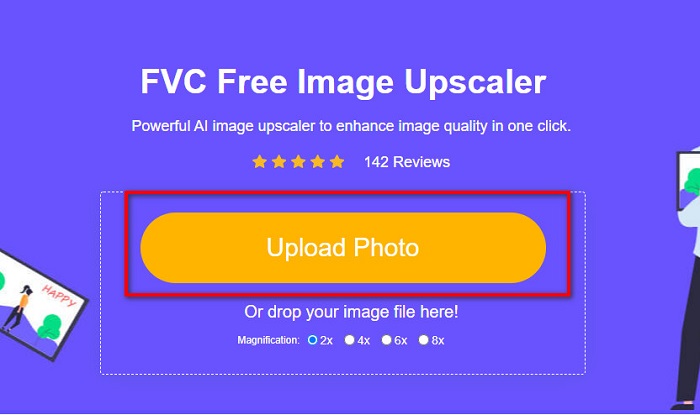
Trinn 3. Velg deretter den Magnification du ønsker for bildet ditt. Du kan velge mellom 2x, 4x, 6x og 8x.
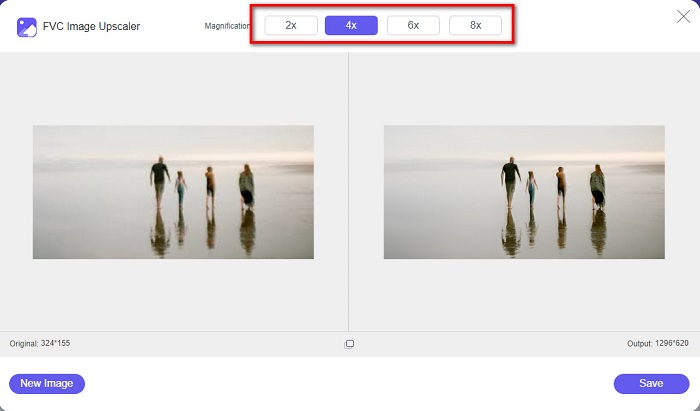
Trinn 4. Du kan se en forhåndsvisning av bildet ditt, og hvis du er fornøyd, klikker du på knappen Save for å lagre det oppskalerte bildet på enheten din.
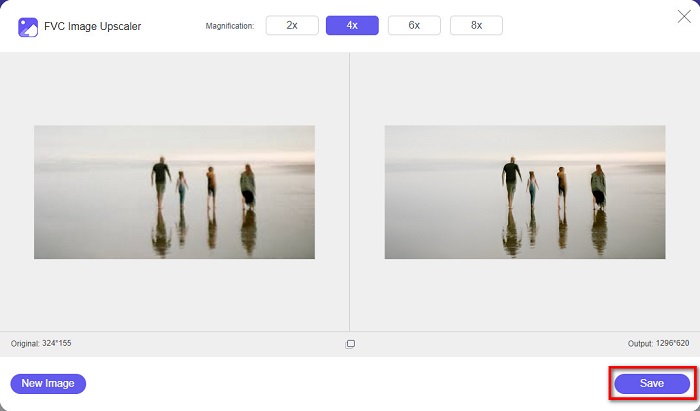
Og det er det! Du kan nå se bildet ditt på datamaskinen med høykvalitetsvisning.
Del 2. Hvordan forbedre bildekvaliteten i Photoshop
Vi har det du ønsker hvis du liker å bruke et profesjonelt verktøy for å øke bildekvaliteten. Denne delen vil lære deg hvordan du kan forbedre bildekvaliteten ved hjelp av Adobe Photoshop.
Adobe Photoshop er et profesjonelt redigeringsprogram som du kan bruke til å forbedre kvaliteten på bildene dine. Adobe Photoshop har mange redigeringsverktøy som du kan bruke til å redigere bilder. I tillegg bruker mange profesjonelle dette verktøyet fordi det har mange funksjoner. Dette programmet gir også resultater i høy kvalitet som du kan dele på andre sosiale medieplattformer eller nettsteder. Dessuten er Adobe Photoshop en av de beste løsningene fra Adobe, og du kan laste det ned på nesten alle plattformer. Ved å bruke dette redigeringsprogrammet kan du designe logoer, bannere, brosjyrer og mer. Men mange brukere vet ikke at det også kan forbedre et bilde. Likevel synes mange brukere det er vanskelig å bruke verktøyet, fordi programgrensesnittet er komplisert å betjene og det er ganske kostbart å laste ned.
Trinn for hvordan du forbedrer bildekvaliteten i Photoshop:
Trinn 1. Last først ned Adobe Photoshop på datamaskinen din. Følg installasjonsprosessen, og åpne deretter programmet.
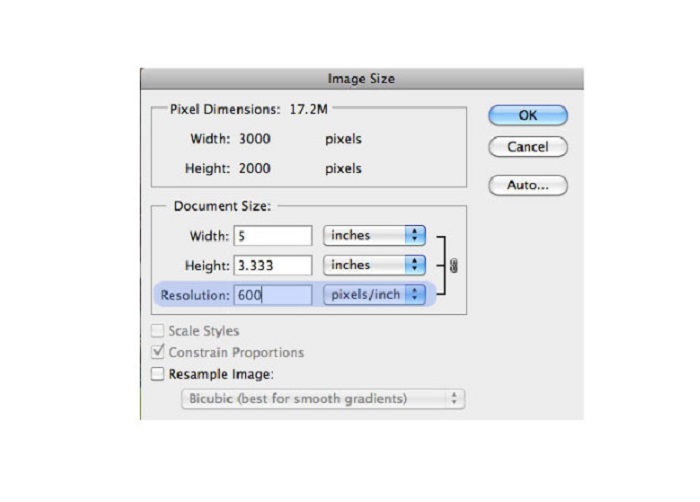
Trinn 2. Gå til File > Open i hovedgrensesnittet og velg bildet du vil forbedre.
Trinn 3. Gå deretter til Image > Image Size. Da vises et dialogvindu der du skal fjerne avmerkingen i boksen Resample Image, slik at det bare er oppløsningen på bildet som endres. Skriv inn ønsket oppløsning for bildet i alternativet for oppløsning.
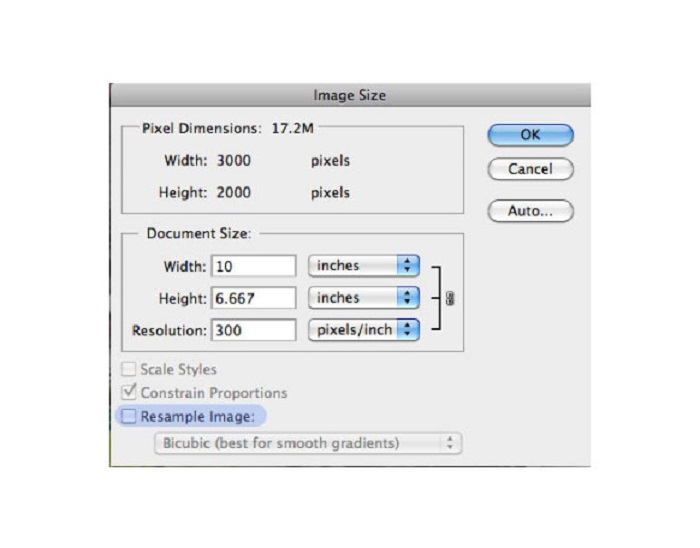
Trinn 4. Når du endrer Resolution, vil også Width and Height på bildet ditt endres. Klikk deretter på knappen OK for å lagre endringen du gjorde på bildet. På denne måten kan du konvertere bilder med lav oppløsning til høy.
Del 3. Hvordan forbedre kvaliteten på et bilde på iPhone
Noen apper kan forbedre bildet av lav kvalitet hvis du er iPhone-bruker. Selv om mange fotoforbedringsapper er tilgjengelige på AppStore, valgte vi de mest kjente blant dem. Les denne delen for å lære hvordan du kan forbedre kvaliteten på et bilde på en iPhone.
Remini er en av de beste appene du kan bruke til å forbedre et bilde med lav kvalitet. Denne flotte appen har et enkelt grensesnitt, noe som gjør den brukervennlig. Dessuten bruker den også AI-teknologi som automatisk oppdager de uskarpe delene av bildet ditt. Det er også en trygg app å bruke, så filene dine er sikre når du bruker den. Ulempen med denne appen er at du må se en annonse for å kunne se og laste ned resultatet, eller du kan kjøpe fullversjonen for å laste ned resultater uten å se en annonse.
Slik forbedrer du bildekvaliteten på iPhone ved å bruke Remini-appen:
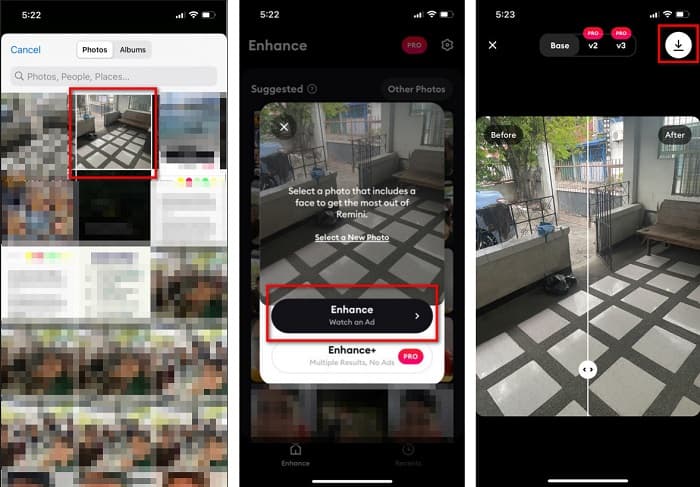
Trinn 1. Last ned appen Remini fra App Store. Når den er lastet ned, åpner du appen på telefonen din.
Trinn 2. Velg deretter bildet du vil skalere opp i hovedgrensesnittet til appen.
Trinn 3. Trykk deretter på knappen Enhance for å forbedre kvaliteten på bildet ditt. Hvis du kjøper pro‑versjonen av appen, trenger du ikke å se en annonse. Hvis ikke, må du se en annonse for å kunne se og lagre resultatet.
Trinn 4. Nå kan du se det forbedrede bildet ditt. Trykk så på Download-ikonet oppe i høyre hjørne på skjermen. Og voilà! Med disse enkle trinnene kan du forbedre kvaliteten på bildet ditt.
Del 4. Vanlige spørsmål om hvordan du kan forbedre bildekvaliteten
Finnes det en app som kan forbedre bildekvaliteten på Android?
Verktøyet Forbedre bildekvalitet er en av de beste appene for forbedring av bildekvalitet for å forbedre bildekvaliteten. Ved å bruke bildet Beautifying Effects vil du gi bildet et profesjonelt utseende.
Hvordan forbedre bildekvaliteten i Lightroom?
Adobe Lightroom er et annet Adobe‑produkt som du kan bruke til å forbedre oppløsningen på bildet ditt. Les de enkle trinnene nedenfor for å lære hvordan du kan forbedre bildekvaliteten i Lightroom. 1. Last ned Adobe Lightroom på datamaskinen din. 2. Åpne deretter bildet ditt i Lightroom. 3. Klikk Choose Photo > Enhance. 4. Velg deretter Super Resolution, og klikk på Enhance. 5. Deretter vil du se at Lightroom øker oppløsningen på bildet ditt og lagrer det som en DNG‑fil.
Vil det påvirke filstørrelsen hvis du oppskalerer bildet ditt?
Endring av utskriftsoppløsningen vil ikke endre antall piksler på bildet og vil ikke påvirke størrelsen på bildet.
Konklusjon
Det er enkelt å forbedre bildekvalitet, spesielt nå som du har en veiledning å følge. Det finnes også mange apper på datamaskin eller iPhone som kan hjelpe deg med å skalere opp bildet ditt. Men hvis du vil bruke en gratis bildeoppskaler som automatisk skalerer opp det uskarpe bildet ditt, bruk FVC Free Image Upscaler nå.
-
 5 måter å fjerne B612 vannmerke ved å bruke de beste verktøyene
 Vil du vite hvordan du fjerner B612 vannmerker fra bildene dine? Du kan enkelt fjerne B612-vannmerket fra bildene dine ved å bruke disse enestående verktøyene.
-
 Enkle trinn for hvordan du fjerner WOW Slider Watermark [Løst]
 WOW Slider er en app for å lage en fantastisk lysbildefremvisning. Imidlertid bygger den inn vannmerker på utgangen. Les nedenfor for å lære hvordan du fjerner WOW Slider-vannmerket.
-
 Enkle metoder for hvordan du fjerner skuddsikkert vannmerke
 Fjern Shootproof vannmerke ved å følge disse enkle metodene. Bruk disse fantastiske vannmerkefjernerne for å enkelt fjerne Shootproof-vannmerket fra bildet ditt.
